Scaling
AKS scaling operates at multiple layers: pods, nodes, and sometimes cluster topology. Stable scaling comes from correct workload requests, good probes, and realistic capacity boundaries.
Main Content
flowchart TD
    A[Demand Increase] --> B[HPA changes replicas]
    B --> C[Scheduler places pods]
    C --> D{{Enough node capacity?}}
    D -->|No| E[Cluster Autoscaler adds nodes]
    D -->|Yes| F[Pods become Ready]
    F --> G[VPA recommendations tune requests]
Scaling building blocks
- Horizontal Pod Autoscaler (HPA) changes replica count.
- Cluster Autoscaler adds or removes nodes when pods cannot schedule or capacity is idle.
- Vertical Pod Autoscaler (VPA) recommends or applies request changes based on observed usage.
- KEDA adds event-driven and scale-to-zero behavior for external triggers.
- Node autoprovisioning (NAP) replaces fixed-pool growth logic with constraint-based node provisioning.
Operational examples
kubectl get hpa \
    --all-namespaces
kubectl top pods \
    --all-namespaces
az aks update \
    --resource-group "$RG" \
    --name "$CLUSTER_NAME" \
    --enable-cluster-autoscaler \
    --min-count 3 \
    --max-count 10
| Command | Purpose |
|---|---|
kubectl get hpa | List HorizontalPodAutoscalers across namespaces. |
kubectl top pods | Show current pod CPU and memory usage. |
az aks update | Enable the cluster autoscaler bounds. |
--resource-group | Resource group that contains the AKS cluster. |
--name | Name of the AKS cluster. |
--enable-cluster-autoscaler | Turn on the cluster autoscaler. |
--min-count | Minimum node count for autoscaling. |
--max-count | Maximum node count for autoscaling. |
Common failure modes
- HPA scales replicas but requests are too large for existing nodes.
- Autoscaler is enabled but subnet IPs or quotas block node growth.
- Workloads have no CPU/memory requests, so autoscaling decisions are noisy.
When you outgrow HPA + Cluster Autoscaler
The default HPA-plus-Cluster-Autoscaler model is still the best starting point for many clusters. Move beyond it when one of these becomes true:
- Demand is event-driven, not resource-driven.
- Scale-to-zero matters for worker cost control.
- One fixed VM pool per workload class is creating too much operational sprawl.
- Application metrics such as backlog, concurrency, or latency are better scaling signals than CPU.
Use this decision guide:
| If the real problem is... | Prefer | Why |
|---|---|---|
| Queue depth, event lag, or bursty asynchronous work | KEDA on AKS | KEDA scales from external demand and supports scale-to-zero |
| Too many near-duplicate node pools and VM-shape choices | Node Autoprovisioning | NAP provisions node shapes from constraints instead of only scaling fixed pools |
| CPU and memory are poor proxies for demand | Custom Metrics Scaling | HPA or KEDA can follow custom or Prometheus-backed signals instead |
Inspect workload health in the Azure Portal
The Workloads blade lists Deployments, ReplicaSets, and Pods with ready/desired replica counts, so you can confirm scaling actions converged.
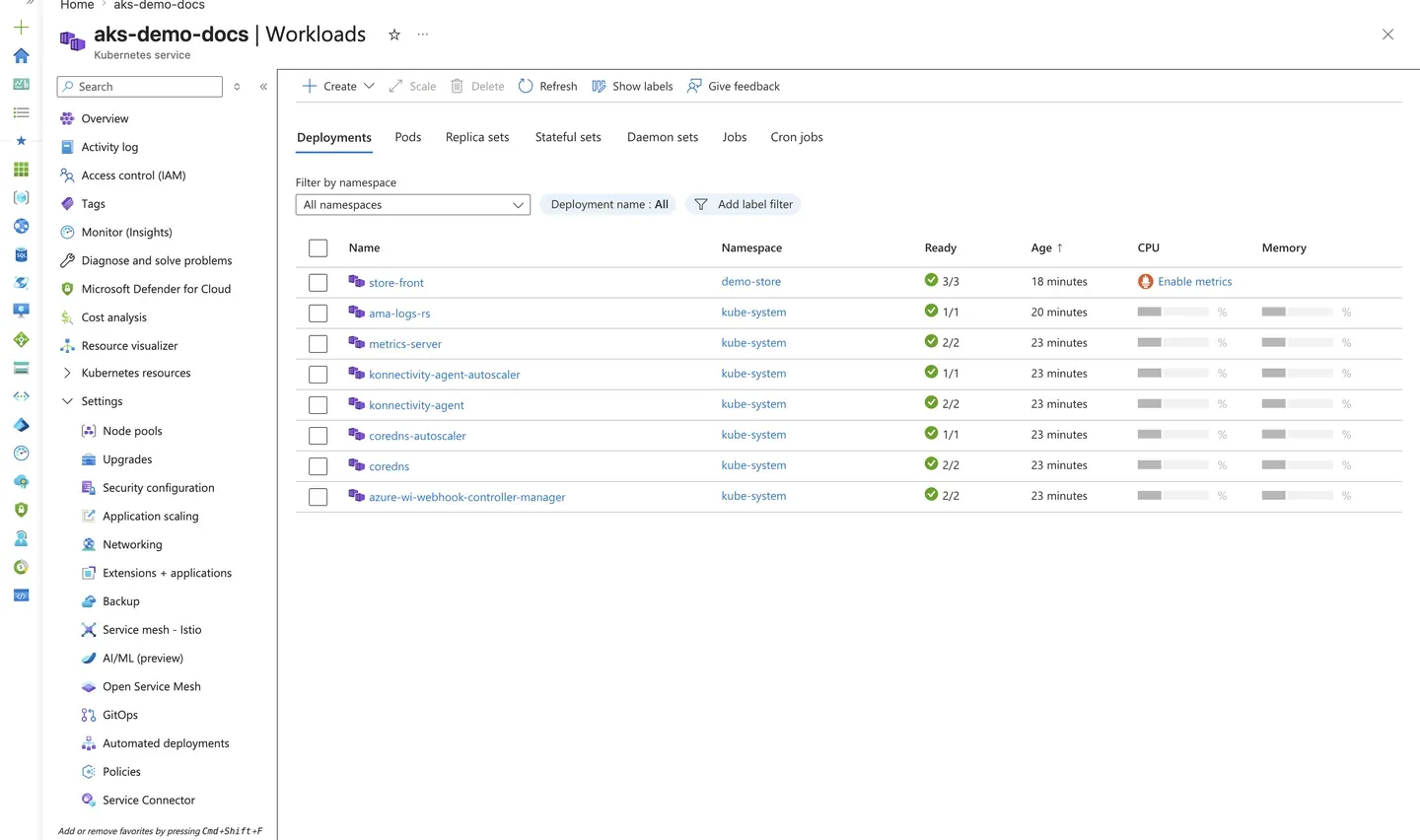
Purpose: Confirm that a Deployment reached its desired replica count after an HPA or manual scaling event.
Look for:
- The Deployment shows Ready equal to Desired (for example,
3/3). - No pods are stuck in
Pending, which would indicate capacity or scheduling limits. - Replica counts match what the HPA target or manual scale command requested.
Expected result: The workload is fully scheduled with all replicas Ready, confirming the scaling path worked end to end.
Next step: Enable event-driven scaling from the Application scaling blade if your workload scales on external signals.
Enable event-driven scaling (KEDA)
The Application scaling blade is where you enable the KEDA add-on for event-driven autoscaling based on external scalers.
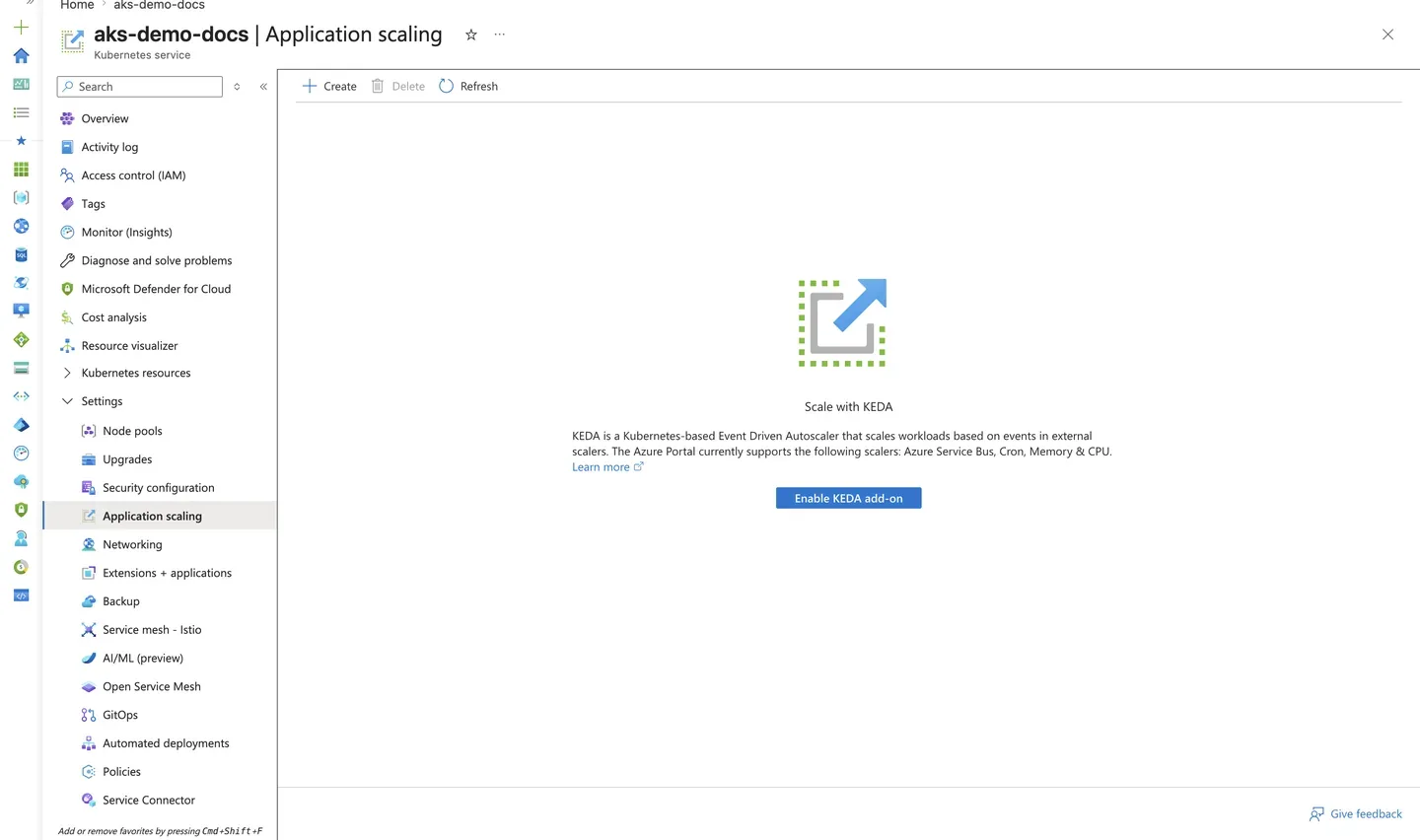
Purpose: Show where to enable KEDA when workloads must scale on events (queues, cron, custom metrics) rather than CPU/memory alone.
Look for:
- The Scale with KEDA panel and Enable KEDA add-on action are available.
- The supported scaler list (Azure Service Bus, Cron, Memory & CPU) matches your scaling triggers.
Expected result: You can enable KEDA to complement HPA with event-driven scaling for bursty or queue-based workloads.
Next step: Follow Scaling Operations to configure a ScaledObject.
See Also
- Node Pools
- KEDA on AKS
- Node Autoprovisioning
- Custom Metrics Scaling
- Best Practices: Cost Optimization
- Best Practices: Autoscaling
- Scaling Operations
- Scaling Failure