Node Pools
Node pools are the core workload isolation and lifecycle boundary in AKS. Treat them as operational contracts, not just groups of VMs.
Main Content
graph TD
    A[Cluster] --> B[System Pool]
    A --> C[User Pool - General]
    A --> D[User Pool - GPU]
    A --> E[User Pool - Spot]
    C --> F[Business Workloads]
    D --> G[Specialized Jobs]
    E --> H[Interruptible Capacity]
Design principles
- Keep at least one dedicated system node pool for critical add-ons.
- Use user pools for application workloads and isolate by workload class when needed.
- Use taints and tolerations intentionally; don't rely only on node labels.
- Match VM family to workload profile instead of making every app share one pool.
Common operations
az aks nodepool add     --resource-group $RG     --cluster-name $CLUSTER_NAME     --name user01     --mode User     --node-count 3     --node-vm-size Standard_D4ds_v5
kubectl get nodes --show-labels
kubectl describe node <node-name>
| Command | Purpose |
|---|---|
az aks nodepool add | Add a user node pool for applications. |
--resource-group | Resource group that contains the AKS cluster. |
--cluster-name | Name of the AKS cluster. |
--name | Name of the new node pool. |
--mode | Node pool mode, User for application workloads. |
--node-count | Initial number of nodes in the pool. |
--node-vm-size | VM size for the pool nodes. |
kubectl get nodes | List nodes with labels. |
kubectl describe node | Show node details and capacity. |
Decision points
- Linux-only or mixed Linux/Windows cluster.
- General-purpose vs memory-optimized vs compute-optimized pools.
- Spot pools for interruptible work.
- Autoscaler enabled or fixed-capacity pools.
Inspect node pools in the Azure Portal
The Node pools blade lists every pool with its mode, node count, VM size, Kubernetes version, and provisioning/power state.
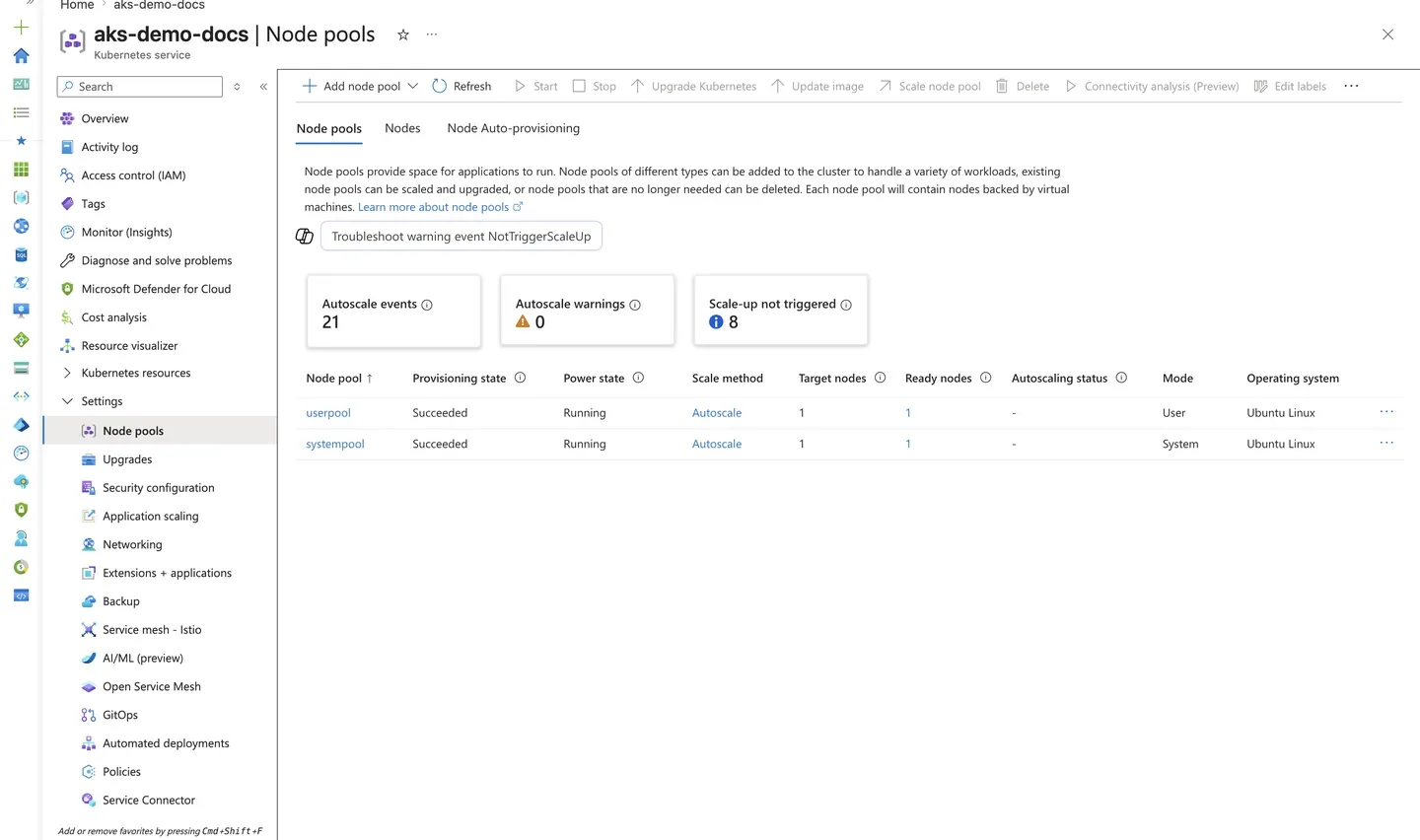
Purpose: Confirm the system/user pool split and per-pool health after provisioning or scaling.
Look for:
- A dedicated system pool and at least one user pool are present.
- Provisioning state shows
Succeededand Power state showsRunningfor each pool. - The node count and VM size match the intended sizing for each workload class.
Expected result: Each node pool is healthy and sized as designed, with the system pool isolated from user workloads.
Next step: Open the Upgrades blade to review the cluster Kubernetes version and upgrade policy.
Review upgrade posture
The Upgrades blade shows the current Kubernetes version, automatic upgrade channel, and any planned maintenance schedule.
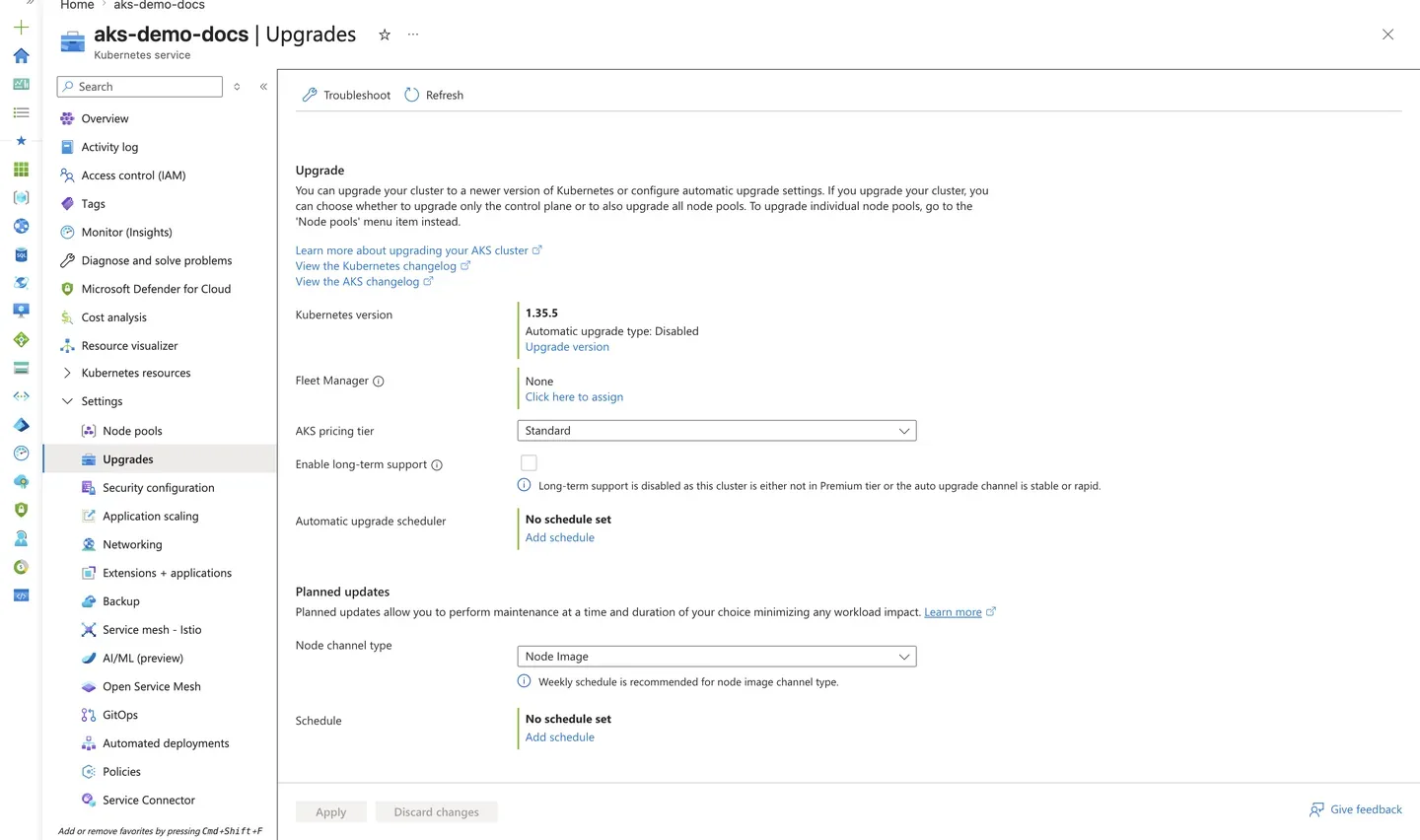
Purpose: Confirm the cluster version and upgrade strategy that govern node pool lifecycle.
Look for:
- The Kubernetes version matches what this guide targets.
- The Automatic upgrade type and Node channel type reflect your intended maintenance policy.
- The AKS pricing tier matches the tier your workloads require.
Expected result: The cluster's version and upgrade channel are known and intentional, not left at unexpected defaults.
Next step: Plan node pool upgrades from the Node Pool Operations runbook.