Ingress and Load Balancing
AKS traffic entry points combine Kubernetes Services, Azure load balancers, and one or more ingress controllers. Separate north-south routing from east-west service discovery in your design.
Main Content
flowchart TD
    U[Users] --> PIP[Public IP or Private IP]
    PIP --> LB[Azure Load Balancer]
    LB --> IC[Ingress Controller]
    IC --> SVC[Service]
    SVC --> PODS[Pods]
Core traffic primitives
- Service type LoadBalancer exposes a workload through an Azure load balancer.
- Ingress provides HTTP routing, TLS termination strategy, and path/host mapping.
- Internal load balancer patterns are common for private platform APIs.
Common AKS ingress choices
- NGINX Ingress Controller for broad Kubernetes ecosystem compatibility.
- Application Gateway for Containers or app routing add-on when Azure-managed edge integration is preferred.
- Service meshes or gateway APIs for larger platform-standard traffic controls.
Application Gateway for Containers as the newer Azure-managed ingress direction
Application Gateway for Containers (AGC) is the newer Azure-managed ingress direction for AKS workloads that want an Azure-managed Layer 7 data plane plus Kubernetes-native Ingress and Gateway API resources.
- Use AGC when you want Azure-managed ingress outside the cluster.
- Use AGC when Gateway API adoption is part of the platform standard.
- Do not treat AGC as a universal drop-in replacement for AGIC. Brownfield AGIC estates can still be the right near-term choice.
See Application Gateway for Containers for the control model, migration posture, and AGC versus AGIC decision points.
Istio gateways when ingress is part of a service-mesh decision
If the platform needs mTLS, service-to-service policy, and mesh telemetry, the ingress choice may belong to the Istio operating model instead of the standalone ingress-controller model.
- Use an Istio gateway when ingress policy is tightly coupled to a broader service-mesh strategy.
- Keep standalone ingress controllers for simpler north-south routing cases.
- If you use the AKS Istio add-on, align namespace onboarding and revision management before standardizing ingress.
See Istio Managed Add-on for service-mesh lifecycle, sidecar injection, and ingress trade-offs.
[!WARNING] ingress-nginx upstream maintenance ends in March 2026. In AKS, the application routing add-on can continue using NGINX through November 2026, but Gateway API is the recommended long-term direction for new designs.
Useful commands
kubectl get ingress \
    --all-namespaces

kubectl get service \
    --all-namespaces

kubectl describe ingress <ingress-name> \
    --namespace <namespace>

az network public-ip list --resource-group MC_<managed-resource-group>_<cluster-name>_<location> --output table
| Command | Purpose |
|---|---|
kubectl get ingress | List Ingress resources across namespaces. |
kubectl get service | List Services across namespaces. |
kubectl describe ingress | Show Ingress details and events. |
az network public-ip list | List public IPs in the node resource group. |
--resource-group | Node resource group that holds the load balancer IPs. |
--output | Output format for the result. |
View services and ingresses in the Azure Portal
The Services and ingresses blade lists Kubernetes Services with their type and external endpoint, so you can confirm a LoadBalancer service received a public IP.
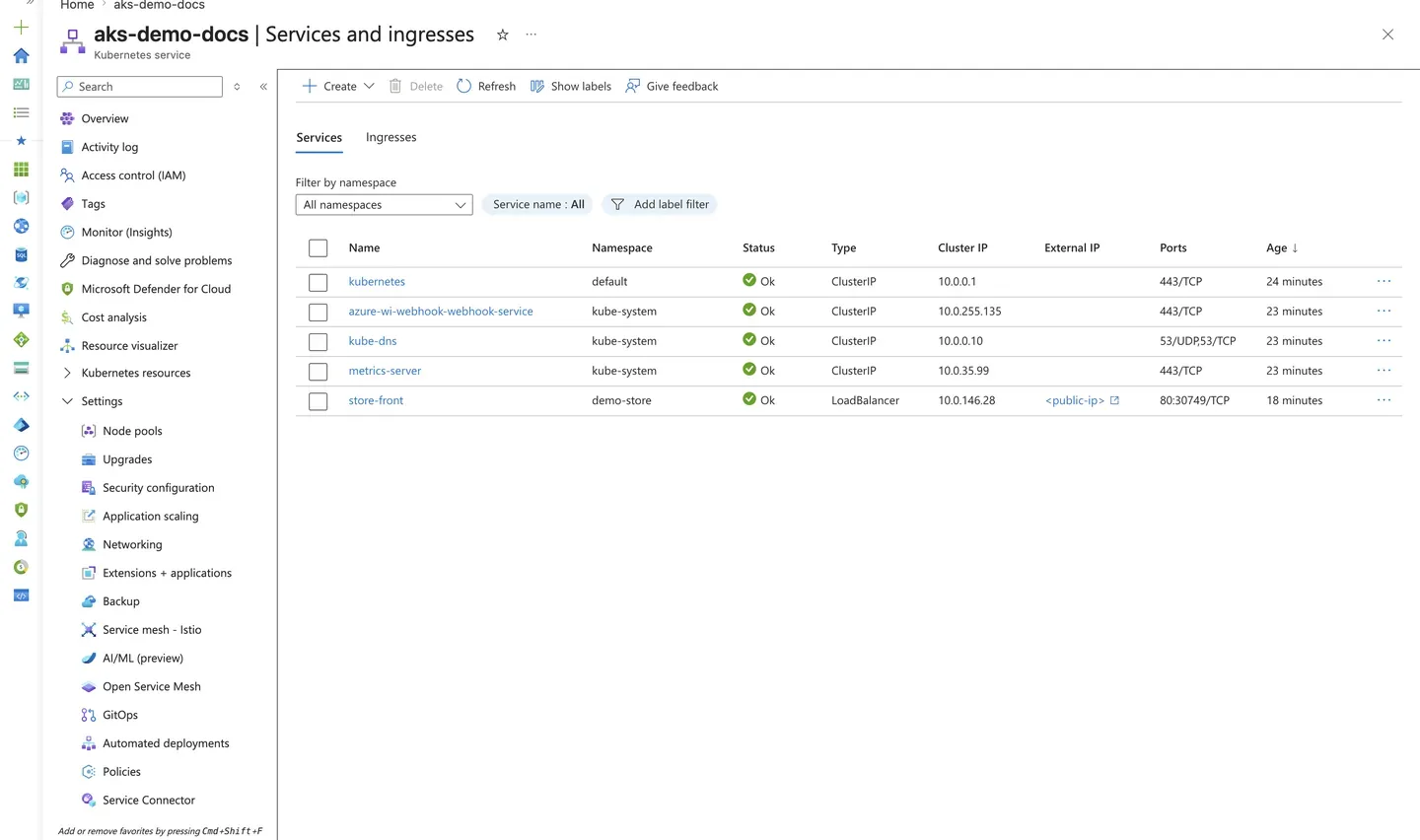
Purpose: Confirm that a workload exposed through a LoadBalancer service obtained an external endpoint.
Look for:
- The service type shows
LoadBalancerfor the exposed workload. - The external IP is populated (and sanitized as
<public-ip>in this screenshot). - The service maps to the expected namespace and backing pods.
Expected result: The exposed service has a reachable external endpoint, confirming the Azure load balancer provisioned correctly.
Next step: Add an ingress controller for HTTP routing and TLS termination as described above.
See Also
- Networking Models
- Application Gateway for Containers
- Istio Managed Add-on
- Storage Options
- Best Practices: Networking
- Best Practices: Platform Extensions
- Ingress Failure Playbook