Identity and Secrets
Use Azure-native identity wherever possible so workloads authenticate without long-lived secrets. AKS security maturity improves dramatically when you separate cluster access, node identity, and workload identity.
Main Content
flowchart TD
    A[Human Access] --> B[Microsoft Entra ID]
    C[Cluster] --> D[Managed Identity]
    E[Workload Pod] --> F[Workload Identity]
    F --> G[Azure Key Vault]
    D --> H[Azure Resources]
Identity layers
- Cluster access: Microsoft Entra ID-backed authentication and Kubernetes RBAC.
- Cluster identity: managed identity used by AKS to manage Azure resources.
- Workload identity: pod-to-Azure-resource authentication without storing secrets in Kubernetes. Use the full Microsoft Entra Workload Identity deep-dive for the OIDC issuer, federated identity credential, service account subject, projected token, and Azure token exchange flow.
Identity model boundaries
AKS uses different Azure identities for different scopes. Do not troubleshoot image pull, infrastructure mutation, and application secret access as the same problem.
- Use Identity Model Comparison to separate control-plane identity, kubelet identity, and workload identity responsibilities.
- Use Azure Key Vault CSI Driver for mount flow, sync-to-Kubernetes-Secret behavior, and rotation expectations.
Secret handling guidance
- Prefer workload identity plus Key Vault over static Kubernetes Secrets when possible.
- Use the Secrets Store CSI Driver for mounted secret material that must appear as files.
- Keep Kubernetes Secrets only for data that must stay Kubernetes-native and protect them with RBAC and etcd encryption controls.
Example commands
az aks update \
    --resource-group "$RG" \
    --name "$CLUSTER_NAME" \
    --enable-oidc-issuer \
    --enable-workload-identity

az aks get-credentials \
    --resource-group "$RG" \
    --name "$CLUSTER_NAME" \
    --overwrite-existing

kubectl get serviceaccount \
    --all-namespaces

kubectl get secret \
    --all-namespaces
| Command | Purpose |
|---|---|
az aks update | Enable the OIDC issuer and workload identity. |
--resource-group | Resource group that contains the AKS cluster. |
--name | Name of the AKS cluster. |
--enable-oidc-issuer | Enable the OIDC issuer for workload identity. |
--enable-workload-identity | Enable Microsoft Entra Workload ID. |
az aks get-credentials | Refresh the local kubeconfig. |
--resource-group | Resource group that contains the AKS cluster. |
--name | Name of the AKS cluster. |
--overwrite-existing | Overwrite any existing kubeconfig entry for the cluster. |
kubectl get serviceaccount | List service accounts across namespaces. |
kubectl get secret | List secrets across namespaces. |
Review cluster access in the Azure Portal
The Access control (IAM) blade shows Azure RBAC role assignments that govern who can manage the cluster and its resources.
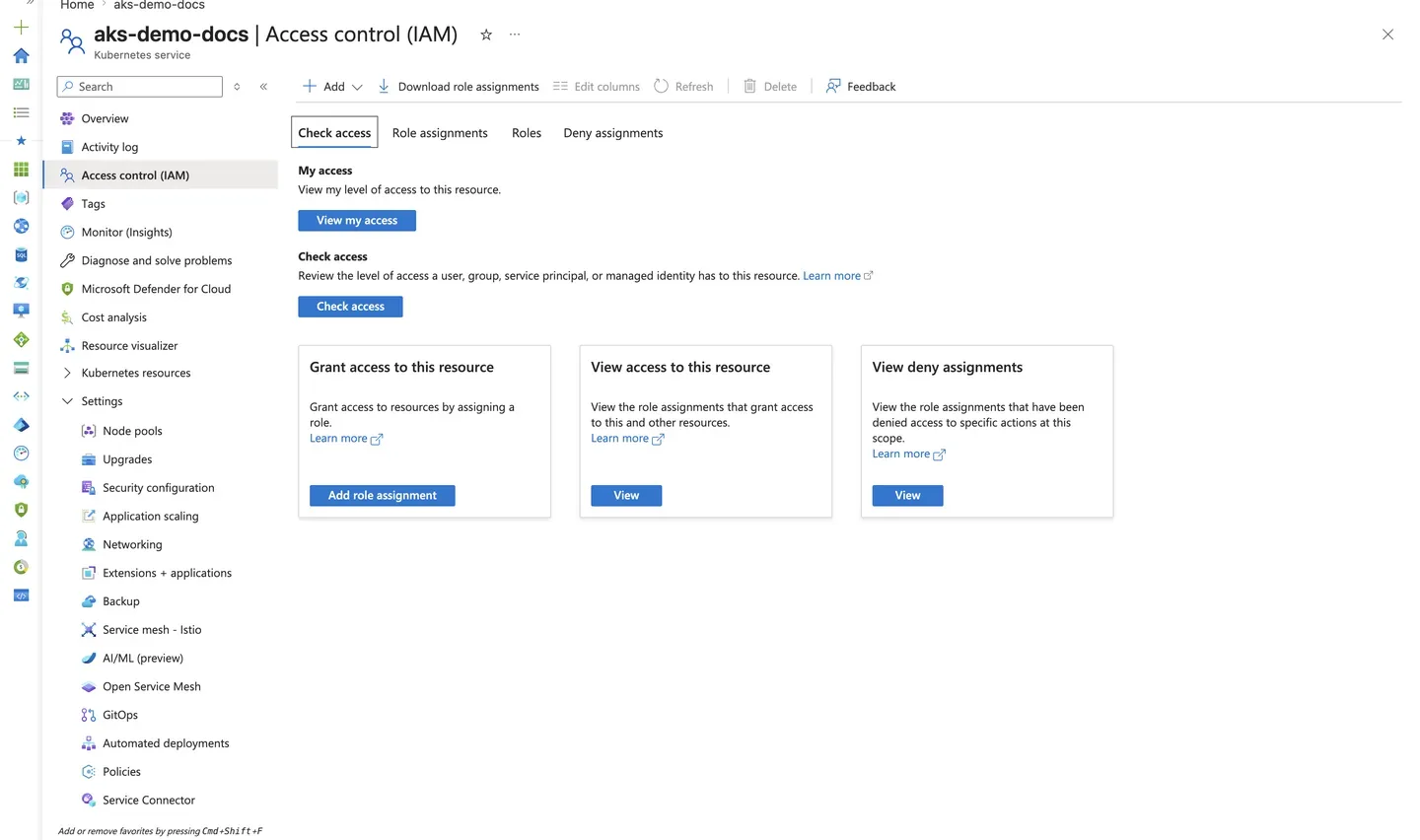
Purpose: Confirm that human and workload access to the cluster is governed by explicit Azure RBAC assignments.
Look for:
- The Check access tab lets you verify effective permissions for a specific identity.
- Role assignments follow least privilege — no broad
Ownergrants where a scoped role suffices. - Account and directory identifiers are sanitized (
user@example.com,<object-id>).
Expected result: Cluster access is explicit and auditable through Azure RBAC rather than implicit or shared credentials.
Next step: Confirm workload identity and OIDC settings on the Security configuration blade.
Confirm workload identity configuration
The Security configuration blade shows whether the OIDC issuer and workload identity are enabled — the foundation for secret-free pod authentication.
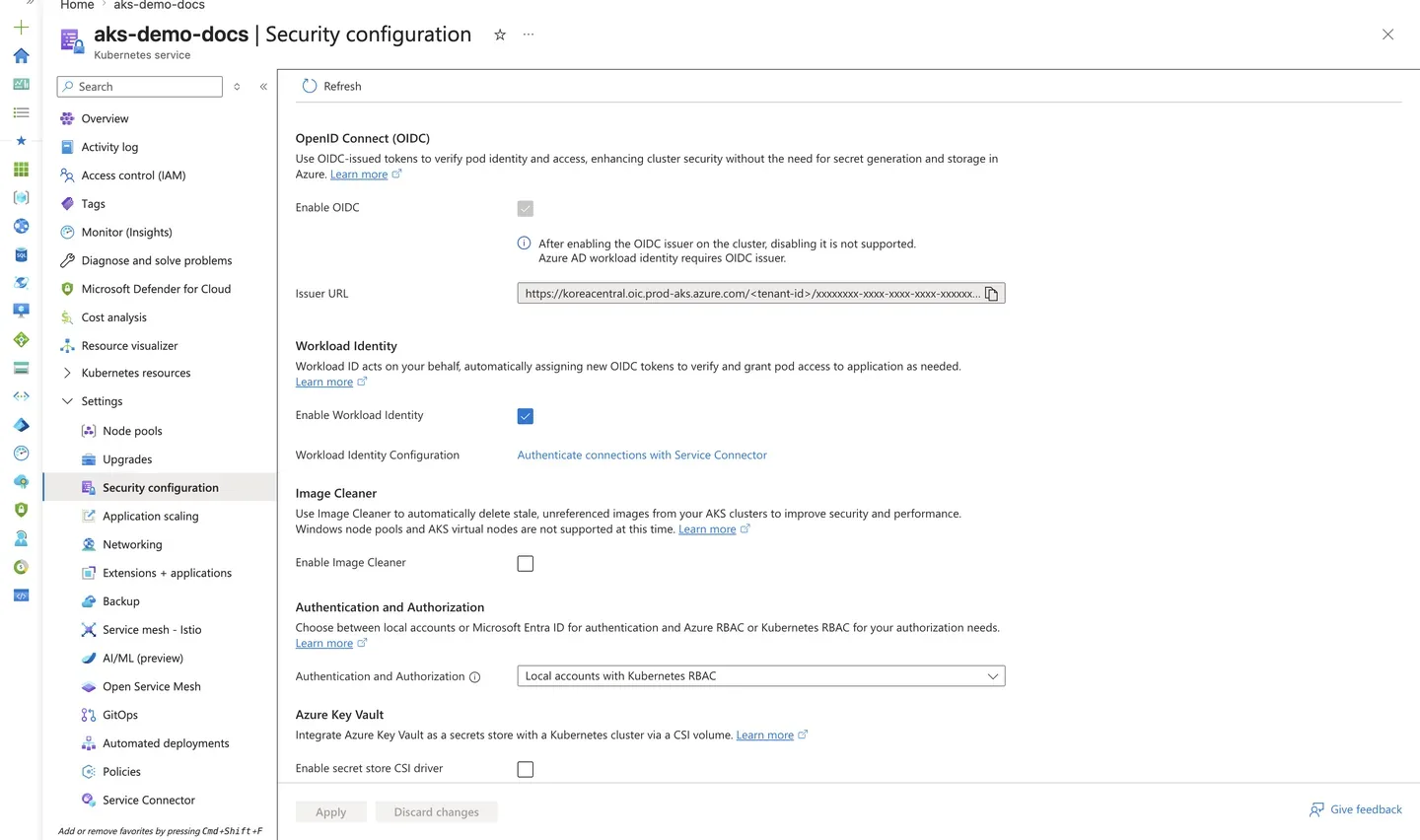
Purpose: Verify that workload identity is enabled so pods can authenticate to Azure without stored secrets.
Look for:
- Workload identity is enabled and the OIDC issuer URL is populated.
- Tenant and cluster identifiers in the issuer URL are sanitized (
<tenant-id>). - The configuration matches the
--enable-oidc-issuer --enable-workload-identityflags used at setup.
Expected result: The cluster exposes an OIDC issuer with workload identity enabled, allowing federated pod-to-Azure authentication.
Next step: Bind a Kubernetes service account to a managed identity following Best Practices: Security.
See Also
- Cluster Architecture
- Microsoft Entra Workload Identity
- Identity Model Comparison
- Azure Key Vault CSI Driver
- Best Practices: Security
- Credential Rotation
- Image Pull Failure