Cluster Architecture
AKS separates a Microsoft-managed control plane from customer-managed worker nodes. Most production design mistakes happen when teams treat the cluster as a single opaque box instead of a layered system.
Main Content
flowchart TD
    subgraph Azure Subscription
        CP[Managed Control Plane]
        subgraph Cluster VNet
            NP1[System Node Pool]
            NP2[User Node Pool]
            ILB[Internal Load Balancer]
        end
        ACR[Azure Container Registry]
        KV[Azure Key Vault]
        LA[Log Analytics]
    end
    CP --> NP1
    CP --> NP2
    NP1 --> ILB
    NP2 --> ILB
    NP2 --> ACR
    NP2 --> KV
    NP1 --> LA
    NP2 --> LA
Control plane responsibilities
- Kubernetes API server, scheduler, controller manager, and etcd are managed by Azure.
- Control plane upgrades and health are Azure's responsibility, but your workload compatibility is still your responsibility.
- You don't SSH into the control plane; you interact through the Kubernetes API and Azure APIs.
Data plane responsibilities
- Node pools, OS images, kubelet behavior, and workload placement remain your concern.
- Azure still manages AKS node image publishing, but you choose when to upgrade cluster and node pools.
- Networking, namespace boundaries, and workload isolation are customer-owned design areas.
Azure resource relationships
- AKS creates and manages resources in the node resource group.
- Load balancers, managed disks, NICs, and public IPs often live there.
- Incident triage often requires checking both the cluster resource group and the node resource group.
Confirm cluster identity in the Azure Portal
The Overview and Properties blades summarize the control plane, node pool count, Kubernetes version, and networking profile in one place.
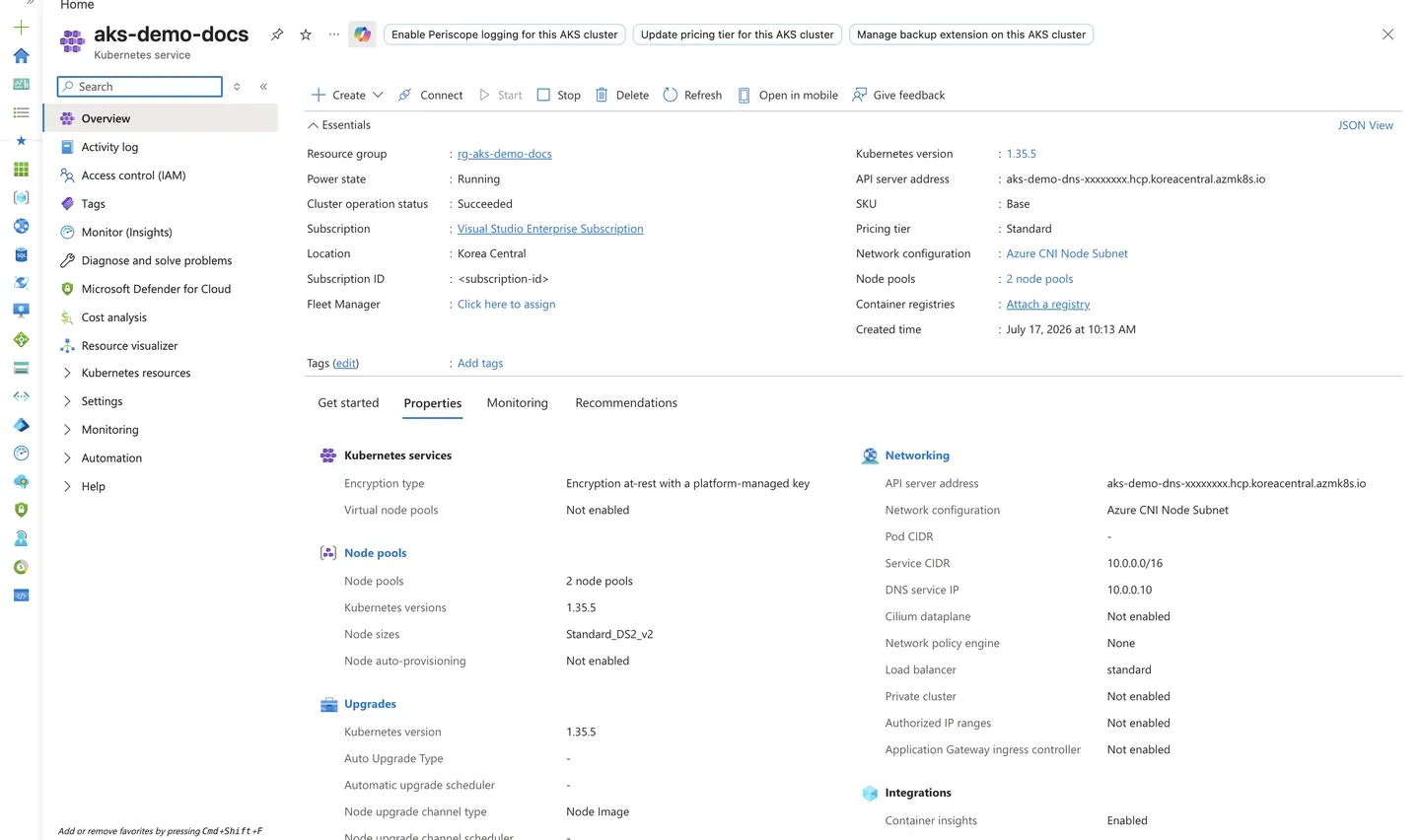
Purpose: Show where to confirm the layered cluster identity — control plane version, node pool count, and networking profile — after provisioning.
Look for:
- Provisioning state shows
Succeededand Power state showsRunning. - The Kubernetes version matches the version this guide targets.
- The API server address, Subscription ID, and account header are sanitized (
aks-demo-dns-xxxxxxxx.hcp.<region>.azmk8s.io,<subscription-id>,user@example.com). - The networking profile (Azure CNI) and node pool count reflect the intended topology.
Expected result: The cluster reports a healthy managed control plane paired with the expected worker node pools and network plugin.
Next step: Open the Node pools blade to inspect system and user pool health and sizing.
Review namespace boundaries
The Namespaces blade lists the Kubernetes namespaces that form your workload isolation boundaries, including system namespaces and your application namespaces.
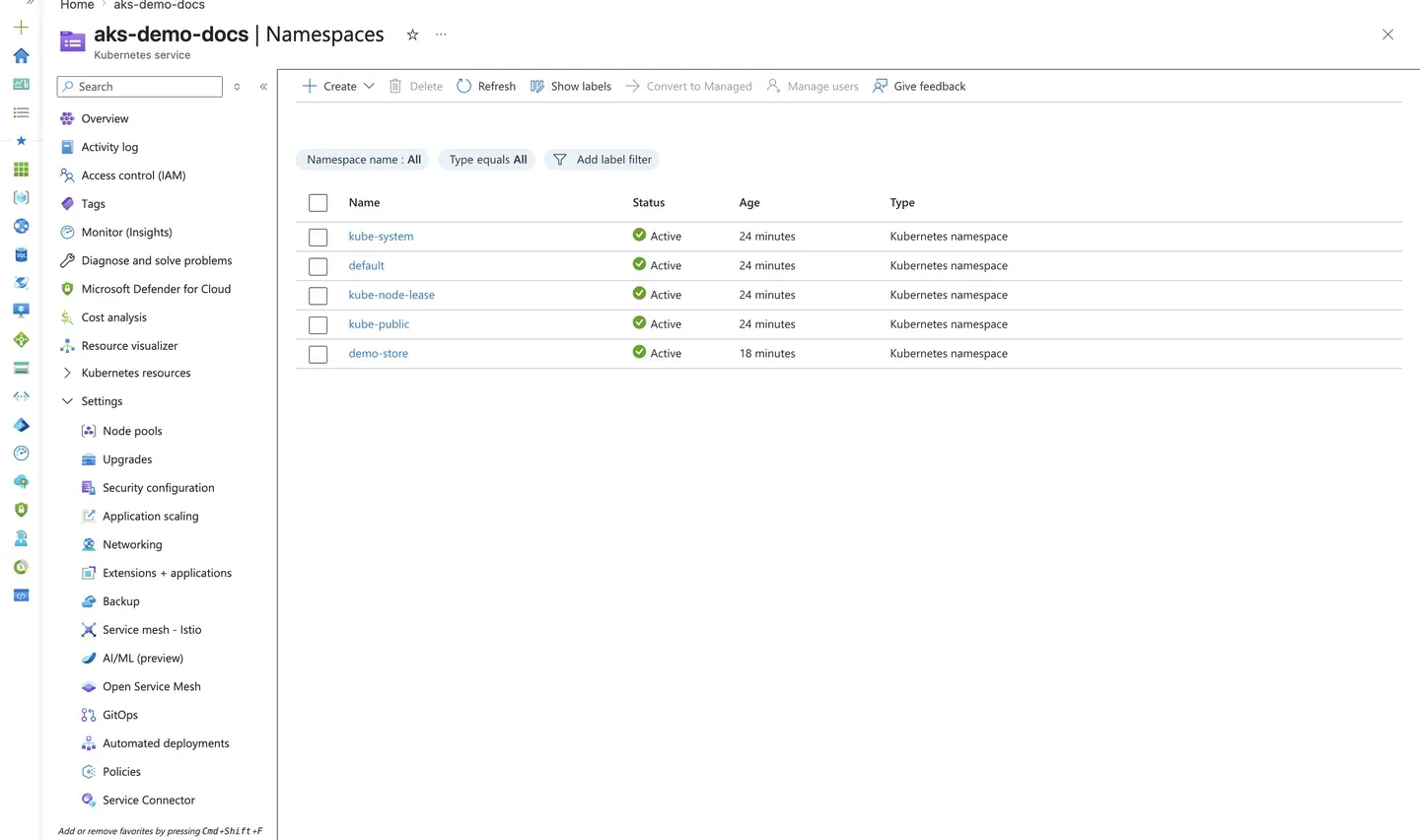
Purpose: Confirm the namespace layout that separates platform add-ons from application workloads.
Look for:
- System namespaces (
kube-system,kube-public,kube-node-lease,default) are present andActive. - Your application namespace (for example, a dedicated app namespace) is
Active. - No unexpected namespaces exist that could indicate stray or unmanaged workloads.
Expected result: Namespaces cleanly separate system components from application workloads, supporting isolation and RBAC scoping.
Next step: Scope Kubernetes RBAC and resource quotas per namespace as described in Resource Governance.