Node Pool Operations
Use node pool changes to adjust cluster capacity and isolate workloads without rebuilding the cluster. Safe node pool operations depend on drain behavior, pod disruption budgets, and quota awareness.
Prerequisites
- Cluster credentials are current.
- You understand which workloads run on the target pool.
- PodDisruptionBudgets and autoscaler settings have been reviewed.
When to Use
- Adding a new workload class.
- Replacing VM sizes or OS images.
- Scaling specific workload pools independently.
Procedure
flowchart TD
    A[Identify target pool] --> B[Add or scale pool]
    B --> C[Cordon and drain if retiring]
    C --> D[Validate workload rescheduling]
az aks nodepool list --resource-group $RG --cluster-name $CLUSTER_NAME --output table
az aks nodepool add --resource-group $RG --cluster-name $CLUSTER_NAME --name apps01 --mode User --node-vm-size Standard_D4ds_v5 --node-count 3
kubectl get nodes -L kubernetes.azure.com/agentpool
kubectl cordon <node-name>
kubectl drain <node-name> --ignore-daemonsets --delete-emptydir-data
| Command | Purpose |
|---|---|
az aks nodepool list | List the node pools in the cluster. |
--resource-group | Resource group that contains the AKS cluster. |
--cluster-name | Name of the AKS cluster. |
--output | Output format for the result. |
az aks nodepool add | Add a user node pool for applications. |
--resource-group | Resource group that contains the AKS cluster. |
--cluster-name | Name of the AKS cluster. |
--name | Name of the new node pool. |
--mode | Node pool mode, User for application workloads. |
--node-vm-size | VM size for the pool nodes. |
--node-count | Initial number of nodes in the pool. |
kubectl get nodes | List nodes labeled by agent pool. |
kubectl cordon | Mark a node unschedulable. |
kubectl drain | Evict workloads from a node before maintenance. |
Verification
az aks nodepool show --resource-group $RG --cluster-name $CLUSTER_NAME --name apps01 --query "{count:count,mode:mode,vmSize:vmSize,provisioningState:provisioningState}" --output yaml
kubectl get pods -A -o wide
| Command | Purpose |
|---|---|
az aks nodepool show | Show a node pool's count, size, and state. |
--resource-group | Resource group that contains the AKS cluster. |
--cluster-name | Name of the AKS cluster. |
--name | Name of the node pool to show. |
--query | Selects count, mode, VM size, and provisioning state. |
--output | Output format for the result. |
kubectl get pods | List pods across namespaces with node placement. |
The Azure Portal Node pools blade shows the same state across every pool in one view.
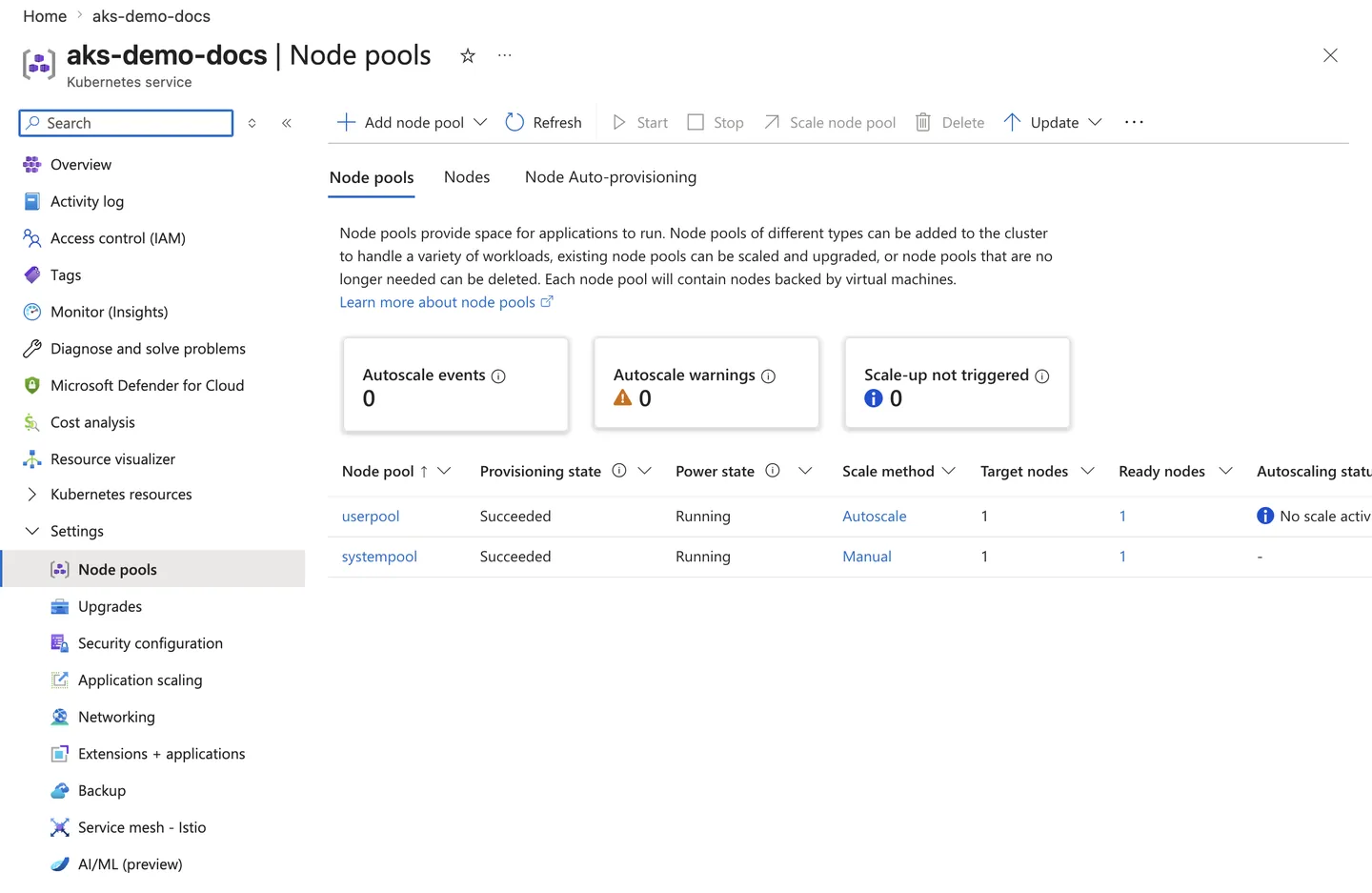
Purpose: Show where to verify AKS node pool mode, scale method, node counts, and provisioning state.
Look for:
- At least one pool is marked System (
systempool) and workload pools use User mode (userpool). - Every pool shows Provisioning state
Succeededand Power stateRunning. - The Scale method matches intent —
Autoscalefor elastic user pools,Manualfor fixed pools. - Target nodes and Ready nodes counts agree, and no autoscale warnings are raised.
Expected result: The node pool table lists healthy system and user pools with the expected scale method and node counts.
Next step: Continue to the scaling, upgrade, or workload placement procedure that depends on these pools.
Rollback / Troubleshooting
- If drain blocks, inspect PodDisruptionBudgets and unmanaged pods.
- If scale-out fails, inspect quota, subnet IPs, and autoscaler bounds.
- If workloads land on the wrong pool, inspect taints, tolerations, selectors, and affinity.