Traffic Routing and Canary Failure Lab
Practice traffic splitting between revisions and learn to diagnose scenarios where a bad revision receives production traffic.
Lab Metadata
| Attribute | Value |
|---|---|
| Difficulty | Intermediate |
| Estimated Duration | 20-30 minutes |
| Tier | Consumption |
| Failure Mode | Bad revision receiving 50% traffic causes intermittent failures |
| Skills Practiced | Traffic splitting, revision management, rollback |
1) Background
Azure Container Apps supports traffic splitting between multiple revisions, enabling canary deployments, blue-green releases, and A/B testing. When activeRevisionsMode is set to Multiple, you can assign traffic weights to each revision.
A common failure scenario occurs when:
- A new revision is deployed with a misconfiguration (wrong port, broken code, etc.)
- Traffic is split between the good and bad revisions
- Users experience intermittent failures—some requests succeed (good revision), others fail (bad revision)
This lab simulates this scenario by:
- Deploying a healthy baseline revision whose image listens on the same port as ingress
targetPort(:80). - Creating a bad revision by swapping the container image to one that listens on a different port (
:8080) while leaving ingresstargetPortunchanged at80. This isolates the failure to the bad revision only — ingresstargetPortis a shared, ingress-level setting and cannot be flipped per revision. - Splitting traffic 50/50 between good and bad revisions.
- Observing intermittent failures (curl status
000timeouts from the bad-revision half) and practicing rollback.
Architecture
flowchart TD
    A[User Request] --> B[Ingress Controller<br/>targetPort=80]
    B --> C{Traffic Split}
    C -->|50%| D[Good Revision<br/>image listens on :80 ✓]
    C -->|50%| E[Bad Revision<br/>image listens on :8080 ✗]
    D --> F[HTTP 200]
    E --> G[Probe fails → timeout / 5xx]
2) Hypothesis
IF traffic is split 50/50 between a healthy revision and a revision whose container image listens on a port that does not match the ingress targetPort, THEN approximately 50% of requests will fail (timeout or 5xx) because ingress cannot reach the listening process on the bad revision's replicas.
| Variable | Control State | Experimental State |
|---|---|---|
| Revision Count | 1 (healthy) | 2 (healthy + bad) |
| Traffic Split | 100% to healthy | 50% healthy, 50% bad |
| Bad Revision Listening Port | n/a | :8080 (mismatched against ingress targetPort=80) |
| Request Success Rate | ~100% | ~50% (the bad-revision half times out) |
3) Runbook
Deploy Baseline Infrastructure
export RG="rg-aca-lab-traffic"
export LOCATION="koreacentral"

az group create --name "$RG" --location "$LOCATION"

az deployment group create \
    --name "lab-traffic" \
    --resource-group "$RG" \
    --template-file "./labs/traffic-routing-canary/infra/main.bicep" \
    --parameters baseName="labtraffic"
| Command | Why it is used |
|---|---|
az group create ... | Creates the isolated resource group used by the example. |
Capture Resource Names
export APP_NAME="$(az deployment group show \
    --resource-group "$RG" \
    --name "lab-traffic" \
    --query "properties.outputs.containerAppName.value" \
    --output tsv)"

export APP_FQDN="$(az containerapp show \
    --name "$APP_NAME" \
    --resource-group "$RG" \
    --query "properties.configuration.ingress.fqdn" \
    --output tsv)"
| Command | Purpose |
|---|---|
export APP_NAME="$(az deployment group show ... --query "properties.outputs.containerAppName.value" --output tsv)" | Captures the deployed app name so every revision-list and traffic-split command in the canary lab points at the correct Container App. |
export APP_FQDN="$(az containerapp show ... --query "properties.configuration.ingress.fqdn" --output tsv)" | Reads the live ingress hostname so the request loop tests the same public endpoint that end users hit during the 50/50 canary split. |
Verify Baseline (Before Trigger)
# Confirm single revision with 100% traffic
az containerapp revision list \
    --name "$APP_NAME" \
    --resource-group "$RG" \
    --output table
| Command | Why it is used |
|---|---|
az containerapp revision list ... | Lists revisions so rollout state, traffic, and health can be verified. |
Expected output:
Name                          Active    TrafficWeight    HealthState
----------------------------  --------  ---------------  -----------
ca-labtraffic-xxxxxx--xxxxx   True      100              Healthy
# Confirm endpoint is fully reachable
for i in {1..5}; do
    curl --silent --fail "https://${APP_FQDN}" > /dev/null && echo "Request $i: OK"
done
Expected: All 5 requests succeed.
Trigger the Failure
trigger.sh is broken with az CLI 2.71.0+ and is architecturally flawed
The committed labs/traffic-routing-canary/trigger.sh runs az containerapp update --target-port 9999, which:
- Is rejected by CLI 2.71.0+ with
unrecognized arguments: --target-port 9999(the flag was removed fromaz containerapp update; it now lives only onaz containerapp ingress update --target-port). - Cannot create per-revision failure even if it worked.
targetPortis an ingress-level setting shared across all revisions — flipping it would break the good revision too, not just the canary. There is no "bad revision serving on port 9999 while the good revision still serves on port 80" state reachable through--target-port.
Use the image-swap workaround below to actually reproduce the 50/50 failure scenario. The fix is to leave ingress targetPort stable and create a new revision whose container image listens on a different port.
# Record the current healthy revision name BEFORE creating the bad one
GOOD_REVISION="$(az containerapp revision list \
    --name "$APP_NAME" \
    --resource-group "$RG" \
    --query 'sort_by([].{name:name,created:properties.createdTime}, &created)[-1].name' \
    --output tsv)"

# Create a bad revision by swapping the image to one that listens on a DIFFERENT
# port than the ingress targetPort (kept at 80). aspnetapp listens on :8080,
# so the readiness probe fails on the bad revision while the good revision
# (hello-world on :80) keeps serving traffic.
az containerapp update \
    --name "$APP_NAME" \
    --resource-group "$RG" \
    --image "mcr.microsoft.com/dotnet/samples:aspnetapp" \
    --revision-suffix "badv2"

# Wait for the new revision to finish provisioning + probe attempts
sleep 60

BAD_REVISION="$(az containerapp revision list \
    --name "$APP_NAME" \
    --resource-group "$RG" \
    --query 'sort_by([].{name:name,created:properties.createdTime}, &created)[-1].name' \
    --output tsv)"

# Split traffic 50/50
az containerapp ingress traffic set \
    --name "$APP_NAME" \
    --resource-group "$RG" \
    --revision-weight "${GOOD_REVISION}=50" "${BAD_REVISION}=50"
| Command | Why it is used |
|---|---|
az containerapp revision list ... created[-1] | Captures the name of the most recently created (currently healthy) revision before introducing the bad one. |
az containerapp update --image ... --revision-suffix badv2 | Creates a new revision whose container image listens on :8080, but ingress targetPort is still 80. Probe failure isolates the bad behavior to this revision only. |
sleep 60 | Allows the new revision to finish creation, replica scheduling, and the first round of probe attempts before traffic is split. |
az containerapp ingress traffic set --revision-weight | Splits ingress traffic 50/50 between the recorded good revision and the newly created bad revision. |
Observe the Failure
# Check revision list - should show two revisions
az containerapp revision list \
    --name "$APP_NAME" \
    --resource-group "$RG" \
    --query "[].{name:name,active:properties.active,traffic:properties.trafficWeight,health:properties.healthState}" \
    --output table
| Command | Why it is used |
|---|---|
az containerapp revision list ... | Lists revisions so rollout state, traffic, and health can be verified. |
Expected output:
Name                          Active    Traffic    Health
----------------------------  --------  ---------  --------
ca-labtraffic-xxxxxx--xxxxx   True      50         Healthy
ca-labtraffic-xxxxxx--badv2   True      50         <Unhealthy or empty>
Note: The bad revision's healthState reflects probe failure caused by the listening-port mismatch (the container's listening port :8080 does not match ingress targetPort=80). In the Azure Portal, the same revision is surfaced as Failed under "Revisions with Issues" with the verbatim error "The TargetPort 80 does not match the listening port 8080. 1/1 Container crashing: app" — see the Observed Evidence subsection below.
# Test multiple requests - observe intermittent failures.
# IMPORTANT: use --max-time. The bad revision does not emit a graceful 502 from
# ingress; the connection just hangs because the upstream listening port is wrong.
# Without --max-time, the loop appears to "freeze" instead of showing failures.
for i in $(seq 1 30); do
    STATUS=$(curl --silent --output /dev/null --max-time 10 --write-out "%{http_code}" "https://${APP_FQDN}/")
    echo "Request $i: HTTP $STATUS"
done
Expected: Approximately 50% return 200, 50% return 000 (curl timeout code, because the bad revision's replica never responds within --max-time).
| Command | Why it is used |
|---|---|
curl --silent --output /dev/null --max-time 10 --write-out "%{http_code}" ... | Sends one HTTP request and prints only the response status code. --max-time 10 is mandatory: the bad revision does not emit a graceful 502, so without a timeout the loop appears to hang. With --max-time 10, hangs are converted into the measurable curl status 000, which is what makes the ~50% failure rate visible. |
for i in $(seq 1 30); do ... done | Issues 30 requests so the 50/50 traffic split produces a statistically meaningful ratio (~15 success / ~15 timeout) rather than a 5-sample artifact. |
# View current traffic distribution
az containerapp ingress traffic show \
    --name "$APP_NAME" \
    --resource-group "$RG"
| Command | Why it is used |
|---|---|
az containerapp ingress traffic ... | Runs the Azure CLI operation required by the documented step. |
Fix the Issue (Rollback)
Rollback by sending 100% traffic to the good revision:
# Get the good revision name (the one created first)
GOOD_REVISION=$(az containerapp revision list \
    --name "$APP_NAME" \
    --resource-group "$RG" \
    --query "sort_by([].{name:name,created:properties.createdTime}, &created)[0].name" \
    --output tsv)

# Send all traffic to good revision
az containerapp ingress traffic set \
    --name "$APP_NAME" \
    --resource-group "$RG" \
    --revision-weight "${GOOD_REVISION}=100"
| Command | Why it is used |
|---|---|
az containerapp revision list ... | Lists revisions so rollout state, traffic, and health can be verified. |
Optionally, deactivate the bad revision:
BAD_REVISION=$(az containerapp revision list \
    --name "$APP_NAME" \
    --resource-group "$RG" \
    --query "sort_by([].{name:name,created:properties.createdTime}, &created)[-1].name" \
    --output tsv)

az containerapp revision deactivate \
    --name "$APP_NAME" \
    --resource-group "$RG" \
    --revision "$BAD_REVISION"
| Command | Purpose |
|---|---|
BAD_REVISION=$(az containerapp revision list --name "$APP_NAME" --resource-group "$RG" --query "sort_by([].{name:name,created:properties.createdTime}, &created)[-1].name" --output tsv) | Captures BAD_REVISION from the live Azure lookup so later commands reuse the exact current value instead of guessing it. Lists revisions and filters them to the health, traffic, or timing fields needed for this hypothesis, so you can see whether rollout state matches the failure pattern. |
az containerapp revision deactivate --name "$APP_NAME" --resource-group "$RG" --revision "$BAD_REVISION" | Deactivates the broken canary revision after rollback so it can no longer re-enter traffic or confuse later revision-health checks. |
Verify the Fix
# Confirm traffic is 100% to good revision
az containerapp ingress traffic show \
    --name "$APP_NAME" \
    --resource-group "$RG"

# Test multiple requests - all should succeed
for i in {1..10}; do
    STATUS=$(curl --silent --output /dev/null --write-out "%{http_code}" "https://${APP_FQDN}")
    echo "Request $i: HTTP $STATUS"
done
| Command | Purpose |
|---|---|
az containerapp ingress traffic show --name "$APP_NAME" --resource-group "$RG" | Reads the live traffic weights after rollback so you can prove the bad revision is no longer receiving requests before retesting the endpoint. |
for i in {1..10}; do STATUS=$(curl --silent --output /dev/null --write-out "%{http_code}" "https://${APP_FQDN}"); echo "Request $i: HTTP $STATUS"; done | Replays end-user requests against the app FQDN after the rollback so you can verify the intermittent canary failure pattern has fully cleared. |
Expected: All requests return HTTP 200.
4) Experiment Log
| Step | Action | Expected | Actual | Pass/Fail |
|---|---|---|---|---|
| 1 | Deploy baseline | Single healthy revision | ||
| 2 | Test baseline | 100% success rate | ||
| 3 | Run image-swap workaround (az containerapp update --image ... --revision-suffix badv2 + az containerapp ingress traffic set --revision-weight) | Two revisions Active at 50/50; bad revision marked Failed in Portal with TargetPort/listening-port mismatch error | ||
| 4 | Test requests (30-request curl loop with --max-time 10) | ~50% HTTP 200, ~50% curl status 000 (timeout) | ||
| 5 | Rollback traffic | 100% to good revision | ||
| 6 | Test after rollback | 100% success rate |
Expected Evidence
During Failure
| Evidence Source | Expected State |
|---|---|
az containerapp revision list | 2 revisions, both Active at 50/50; bad revision shows degraded/unhealthy healthState |
| Container App → Overview ("Revisions with Issues" tab) | Bad revision listed with error "The TargetPort 80 does not match the listening port 8080. 1/1 Container crashing: app" |
az containerapp ingress traffic show | 50/50 split |
Request loop (curl --max-time 10) | ~50% HTTP 200, ~50% curl status 000 (timeout — ingress upstream never responds) |
After Rollback
| Evidence Source | Expected State |
|---|---|
az containerapp ingress traffic show | 100% to good revision |
| Request loop | 100% HTTP 200 |
| Bad revision | Deactivated (optional) |
Observed Evidence (Live Azure Reproduction — 2026-06-03)
Environment: rg-aca-lab-traffic / cae-labtraffic-l6uluw, koreacentral, Consumption plan, az CLI 2.71.0. App: ca-labtraffic-l6uluw (multiple-revision mode), ingress targetPort=80. Revisions:
- Good:
ca-labtraffic-l6uluw--pnjn5yn— imagemcr.microsoft.com/azuredocs/containerapps-helloworld:latest, listens on:80— Running, 50% traffic. - Bad:
ca-labtraffic-l6uluw--badv2— imagemcr.microsoft.com/dotnet/samples:aspnetapp, listens on:8080— Failed, 50% traffic.
[Observed] The Container App Overview blade displayed the bad revision under the "Revisions with Issues" tab with the verbatim platform error text: "The TargetPort 80 does not match the listening port 8080. 1/1 Container crashing: app".
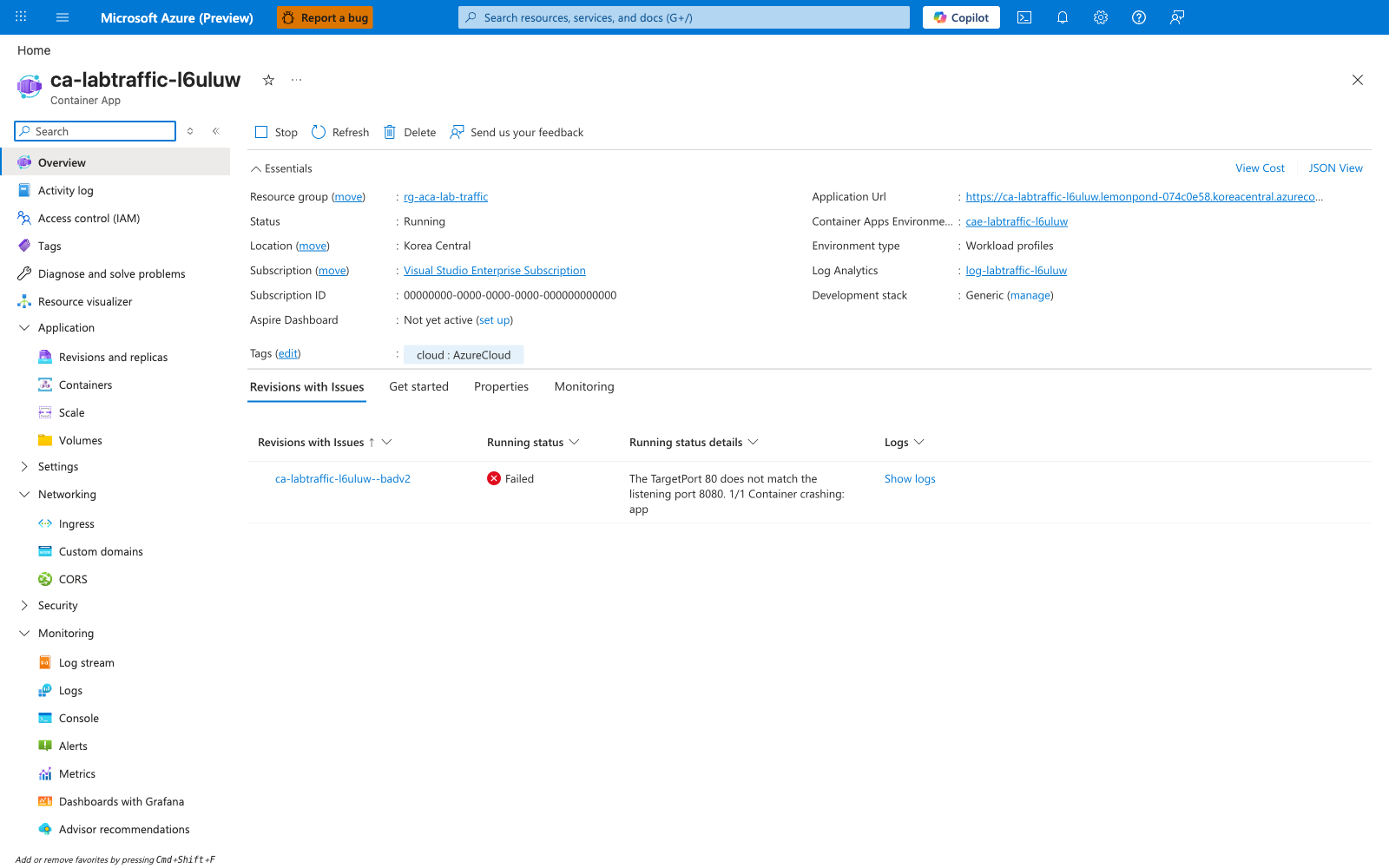
[Inferred] The platform itself attributes the failure to a listening-port mismatch on this specific revision, not to ingress misconfiguration. The error is scoped to the bad revision because the Overview blade groups it under the per-revision "Revisions with Issues" view.
[Observed] The Revisions and replicas blade showed both revisions Active at 50/50, with the bad revision (badv2) marked Failed and the good revision (pnjn5yn) marked Running, each with one replica.
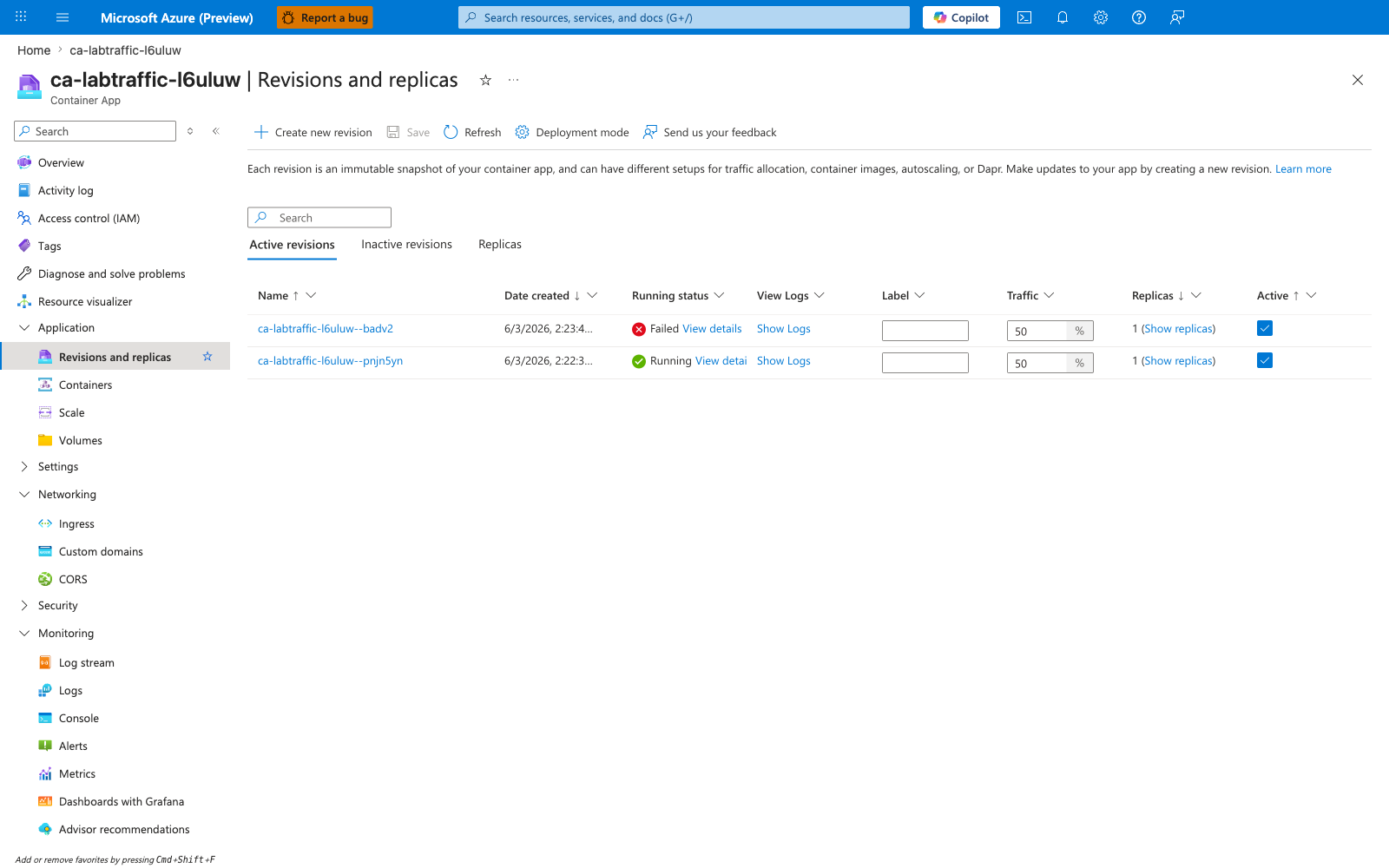
[Inferred] Half of production traffic is routed to a revision the platform has already marked Failed. This is the smoking gun for the canary-failure hypothesis: traffic weighting is independent of revision health, so a Failed revision can still receive its configured share of traffic.
[Observed] The bad revision's "View details" flyout repeated the same TargetPort/listening-port mismatch text as a Revision status detail.
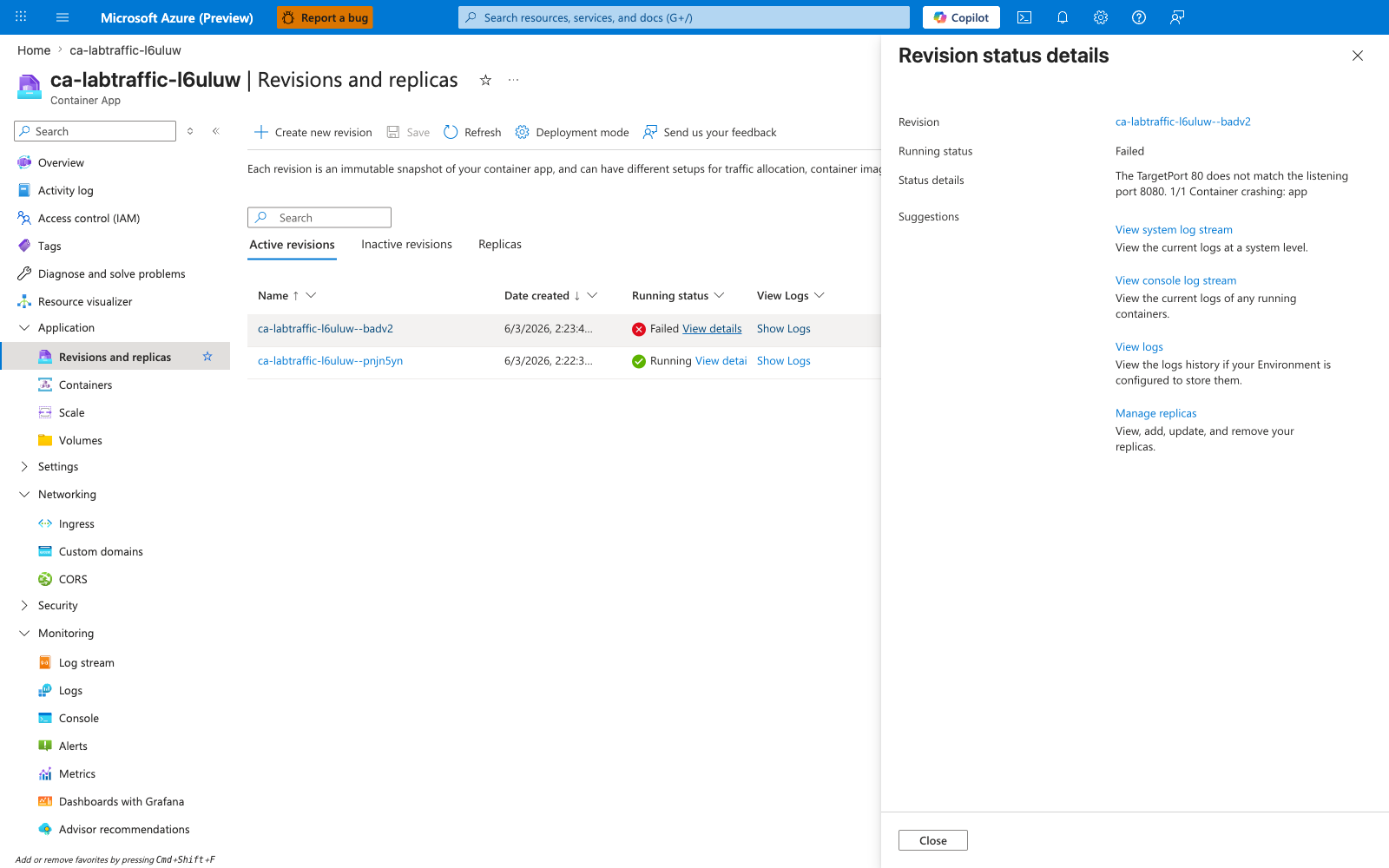
[Inferred] Surfacing the same error at both the Overview blade and the revision-detail flyout (paired with capture 05 — empty status details on the good revision) isolates the failure to the bad revision only.
[Observed] The Ingress blade showed Target port = 80 at capture time.
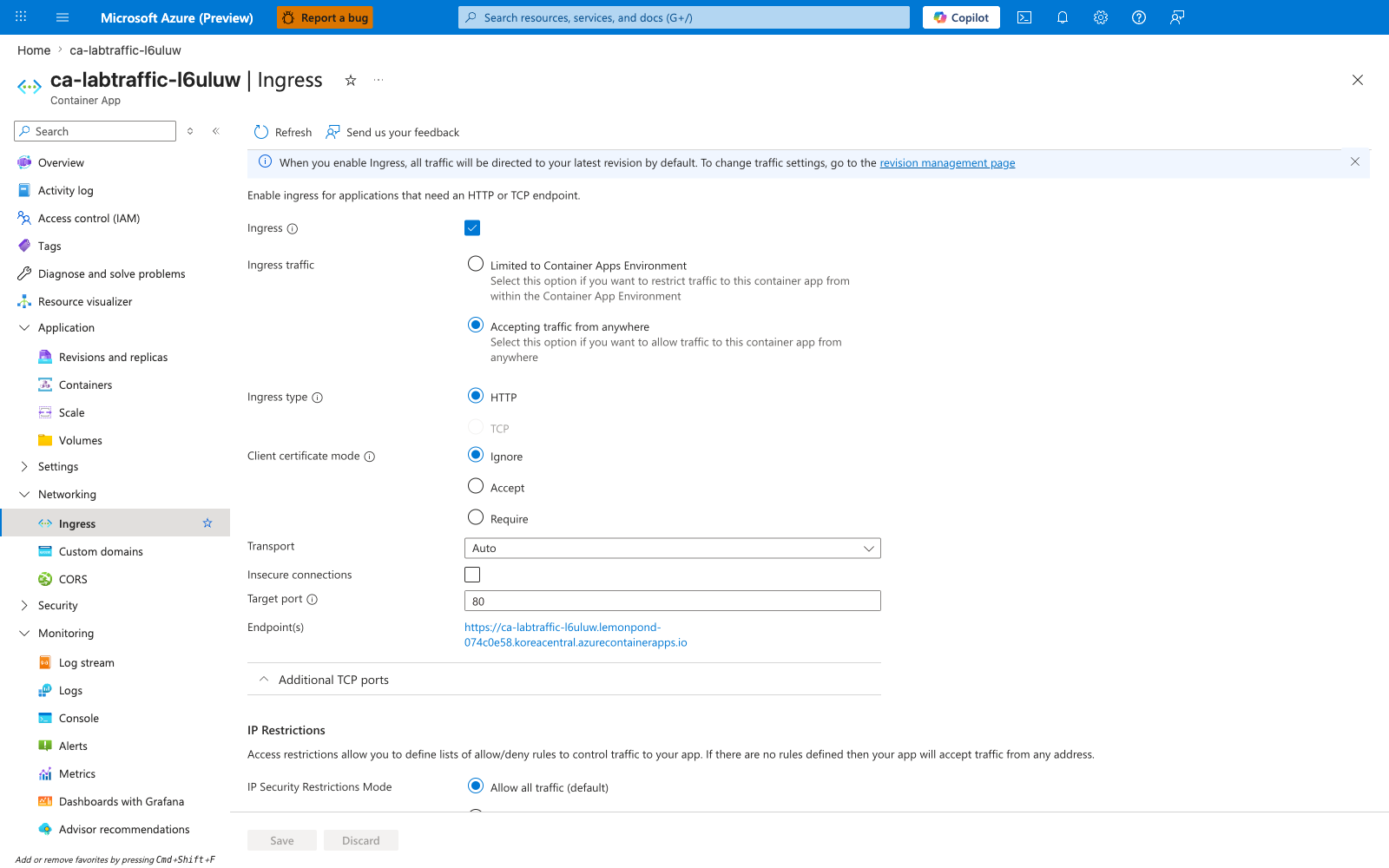
[Inferred] Because the failure surfaces on badv2 while pnjn5yn (whose image listens on :80) keeps serving traffic, the mismatch must come from the bad revision's image (listening on :8080), not from ingress configuration. This also explains why the original trigger.sh design (flipping ingress targetPort) cannot reproduce per-revision failure: ingress targetPort is a shared, ingress-level setting and would affect both revisions, not isolate the failure to one.
[Observed] The good revision's "View details" flyout reported Running status: Running and Status details: "There are no additional running status details at this time".
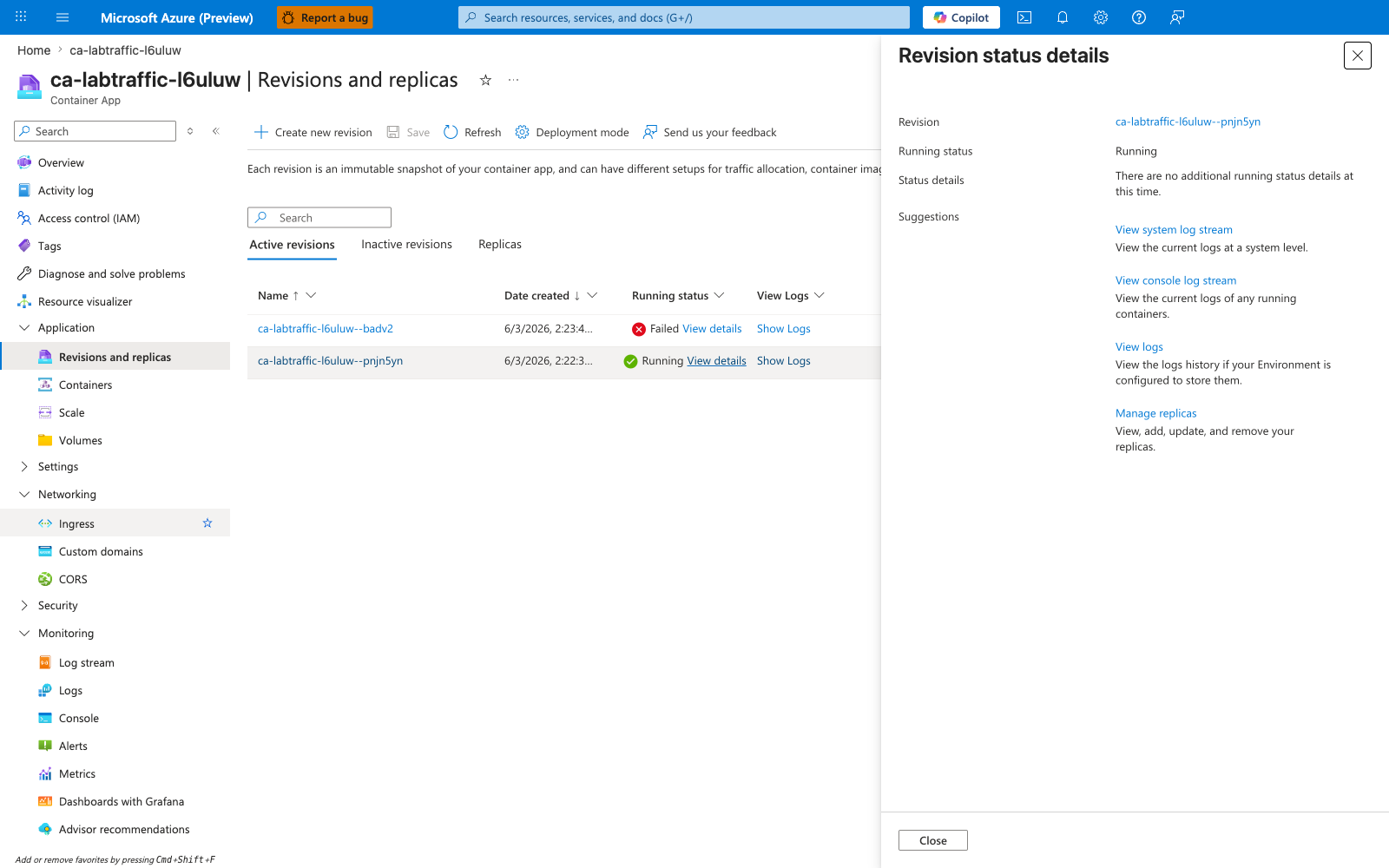
[Inferred] The Status details field is empty precisely because nothing is wrong with the good revision. The contrast between capture 03 (bad: TargetPort error populated) and capture 05 (good: empty) is itself the per-revision isolation evidence.
[Observed] The Activity log showed three Create or Update Container App operations at relative times 16 minutes, 17 minutes, and 18 minutes (Status: 2× Accepted, 1× Succeeded).
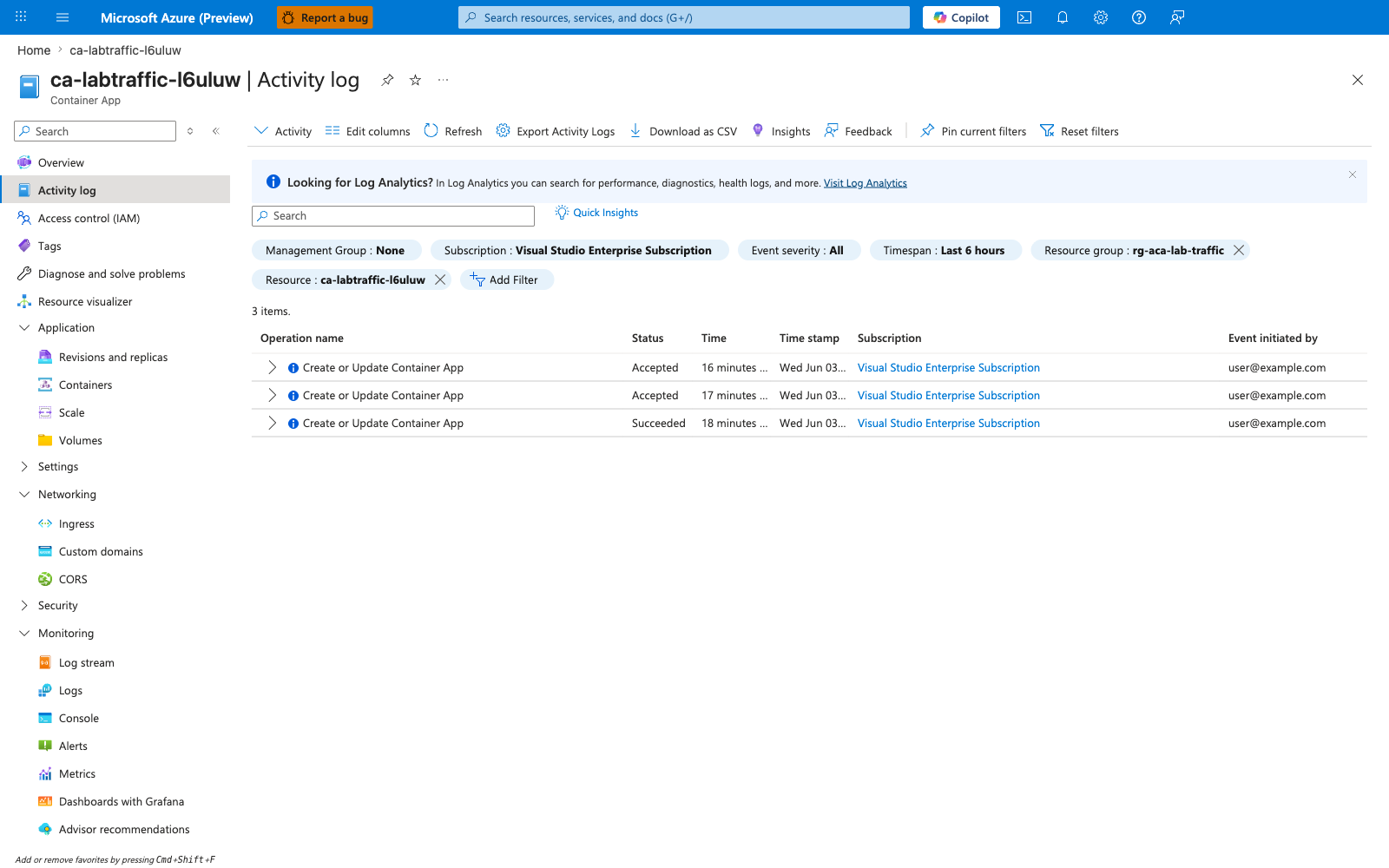
[Inferred] The three operations map to (a) the initial az deployment group create, (b) the az containerapp update --image ... --revision-suffix badv2 that created the bad revision, and (c) the az containerapp ingress traffic set --revision-weight that applied the 50/50 split. The Accepted/Succeeded statuses confirm the control plane received each step.
[Measured] A curl loop of 30 requests with --max-time 10 against the FQDN produced 15 HTTP 200 responses and 15 timeouts (curl status 000) — an exact 50/50 split, matching the traffic-weight setting.
Request 1: HTTP 200
Request 2: HTTP 000
Request 3: HTTP 200
Request 4: HTTP 000
...
(Summary: success=15, timeout=15)
[Inferred] The bad-revision half did not return a graceful HTTP 502 because ingress simply does not get a response from the upstream replica (the image is not listening on the port ingress is dialing). This is why --max-time is mandatory in the reproduction loop above. The combination of (a) Portal's verbatim TargetPort/listening-port mismatch error, (b) the empty status details on the good revision, (c) ingress targetPort shown as 80, and (d) the 15/15 split in the curl loop confirms the hypothesis: a per-revision listening-port mismatch on one of two revisions receiving 50% traffic produces a ~50% failure rate. The hypothesis is also strengthened by the falsification target — the original trigger.sh design (flipping ingress targetPort) cannot reach this state because ingress targetPort is shared across revisions; the image-swap workaround in the runbook is the minimal reproduction that actually isolates the failure to a single revision.
Observed Evidence (Live Azure Test — 2026-06-24)
A second end-to-end live Azure run executed on 2026-06-24 with az CLI version 2.79.0 (see labs/traffic-routing-canary/evidence/19-cli-versions.json) against resource group rg-aca-lab-traffic2 (subscription redacted to placeholder 00000000-0000-0000-0000-000000000000). The run produced 22 numbered evidence prefixes (01-* through 22-*, totaling 27 files when counting .stderr companions to 05-*, 09-*, and 15-*, plus the two 08-* per-revision and two 17-* per-snapshot pairs) under labs/traffic-routing-canary/evidence/, covering H1 (50/50-split canary failure reproduction) and H2 (config-plane rollback without minting a new GOOD revision). All 11 sub-gates across both hypotheses passed.
H1 reproduction — evidence/12-h1-gate.json:
| Sub-gate | Value | Source |
|---|---|---|
a_bad_revision_minted_with_port_mismatched_image | true | evidence/05-containerapp-update-image.json latestRevisionName=ca-labtraffic-ve2wnr--badv2 (--image mcr.microsoft.com/dotnet/samples:aspnetapp, documented listening port :8080); evidence/12-h1-gate.json trigger_window.ingress_target_port="80" and bad_image_listening_port_documented=8080 confirm the port mismatch is in place |
b_ingress_traffic_split_50_50 | true | evidence/09-traffic-set-50-50.json returns [{ca-labtraffic-ve2wnr--w3daylh, weight:50}, {ca-labtraffic-ve2wnr--badv2, weight:50}]; evidence/12-h1-gate.json traffic_split.weights_sorted=[50, 50] |
c_bad_revision_probe_failure_evidence | true | Strong path: evidence/08-revision-show-bad.json runningStateDetails="The TargetPort 80 does not match the listening port 8080." (port-specific platform text). Fallback path (also satisfied): evidence/12-h1-gate.json system_log_capture.probe_failed_lines_in_tail=18 (non-zero ProbeFailed count from evidence/11-system-logs-tail.log) |
d_curl_loop_shows_intermittent_failure | true | evidence/10-curl-loop-30-requests.json reports success_count_200=17 and timeout_count_000=13 out of 30 attempts; evidence/12-h1-gate.json client_probe_results.tolerance_band_for_timeouts=[8, 22] (13 ∈ band) |
e_good_revision_still_healthy | true | evidence/08-revision-show-good.json runningState=Running, healthState=Healthy even while the 50/50 split is active |
Gate classification: canary_failure_reproduced_50_50_traffic_split.
H2 same-revision rollback — evidence/22-h2-gate.json:
| Sub-gate | Value | Source |
|---|---|---|
a_pre_fix_failure_re_confirmed | true | Strong path: evidence/13-revision-pre-fix-bad.json runningStateDetails="Deployment Progress Deadline Exceeded. 0/1 replicas ready. The TargetPort 80 does not match the listening port 8080." (port-specific platform text persists into the verify window). Fallback path (also satisfied): evidence/12-h1-gate.json system_log_capture.probe_failed_lines_in_tail=18 (re-used cross-script) |
b_traffic_set_rollback_succeeded | true | evidence/22-h2-gate.json fix_window.cli_exit_code=0; evidence/15-traffic-set-rollback.json returns [{ca-labtraffic-ve2wnr--w3daylh, weight:100}]. Platform behavior: az containerapp ingress traffic set --revision-weight rev=100 returns only the entries it explicitly assigned; unmentioned revisions are implicitly weight=0 and do not appear in the response, so the gate accepts BAD as absent OR weight=0 (verify.sh b_traffic_set_rollback_succeeded logic) |
c_traffic_100_pct_good | true | evidence/15-traffic-set-rollback.json shows exactly one entry at weight=100 belonging to the GOOD revision; no other non-zero entry exists |
d_post_fix_curl_all_success | true | evidence/18-curl-post-fix.json 5/5 HTTP 200 |
e_good_revision_unchanged | true | Triangulated via same_revision_proof in evidence/22-h2-gate.json: name_unchanged=true (computed from evidence/04-good-revision-captured.json good_revision_name vs evidence/17-revision-show-good-post-fix.json name, both ca-labtraffic-ve2wnr--w3daylh), created_time_unchanged=true (evidence/04-good-revision-captured.json good_revision_created_time vs evidence/17-revision-show-good-post-fix.json createdTime, both 2026-06-24T00:12:40+00:00), image_unchanged=true (evidence/04-good-revision-captured.json good_revision_image vs evidence/17-revision-show-good-post-fix.json image, both mcr.microsoft.com/azuredocs/containerapps-helloworld:latest); evidence/17-revision-show-good-post-fix.json runningState=Running, healthState=Healthy |
f_bad_revision_still_visible_with_zero_traffic | true | evidence/17-revision-list-post-fix.json lists ca-labtraffic-ve2wnr--badv2 with trafficWeight=0 (not deactivated, preserving the rollback's reversibility and the diagnostic audit trail) |
Gate classification: canary_rolled_back_to_good_revision_intact. The fix command was az containerapp ingress traffic set --revision-weight ca-labtraffic-ve2wnr--w3daylh=100 — a config-plane-only edit that does not mint a new revision.
Honest disclosure of platform behavior
Two platform-behavior observations from this run worth flagging to future maintainers:
-
BAD revision surface state transitions. The trigger window captured
runningState=Activating(evidence/12-h1-gate.jsontrigger_window.bad_revision_running_state), while the verify window capturedrunningState=Degraded(evidence/22-h2-gate.jsonpre_fix_state.bad_revision_running_state) for the sameca-labtraffic-ve2wnr--badv2revision. TherunningStateDetailstext containing"TargetPort 80 does not match the listening port 8080."was present in both windows. The gates accept either non-healthy surface state when paired with port-specific corroboration (strong path:runningStateDetailstext match; fallback path: non-healthy state +system_log_capture.probe_failed_lines_in_tail> 0). A bareFailed/Degraded/Activatinglabel with no port-specific corroboration is explicitly insufficient — it could otherwise be caused by image pull failure, OOMKilled, or other non-port failure modes. -
az containerapp ingress traffic setresponse shape. The CLI returns the traffic array directly as the top-level JSON (a list of{revisionName, weight}entries), NOT the full Container App resource — seeevidence/15-traffic-set-rollback.json. Furthermore, the response contains ONLY the entries explicitly assigned in the--revision-weightargument; unmentioned revisions are implicitly weight=0 and do not appear in the response (the BAD revision is absent from15-traffic-set-rollback.jsoneven though it remains in the revision list attrafficWeight=0, seeevidence/17-revision-list-post-fix.jsonfor the independent corroboration). The H2b_traffic_set_rollback_succeededsub-gate accepts both response shapes defensively and treats an absent BAD entry as implicit weight=0.
Evidence provenance note
All 22 artifacts (01-* through 22-*) come from a single coherent 2026-06-24 00:13–00:28 UTC run against rg-aca-lab-traffic2 (Korea Central). The full provenance map and file index are in labs/traffic-routing-canary/evidence/README.md.
Operator caveat
The H1 sub-gate a_bad_revision_minted_with_port_mismatched_image and the H2 same-revision-proof checks hard-code the image identities (mcr.microsoft.com/azuredocs/containerapps-helloworld:latest for GOOD, mcr.microsoft.com/dotnet/samples:aspnetapp for BAD) and the listening ports (:80 and :8080). If a future maintainer changes any of these constants in trigger.sh (GOOD_IMAGE, BAD_IMAGE, BAD_IMAGE_LISTENING_PORT, EXPECTED_INGRESS_TARGET_PORT), the corresponding gate string matches must be updated in lockstep across both trigger.sh and verify.sh.
Clean Up
| Command | Why it is used |
|---|---|
az group delete ... | Removes the lab resource group and its contained resources. |
Related Playbook
See Also
- Ingress Target Port Mismatch Lab — the single-revision form of the same TargetPort/listening-port mismatch failure class; the "Production case pattern" subsection there walks through 8 failure↔fix Portal capture pairs that share the same
Reason_s: TargetPortMismatchsmoking gun - Target Port Mismatch Detection KQL — the query pack for the verbatim "TargetPort N does not match the listening port M" platform message, applicable to both this canary failure and the single-revision form
- Revision Failover Lab
- Revision Provisioning Failure Lab