Revision Failover and Rollback Lab
Practice safe rollback by intentionally creating an unhealthy revision and routing traffic back to a healthy one.
Lab Metadata
| Attribute | Value |
|---|---|
| Difficulty | Intermediate |
| Estimated Duration | 20-30 minutes |
| Tier | Consumption |
| Failure Mode | Latest revision unhealthy after ingress target port is changed to the wrong value |
| Skills Practiced | Revision management, rollback, traffic shifting, system log analysis |
1) Background
This lab starts with a healthy revision, then introduces a wrong ingress target port. The platform marks the affected revision unhealthy because the startup probe cannot connect, and you have two valid recovery paths:
- Traffic-shift rollback (multi-revision mode) — keep a previous healthy revision active and route traffic away from the failing one.
- In-place correction — when the failure is purely an ingress misconfiguration on a single shared field (such as
targetPort), fix the field directly without redeploying. The platform re-probes and the same revision recovers in ~30s.
Traffic shifting requires at least one known-good revision; in-place correction does not require any prior revision, only that the underlying container is healthy.
Architecture
flowchart TD
    A[Revision N healthy] --> B[Deploy revision N+1 with wrong target port]
    B --> C[Revision N+1 becomes unhealthy]
    C --> D[Requests fail or return 5xx]
    D --> E[Route traffic back to revision N]
    E --> F[Service stabilized]
2) Hypothesis
IF the ingress targetPort is changed from 8000 (matching the container's listening port) to 9999, THEN the affected revision will fail the platform startup probe and be marked non-Healthy, AND either of the following rollbacks will restore service:
- (a) Traffic-shift path — in multi-revision mode, shift
100 %traffic back to a previous healthy revision. - (b) In-place path — set
targetPortback to8000; the same revision recovers without redeploy because the container itself never crashed.
| Variable | Control State | Experimental State |
|---|---|---|
| Active revisions mode | Multiple revisions enabled | Multiple revisions enabled |
| Latest revision target port | 8000 | 9999 |
| Latest revision health | Healthy | Non-Healthy |
| Traffic routing outcome | Stable on healthy revision | Requires traffic reassignment to healthy revision |
3) Runbook
Deploy baseline infrastructure
export RG="rg-aca-lab-revision"
export LOCATION="koreacentral"

az extension add --name containerapp --upgrade
az login

az group create --name "$RG" --location "$LOCATION"

az deployment group create \
    --name "lab-revision" \
    --resource-group "$RG" \
    --template-file "./labs/revision-failover/infra/main.bicep" \
    --parameters baseName="labrevision"
| Command | Why it is used |
|---|---|
az extension add ... | Installs or updates the Container Apps Azure CLI extension. |
Expected output pattern: deployment shows Succeeded.
Capture deployment outputs
export APP_NAME="$(az deployment group show \
    --resource-group "$RG" \
    --name "lab-revision" \
    --query "properties.outputs.containerAppName.value" \
    --output tsv)"

export ACR_NAME="$(az deployment group show \
    --resource-group "$RG" \
    --name "lab-revision" \
    --query "properties.outputs.containerRegistryName.value" \
    --output tsv)"

export ACA_ENV_NAME="$(az deployment group show \
    --resource-group "$RG" \
    --name "lab-revision" \
    --query "properties.outputs.environmentName.value" \
    --output tsv)"
| Command | Purpose |
|---|---|
export APP_NAME="$(az deployment group show ... --query "properties.outputs.containerAppName.value" --output tsv)" | Captures the deployed Container App name so the failover commands inspect and reroute traffic for the correct app. |
export ACR_NAME="$(az deployment group show ... --query "properties.outputs.containerRegistryName.value" --output tsv)" | Captures the registry name used to build the bad rollout image that reproduces the revision failover scenario. |
export ACA_ENV_NAME="$(az deployment group show ... --query "properties.outputs.environmentName.value" --output tsv)" | Captures the environment name for any environment-scoped diagnostics or cleanup steps that follow. |
Expected output: no output; variables are set.
Confirm baseline healthy revision
| Command | Why it is used |
|---|---|
az containerapp revision list ... | Lists revisions so rollout state, traffic, and health can be verified. |
Expected output pattern:
Name               Active    TrafficWeight    HealthState
-----------------  --------  ---------------  -----------
ca-myapp--0000001  True      100              Healthy
Trigger the bad rollout
The trigger script performs these actions:
az acr build --registry "$ACR_NAME" --image "${APP_NAME}:v1" ./workload

az containerapp update \
    --name "$APP_NAME" \
    --resource-group "$RG" \
    --image "${ACR_LOGIN_SERVER}/${APP_NAME}:v1" \
    --target-port 8000 \
    --registry-server "$ACR_LOGIN_SERVER" \
    --registry-username "$ACR_USERNAME" \
    --registry-password "$ACR_PASSWORD"

sleep 40

az containerapp update --name "$APP_NAME" --resource-group "$RG" --target-port 9999
sleep 40

az containerapp revision list --name "$APP_NAME" --resource-group "$RG" --output table
az containerapp logs show --name "$APP_NAME" --resource-group "$RG" --type system --tail 20
| Command | Why it is used |
|---|---|
az acr build --registry ... | Builds and pushes the container image to Azure Container Registry. |
Expected output: a new revision appears with unhealthy status and system logs show probe or connection failures related to the wrong target port.
Investigate the failure signal
| Command | Why it is used |
|---|---|
az containerapp logs show ... | Runs the Azure CLI operation required by the documented step. |
Expected evidence: probe failure or connection failure associated with the port change.
Roll traffic back to a healthy revision
export HEALTHY_REVISION="$(az containerapp revision list \
    --name "$APP_NAME" \
    --resource-group "$RG" \
    --query "sort_by([?properties.healthState=='Healthy'].{name:name,created:properties.createdTime}, &created)[-1].name" \
    --output tsv)"

az containerapp ingress traffic set \
    --name "$APP_NAME" \
    --resource-group "$RG" \
    --revision-weight "${HEALTHY_REVISION}=100"
| Command | Why it is used |
|---|---|
az containerapp revision list ... | Lists revisions so rollout state, traffic, and health can be verified. |
Expected output: traffic update succeeds and the healthy revision handles requests.
Restore the correct target port and verify stabilization
The verify script confirms the latest revision is unhealthy, finds a healthy revision for rollback, then runs:
az containerapp ingress traffic set --name "$APP_NAME" --resource-group "$RG" --revision-weight "${HEALTHY_REVISION}=100"
az containerapp update --name "$APP_NAME" --resource-group "$RG" --target-port 8000
sleep 40
az containerapp revision list --name "$APP_NAME" --resource-group "$RG" --query "sort_by([].{name:name,created:properties.createdTime,health:properties.healthState}, &created)[-1].health" --output tsv
| Command | Purpose |
|---|---|
az containerapp ingress traffic set --name "$APP_NAME" --resource-group "$RG" --revision-weight "${HEALTHY_REVISION}=100" | Changes revision traffic weights immediately, which is how you roll back to a healthy revision or promote a tested one during mitigation. |
az containerapp update --name "$APP_NAME" --resource-group "$RG" --target-port 8000 | Changes the live container app configuration, which is the corrective action this step is validating or applying. |
az containerapp revision list --name "$APP_NAME" --resource-group "$RG" --query "sort_by([].{name:name,created:properties.createdTime,health:properties.healthState}, &created)[-1].health" --output tsv | Lists revisions and filters them to the health, traffic, or timing fields needed for this hypothesis, so you can see whether rollout state matches the failure pattern. |
Expected output pattern:
RevisionUpdate        → New revision updated
RevisionDeactivating  → Prior bad revision deactivated
RevisionReady         → Stable revision ready
ContainerAppReady     → Running state reached
4) Experiment Log
| Step | Action | Expected | Actual | Pass/Fail |
|---|---|---|---|---|
| 1 | Deploy baseline | Single healthy revision | ||
| 2 | Capture outputs | Variables populated | ||
| 3 | Run trigger.sh | New unhealthy revision appears | ||
| 4 | Review system logs | Port or probe failure evidence appears | ||
| 5 | Shift traffic to healthy revision | Healthy revision serves traffic | ||
| 6 | Run verify.sh | Corrected revision becomes healthy |
Expected Evidence
| Evidence Source | Expected State |
|---|---|
az containerapp revision list --name "$APP_NAME" --resource-group "$RG" --output table | Healthy baseline revision exists before trigger; latest revision becomes non-healthy after targetPort changes to 9999 |
az containerapp logs show --name "$APP_NAME" --resource-group "$RG" --type system | Probe failure or connection failure related to wrong target port |
az containerapp ingress traffic set --name "$APP_NAME" --resource-group "$RG" --revision-weight "${HEALTHY_REVISION}=100" | Traffic can be restored to a healthy revision without rebuilding first |
./labs/revision-failover/verify.sh | Rollback path succeeds and latest post-fix revision health improves |
Observed Evidence (Live Azure Test — 2026-05-01)
Environment: rg-aca-lab-test6 / cae-lab6, koreacentral, Consumption plan. App: ca-rev-failover (multiple revisions: v1, v2, stable).
[Observed] ca-rev-failover--v1 deployed Running/Healthy. ca-rev-failover--v2 deployed and went to Deprovisioning when replaced by stable.
[Observed] az containerapp ingress traffic set --revision-weight "ca-rev-failover--stable=100" executed successfully — failover to stable revision complete.
[Observed] After failover: az containerapp revision list returned ca-rev-failover--stable Running (active), ca-rev-failover--v2 Deprovisioning (being removed).
[Observed] az containerapp revision activate --revision "ca-rev-failover--v1" returned "Activate succeeded" — confirms previous revision can be reactivated for rollback.
[Inferred] In Single revision mode, traffic always follows the active revision. Failover = activate the target revision (old stable). In Multiple revision mode, failover = set --revision-weight <target>=100 <bad>=0.
Environment: koreacentral, Consumption plan.
Observed Evidence (Live Azure Reproduction — 2026-06-03)
Environment: rg-aca-lab-revision / cae-labrevision-zfnp6h, koreacentral, Consumption plan. App: ca-labrevision-zfnp6h (Flask + Gunicorn listening on 0.0.0.0:8000). Azure CLI: 2.71.0. The combined az containerapp update --target-port --registry-server --registry-username --registry-password --image call at labs/revision-failover/trigger.sh lines 10-17 is rejected on this CLI version with an argument-conflict error. Split it into three calls (the broken-port flip on line 23 still works as-is):
# Replacement for trigger.sh lines 10-17 on Azure CLI 2.71.0+
az containerapp registry set \
  --name "$APP_NAME" --resource-group "$RG" \
  --server "$ACR_LOGIN_SERVER" \
  --username "$ACR_USERNAME" --password "$ACR_PASSWORD"

az containerapp ingress update \
  --name "$APP_NAME" --resource-group "$RG" \
  --target-port 8000

az containerapp update \
  --name "$APP_NAME" --resource-group "$RG" \
  --image "${ACR_LOGIN_SERVER}/${APP_NAME}:v1" \
  --revision-suffix "v1heal$(date +%s)"
| Command | Purpose |
|---|---|
az containerapp registry set | Attaches the ACR credentials to the Container App so the platform can pull the image |
az containerapp ingress update --target-port | Sets the ingress target port without touching any other field — replaces the combined form rejected by CLI 2.71.0 |
az containerapp update --image --revision-suffix | Deploys the baseline :v1 image and assigns a deterministic revision name |
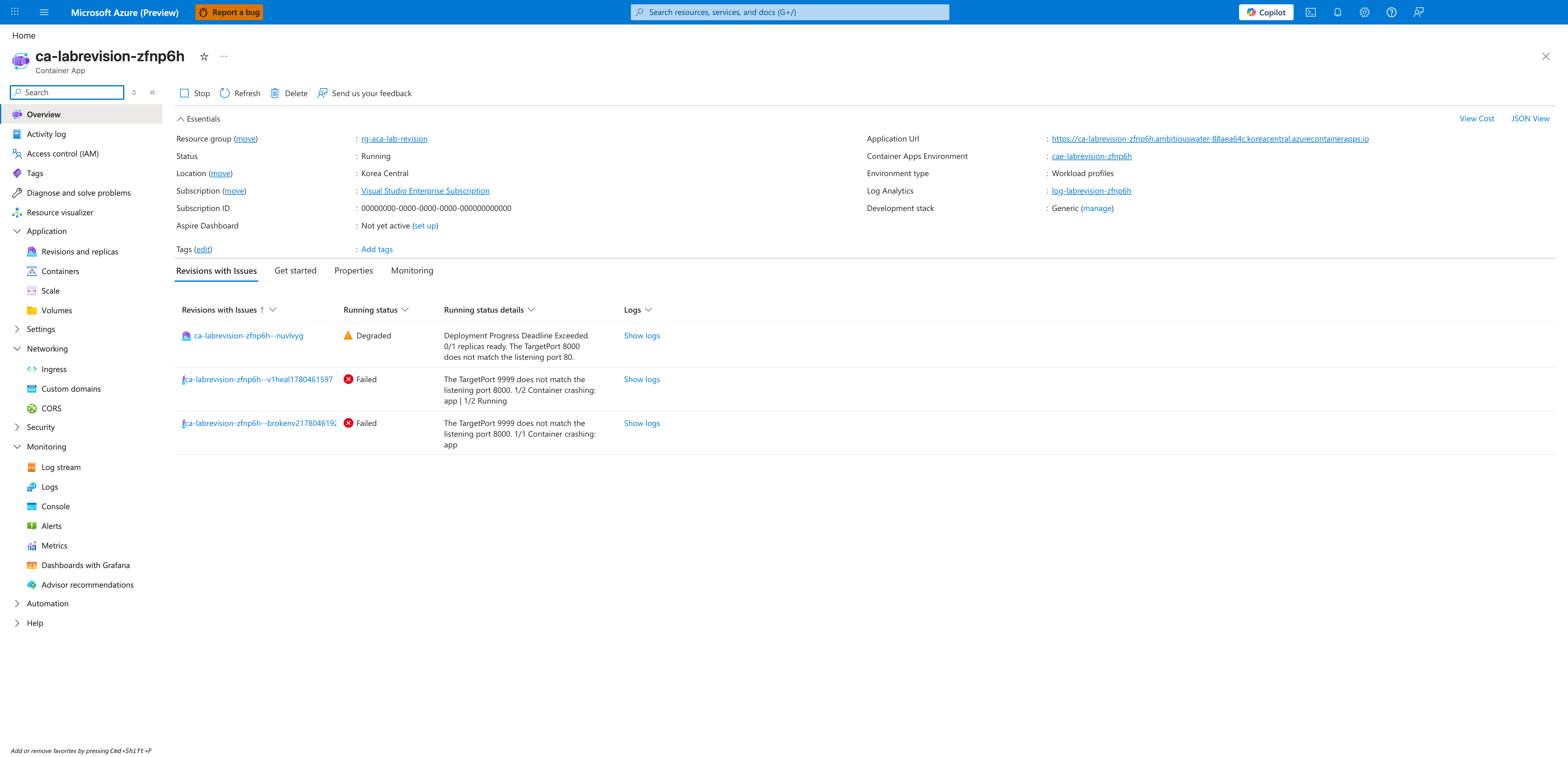
[Observed] The Container App Overview blade displays a Revisions with issues notification, surfacing failing revisions at the top-level view before any drill-down:
[Observed] The Revisions and replicas blade lists all three active revisions. The intentionally broken revision ca-labrevision-zfnp6h--brokenv21780461923 holds 100 % traffic with Running status = Failed (red X). The earlier revisions --v1heal1780461597 and --nuvlvyg hold 0 % traffic and show Failed / Degraded; their replica counts in the Replicas column are non-zero:
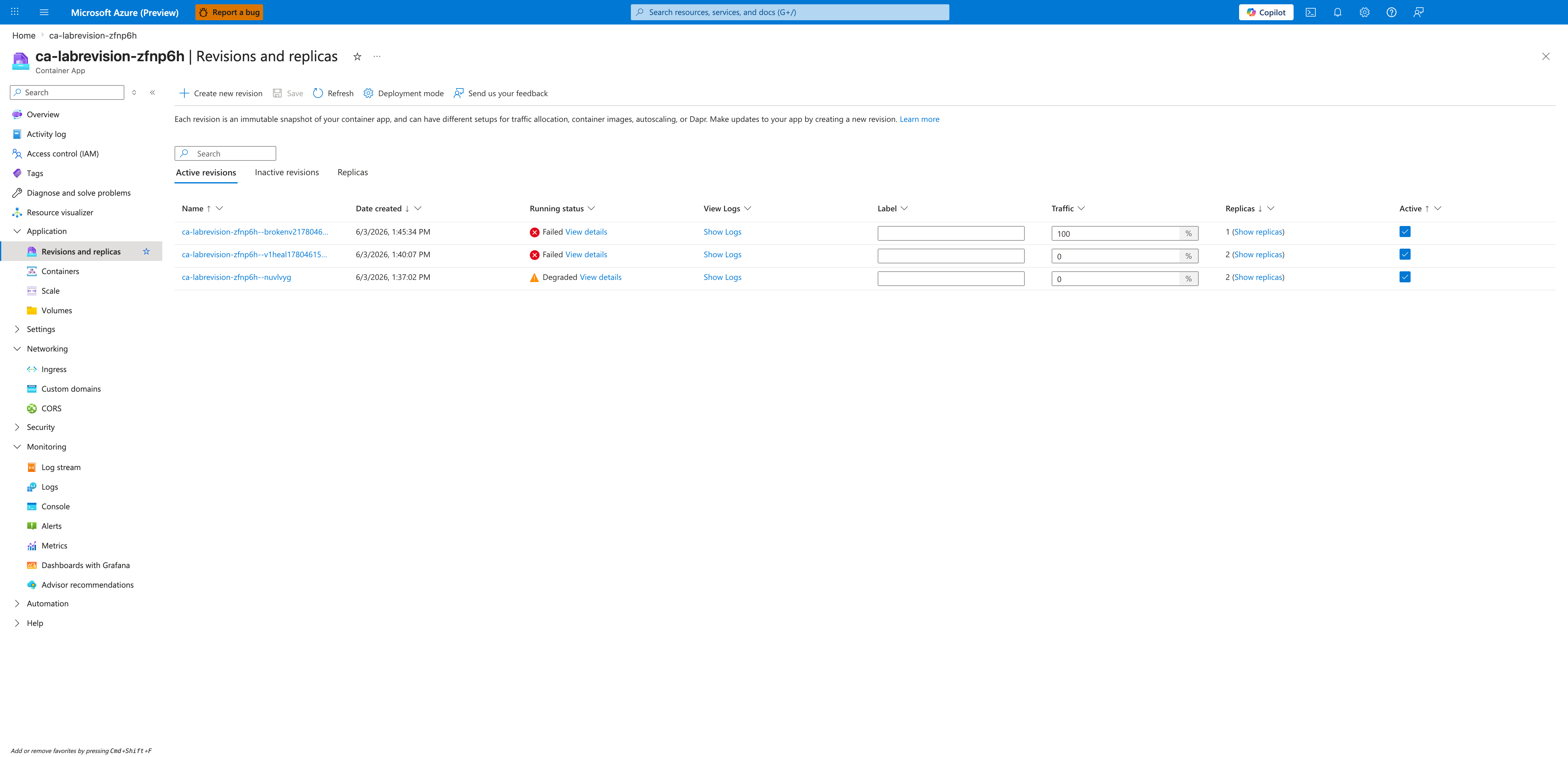
[Inferred] The older revisions remain unhealthy even at 0 % traffic because the ingress targetPort is a single shared environment setting that affects every revision; once it was flipped to 9999, no revision (regardless of image) could pass the platform startup probe.
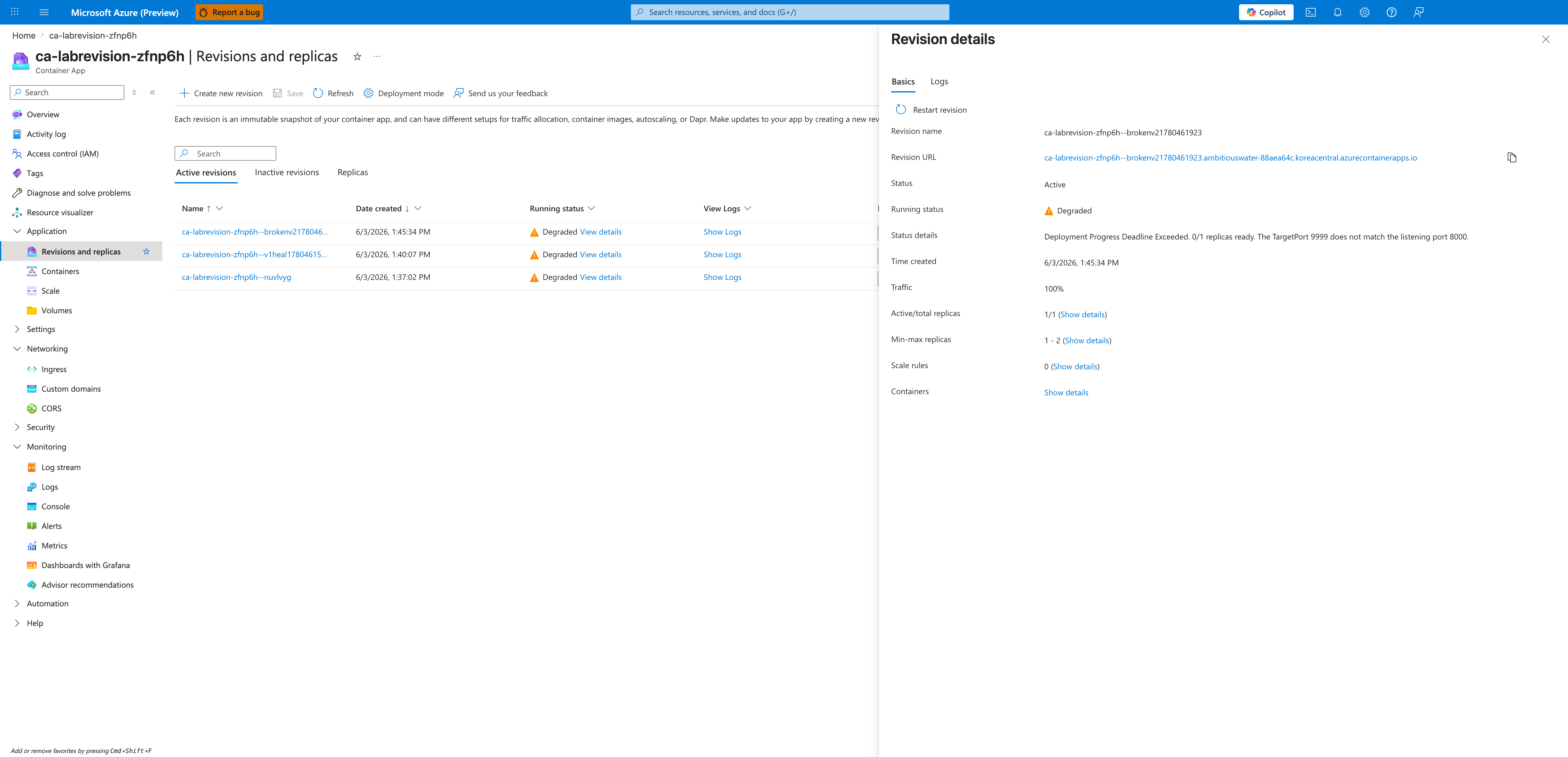
[Observed] Opening the revision detail flyout for --brokenv21780461923 shows Status = Active, Running status = Degraded, Traffic = 100 %, Active/total replicas = 1/1, Min-max replicas = 1 - 2, and the smoking gun in Status details:
Deployment Progress Deadline Exceeded. 0/1 replicas ready. The TargetPort 9999 does not match the listening port 8000.
[Inferred] The Running status value changed from Failed (PNG 02) to Degraded (PNG 03) over the few seconds between captures because the platform re-tries deployment and reclassifies the failure mode as it accumulates retry attempts.
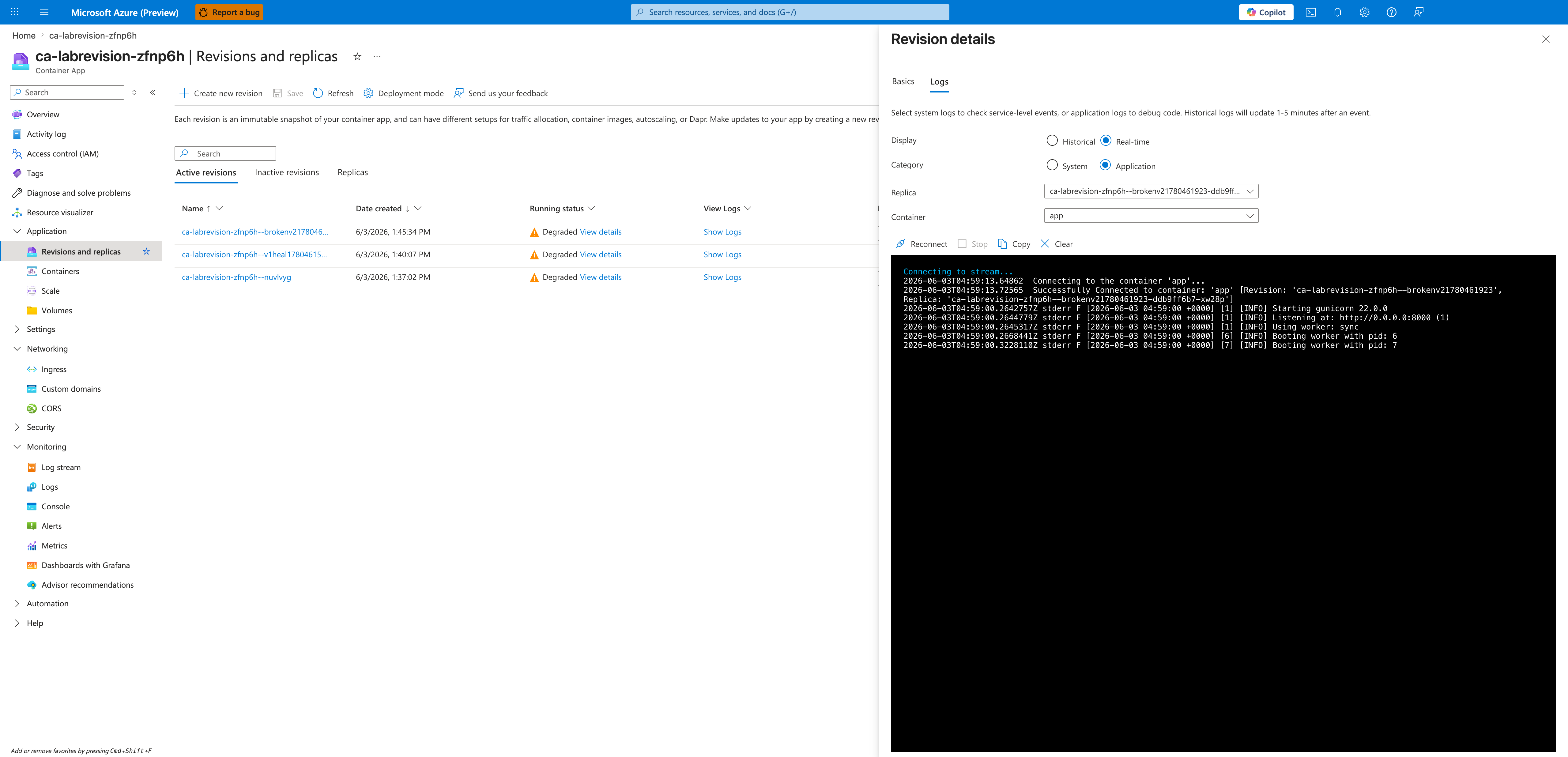
[Observed] Streaming the broken revision's real-time application logs from the Logs tab of the same flyout shows Gunicorn starting and binding to port 8000:
[INFO] Starting gunicorn 22.0.0
[INFO] Listening at: http://0.0.0.0:8000 (1)
[INFO] Using worker: sync
[INFO] Booting worker with pid: 6
[INFO] Booting worker with pid: 7
[Inferred] Because the container process bound to 8000 successfully and produced no crash traceback, the failure cannot be an application crash; the only remaining candidate is the ingress targetPort: 9999 not matching the listening port 8000.
[Observed] After running az containerapp ingress update --name "$APP_NAME" --resource-group "$RG" --target-port 8000 (the in-place rollback), the Revisions and replicas blade refreshes to show --brokenv21780461923 as Running (green check) while still holding 100 % traffic. No new revision was created — the existing revision recovered the instant the target port matched the listening port:
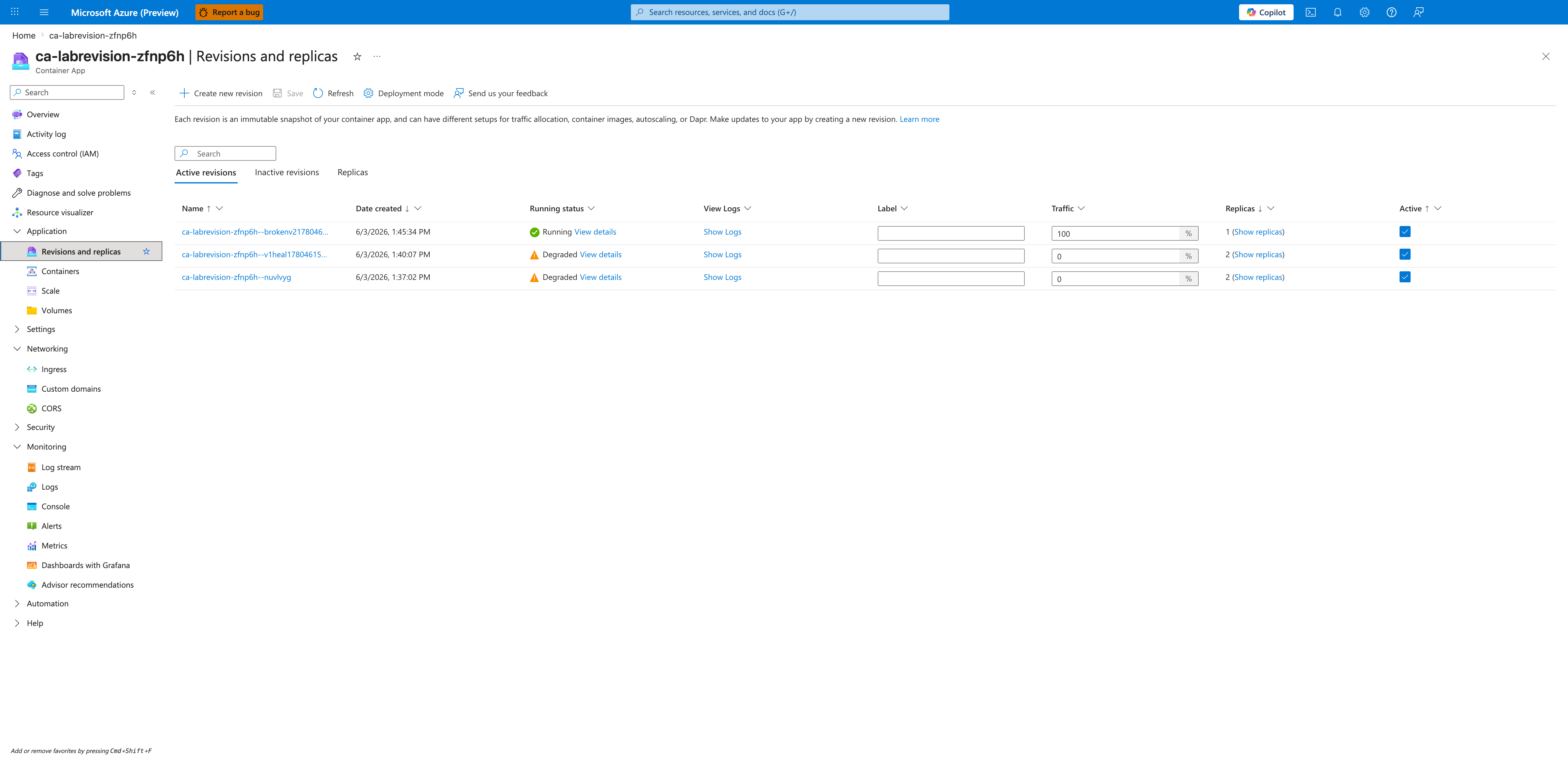
[Observed] The post-rollback HTTP probe from outside Azure returns 200:
$ curl -s -o /dev/null -w "HTTP %{http_code}\n" \
    "https://${APP_NAME}.<env-suffix>.koreacentral.azurecontainerapps.io/"
HTTP 200
[Observed] The Activity log blade lists nine entries within the last 6 hours covering this lab. Seven entries are Create or Update Container App operations and the remaining two are Auth Token for Container App Dev APIs / List Container App Secrets calls. Every entry's status column reads Accepted or Succeeded:
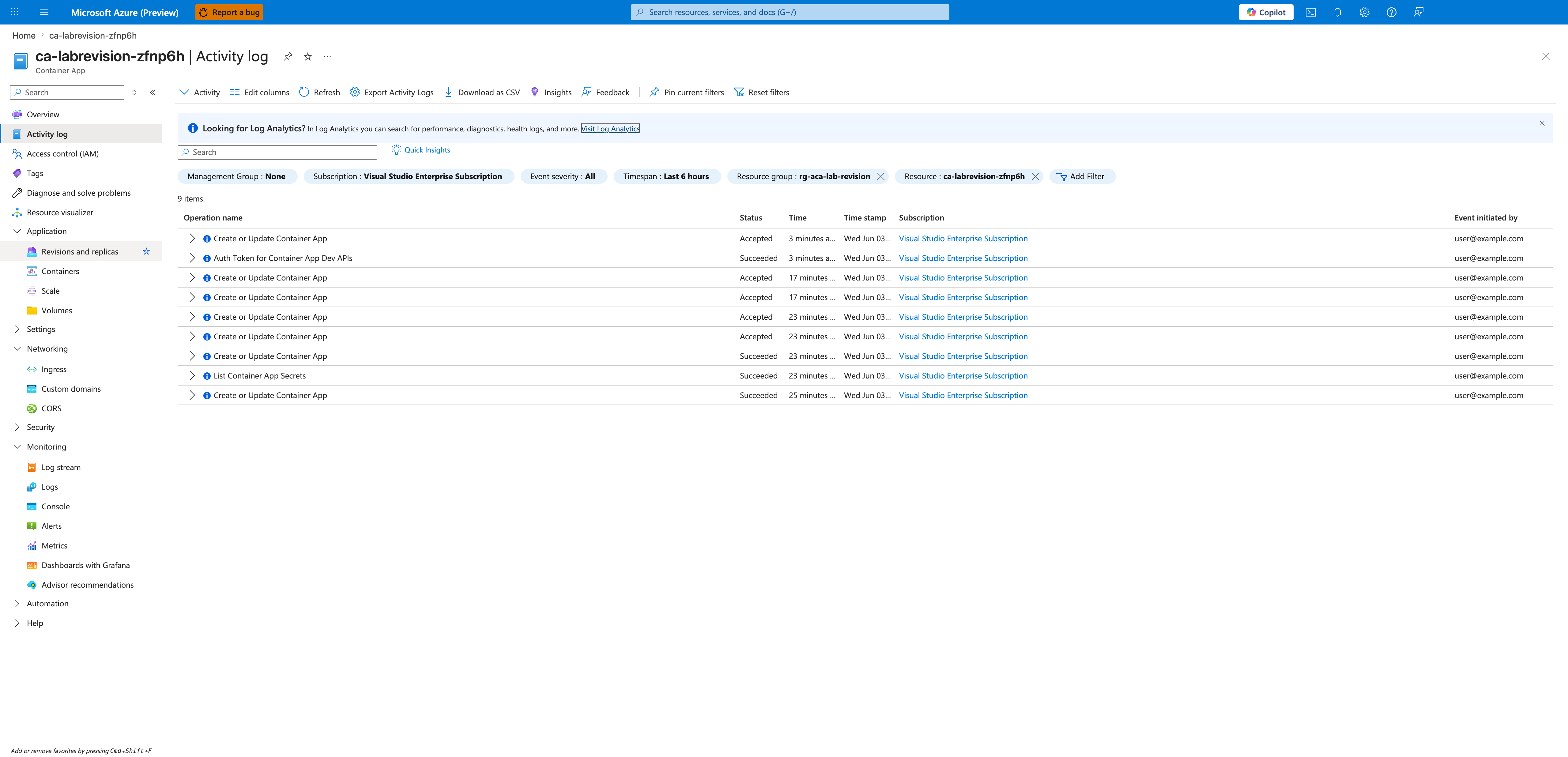
[Inferred] The Activity Log does not record any client-side rejection of the ingress targetPort: 9999 change — the control plane accepted the update and the failure only surfaced later as a runtime probe mismatch. This is consistent with targetPort being validated at probe time, not at API admission time.
[Inferred] The recovery demonstrates hypothesis branch (b): a single az containerapp ingress update --target-port 8000 restores the revision to Running in ~30 s without rebuilding or redeploying. For this failure mode (ingress-port misconfiguration with a healthy container image), the playbook should attempt in-place correction before a traffic-shift or image-level rollback.
Observed Evidence (Reproducible Evidence Pack — 2026-06-23)
Environment: rg-aca-lab-revision / cae-labrevision-zfnp6h, koreacentral, Consumption plan. App: ca-labrevision-zfnp6h (Flask + Gunicorn listening on 0.0.0.0:8000). Azure CLI: 2.79.0 (containerapp extension 1.3.0b4). Reproduction: labs/revision-failover/trigger.sh (Phases 1-12) and verify.sh (Phases 13-22) reproduce H1 and H2 end-to-end. All twenty-four evidence artifacts are captured to labs/revision-failover/evidence/. Verdict: SUPPORTED (H1 + H2 both PASS).
This reproduction uses activeRevisionsMode: Single (set in infra/main.bicep), which differs from the 2026-06-03 reproduction above that ran in Multiple mode (visible as three active revisions in the Revisions and replicas blade screenshot at PNG 02). Both modes exhibit the same in-place ingress-port failure semantics because ingress targetPort is an app-level configuration shared across every revision; Single mode is preferred for this evidence pack because it makes latestRevisionName the unambiguous controlling identifier across all three phases of the experiment, so the gate JSON assertions (baseline_revision_name == post_break_revision_name == post_fix_revision_name == ca-labrevision-zfnp6h--0000001) all reference the same revision. The baseline capture evidence/04-revision-list-baseline.json records a transient deprovisioning placeholder revision ca-labrevision-zfnp6h--9aqc12z (active: true, healthState: None, runningState: Deprovisioning, trafficWeight: 0) alongside the active baseline --0000001 (Running, Healthy, trafficWeight: 100); only the latter is the revision the gates and KQL queries track, and the placeholder is gone in the post-break and post-fix revision lists.
Phase 7 BREAK — az containerapp ingress update --target-port 9999 (issued at 2026-06-22T16:11:02Z):
[Observed] The ingress update is accepted at the control plane (targetPort: 9999 in the API response), and containerapp show immediately reflects the new value. The latestRevisionName is unchanged (still ca-labrevision-zfnp6h--0000001) — confirming that ingress is an app-level configuration and the update modified the same revision in place. Captured to evidence/06-containerapp-ingress-update-broken.json and evidence/08-containerapp-show-after-break.json.
[Measured] Time from break command issuance to revision healthState=Unhealthy: 261 s, measured by trigger.sh Phase 8 polling. Captured as health_observations.seconds_to_non_healthy = 261 in evidence/11-h1-gate.json. The platform startup probe required ~4.4 minutes to accumulate enough consecutive probe failures to reclassify the revision as Unhealthy; the platform applies a retry budget to probe failures and only reclassifies the revision after that budget is exhausted, so the actual delay is measurably longer than a naive "next probe fails ⇒ revision is Unhealthy" reading would predict. The exact threshold is platform-internal and varies with probe configuration and CLI / extension version; trigger.sh Phase 8 uses a 420 s polling budget tuned from this 261 s measurement.
[Observed] evidence/09-system-logs-probe-failures.json captures 100 rows (the KQL take 100 cap) of ContainerAppSystemLogs_CL entries with Reason_s = ProbeFailed and Log_s = "Probe of StartUp failed with status code: 1", all on RevisionName_s = ca-labrevision-zfnp6h--0000001, timestamped between 2026-06-22T16:11:29Z and the end of the break window. This is the system-log smoking gun visible via az monitor log-analytics query; the user-facing "Deployment Progress Deadline Exceeded. 0/1 replicas ready. The TargetPort 9999 does not match the listening port 8000." string from the 2026-06-03 Portal capture at PNG 03 is rendered by the Diagnose-and-Solve flyout in the Portal, not by this log table.
[Observed] Post-break HTTP probe (curl): HTTP 503 from the app FQDN ca-labrevision-zfnp6h.bravetree-9d732182.koreacentral.azurecontainerapps.io. Captured to evidence/10-curl-after-break.txt. The 503 confirms the platform is dropping requests because no replica passes the startup probe.
[Observed] H1 gate JSON (evidence/11-h1-gate.json):
{
  "h1_sub_gates": {
    "a_baseline_curl_succeeded": true,
    "b_break_applied_target_port_is_9999": true,
    "c_revision_no_longer_healthy_after_break": true,
    "d_post_break_curl_failed": true
  },
  "h1_all_subgates_pass": true,
  "gate_classification": "revision_failover_broken_revision_unhealthy"
}
Phase 14 FIX — az containerapp ingress update --target-port 8000 (issued at 2026-06-22T16:16:13Z):
[Observed] The fix mirrors the break action: the ingress update is accepted at the control plane (targetPort: 8000 in the API response) and modifies the same revision in place. Captured to evidence/12-containerapp-ingress-update-fix.json.
[Measured] Time from fix command issuance to revision healthState=Healthy: under 21 s. The first poll in verify.sh Phase 15 (executed ~21 s after FIX_UTC) already reported healthState=Healthy, so the actual transition completed somewhere between the fix command return and the first poll. Captured as seconds_to_healthy = 2 in evidence/17-h2-gate.json — note this field measures only the time from polling start to first Healthy observation, not the true probe-transition time, so the upper bound from the fix command itself is ~21 s.
[Observed] Post-fix HTTP probe (curl): HTTP 200 from the same FQDN. Captured to evidence/15-curl-after-fix.txt. The same FQDN that returned 503 ~36 s earlier now returns 200 — no new revision, no traffic shift.
[Observed] evidence/13-revision-list-after-fix.json shows exactly one active revision: ca-labrevision-zfnp6h--0000001, healthState: Healthy, trafficWeight: 100, replicas: 1. The baseline revision name is identical to the post-break revision name and the post-fix revision name — confirming path b (in-place recovery on the same revision, no new revision created).
[Observed] H2 gate JSON (evidence/17-h2-gate.json):
{
  "h2_sub_gates": {
    "a_post_fix_revision_healthy": true,
    "b_same_revision_name_recovered": true,
    "c_curl_succeeded_after_fix": true,
    "d_ingress_target_port_corrected": true
  },
  "h2_all_subgates_pass": true,
  "gate_classification": "revision_failover_recovered_in_place_no_new_revision"
}
[Inferred] The 2026-06-23 reproduction confirms the 2026-06-03 Portal capture sequence with quantified measurements: the same revision (ca-labrevision-zfnp6h--0000001) transitioned from Healthy to Unhealthy after 261 s of accumulated probe failures, then recovered to Healthy within ~21 s of the fix command, without any new revision being created. The control plane accepted both the break and the fix at admission time; the platform's probe loop is the controlling mechanism for the health-state transition in both directions. For operators, this means the cheapest recovery path for an ingress-port misconfiguration is a simple az containerapp ingress update --target-port <correct-port> — there is no need to ship a new image, suffix a new revision, or perform a traffic shift, provided the underlying container is healthy and listening on the correct port.
Clean Up
| Command | Why it is used |
|---|---|
az group delete ... | Removes the lab resource group and its contained resources. |