Probe and Port Mismatch Lab
Reproduce probe failures when the container process listens on one port while ingress and probes target a different port.
Lab Metadata
| Attribute | Value |
|---|---|
| Difficulty | Beginner |
| Estimated Duration | 20-25 minutes |
| Tier | Consumption |
| Failure Mode | App listens on port 3000 but Container App ingress targets port 8000 |
| Skills Practiced | Port alignment, probe troubleshooting, revision inspection, system log analysis |
1) Background
This lab deploys an app process that listens on one port while ingress and probes target another port. The workload container listens on port 3000, but the Container App is updated to use targetPort 8000, so startup and readiness checks fail before the revision can stabilize.
Port mismatch often looks like an application crash because repeated probe failures can restart replicas even when the process itself is healthy.
Architecture
flowchart TD
    A[Container process binds :3000] --> B[Ingress targets :8000]
    B --> C[Startup and readiness probes hit :8000]
    C --> D[Probe failures accumulate]
    D --> E[Revision unhealthy or unstable]
    E --> F[Align target port with app bind port]
    F --> G[New revision becomes healthy]
2) Hypothesis
IF the application binds to port 3000 while the Container App ingress targetPort remains 8000, THEN system logs will show ProbeFailed events and the latest revision will remain non-healthy until targetPort is corrected to 3000.
| Variable | Control State | Experimental State |
|---|---|---|
| Application bind port | 3000 | 3000 |
| Container App target port | 3000 | 8000 |
| Probe behavior | HTTP 200 on expected port | Probe failures on wrong port |
| Revision health | Healthy | Non-Healthy / unstable |
3) Runbook
Deploy baseline infrastructure
export RG="rg-aca-lab-port"
export LOCATION="koreacentral"

az extension add --name containerapp --upgrade
az login

az group create --name "$RG" --location "$LOCATION"

az deployment group create \
    --name "lab-port" \
    --resource-group "$RG" \
    --template-file "./labs/probe-and-port-mismatch/infra/main.bicep" \
    --parameters baseName="labport"
| Command | Why it is used |
|---|---|
az extension add ... | Installs or updates the Container Apps Azure CLI extension. |
Expected output pattern: deployment shows Succeeded.
Capture deployment outputs
export APP_NAME="$(az deployment group show \
    --resource-group "$RG" \
    --name "lab-port" \
    --query "properties.outputs.containerAppName.value" \
    --output tsv)"

export ACR_NAME="$(az deployment group show \
    --resource-group "$RG" \
    --name "lab-port" \
    --query "properties.outputs.containerRegistryName.value" \
    --output tsv)"

export ACA_ENV_NAME="$(az deployment group show \
    --resource-group "$RG" \
    --name "lab-port" \
    --query "properties.outputs.environmentName.value" \
    --output tsv)"
| Command | Purpose |
|---|---|
export APP_NAME="$(az deployment group show ... --query "properties.outputs.containerAppName.value" --output tsv)" | Captures the app name produced by the deployment so the trigger and verification steps target the correct Container App. |
export ACR_NAME="$(az deployment group show ... --query "properties.outputs.containerRegistryName.value" --output tsv)" | Captures the registry name used to build and push the mismatched workload image before the target-port change. |
export ACA_ENV_NAME="$(az deployment group show ... --query "properties.outputs.environmentName.value" --output tsv)" | Captures the environment name for any later environment-scoped troubleshooting or cleanup steps. |
Expected output: no output.
Trigger the mismatch
The workload is built to listen on port 3000:
Run the lab trigger:
The trigger script builds the workload image and updates the Container App with a mismatched target port:
az acr build --registry "$ACR_NAME" --image "${APP_NAME}:v1" ./workload

az containerapp update \
    --name "$APP_NAME" \
    --resource-group "$RG" \
    --image "${ACR_LOGIN_SERVER}/${APP_NAME}:v1" \
    --target-port 8000 \
    --registry-server "$ACR_LOGIN_SERVER" \
    --registry-username "$ACR_USERNAME" \
    --registry-password "$ACR_PASSWORD"

sleep 40
az containerapp revision list --name "$APP_NAME" --resource-group "$RG" --output table
az containerapp logs show --name "$APP_NAME" --resource-group "$RG" --type system --tail 20
| Command | Why it is used |
|---|---|
az acr build --registry ... | Builds and pushes the container image to Azure Container Registry. |
Expected output: the latest revision is not healthy or repeatedly restarting.
Inspect probe/system logs
| Command | Why it is used |
|---|---|
az containerapp logs show ... | Runs the Azure CLI operation required by the documented step. |
Expected diagnostic output pattern:
{
  "TimeGenerated": "2026-04-04T11:31:10.444Z",
  "ContainerAppName_s": "ca-myapp",
  "Type_s": "Warning",
  "Reason_s": "ProbeFailed",
  "Log_s": "Probe of StartUp failed with status code: 1"
}
Validate the ingress target port setting
az containerapp show \
    --name "$APP_NAME" \
    --resource-group "$RG" \
    --query "properties.configuration.ingress.targetPort" \
    --output tsv
| Command | Why it is used |
|---|---|
az containerapp show ... | Reads the Container App configuration so the documented setting can be verified. |
Expected output: 8000, which does not match the application bind port 3000.
Apply the fix by aligning ports
| Command | Purpose |
|---|---|
az containerapp update --name "$APP_NAME" --resource-group "$RG" --target-port 3000 | Changes the live container app configuration, which is the corrective action this step is validating or applying. |
Expected output: the update succeeds and creates a new revision.
Verify recovery
The verify script confirms the mismatch reproduces the failure, then runs:
az containerapp update --name "$APP_NAME" --resource-group "$RG" --target-port 3000
sleep 40
az containerapp revision list --name "$APP_NAME" --resource-group "$RG" --query "sort_by([].{created:properties.createdTime,health:properties.healthState}, &created)[-1].health" --output tsv
| Command | Purpose |
|---|---|
az containerapp update --name "$APP_NAME" --resource-group "$RG" --target-port 3000 | Restores the ingress target port to the workload's real listening port so the next revision can pass startup and readiness checks. |
az containerapp revision list --name "$APP_NAME" --resource-group "$RG" --query "sort_by([].{created:properties.createdTime,health:properties.healthState}, &created)[-1].health" --output tsv | Extracts the newest revision's health state so the verifier can prove the port-alignment fix actually produced a healthy revision rather than only updating configuration. |
Expected output: latest revision becomes Healthy and requests succeed consistently.
4) Experiment Log
| Step | Action | Expected | Actual | Pass/Fail |
|---|---|---|---|---|
| 1 | Deploy baseline | Deployment succeeds | ||
| 2 | Capture outputs | Variables populated | ||
| 3 | Run trigger.sh | Revision becomes non-healthy | ||
| 4 | Review system logs | ProbeFailed evidence appears | ||
| 5 | Check targetPort | Value is 8000 while app binds to 3000 | ||
| 6 | Update targetPort to 3000 | New revision created | ||
| 7 | Run verify.sh | Latest revision becomes healthy |
Expected Evidence
| Evidence Source | Expected State |
|---|---|
| Workload container command | Process binds to 0.0.0.0:3000 |
az containerapp show --name "$APP_NAME" --resource-group "$RG" --query "properties.configuration.ingress.targetPort" --output tsv | 8000 before fix, 3000 after fix |
az containerapp logs show --name "$APP_NAME" --resource-group "$RG" --type system | ProbeFailed and startup/readiness probe errors |
az containerapp revision list --name "$APP_NAME" --resource-group "$RG" --output table | Latest revision non-healthy before fix; healthy after alignment |
./labs/probe-and-port-mismatch/verify.sh | Failure reproduced first, then corrected revision stabilizes |
Observed Evidence (Live Azure Test — 2026-05-01)
Environment: rg-aca-lab-test6 / cae-lab6, koreacentral, Consumption plan. App: ca-probe-mismatch (mcr.microsoft.com/azuredocs/containerapps-helloworld:latest, port 80).
[Observed] Liveness probe configured on port 9999 (wrong). System logs returned:
[ProbeFailed] Probe of Liveness failed with status code:
[ProbeFailed] Probe of Liveness failed with status code:
[Observed] Container repeatedly killed and restarted due to liveness probe failures — probe cannot connect to port 9999 (nothing listening there).
[Observed] After fix: probe updated to port: 80 (correct). az containerapp update returned provisioningState: Succeeded.
[Observed] Post-fix: az containerapp show --query "properties.runningStatus" returned Running — app stable with correct probe configuration.
[Inferred] Liveness probe failures on a wrong port cause continuous container restarts even though the application itself is healthy. The fix is always to match the probe port to the actual application listening port.
Environment: koreacentral, Consumption plan, mcr.microsoft.com/azuredocs/containerapps-helloworld:latest.
Observed Evidence (Portal Captures — 2026-06-02, failure state)
Environment: rg-aca-lab-probe / cae-labprobe-shes3s, koreacentral, Consumption plan. App: ca-labprobe-shes3s. The Bicep template (labs/probe-and-port-mismatch/infra/main.bicep) deploys a baseline that is already mismatched on first deploy: the placeholder image mcr.microsoft.com/azuredocs/containerapps-helloworld:latest (which listens on port 80) is combined with ingress targetPort: 8000. This baseline revision in the captures is ca-labprobe-shes3s--coxh910. Trigger applied for these captures: ACR build of the workload in labs/probe-and-port-mismatch/workload/ (Flask + Gunicorn, CMD ["gunicorn", "--bind", "0.0.0.0:3000", ...]) → az containerapp registry set → az containerapp update --image .../ca-labprobe-shes3s:v1 → az containerapp ingress update --target-port 8000. The shipped labs/probe-and-port-mismatch/trigger.sh does this in a single az containerapp update --image ... --target-port 8000 --registry-server ... call; the capture-day sequence was split into the three commands above as a workaround for unrecognized-argument errors on the locally installed containerapp CLI extension. The image swap is a revision-template change and created a new revision ca-labprobe-shes3s--0000001, which took 100% of traffic.
Held constant vs. changed (baseline --coxh910 → trigger --0000001):
| Variable | Baseline --coxh910 | Trigger --0000001 | Controlled? |
|---|---|---|---|
| Container image | mcr.microsoft.com/azuredocs/containerapps-helloworld:latest (listens on port 80) | acrlabprobeshes3s.azurecr.io/ca-labprobe-shes3s:v1 (gunicorn, listens on port 3000) | changed (independent variable) |
Ingress targetPort (application-scope) | 8000 | 8000 | held constant |
| Ingress transport / external | auto / enabled | auto / enabled | held constant |
Application listener vs. targetPort | mismatched (80 vs 8000) | mismatched (3000 vs 8000) | both states are mismatched |
| Revision name | ca-labprobe-shes3s--coxh910 | ca-labprobe-shes3s--0000001 | changed (consequence of the image swap) |
[Inferred] Because the baseline --coxh910 was also mismatched on first deploy, this PR-A subsection is not a healthy-vs-failed comparison. PR-A only establishes a single failure-state snapshot for the trigger revision; the controlled comparison to a healthy state is provided by PR-B, which holds the image (and therefore the listening port) constant on the trigger revision and changes only targetPort 8000 → 3000.
Verification CLI (taken at the same time as the captures):
Revision --0000001: Active=True, Health=Unhealthy, RunningStatus=Failed, Replicas=1, Traffic=100%
Revision --coxh910: Active=True, RunningStatus=Activating/Degraded (observed flapping during the capture window), Replicas=2, Traffic=0%
curl https://${FQDN}/ --write-out '%{http_code}' → 000 (5/5: no HTTP response; connection failed or timed out before headers)
TargetPort: 8000
[Observed] The Container App overview blade shows platform Status: Running, but the Revisions with Issues section displays the following message in the UI:
The TargetPort 8000 does not match the listening port 3000. 1/1 Container crashing: app
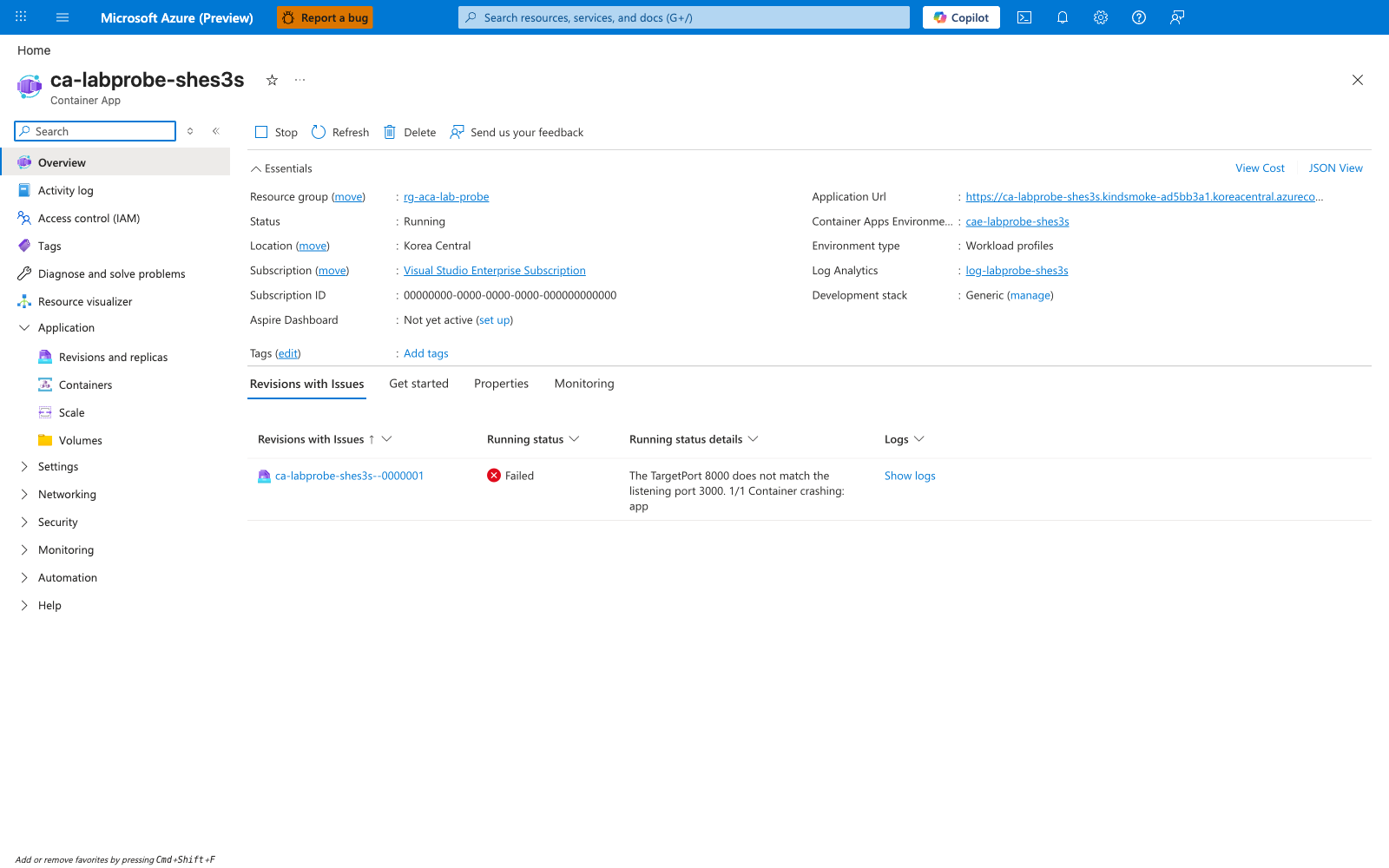
[Inferred] The text of that message names both the configured targetPort (8000) and the workload's actual listening port (3000), which strongly suggests it is produced by Container Apps platform logic (rather than authored by the user). The capture itself only proves that the Portal renders the string; the source attribution is not directly observable from the screenshot.
[Observed] The Revisions and replicas blade shows both revisions in the Active revisions tab: the new --0000001 with Running status: Failed and Traffic: 100, and the prior baseline --coxh910 with Running status: Degraded and Traffic: 0:
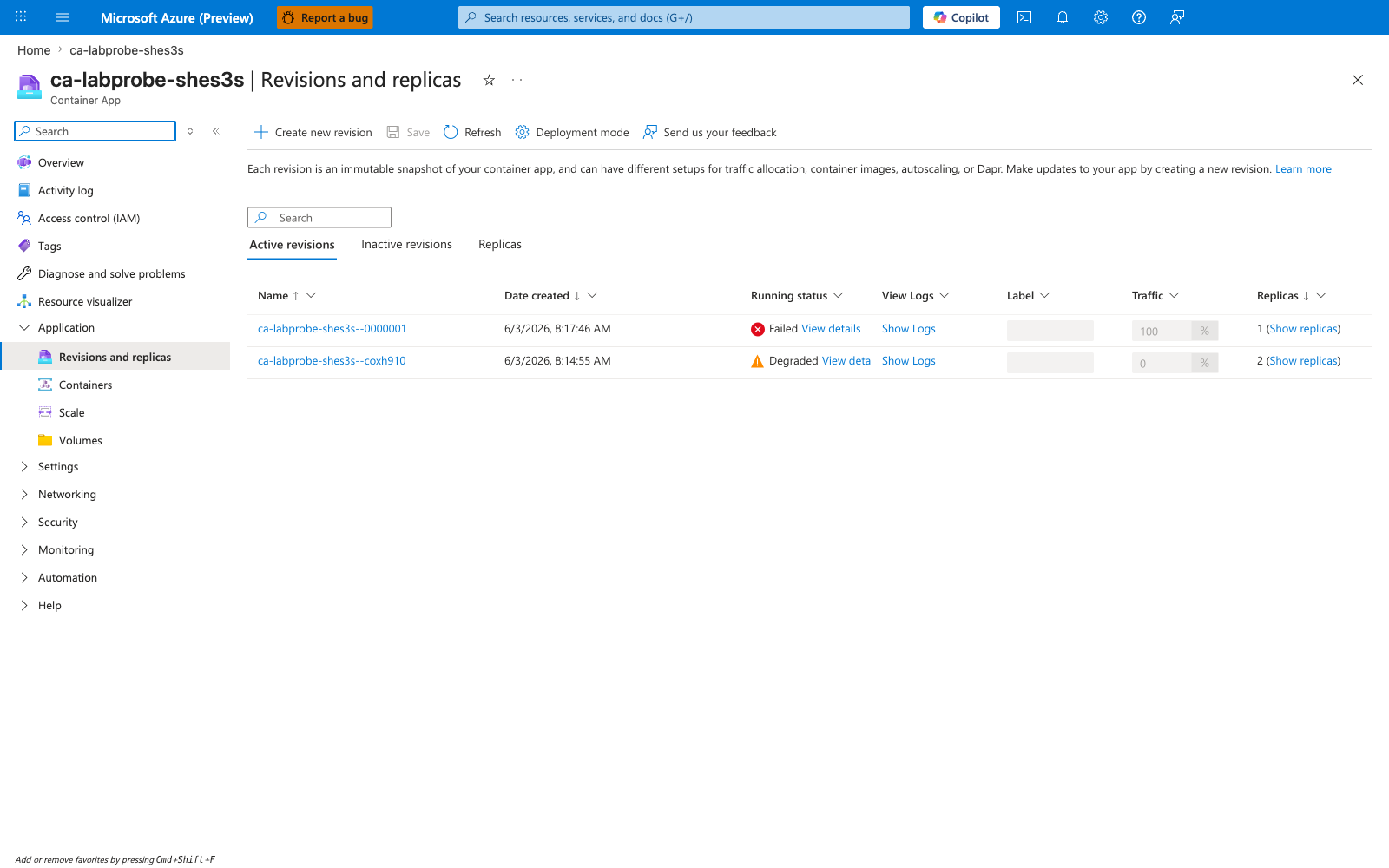
[Observed] Capture 06 below shows that --coxh910 is also emitting ProbeFailed events during the capture window, consistent with its baseline mismatch (helloworld listener on 80, targetPort 8000). The baseline revision is therefore not a healthy control; it is included only to document the full active-revisions list visible in the Portal at capture time.
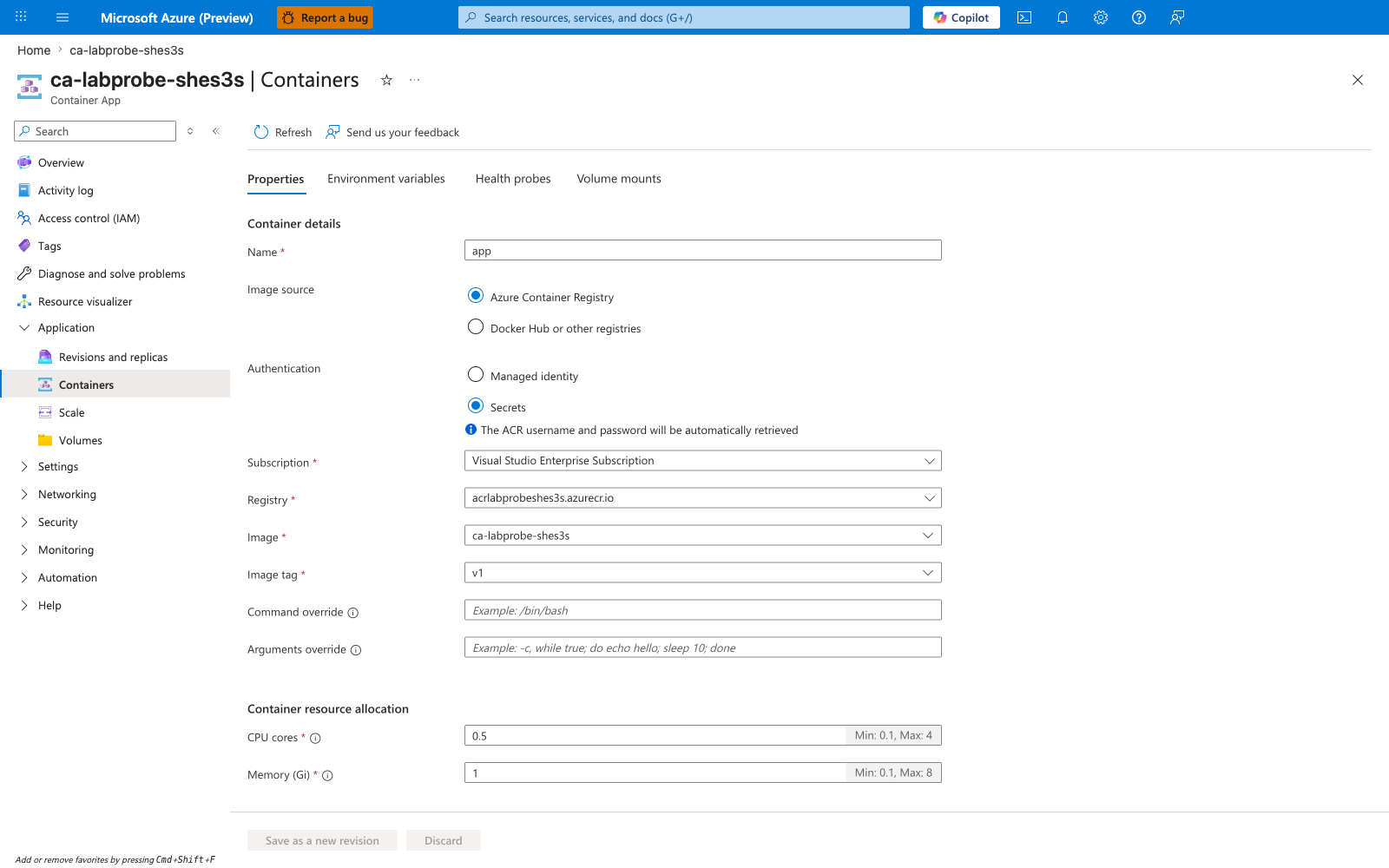
[Observed] The Containers blade confirms the image swap: the active container app is configured with the custom-built image acrlabprobeshes3s.azurecr.io/ca-labprobe-shes3s:v1:
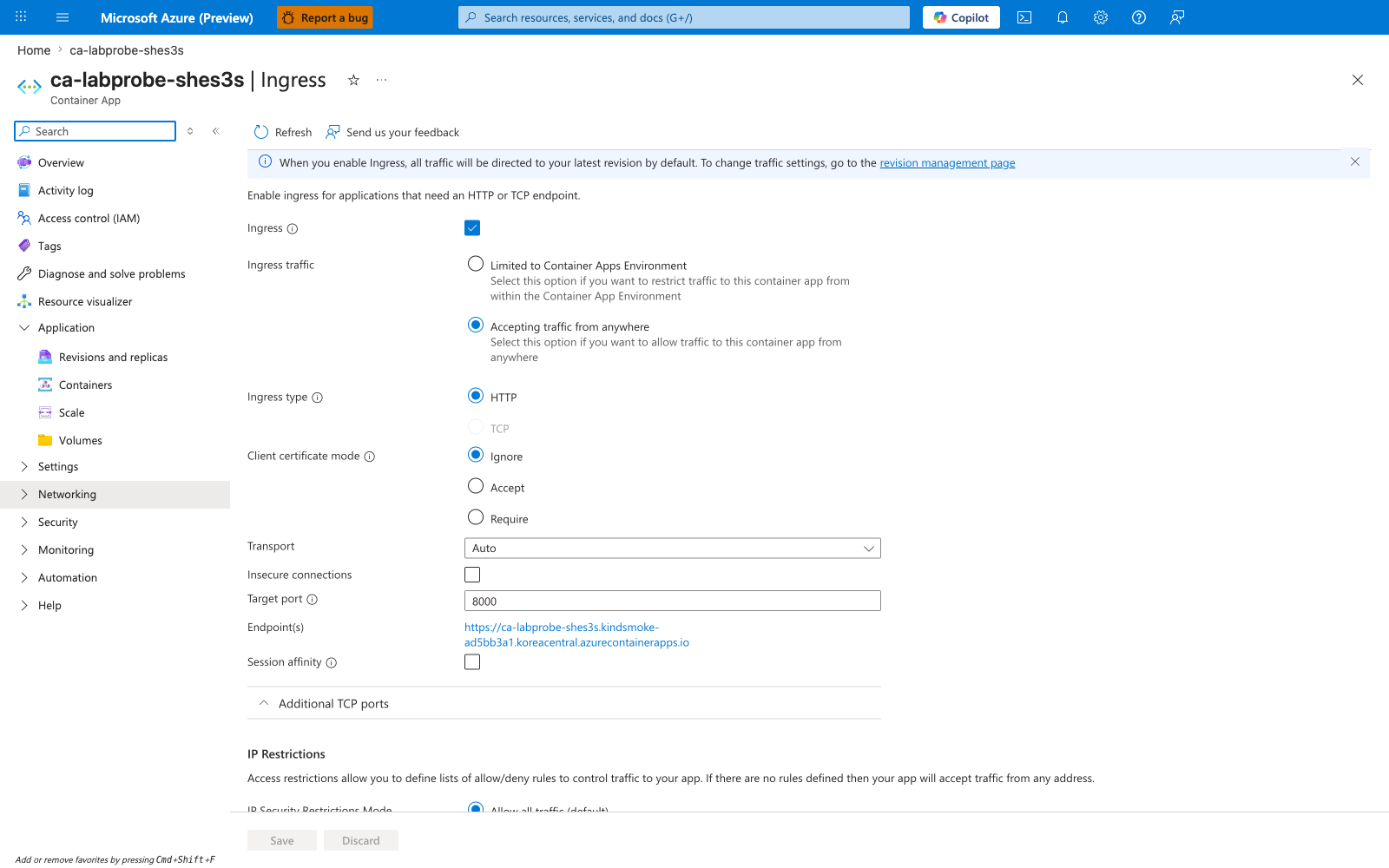
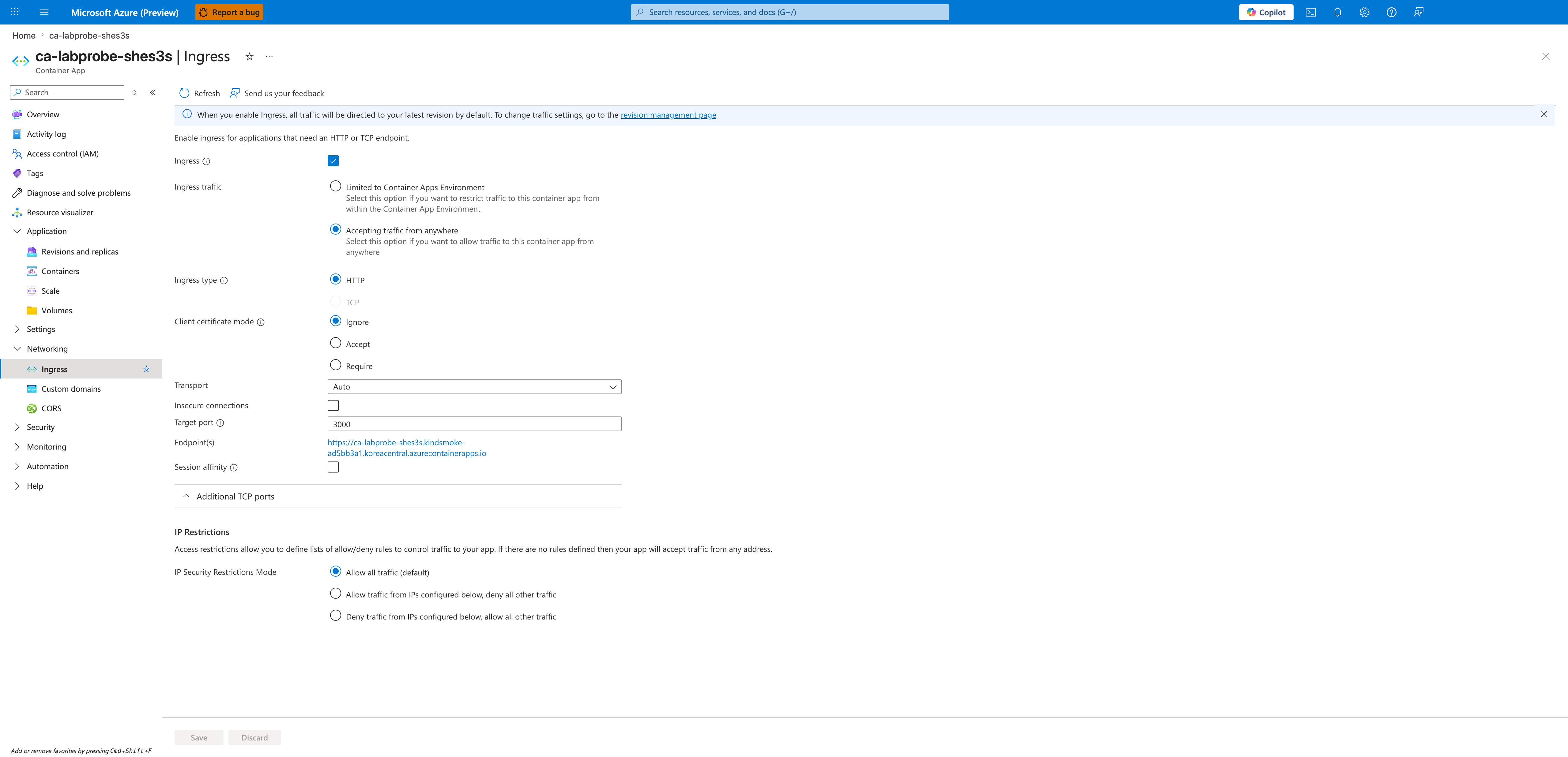
[Observed] The Ingress blade shows Target port: 8000, which is the value the trigger wrote and the value the Overview blade's error message refers to:
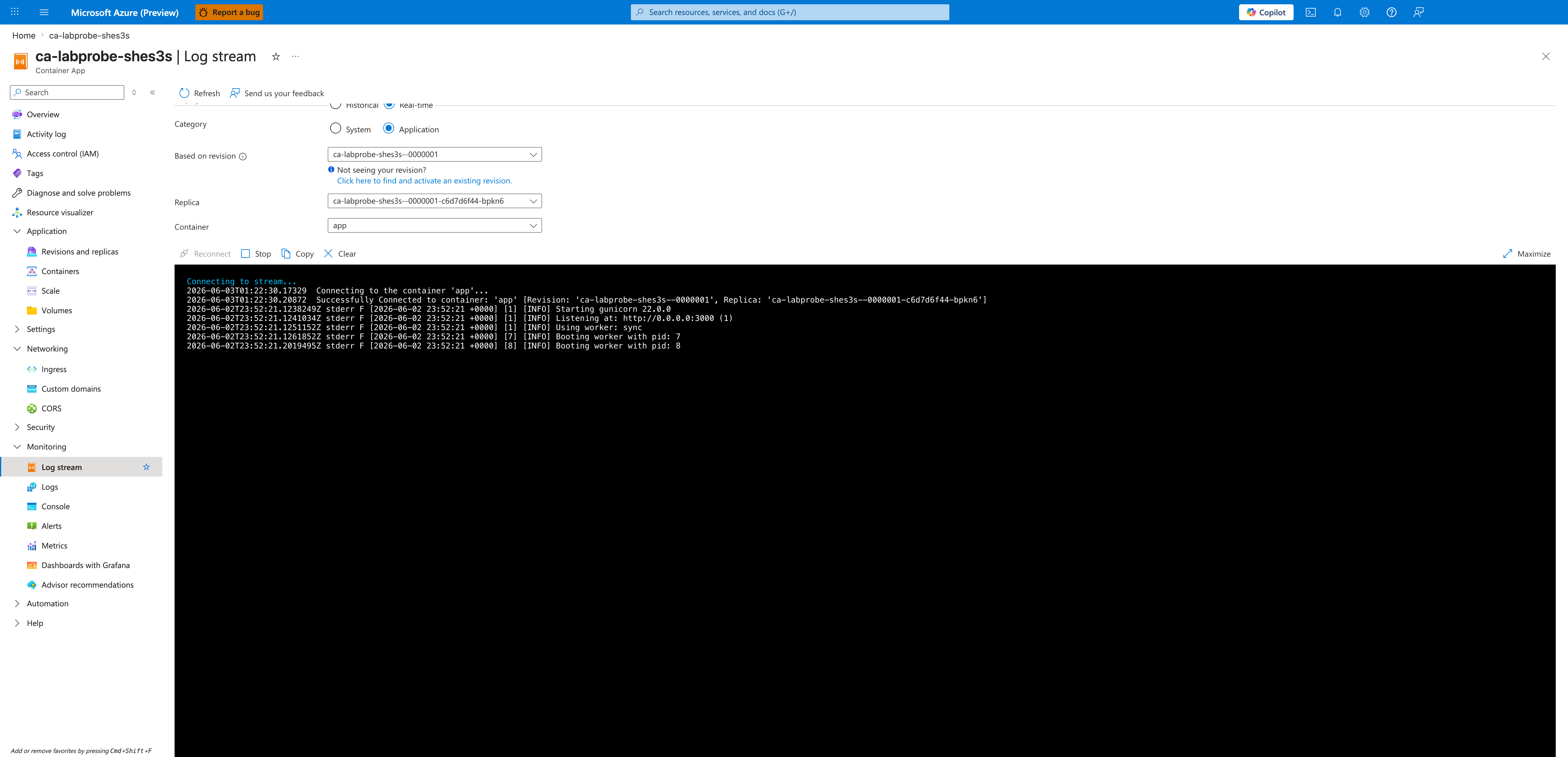
[Observed] The Log stream blade (Category: Application, Based on revision: --0000001) shows gunicorn started successfully and reports its actual listening port:
[INFO] Starting gunicorn 22.0.0
[INFO] Listening at: http://0.0.0.0:3000 (1)
[INFO] Using worker: sync
[INFO] Booting worker with pid: 7
[INFO] Booting worker with pid: 8
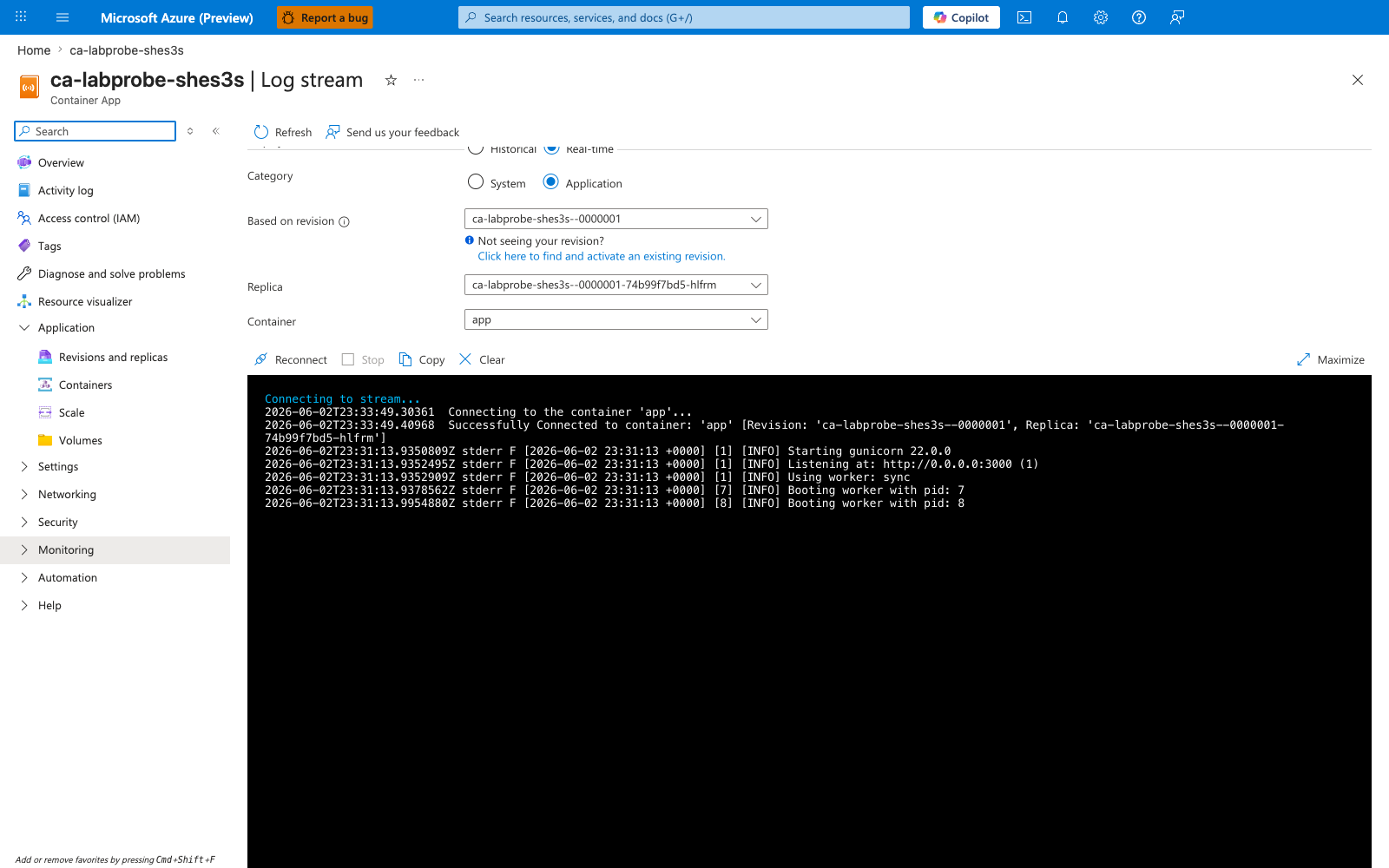
[Correlated] This Application log shows the workload process bound to port 3000, while the Ingress capture above shows the platform routing/probing port 8000. The two captures together establish the mismatch from inside the container's own startup logs, not just from configuration.
[Observed] The Log stream blade (Category: System) shows a continuous stream of ProbeFailed events for both revisions, with the Count field incrementing into the thousands:
"Type":"Warning","ContainerAppName":"ca-labprobe-shes3s","RevisionName":"ca-labprobe-shes3s--0000001",
"Msg":"Probe of StartUp failed with status code: 1","Reason":"ProbeFailed",
"EventSource":"ContainerAppController","Count":955
...
"RevisionName":"ca-labprobe-shes3s--coxh910", "Reason":"ProbeFailed", "Count":1041
...
"Count":957, "Count":958, "Count":959, "Count":960  (incrementing in real time)
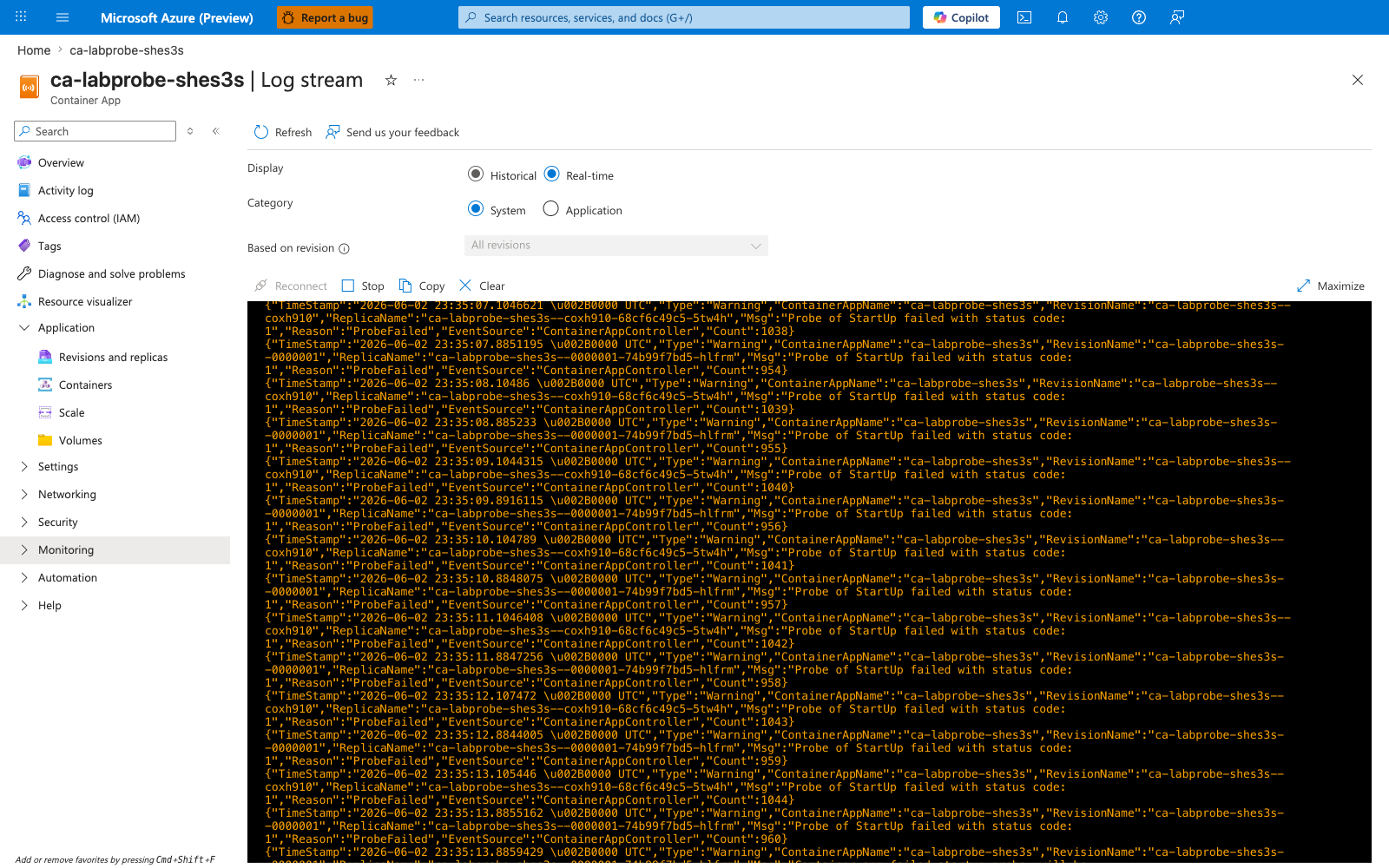
[Inferred] PR-A establishes the failure-state snapshot required for falsification: the trigger revision --0000001 is using a custom image that demonstrably listens on port 3000 (capture 05), while ingress is configured for port 8000 (capture 04); the Portal surfaces the mismatch in the Overview blade (capture 01), drives the revision to Failed at 100% traffic (capture 02), and emits ProbeFailed System events continuously (capture 06). Because PR-A changes both the image and the listening port relative to baseline, PR-A alone does not rule out alternative theories (the new image itself being broken, an ACR pull failure, a probe-config bug, or the revision template introducing the failure). PR-B will hold image, revision template, and replica state constant on --0000001 and change only targetPort from 8000 → 3000; recovery on the same revision is what falsifies those alternatives.
Observed Evidence (Portal Captures — 2026-06-03, after-fix state)
Fix applied for these captures: A single ingress-only edit on the same app, with no image change, no revision-template change, and no scaling change:
Held constant vs. changed (PR-A failure-state --0000001 → PR-B after-fix --0000001):
| Variable | PR-A (failure) | PR-B (after fix) | Controlled? |
|---|---|---|---|
| Revision name | ca-labprobe-shes3s--0000001 | ca-labprobe-shes3s--0000001 | held constant (same revision) |
| Container image | acrlabprobeshes3s.azurecr.io/ca-labprobe-shes3s:v1 | acrlabprobeshes3s.azurecr.io/ca-labprobe-shes3s:v1 | held constant |
| Application listening port | 3000 (gunicorn --bind 0.0.0.0:3000) | 3000 (gunicorn --bind 0.0.0.0:3000) | held constant |
| Replica template | unchanged | unchanged | held constant |
Ingress targetPort (app-scope) | 8000 | 3000 | changed (independent variable) |
| Revision health | Unhealthy / Failed | Healthy / Running | changed (dependent variable) |
[Inferred] Because PR-B changes only targetPort on the same revision and the dependent variable (revision health) flips from Failed to Running while every other input is held constant, the alternative theories enumerated under PR-A (broken image, ACR pull failure, probe-config bug, revision-template defect) are falsified. The remaining cause consistent with all observations is the targetPort vs. application listening port mismatch.
Verification CLI (taken at the same time as the captures):
Revision --0000001: Active=True, Health=Healthy, RunningState=Running, Replicas=1, Traffic=100%
Revision --coxh910: Active=True, RunningState=Deprovisioning, Traffic=0%
curl https://${FQDN}/ --write-out '%{http_code}' → 200, 200, 200, 200, 200 (5/5)
TargetPort: 3000
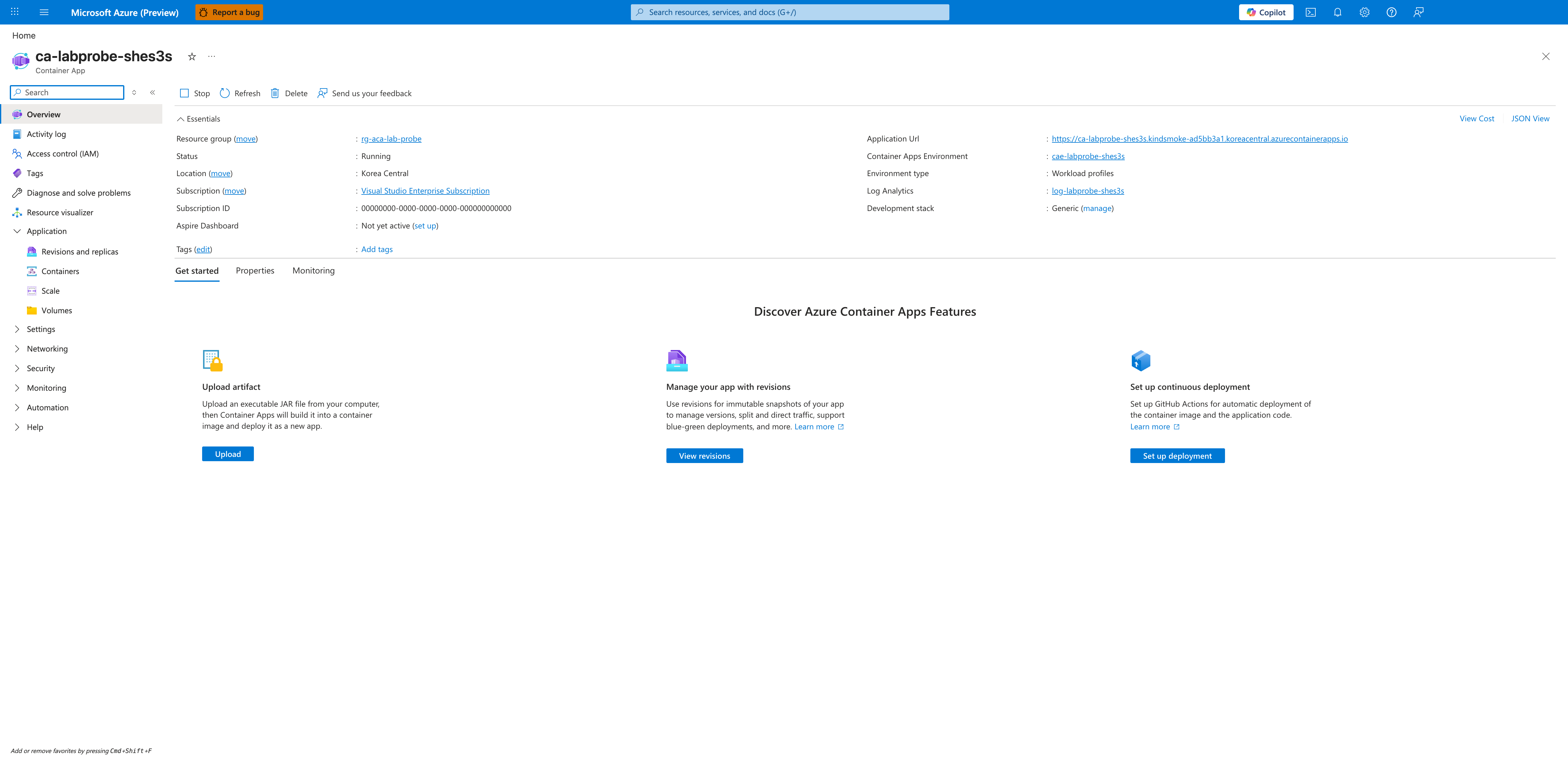
[Observed] The Overview blade now shows Status: Running and the Revisions with Issues banner that was present in capture 01 is gone:
[Observed] The Revisions and replicas blade shows the same revision name ca-labprobe-shes3s--0000001 as the failure state (capture 02), now with Running status: Running and Traffic: 100. The baseline --coxh910 is no longer present in Active revisions:
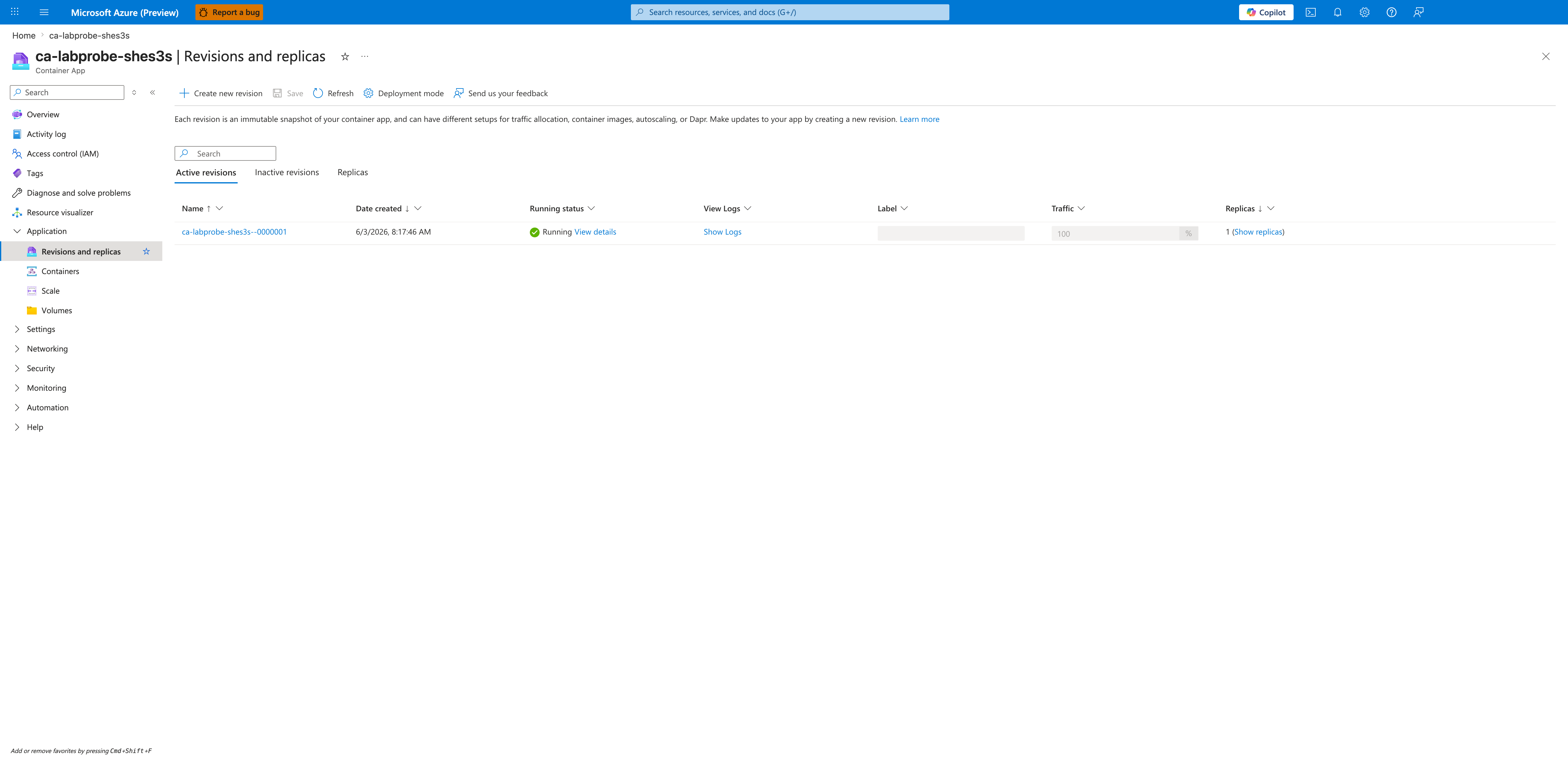
[Observed] The Created field for ca-labprobe-shes3s--0000001 reads 6/3/2026 8:17:46 AM in capture 08, identical to the Created value the Portal renders for the same revision in the failure-state capture 02. This is direct visual evidence that the ingress edit did not mint a new revision: the platform is reporting the same revision.properties.createdTime value before and after the targetPort change. Together with the matching revision name and capture 11 below (the No revision restart or provisioning was needed. controller event), this triangulates the same-revision-recovery claim from three independent signals: revision name, creation timestamp, and platform-emitted event.
[Observed] The Ingress blade shows Target port: 3000, matching the workload's actual listening port (compare to capture 04 which showed 8000):
[Observed] The Log stream blade (Category: Application) is still connected to revision --0000001 and replica --0000001-c6d7d6f44-bpkn6, and shows the same gunicorn startup output as capture 05 (Starting gunicorn 22.0.0, Listening at: http://0.0.0.0:3000). This confirms the image and listening port are unchanged from the failure state:
[Observed] The Log stream blade (Category: System) shows the platform reaction to the ingress edit, with no further ProbeFailed events for --0000001:
"Msg":"Setting traffic weight of '100%' for revision 'ca-labprobe-shes3s--0000001'","Reason":"RevisionUpdate"
"Msg":"Deactivating old revisions for ContainerApp 'ca-labprobe-shes3s'","Reason":"RevisionDeactivating"
"Msg":"No revision restart or provisioning was needed.","Reason":"ContainerAppReady"
"Msg":"Successfully updated containerApp: ca-labprobe-shes3s","Reason":"ContainerAppReady"
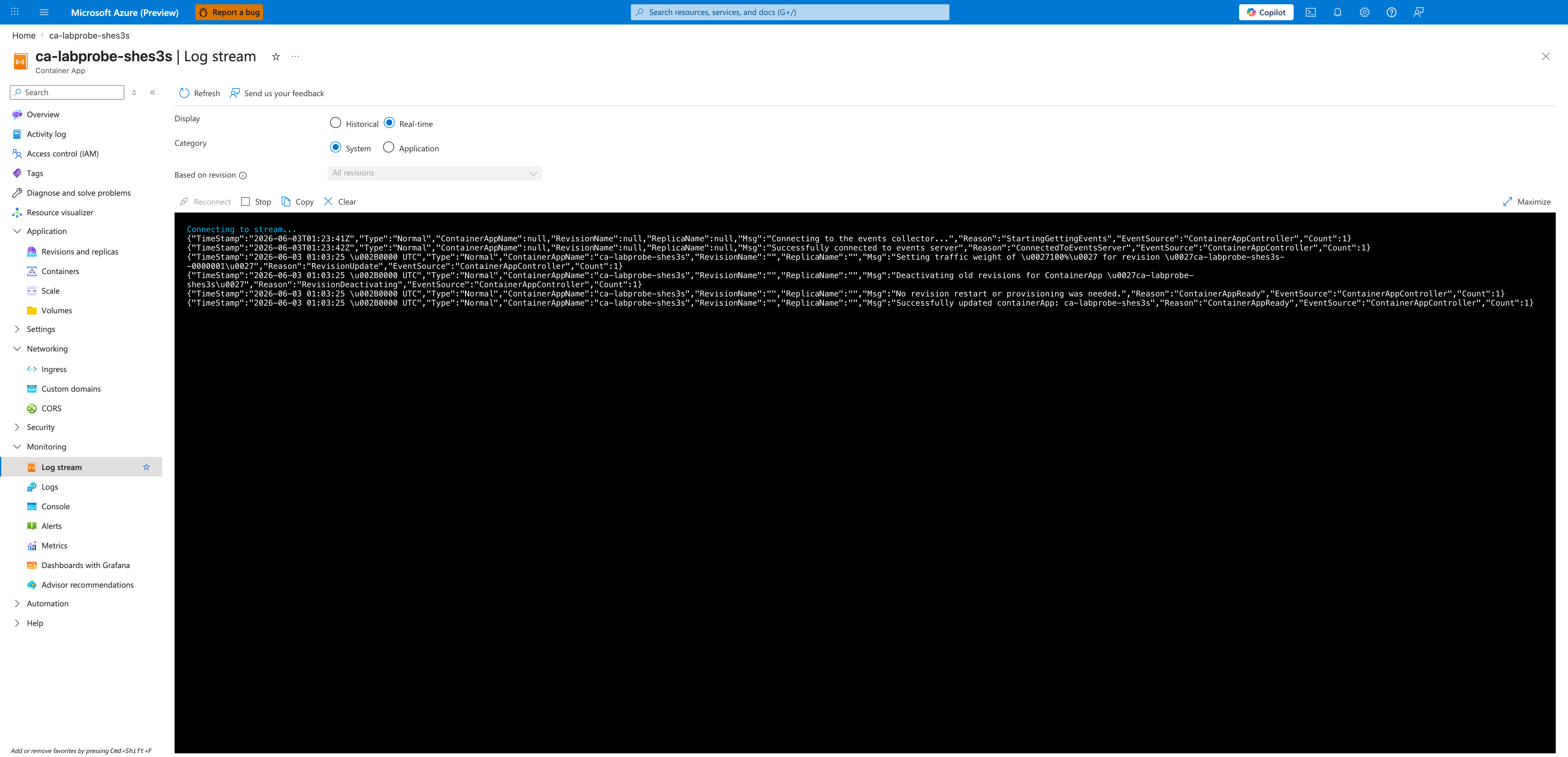
[Observed] The No revision restart or provisioning was needed. event surfaced by the Container Apps controller confirms directly from the platform that the ingress edit did not mint a new revision and did not require a revision restart or new provisioning. Combined with capture 08 — which shows both the same revision name as the failure state and an identical Created timestamp (6/3/2026 8:17:46 AM) — this anchors the same-revision recovery claim in three independent platform signals: name, creation timestamp, and controller event. The claim is therefore not a naming-convention inference; it is a triangulated observation. (Note: the underlying replica was rotated — capture 05's replica hash --74b99f7bd5-hlfrm is distinct from capture 10's --c6d7d6f44-bpkn6 — so this evidence proves same-revision recovery, not same-replica continuity.)
Observed Evidence (Live Azure Test — 2026-06-23)
A second end-to-end live Azure run executed on 2026-06-23 with az CLI version 2.79.0 (see labs/probe-and-port-mismatch/evidence/19-cli-versions.json) against resource group rg-aca-lab-port (subscription redacted to placeholder 00000000-0000-0000-0000-000000000000). The run produced 25 raw evidence files under labs/probe-and-port-mismatch/evidence/ covering H1 (failure-state reproduction) and H2 (same-revision recovery). All 11 sub-gates across both hypotheses passed.
H1 reproduction — evidence/11-h1-gate.json:
| Sub-gate | Value | Source |
|---|---|---|
a_acr_build_succeeded | true | evidence/03-acr-build.log exit code 0 |
b_trigger_revision_minted | true | evidence/05-containerapp-update-image.json returned latestRevisionName=ca-labport-zopng3--0000001 |
c_probe_failure_evidence_present | true | evidence/08-revision-show-failed.json reports runningState=Degraded, healthState=Unhealthy, and runningStateDetails="Deployment Progress Deadline Exceeded. 0/1 replicas ready. The TargetPort 8000 does not match the listening port 3000." |
d_zero_client_200s_out_of_five | true | evidence/09-curl-probes-failed.json reports 0/5 HTTP 200 across 5 attempts (all returned 000 — TCP connection not established) |
e_target_port_still_mismatched | true | Pre-fix ingress targetPort=8000, workload image ca-labport-zopng3:v1 (binds to :3000) |
Gate classification: port_mismatch_probe_failure_reproduced.
H2 same-revision recovery — evidence/22-h2-gate.json:
| Sub-gate | Value | Source |
|---|---|---|
a_failure_state_persisted_into_verify | true | Pre-fix runningState=Degraded + runningStateDetails contains port mismatch evidence + 0/5 curl + createdTime matches H1 capture |
b_ingress_update_succeeded | true | evidence/22-h2-gate.json fix_window.cli_exit_code=0; evidence/14-ingress-update-fix.json returns the updated ingress object showing targetPort=3000 |
c_revision_became_healthy | true | evidence/16-revision-post-fix.json runningState=Running, healthState=Healthy |
d_client_probes_succeed | true | evidence/17-curl-probes-post-fix.json 5/5 HTTP 200 |
e_same_revision_preserved | true | Triangulated via same_revision_proof in evidence/22-h2-gate.json: name_unchanged=true (computed from evidence/12-revision-pre-fix.json.name vs evidence/16-revision-post-fix.json.name, both ca-labport-zopng3--0000001), created_time_unchanged=true (2026-06-23T14:06:19+00:00 in both), image_unchanged=true (acrlabportzopng3.azurecr.io/ca-labport-zopng3:v1 in both) |
f_target_port_now_matches | true | Post-fix ingress targetPort=3000 |
Gate classification: port_mismatch_recovered_on_same_revision. The fix command was az containerapp ingress update --target-port 3000 — an app-scope-only edit that does not mint a new revision.
Honest disclosure of platform behavior difference
The 2026-06-03 historical run captured runningState=Failed for the trigger revision. The 2026-06-23 run captured runningState=Degraded with a runningStateDetails text of "Deployment Progress Deadline Exceeded. 0/1 replicas ready. The TargetPort 8000 does not match the listening port 3000." — the platform did not transition the revision to a terminal Failed state within the lab's polling window (5 minutes). Both observations are evidence of probe failure caused by the port mismatch, but the surface state name differs. The 2026-06-23 H1 and H2 gates require port-specific corroboration on either of two acceptance paths: strong — runningStateDetails contains explicit port/probe text ('TargetPort'/'listening port'/'ProbeFailed'); fallback — non-healthy state (Failed or Degraded) paired with a non-zero ProbeFailed count from evidence/10-system-logs-tail.log (captured into evidence/11-h1-gate.json as system_log_capture.probe_failed_lines_in_tail). A bare Failed/Degraded label with no port-specific corroboration is explicitly insufficient — it could otherwise be caused by image pull failure, OOMKilled, or other non-port failure modes. The 2026-06-23 evidence satisfies both the strong path (the runningStateDetails text quotes the port mismatch verbatim) and the fallback path (system_log_capture.probe_failed_lines_in_tail=50), so the OR-logic does not weaken falsification rigor — it strengthens it by requiring at least one port-specific signal regardless of the surface state label. This disclosure documents the platform behavior variance so future runs are not surprised; the underlying causal claim is unchanged.
Evidence provenance note
Most artifacts (07-* through 24-*) come from a single coherent 2026-06-23 22:23–22:40 UTC run after the trigger script's Phase 5 provisioning poll was strengthened to 30 attempts × 10 s. The file evidence/06-wait-provisioning.log is a single-line snapshot from an earlier 2026-06-23 14:06 UTC run (pre-strengthening) and is explicitly non-gating — no H1 or H2 sub-gate evaluates it. See labs/probe-and-port-mismatch/evidence/README.md for the full provenance map.
Operator caveat
The H1 sub-gate e_target_port_still_mismatched checks that the trigger-state ingress targetPort is still 8000 AND the workload image tag is :v1. If a future maintainer changes the workload image tag in trigger.sh (IMAGE_TAG=v1), this sub-gate's string match must be updated in lockstep. The same maintenance rule applies to the H2 sub-gate f_target_port_now_matches, which hard-codes '3000' as the target value.
Clean Up
| Command | Why it is used |
|---|---|
az group delete ... | Removes the lab resource group and its contained resources. |