Managed Identity Key Vault Failure Lab
Reproduce Key Vault access denial by running a managed-identity-enabled app without the required RBAC role assignment.
This lab is now backed by a 4-gate Phase B bounded-falsification evidence pack in labs/managed-identity-key-vault-failure/evidence/README.md. The committed pack captures one fresh H1/H2 Azure cohort and re-validates the narrow claim ceiling offline: the missing Key Vault Secrets User assignment at the Key Vault scope is the mechanically observable trigger field for this reproduction.
Bounded-scope disclosure: the pack does not prove image byte-identity, pod UID continuity, exact RBAC propagation timing, or token-cache-only recovery without a revision restart. Those confounders are carried explicitly in Gate 17 explicit_drops, so readers can see exactly where the evidence ceiling stops.
Lab Metadata
| Attribute | Value |
|---|---|
| Difficulty | Intermediate |
| Estimated Duration | 25-35 minutes |
| Tier | Consumption |
| Failure Mode | App returns 500 when reading a secret because the managed identity lacks Key Vault Secrets User |
| Skills Practiced | Managed identity validation, Key Vault RBAC diagnosis, revision restart verification |
1) Background
This lab provisions a Container App with a system-assigned managed identity, an Azure Container Registry, and a Key Vault secret. The application uses the managed identity to request a token and read the secret at runtime. The failure occurs because the identity exists, but no RBAC role assignment grants secret-read access at the Key Vault scope.
Managed identity failures are easy to misread because the revision can stay healthy while the secret-dependent route fails with 401/403-derived application errors.
Architecture
sequenceDiagram
    participant User
    participant App as Container App
    participant MI as Managed Identity
    participant KV as Key Vault
    User->>App: Request secret-dependent endpoint
    App->>MI: Request token for Key Vault
    MI-->>App: Access token
    App->>KV: Read secret
    KV-->>App: 403 Forbidden (missing RBAC role)
    App-->>User: 500/authorization error path
    User->>Azure: Assign Key Vault Secrets User role
    App->>KV: Read secret again
    KV-->>App: 200 OK
Identity enabled does not mean authorized
System-assigned identity creation is only step one. Without role assignment at the correct scope, token retrieval can succeed while resource access still fails.
Verify scope explicitly
Assigning the role at the wrong scope, such as the resource group instead of the Key Vault resource ID, is a frequent cause of persistent 403 errors.
2) Hypothesis
IF a Container App uses a system-assigned managed identity to read a Key Vault secret but does not have the Key Vault Secrets User role on that vault, THEN the revision can remain running while the secret-dependent endpoint fails until the RBAC assignment is added and a new revision starts.
| Variable | Control State | Experimental State |
|---|---|---|
| Managed identity authorization | Key Vault Secrets User assigned at Key Vault scope | No role assignment at Key Vault scope |
| Secret-dependent endpoint | HTTP 200 | HTTP 500 or authorization-related failure |
| Revision runtime state | Running and healthy | Running and healthy |
| App logs | No Key Vault authorization errors | 401/403-style authorization errors |
3) Runbook
Deploy baseline infrastructure
Prerequisites:
- Azure CLI with the Container Apps extension
- Permissions for role assignments:
Microsoft.Authorization/roleAssignments/write
az extension add --name containerapp --upgrade
az login

export RG="rg-aca-lab-kv"
export LOCATION="koreacentral"

az group create --name "$RG" --location "$LOCATION"

az deployment group create \
    --name "lab-kv" \
    --resource-group "$RG" \
    --template-file "./labs/managed-identity-key-vault-failure/infra/main.bicep" \
    --parameters baseName="labkv"
| Command | Why it is used |
|---|---|
az extension add ... | Installs or updates the Container Apps Azure CLI extension. |
Expected output:
- Resource group creation succeeds.
- Deployment
provisioningStateisSucceeded.
Capture deployment outputs
export APP_NAME="$(az deployment group show \
    --resource-group "$RG" \
    --name "lab-kv" \
    --query "properties.outputs.containerAppName.value" \
    --output tsv)"

export ACR_NAME="$(az deployment group show \
    --resource-group "$RG" \
    --name "lab-kv" \
    --query "properties.outputs.containerRegistryName.value" \
    --output tsv)"

export ACA_ENV_NAME="$(az deployment group show \
    --resource-group "$RG" \
    --name "lab-kv" \
    --query "properties.outputs.environmentName.value" \
    --output tsv)"

export KV_NAME="$(az deployment group show \
    --resource-group "$RG" \
    --name "lab-kv" \
    --query "properties.outputs.keyVaultName.value" \
    --output tsv)"
| Command | Purpose |
|---|---|
export APP_NAME="$(az deployment group show ... --query "properties.outputs.containerAppName.value" --output tsv)" | Captures the deployed Container App name so later identity, logs, and role-assignment checks all point at the exact workload under test. |
export ACR_NAME="$(az deployment group show ... --query "properties.outputs.containerRegistryName.value" --output tsv)" | Captures the registry name the lab uses for the runtime image, which is needed before the two-step registry set + update --image flow can run. |
export ACA_ENV_NAME="$(az deployment group show ... --query "properties.outputs.environmentName.value" --output tsv)" | Captures the Container Apps environment name for any environment-scoped follow-up diagnostics. |
export KV_NAME="$(az deployment group show ... --query "properties.outputs.keyVaultName.value" --output tsv)" | Captures the Key Vault name from ARM outputs so the RBAC and secret-reference checks target the correct vault created by the lab. |
Expected output:
- Commands return no console output.
- Environment variables resolve to the deployed app, registry, environment, and vault names.
Run the end-to-end capture workflow
fix-and-capture.sh is the canonical Phase A live workflow for this lab. It deploys or reuses the resource group, captures deployment outputs outside evidence/, builds and pushes the workload image, triggers H1, writes raw evidence files 01-... through 12-..., applies the H2 fix, runs the hermetic offline verifier, and starts az group delete --no-wait cleanup.
The script uses this Azure CLI 2.71.0-compatible two-step registry flow (see the warning below for context):
az acr build --registry "$ACR_NAME" --image "${APP_NAME}:v1" ./workload

az containerapp registry set \
    --name "$APP_NAME" \
    --resource-group "$RG" \
    --server "$ACR_LOGIN_SERVER" \
    --username "$ACR_USERNAME" \
    --password "$ACR_PASSWORD"

az containerapp update \
    --name "$APP_NAME" \
    --resource-group "$RG" \
    --image "${ACR_LOGIN_SERVER}/${APP_NAME}:v1"
| Command | Why it is used |
|---|---|
az acr build --registry ... | Builds and pushes the container image to Azure Container Registry. |
az containerapp registry set ... | Configures registry credentials on the Container App (required as a separate step on az CLI 2.71.0 and later). |
az containerapp update --image ... | Rolls the Container App to the new image; this starts a new revision that reads the Key Vault secret on startup. |
Azure CLI 2.71.0+ rejects combined registry flags on containerapp update
On az CLI 2.71.0 and later, passing --registry-server, --registry-username, and --registry-password together with --image to a single az containerapp update call returns unrecognized arguments. Older versions of trigger.sh and similar scripts that issue the combined form must be updated to the two-step registry set + update --image sequence shown above.
Expected output:
- The app is updated to an image that reads Key Vault at runtime.
- Raw evidence files
01-...through08-...are written underlabs/managed-identity-key-vault-failure/evidence/. - The
/healthrequest does not return success before the fix.
Re-run the hermetic offline verifier
verify.sh is now a hermetic offline verifier. It reads only the committed evidence files under labs/managed-identity-key-vault-failure/evidence/, emits Gate 14 through Gate 17 JSONs, and touches no Azure resources.
On a valid cohort, the verifier prints 17/17 gate passes. The Phase B gates prove four bounded claims:
- Gate 14: cohort integrity (file presence, parseability, temporal bound, lineage coherence, README cross-references)
- Gate 15: H1 trigger produces failure
- Gate 16: H2 fix restores recovery
- Gate 17: bounded falsification with explicit drops and claim ceiling
The pre-fix HTTP observation inside the evidence pack is a non-200 /health capture with ForbiddenByRbac in 05-http-response-pre-fix.json.
If you want to inspect the raw evidence directly after fix-and-capture.sh, use:
az containerapp show \
    --name "$APP_NAME" \
    --resource-group "$RG" \
    --query "identity" \
    --output json

export PRINCIPAL_ID="$(az containerapp show \
    --name "$APP_NAME" \
    --resource-group "$RG" \
    --query "identity.principalId" \
    --output tsv)"

az role assignment list \
    --assignee "$PRINCIPAL_ID" \
    --output table

az containerapp logs show \
    --name "$APP_NAME" \
    --resource-group "$RG" \
    --type system \
    --tail 20
| Command | Why it is used |
|---|---|
az containerapp show ... | Reads the Container App configuration so the documented setting can be verified. |
Expected output:
identity.principalIdis present.- No
Key Vault Secrets Userassignment exists yet at the Key Vault scope. - System logs show authorization-related behavior while the app still has a running revision.
Managed identity failures commonly present like this while the revision stays running:
Name               Active    TrafficWeight    Replicas    HealthState    RunningState
-----------------  --------  ---------------  ----------  -------------  ------------
ca-myapp--0000001  True      100              1           Healthy        Running
Apply the RBAC fix manually (optional)
If you want the direct fix command, use:
export KV_ID="$(az keyvault show \
    --name "$KV_NAME" \
    --resource-group "$RG" \
    --query "id" \
    --output tsv)"

az role assignment create \
    --assignee-object-id "$PRINCIPAL_ID" \
    --assignee-principal-type ServicePrincipal \
    --role "Key Vault Secrets User" \
    --scope "$KV_ID"
| Command | Why it is used |
|---|---|
az keyvault show ... | Creates or inspects Key Vault resources used by managed identity or secret references. |
The live script rolls a new revision with:
az containerapp update \
    --name "$APP_NAME" \
    --resource-group "$RG" \
    --set-env-vars "RESTART_TOKEN=$(date +%s)"
| Command | Why it is used |
|---|---|
az containerapp update ... | Updates the existing Container App configuration without recreating the app. |
Expected output:
- The role assignment create command returns a role assignment object.
- A new revision starts after the restart token update.
Verify recovery from the evidence pack
Re-run the offline verifier or inspect the post-fix raw files:
./labs/managed-identity-key-vault-failure/verify.sh

az role assignment list \
    --assignee "$PRINCIPAL_ID" \
    --scope "$KV_ID" \
    --output table
| Command | Purpose |
|---|---|
az role assignment list --assignee "$PRINCIPAL_ID" --scope "$KV_ID" --output table | Lists RBAC grants for one principal at one exact scope, which is the quickest way to verify whether the workload has the right permission on the dependency that is failing. |
Expected output:
- Gate 16 passes and
10-http-response-post-fix.jsonshowsHTTP 200 - The role assignment is visible at the Key Vault scope.
- The secret-dependent endpoint succeeds.
4) Experiment Log
| Step | Action | Expected | Actual | Pass/Fail |
|---|---|---|---|---|
| 1 | Deploy baseline infrastructure | Deployment succeeds | provisioningState: Succeeded in koreacentral; app ca-labkv-gtlopy, KV kv-labkv-gtlopy, ACR acrlabkvgtlopy provisioned. | Pass |
| 2 | Capture outputs | App, registry, environment, and vault names resolved | All four names resolved from deployment outputs; FQDN ca-labkv-gtlopy.calmriver-ae84e755.koreacentral.azurecontainerapps.io. | Pass |
| 3 | Run fix-and-capture.sh | App starts with missing Key Vault RBAC and evidence capture begins | Image built and pushed; the script captured 01-... through 08-... for the failing state. | Pass |
| 4 | Inspect 05-http-response-pre-fix.json | Non-200 response before RBAC assignment | HTTP 500 body included ForbiddenByRbac and Assignment: (not found). | Pass |
| 5 | Inspect 01-... / 02-... / 04-... | Principal exists, required role missing, revision stays healthy | identity.principalId present; no Key Vault Secrets User at Key Vault scope; active revision remained Healthy / Running. | Pass |
| 6 | Apply Key Vault role assignment + revision restart | Role assignment succeeds and a new revision starts | 09-role-assignment-post-fix.json recorded the scoped role assignment; 11-revision-list-post-fix.json recorded the newer revision. | Pass |
| 7 | Re-run verify.sh | All 17 gates pass and post-fix HTTP 200 is preserved | Gate 16 passed; 10-http-response-post-fix.json contained {"secretLength":"20","status":"ok"}. | Pass |
Expected Evidence
During failure
| Evidence Source | Expected State |
|---|---|
az containerapp show --query "identity" | System-assigned identity exists with a principal ID |
az role assignment list --assignee "$PRINCIPAL_ID" | No Key Vault Secrets User assignment at Key Vault scope |
curl https://${FQDN}/health from scripts | Non-200 response |
az containerapp logs show --type system | Authorization-related behavior during secret access |
| Revision status | Running and healthy despite endpoint failure |
After fix
| Evidence Source | Expected State |
|---|---|
az role assignment list --assignee "$PRINCIPAL_ID" --scope "$KV_ID" | Key Vault Secrets User assignment present |
./labs/managed-identity-key-vault-failure/verify.sh | PASS after RBAC assignment |
| Secret-dependent endpoint | HTTP 200 |
| Logs | No continuing Key Vault authorization failure for the tested path |
Observed Evidence (Live Azure Reproduction — 2026-06-03)
Environment: rg-aca-lab-kv in koreacentral, Consumption plan, Azure CLI 2.71.0. App: ca-labkv-gtlopy (system-assigned managed identity, principal <principal-id>). Key Vault: kv-labkv-gtlopy (RBAC authorization model — enableRbacAuthorization: true). FQDN: ca-labkv-gtlopy.calmriver-ae84e755.koreacentral.azurecontainerapps.io
During failure
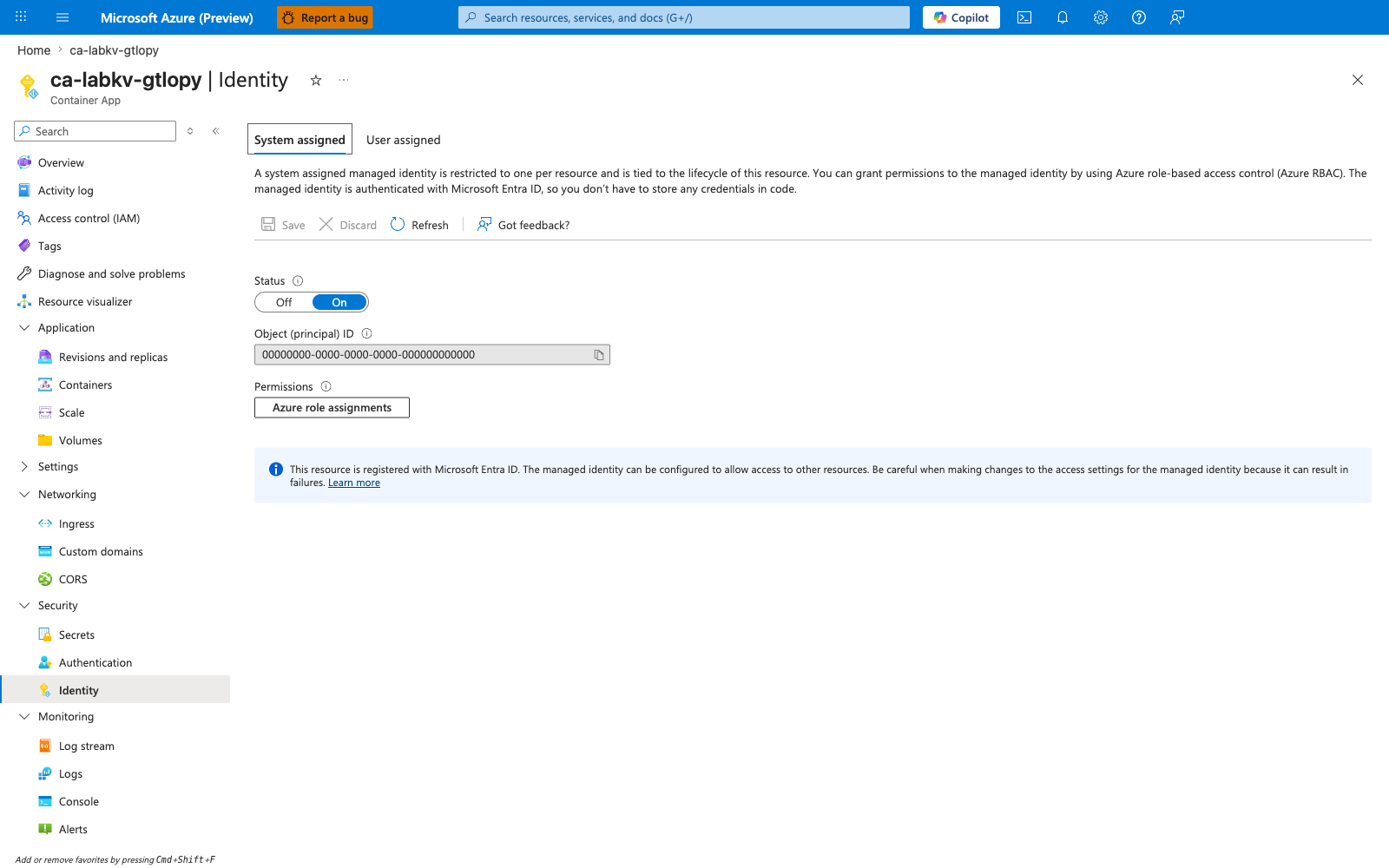
[Observed] The Container App's Identity blade shows the system-assigned managed identity is enabled (Status: On) with an object (principal) ID assigned. Identity provisioning alone does not grant any resource access:
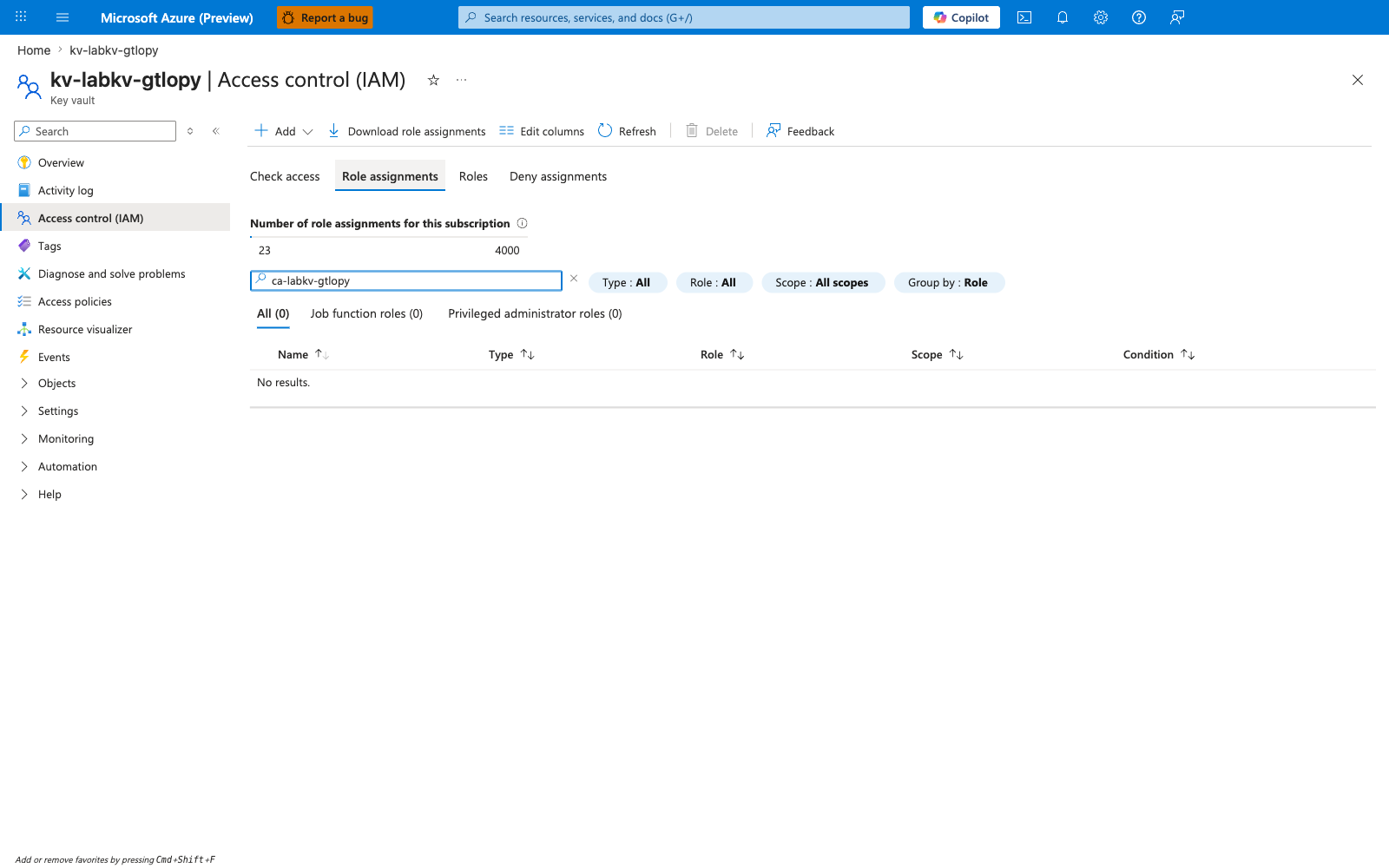
[Observed] The Key Vault's Access control (IAM) → Role assignments blade, filtered by the Container App principal name (ca-labkv-gtlopy), shows All (0) and No results. — confirming that no Key Vault Secrets User (or any other) role exists at the vault scope for this principal:
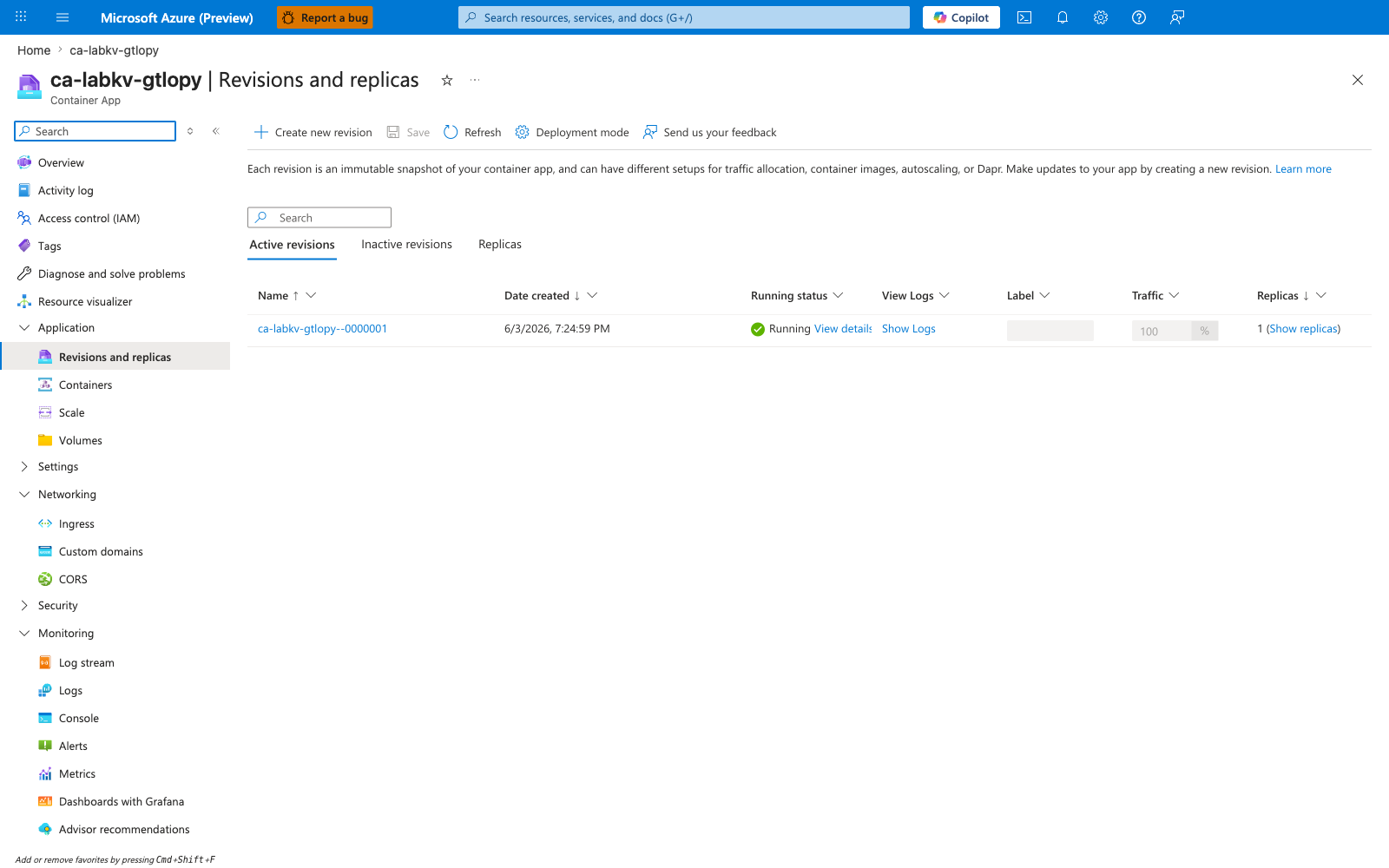
[Observed] The Container App's Revisions and replicas blade shows the active revision is Running with replica count 1 throughout the incident — the platform considers the app healthy even while the secret-dependent endpoint returns HTTP 500:
[Observed] The Container App's Metrics blade, with the Requests metric split by Status Code Category for the last 30 minutes, shows the pre-fix request volume dominated by 5xx responses (5xx = 86, 2xx = 1) — visible proof that the failure is a request-time error, not a startup or scaling failure:
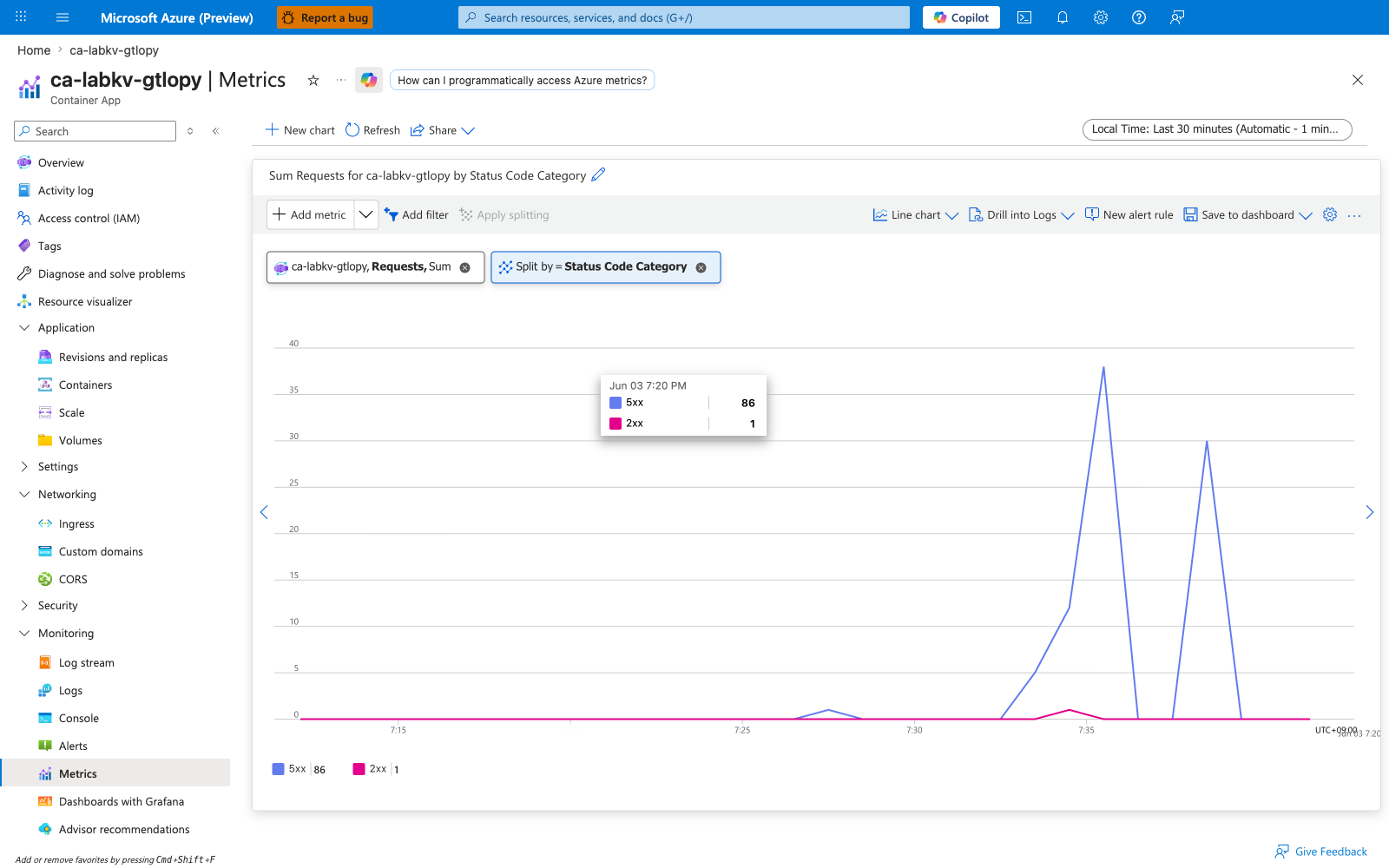
[Not Proven from Portal] The 403 response from Key Vault itself is not directly visible in any Portal blade for this lab. Gunicorn is configured without access logs, and the Flask handler catches the exception and returns it as a JSON 500 — so the Log stream blade contains no useful application output. The ForbiddenByRbac evidence comes from the HTTP response body collected by the verification script (see Verification script output below). The Portal-side proof is the combination of (a) zero role assignments at the KV scope (capture #2) and (b) the 5xx-dominated request metric (capture #4).
After fix
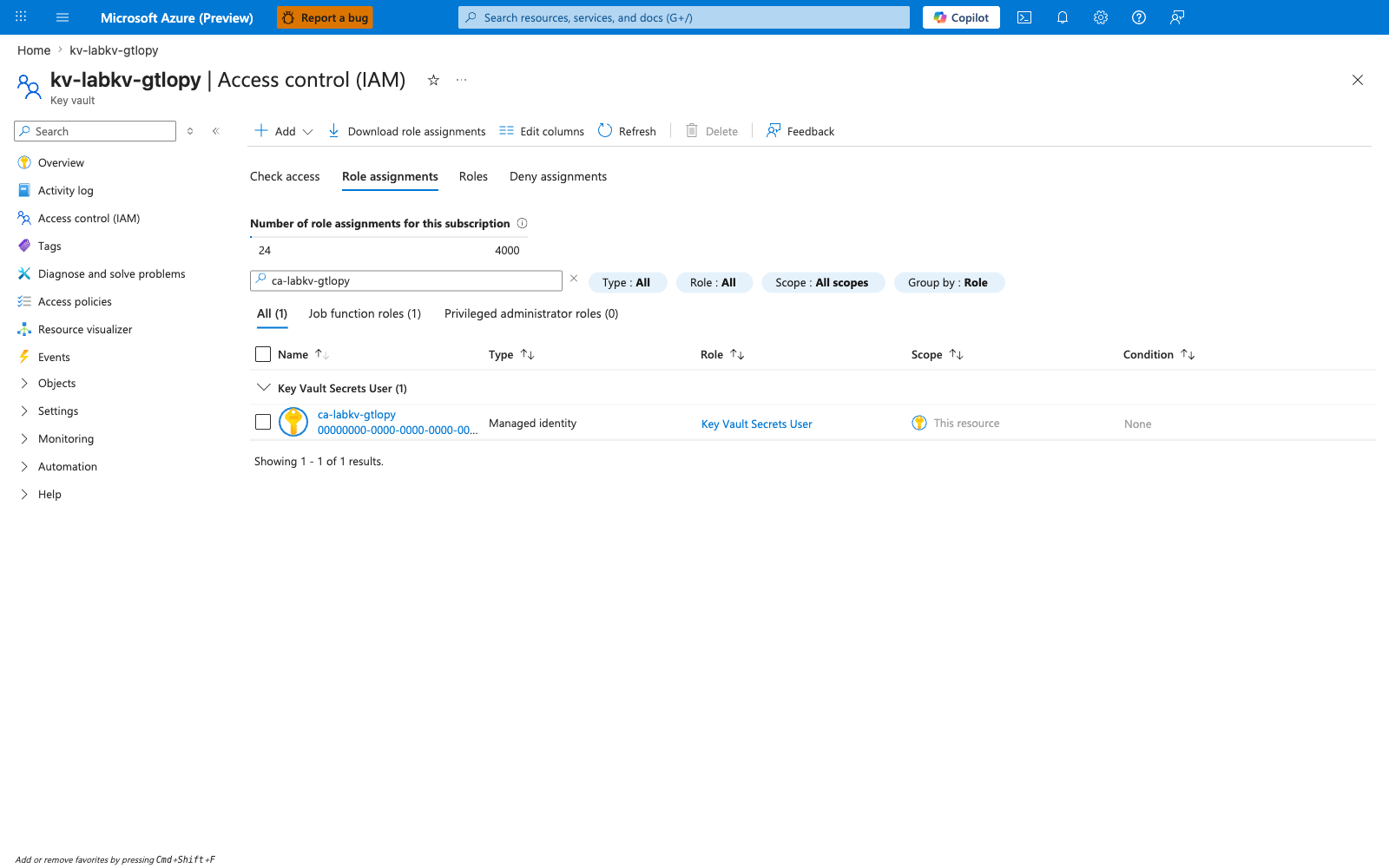
[Observed] After running az role assignment create --role "Key Vault Secrets User" --assignee-object-id <principal-id> --scope <kv-resource-id>, the same Key Vault Access control (IAM) → Role assignments filter now shows exactly one result: Key Vault Secrets User assigned to ca-labkv-gtlopy at this vault's scope:
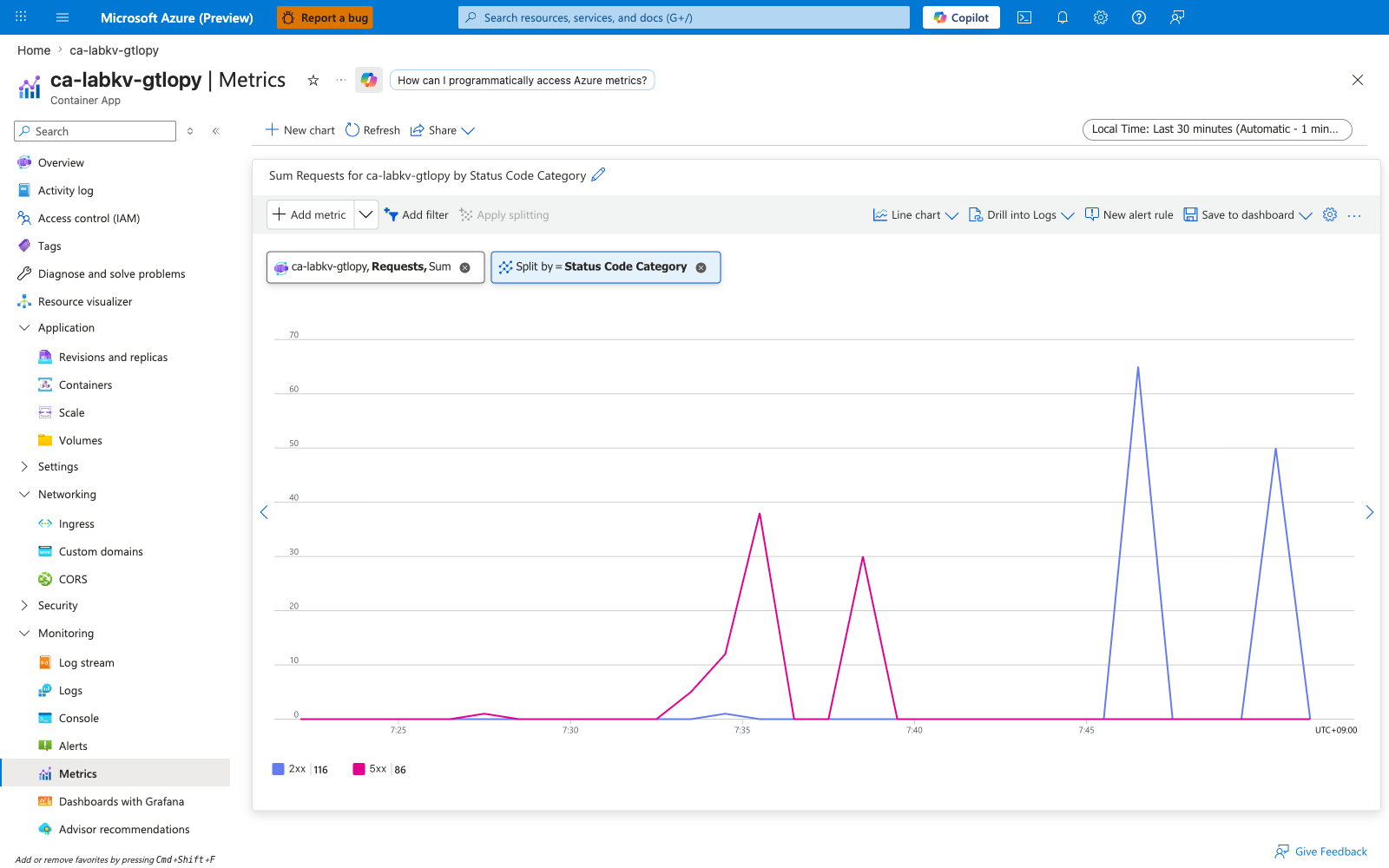
[Observed] The Container App Metrics blade with the same Requests / Status Code Category split, extended to capture both the incident window and the post-fix traffic, shows 2xx responses (116) rising alongside the prior 5xx population (86) — visualizing the clean recovery after the role assignment:
Verification script output (non-Portal evidence)
The Portal captures above are paired with HTTP response bodies collected by verify.sh against the FQDN. These are CLI-side observations, not Portal evidence, and are recorded here separately so the Portal [Observed] bullets above remain strictly one-to-one with captures.
Pre-fix response body (HTTP 500):
Access denied or Key Vault read failed: (Forbidden) Caller is not authorized
to perform action on resource ...
Action: 'Microsoft.KeyVault/vaults/secrets/getSecret/action'
... Assignment: (not found) ... Inner error: ForbiddenByRbac
Post-fix response body (HTTP 200):
Causal analysis
[Inferred] Because (a) no infrastructure change other than the role assignment + identity restart was applied between captures #4 and #6, and (b) the response body changed from ForbiddenByRbac to {"status":"ok"} over the same code path, the failure is fully explained by the missing Key Vault Secrets User assignment at the vault scope. The fix is deterministic: assign the role, restart the revision, secret reads succeed.
[Strongly Suggested] On vaults configured with enableRbacAuthorization: true, legacy az keyvault set-policy calls are silently ignored by the data plane (the policy is stored but not consulted). Engineers reproducing similar incidents on RBAC-mode vaults must use az role assignment create, not set-policy.
Clean Up
| Command | Why it is used |
|---|---|
az group delete ... | Removes the lab resource group and its contained resources. |