KEDA "No Metrics Returned" Reproduction Lab¶
Reproduce the KEDA/HPA log messages no metrics returned from resource metrics API and invalid metrics by creating containers that are intentionally Not Ready or crash-looping, then compare against a healthy baseline to confirm the errors are caused by container lifecycle events.
Lab Metadata¶
| Attribute | Value |
|---|---|
| Difficulty | Beginner-Intermediate |
| Estimated Duration | 20-30 minutes (10 min wait for log ingestion) |
| Tier | Consumption |
| Failure Mode | KEDA system logs show "no metrics returned" / "invalid metrics" |
| Skills Practiced | System log analysis, KQL queries, container lifecycle correlation, KEDA deprecation awareness |
Evidence depth
This lab is fully reproducible with dedicated infrastructure-as-code, helper scripts, and raw evidence committed under labs/keda-no-metrics-returned/:
infra/main.bicepprovisions one ACR (Basic), one Log Analytics workspace, and one Container Apps environment. The image is baked fromworkload/Dockerfile(a 30-line Python script that branches onMODE=healthy|slow-start|crash-loop|oomto produce the three deliberately-different startup behaviors).trigger.shis a self-contained orchestrator that drives all three scenarios deterministically: Bicep deploy → ACR build → sequential scenario A/B/C deploy (viatrigger-scenario-a.sh,trigger-scenario-b.sh,trigger-scenario-c.sh) → Log Analytics ingestion wait → per-scenario report generation. All 18 per-scenario evidence files (6 files × 3 scenarios underevidence/ca-nometrics-*/) are written by this single script.verify.shis a pure file processor — it readsevidence/ca-nometrics-*/report-*.txt,evidence/ca-nometrics-*/revisions-*.json, andevidence/ca-nometrics-*/traffic-*.jsonfrom disk and emits four falsifiable gate JSONs (10-h1-slow-not-ready-gate.json,11-h1-crash-not-ready-gate.json,12-h2-healthy-post-ready-gate.json,13-h3-cross-scenario-falsification-gate.json). It does NOT call Azure, so the resource group can be deleted (viacleanup.sh) beforeverify.shfinishes.evidence/carries 23 files total: 1 provenance README plus 18 historical-capture artifacts from the 2026-06-20 reproduction plus 4 verify.sh-emitted gate JSONs. Seelabs/keda-no-metrics-returned/evidence/README.mdfor the full capture timeline and honest-disclosure notes on empirical platform behavior (emptysummary-*.md, empty§12cgroup sections,§7DEPRECATED warning scope, sidecarreplicasfield semantics, mutable image tags).
1) Background¶
KEDA's CPU and memory scalers query the Kubernetes Resource Metrics API for per-container utilization data. The Metrics Server can only return data for containers that are Running and Ready. When a container is:
- Still initializing (readiness probe not yet passing)
- Restarting after a crash or OOMKill
- Being rescheduled during platform maintenance
…the Metrics API returns an empty response, and the HPA controller logs:
failed to get memory usage: unable to get metrics for resource memory: no metrics returned from resource metrics API
If the app has multiple scale rules and only some metrics fail:
invalid metrics (1 invalid out of 5), first error is: failed to get <app> container metric value: ...
Additionally, scale rules using --scale-rule-metadata "type=Utilization" trigger a deprecation warning because KEDA v2.7+ replaced metadata.type with the trigger-level metricType field (removed in v2.18):
scaler memory info: The 'type' setting is DEPRECATED and will be removed in v2.18 - Use 'metricType' instead.
2) Hypothesis¶
IF three Container Apps share the same memory scale rule but run workloads with different startup/crash behaviors, THEN:
- Scenario A (slow-start): System logs show "no metrics returned" during the first ~2 minutes (while the container is Not Ready), then the errors stop once the readiness probe passes.
- Scenario B (crash-loop): System logs show recurring "no metrics returned" and "invalid metrics" that correlate with container restart timestamps. The pattern repeats with exponential backoff intervals.
- Scenario C (healthy): System logs show a brief burst of metric error entries (~30-60s) immediately after deployment due to the Kubernetes Metrics Server warm-up period, then no further errors. The DEPRECATED warning also appears (it is independent of container health).
Architecture¶
flowchart TD
    A["Container Apps environment"] --> B["Scenario A: ca-nometrics-slow"]
    A --> C["Scenario B: ca-nometrics-crash"]
    A --> D["Scenario C: ca-nometrics-healthy"]
    B --> B1["MODE=slow-start<br/>DELAY_SECONDS=120"]
    C --> C1["MODE=crash-loop<br/>DELAY_SECONDS=30"]
    D --> D1["MODE=healthy"]
    B1 --> S["Same scale rule:<br/>memory Utilization=50<br/>min 1-2 / max 10"]
    C1 --> S
    D1 --> S
S --> R["Observe:<br/>ContainerAppSystemLogs_CL<br/>RestartCount<br/>Replica status"]| Scenario | App name | Mode | Expected "no metrics" logs | Expected RestartCount |
|---|---|---|---|---|
| A. Slow startup | ca-nometrics-slow | slow-start (120s delay) | Transient, first ~90s only | 0 |
| B. CrashLoopBackOff | ca-nometrics-crash | crash-loop (exit every 30s) | Recurring, correlates with restarts | Rising |
| C. Healthy baseline | ca-nometrics-healthy | healthy | Transient, first ~60s only (deployment gap) | 0 |
3) Runbook¶
Deploy infrastructure¶
export RG="rg-aca-no-metrics-lab"
export LOCATION="koreacentral"
export BASE_NAME="nometrics"

az group create --name "$RG" --location "$LOCATION"

az deployment group create \
    --resource-group "$RG" --name main \
    --template-file labs/keda-no-metrics-returned/infra/main.bicep \
    --parameters baseName="$BASE_NAME"

export ACR_NAME="$(az deployment group show --resource-group "$RG" --name main \
    --query properties.outputs.containerRegistryName.value --output tsv)"
export ENV_NAME="$(az deployment group show --resource-group "$RG" --name main \
    --query properties.outputs.environmentName.value --output tsv)"
| Command | Why it is used |
|---|---|
az group create | Creates the resource group that scopes all lab resources. |
az deployment group create | Deploys the Bicep template that provisions Log Analytics, ACR, and the Container Apps environment. |
az deployment group show | Reads the Bicep outputs to capture the generated ACR and environment names. |
Create three scenarios¶
bash labs/keda-no-metrics-returned/trigger-scenario-a.sh
bash labs/keda-no-metrics-returned/trigger-scenario-b.sh
bash labs/keda-no-metrics-returned/trigger-scenario-c.sh
| Command | Why it is used |
|---|---|
trigger-scenario-a.sh | Builds the image, creates ca-nometrics-slow with MODE=slow-start and DELAY_SECONDS=120. The container sleeps 2 minutes before starting the HTTP server, so the readiness probe fails during this window. |
trigger-scenario-b.sh | Creates ca-nometrics-crash with MODE=crash-loop and DELAY_SECONDS=30. The container exits every 30 seconds, triggering CrashLoopBackOff. |
trigger-scenario-c.sh | Creates ca-nometrics-healthy with MODE=healthy. The container starts immediately and stays stable. |
Observe (wait at least 10 minutes for Log Analytics ingestion)¶
sleep 600

for APP in ca-nometrics-slow ca-nometrics-crash ca-nometrics-healthy; do
    APP_NAME=$APP bash labs/keda-no-metrics-returned/verify.sh
done
verify.sh queries ContainerAppSystemLogs_CL for "no metrics returned", "invalid metrics", and "DEPRECATED" messages, then checks console logs, replica status, and restart counts.
4) Expected Evidence¶
The hypothesis is confirmed when all of the following hold:
| Check | Confirmation rule | Falsification |
|---|---|---|
| Scenario A: transient errors | "no metrics returned" entries appear within the first ~90s after deployment, then stop | Errors persist beyond 5 minutes after container becomes Ready |
| Scenario B: recurring errors | "no metrics returned" entries repeat and correlate with RestartCount increases | No metric errors despite container crashes |
| Scenario C: brief deployment gap | "no metrics returned" entries appear for ~30-60s after deployment, then stop permanently | Errors persist beyond 2 minutes for a healthy container |
| All: DEPRECATED warning | "The 'type' setting is DEPRECATED" appears for all three apps | Warning does not appear (Azure platform may have migrated) |
4a) Experiment Log¶
Tested in Azure region Korea Central, 2026-06-05, az CLI 2.73.0 (containerapp extension preview).
Metric error summary [Measured]¶
App                   ErrorCount  FirstError (UTC)       LastError (UTC)
--------------------  ----------  ---------------------  ---------------------
ca-nometrics-slow     12          04:05:14               04:06:30  (~76s window)
ca-nometrics-crash    29          04:06:07               04:26:15  (20+ min, ongoing)
ca-nometrics-healthy  10          04:10:26               04:11:27  (~61s window)
Key observations¶
-
Scenario A (slow-start): 12 error entries in 76 seconds. The container slept 120s before starting the HTTP server, so the readiness probe (StartUp probe) failed continuously — confirmed by
ProbeFailedsystem log entries. Once the server started at04:07:15, metric errors stopped. -
Scenario B (crash-loop): 29 error entries over 20+ minutes. The container exited every 30s, triggering restarts with exponential backoff. Errors appeared in ~15s intervals during active restarts, then spaced out to ~5min as CrashLoopBackOff lengthened the restart delay.
-
Scenario C (healthy): Unexpected finding — 10 error entries in 61 seconds immediately after deployment. The container started within seconds (
[app] listening on :8000logged instantly), but the Kubernetes Metrics Server needed ~60s to begin returning data for the new pod. This proves that even a perfectly healthy container produces "no metrics returned" logs during initial provisioning. -
DEPRECATED warning: All three apps produced exactly one instance of:
This confirms the warning is configuration-driven, not health-dependent.
Error log samples (PII masked)¶
# Scenario A — transient during startup probe failure
[04:05:14] ca-nometrics-slow | FailedGetContainerResourceMetric | failed to get memory usage: unable to get metrics for resource memory: no metrics returned from resource metrics API
[04:05:14] ca-nometrics-slow | FailedComputeMetricsReplicas     | invalid metrics (1 invalid out of 5), first error is: failed to get ca-nometrics-slow container metric value: ...

# Scenario B — recurring with crash-loop
[04:06:07] ca-nometrics-crash | FailedGetContainerResourceMetric | failed to get memory usage: ...
[04:08:38] ca-nometrics-crash | FailedGetContainerResourceMetric | failed to get memory usage: ...
[04:16:12] ca-nometrics-crash | FailedGetContainerResourceMetric | failed to get memory usage: ...  (interval lengthened due to backoff)
[04:21:13] ca-nometrics-crash | FailedGetContainerResourceMetric | failed to get memory usage: ...
[04:26:15] ca-nometrics-crash | FailedGetContainerResourceMetric | failed to get memory usage: ...

# Scenario C — brief deployment gap even for healthy container
[04:10:26] ca-nometrics-healthy | FailedGetContainerResourceMetric | failed to get memory usage: ...
[04:11:27] ca-nometrics-healthy | FailedComputeMetricsReplicas     | invalid metrics (1 invalid out of 5), ...
(no further errors after 04:11:27)

# All scenarios — DEPRECATED warning (once per app)
[04:04:59] ca-nometrics-slow    | scaler memory info: The 'type' setting is DEPRECATED ...
[04:05:52] ca-nometrics-crash   | scaler memory info: The 'type' setting is DEPRECATED ...
[04:10:12] ca-nometrics-healthy | scaler memory info: The 'type' setting is DEPRECATED ...
Operator takeaway from experiment¶
The Scenario C result is the most important takeaway: expect 30-60 seconds of "no metrics returned" logs after every deployment, even when the application starts instantly. This is a normal Kubernetes Metrics Server warm-up period, not a defect.
4b) Phase B Falsification Gates¶
verify.sh is a pure file processor against the 18 historical-capture artifacts (6 files × 3 scenarios under evidence/ca-nometrics-*/) and emits four falsifiable gate JSONs under evidence/. Each gate is evaluated against a strict 2-path predicate per sub-gate — a Strong path that matches the exact lab specification (e.g. exact field match in a specific JSON file or column-aligned section parse), and a Fallback path that tolerates the same controlling behavior under minor numeric drift (e.g. substring search or weaker ordering check). All twelve sub-gates (4 gates × 3 sub-gates each) emitted on 2026-06-20 pass on both the Strong and Fallback paths.
| Gate | File | Hypothesis | Sub-gates | Result |
|---|---|---|---|---|
| 10 | 10-h1-slow-not-ready-gate.json | H1 (Scenario A slow-start): "no metrics returned" during startup is correlated with NotReady and resolves | 3 — (a) signal observed: §5 has ≥ 10 "no metrics returned" lines OR §6 bin total ≥ 10; (b) NotReady correlation: §9 Probe of StartUp failed events present AND §5 ↔ §9 timestamp windows overlap OR §9 probe failures present only; (c) eventually Ready: sidecar healthState: Healthy OR sidecar trafficWeight: 100 | PASS — 20 §5 lines, 30 §9 probe failures, §5 window 00:35:49–00:38:05 overlaps §9 probe window 00:37:22–00:37:51, sidecar Healthy + traffic 100 |
| 11 | 11-h1-crash-not-ready-gate.json | H1 (Scenario B crash-loop): "no metrics returned" persists across multiple bins with unready state | 3 — (a) signal spans ≥ 2 bins: §6 row count ≥ 2 OR §5 first→last duration > 300 s; (b) unready state: §2 inline JSON has healthState: Unhealthy AND runningState: Failed OR sidecar healthState ≠ Healthy OR §2 provisioningState: Failed; (c) persistent pattern: §6 bins beyond the first OR §5 duration > 600 s | PASS — 3 §6 bins (25/1/1 at 00:35/00:40/00:45), §5 duration 603 s, §2 reports Unhealthy + Failed + Failed, sidecar Unhealthy |
| 12 | 12-h2-healthy-post-ready-gate.json | H2 (Scenario C healthy baseline): "no metrics returned" is bounded to Metrics Server warm-up and does not persist | 3 — (a) Healthy/Running: §2 Healthy + Running OR sidecar Healthy + traffic 100; (b) single bin: §6 has 1 row OR §6 has ≤ 2 rows; (c) silent after warm-up: §5 duration ≤ 300 s OR §5 lines ≤ 20 | PASS — §2 Healthy/Running, sidecar Healthy + traffic 100, §6 has 1 bin (16), §5 duration 106 s, 16 §5 lines, §9 has 0 probe failures |
| 13 | 13-h3-cross-scenario-falsification-gate.json | H3 (cross-scenario): metric-error severity tracks unreadiness severity | 3 — (a) bin count ordering: exact healthy=1 AND slow=1 AND crash≥2 OR weak healthy ≤ slow < crash; (b) duration ordering: crash ≥ 3.0× max(healthy, slow) OR crash > both; (c) health state matches outcome: exact healthy=Healthy AND slow=Healthy AND crash=Unhealthy OR crash ≠ Healthy AND at-least-one of {healthy, slow} = Healthy | PASS — bin counts 1/1/3, durations 106 s / 136 s / 603 s (ratio crash÷max(healthy, slow) = 4.44× ≥ 3.0×), health states Healthy / Healthy / Unhealthy |
The Gate 13 cross-scenario ratio threshold is intentionally lower than the observed 4.44× (set to ≥ 3.0×) to absorb run-to-run variance while still falsifying the case where crash-loop duration converges with the healthy/slow baselines. The Gate 11 sub-gate (b) intentionally keys off the §2 inline JSON runningState and provisioningState fields rather than the sidecar revisions-*.json (which carries only healthState, name, replicas, trafficWeight) because runningState and provisioningState are the authoritative platform-observed state for a failing revision. See labs/keda-no-metrics-returned/evidence/README.md "Honest disclosure" section for the full empirical platform behavior documented during the 2026-06-20 live run, including the sidecar replicas semantics (DESIRED replica count from the revision spec, NOT the count of replicas that successfully reached Running).
The H1 gates (10/11) together prove that "no metrics returned from resource metrics API" is not a generic platform noise signal — its count, span, and duration scale with container unreadiness severity. The H2 gate (12) proves that the same signal still appears (in bounded form) on a healthy container during Metrics Server warm-up. The H3 cross-scenario gate (13) proves the differential — crash-loop produces materially more errors over a materially longer window than either the slow-startup or healthy baseline. Together these four gates yield the operator guidance in the Operator takeaway from experiment subsection above: a transient burst of "no metrics returned" during the first 30–90 seconds after revision creation is expected (Metrics Server warm-up); the same signal spanning multiple 5-minute bins with §2 reporting Unhealthy + Failed indicates a container-health defect that requires application-level diagnosis (crash-loop, OOMKill, readiness probe misconfiguration), not a platform escalation.
5) Verification Queries¶
KQL: metric error log pattern¶
ContainerAppSystemLogs_CL
| where ContainerAppName_s in ("ca-nometrics-slow", "ca-nometrics-crash", "ca-nometrics-healthy")
| where Log_s has_any ("no metrics returned", "invalid metrics", "failed to get")
| summarize ErrorCount=count() by ContainerAppName_s, bin(TimeGenerated, 5m)
| order by TimeGenerated asc
Expected: ca-nometrics-crash shows sustained error counts across multiple 5-min bins. ca-nometrics-slow shows errors only in the first 1-2 bins. ca-nometrics-healthy shows errors only in the first bin (deployment warm-up), then zero.
KQL: DEPRECATED warning¶
ContainerAppSystemLogs_CL
| where ContainerAppName_s in ("ca-nometrics-slow", "ca-nometrics-crash", "ca-nometrics-healthy")
| where Log_s has "DEPRECATED"
| summarize count() by ContainerAppName_s
Expected: All three apps show the warning (it is configuration-based, not health-based).
6) Portal Evidence (to capture after reproduction)¶
Azure Portal screenshots to collect for each scenario. Save to docs/assets/troubleshooting/keda-no-metrics-returned/.
Scenario A — ca-nometrics-slow (transient metric gap during startup)¶
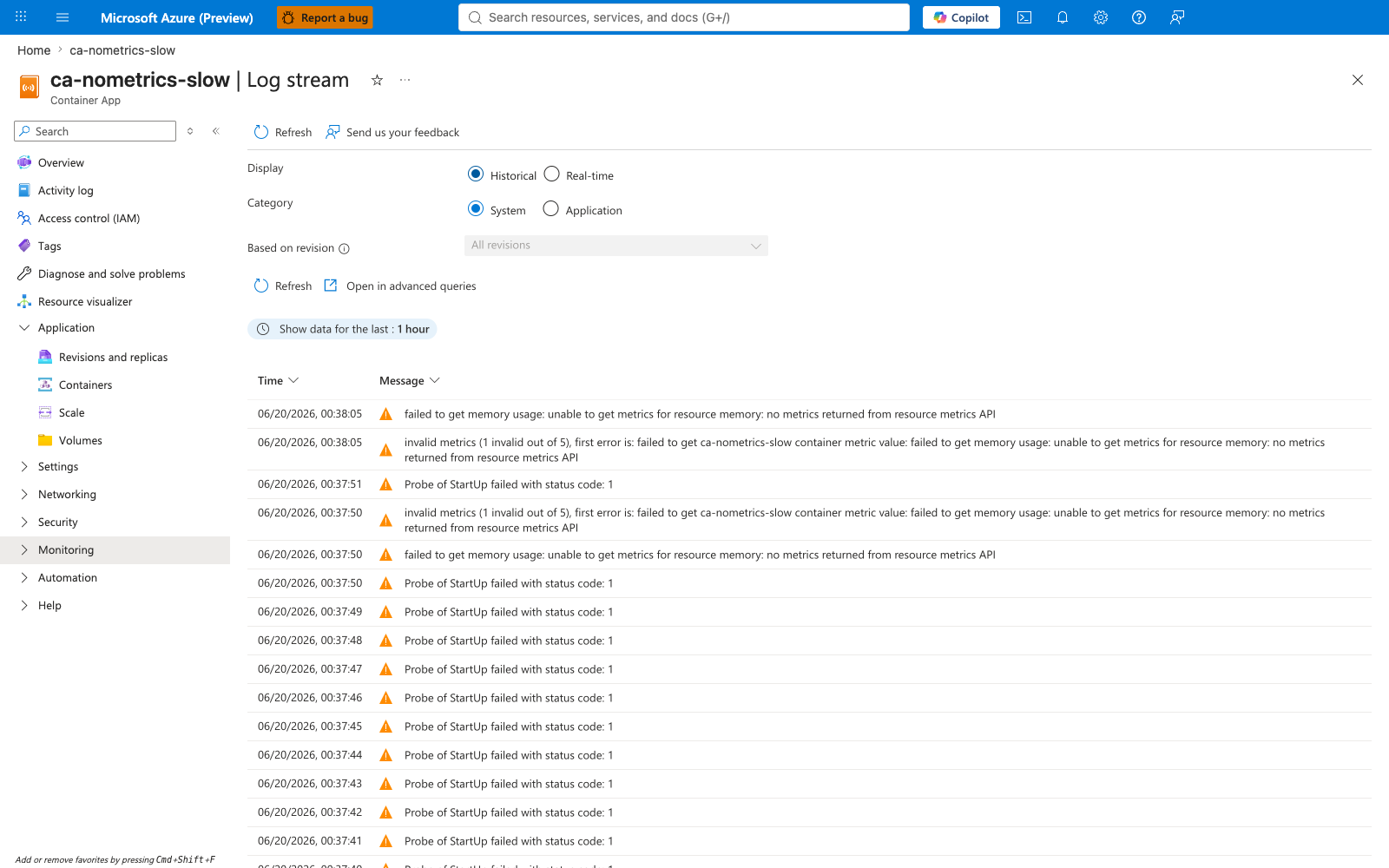
Portal evidence — System logs
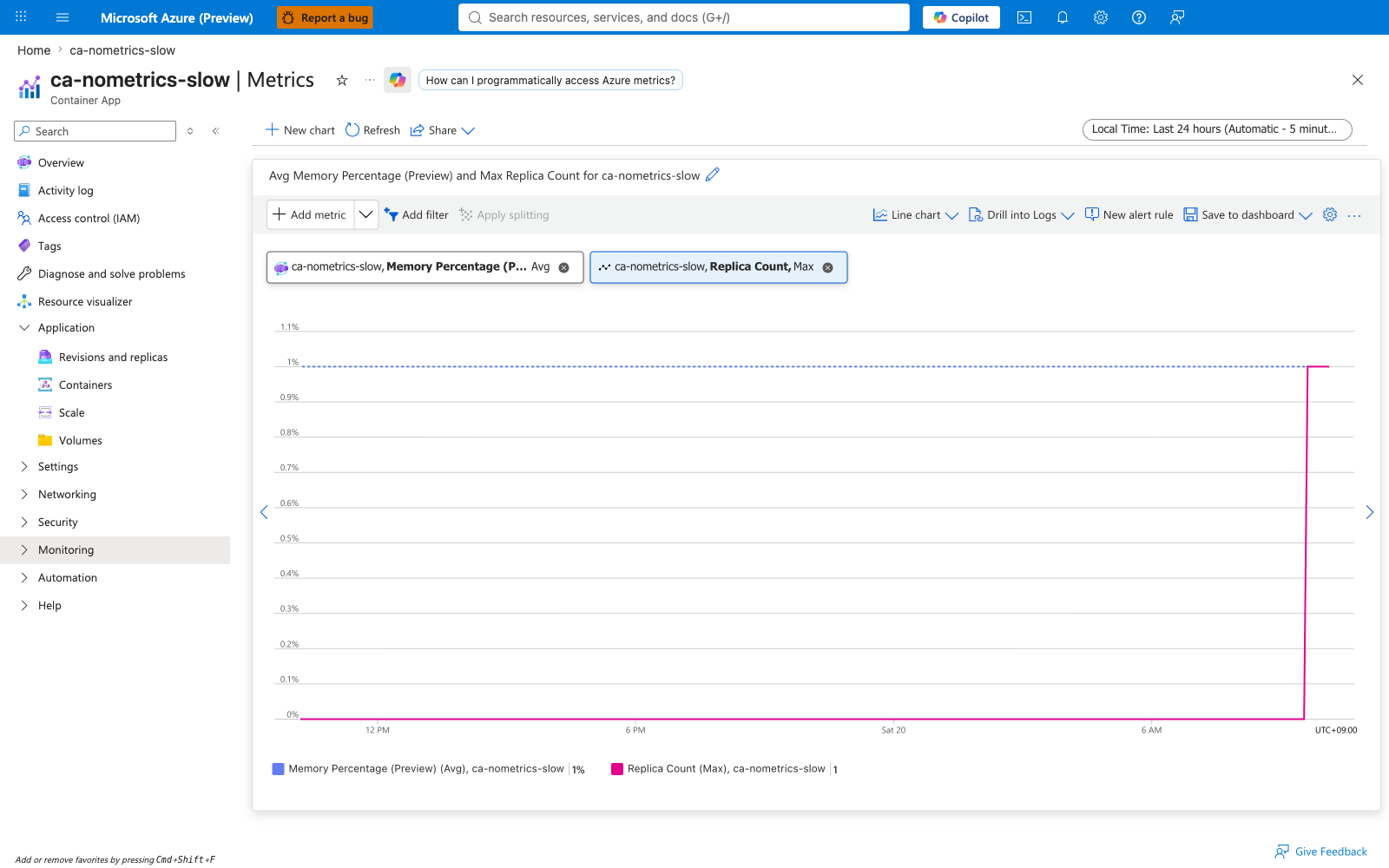
System logs show "no metrics returned" entries in the first ~90 seconds after deployment. After the container becomes Ready, the errors stop. Replica Count remains 1. Memory Percentage stays low during the slow-start window because the container is still sleeping/initializing and not yet serving requests.
Scenario B — ca-nometrics-crash (recurring metric gaps from CrashLoopBackOff)¶
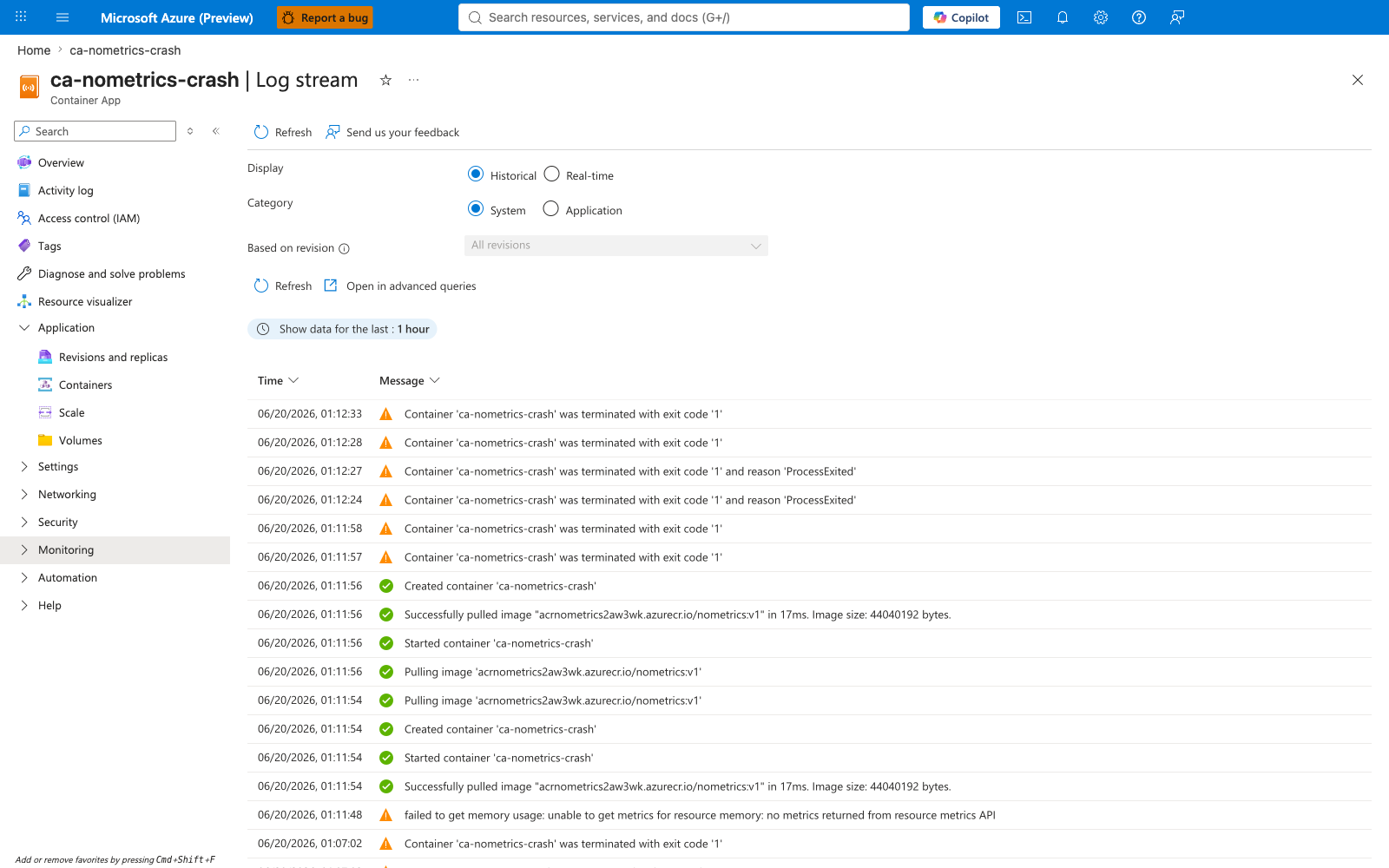
Portal evidence — System logs + Total Replica Restart Count
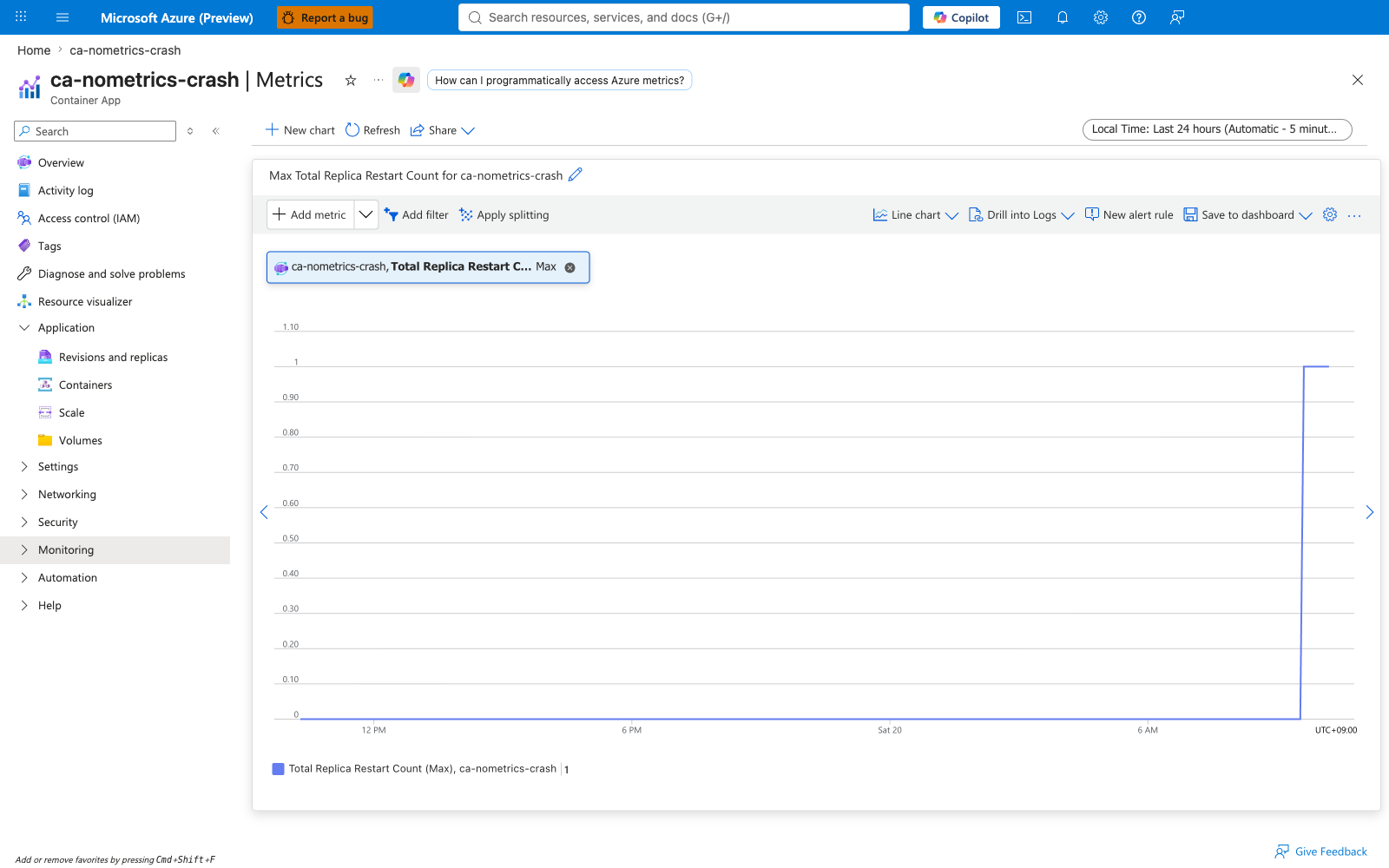
System logs show recurring "no metrics returned" and "invalid metrics" entries plus container exit code 1 (ProcessExited) events. The pattern repeats with increasing intervals as Kubernetes applies CrashLoopBackOff exponential backoff. The Total Replica Restart Count platform metric records the matching restart trace.
Scenario C — ca-nometrics-healthy (brief deployment gap)¶
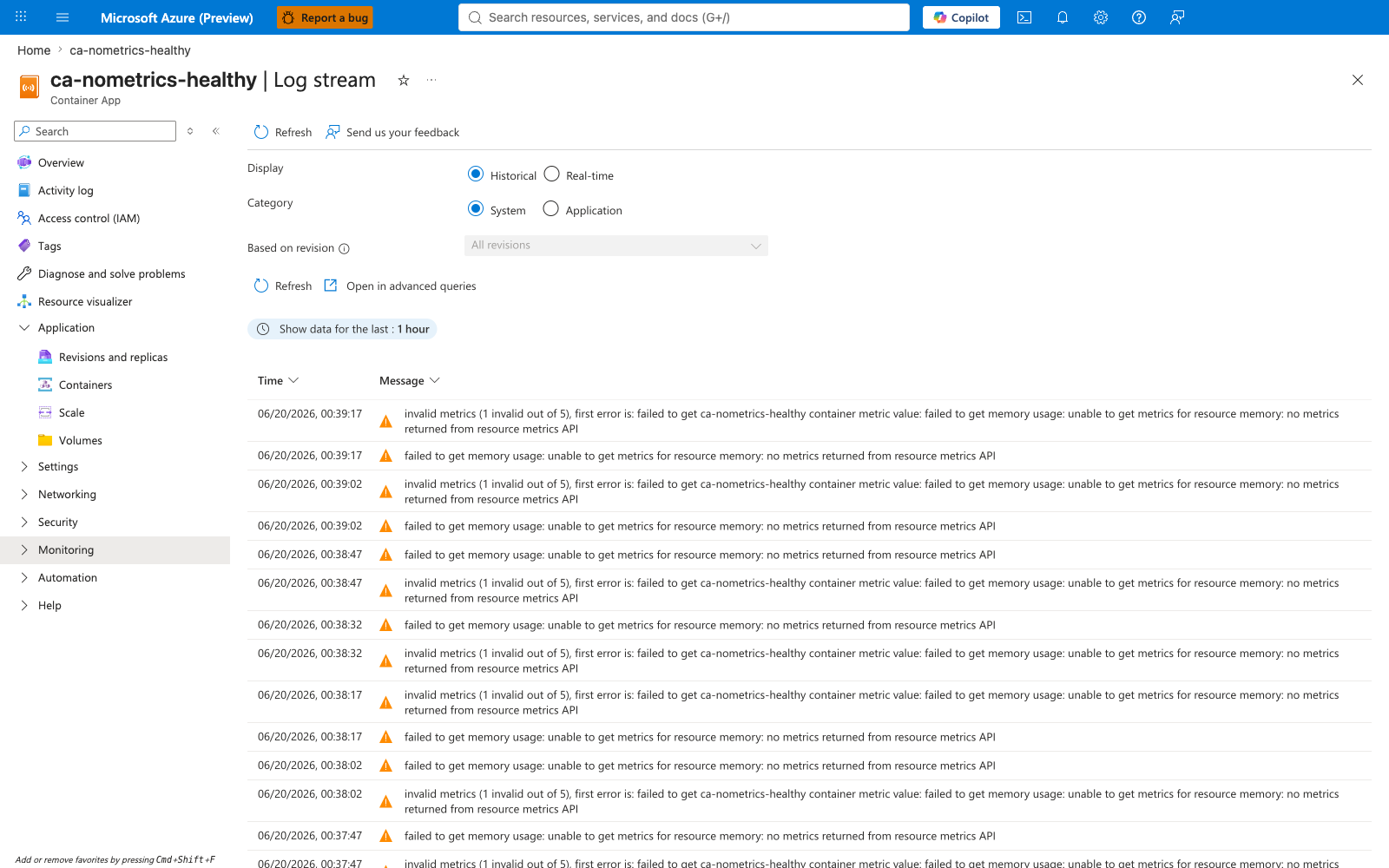
Portal evidence — System logs
~10 metric error entries during the first ~60 seconds after deployment, then no further errors. The container started instantly but the Kubernetes Metrics Server needed ~60s to warm up for the new pod. Total Replica Restart Count is 0. This is the most important screenshot in the lab: it proves the error appears even when nothing is wrong with the container.
All scenarios — DEPRECATED warning¶
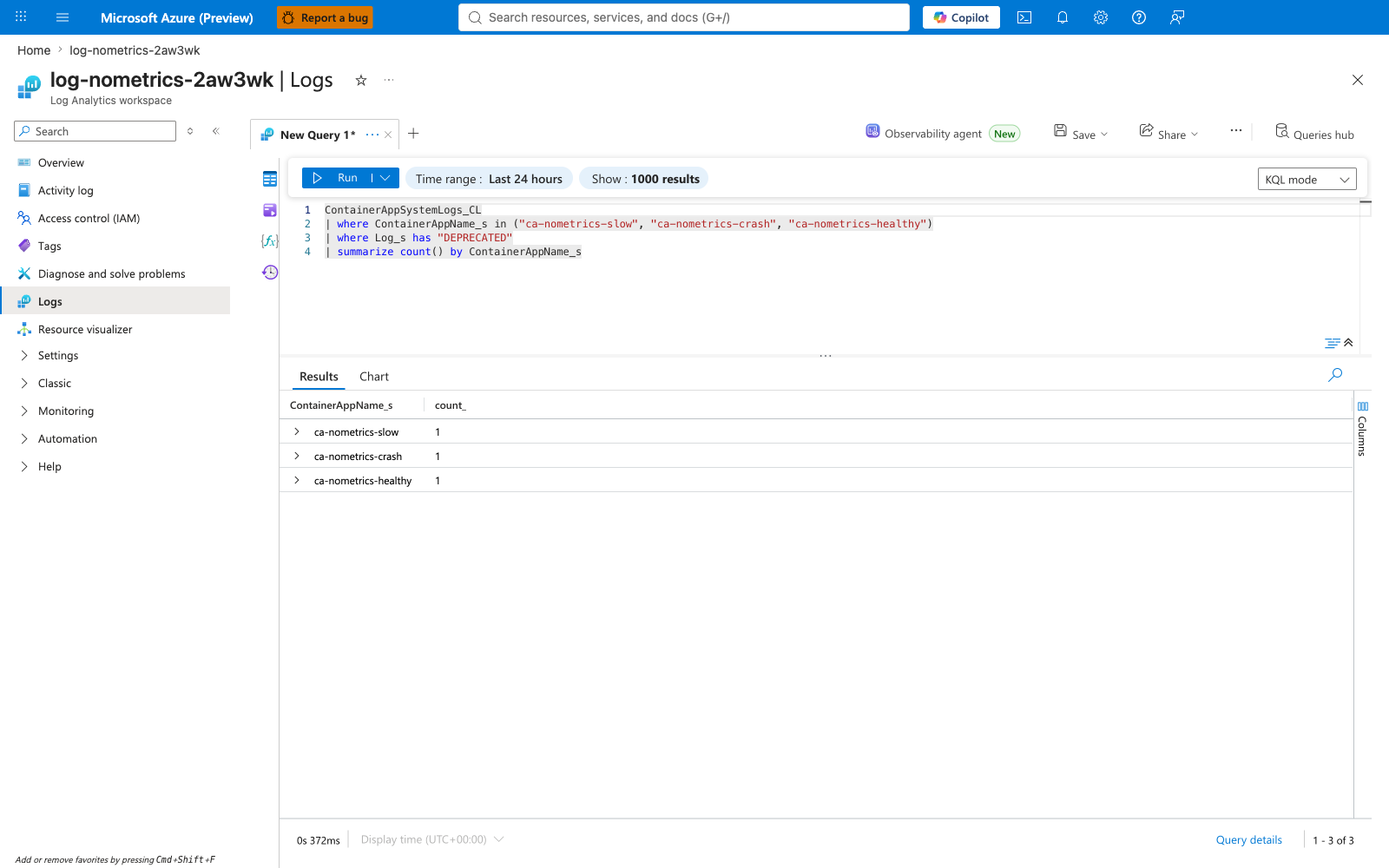
Portal evidence — Log Analytics KQL
A KQL summarize across all three apps shows exactly one type DEPRECATED warning per app, confirming it is triggered by the scale rule configuration (metadata.type=Utilization), not by container health state.
All scenarios — Error timeline (KQL)¶
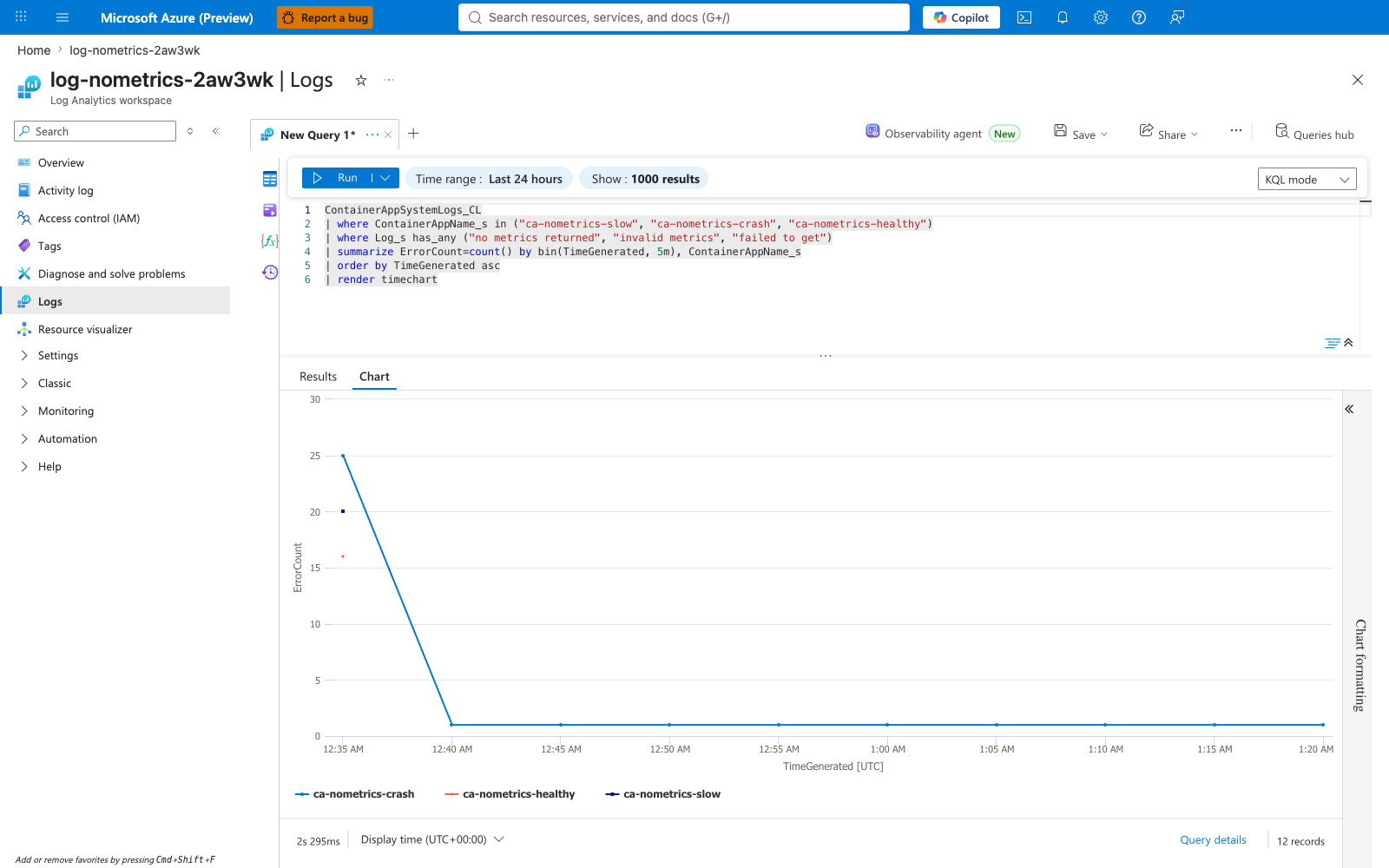
Portal evidence — Log Analytics timechart
A render timechart of "no metrics returned" / "invalid metrics" / "failed to get" entries bucketed by 5-minute bins, broken out by ContainerAppName_s. The initial deployment burst is concentrated in the first bin (~25 errors) and tails off to a baseline of ~1 error per 5-minute bin afterward, dominated by the crash-loop app.
Screenshot capture checklist¶
When re-running the lab, capture the following screenshots and save to docs/assets/troubleshooting/keda-no-metrics-returned/:
| Screenshot | File name | Source |
|---|---|---|
| Scenario A: system logs | scenario-a-slow-system-logs.png | Log stream → Historical + System |
| Scenario A: metrics | scenario-a-slow-metrics.png | Metrics → Memory Percentage + Replica Count |
| Scenario B: system logs | scenario-b-crash-system-logs.png | Log stream → Historical + System |
| Scenario B: restart count | scenario-b-crash-restart-count.png | Metrics → Total Replica Restart Count |
| Scenario C: system logs | scenario-c-healthy-system-logs.png | Log stream → Historical + System |
| DEPRECATED warning | all-deprecated-warning.png | Log Analytics → KQL summarize count() by ContainerAppName_s |
| KQL error timeline | kql-error-timeline.png | Log Analytics → KQL render timechart |
Clean Up¶
| Command | Why it is used |
|---|---|
cleanup.sh | Deletes the resource group and all child resources (async). |