Dapr Integration Troubleshooting Lab
Diagnose and fix Dapr sidecar port misconfiguration issues in Azure Container Apps.
Lab Metadata
| Attribute | Value |
|---|---|
| Difficulty | Intermediate |
| Estimated Duration | 25-35 minutes |
| Tier | Consumption |
| Failure Mode | Dapr sidecar cannot communicate with the app because appPort is misconfigured |
| Skills Practiced | Dapr configuration review, sidecar diagnostics, port alignment validation |
1) Background
This lab starts with a working Dapr configuration: Dapr is enabled, appId is set, and appPort matches the application listening port. The trigger changes Dapr appPort from 8000 to 8081, so the sidecar keeps running but can no longer forward service invocation traffic to the application process.
The key troubleshooting lesson is that ingress targetPort and Dapr appPort are separate settings. An app can still be reachable through ingress while Dapr-to-app communication is broken.
Architecture
flowchart TD
    A[External Request] --> B[Ingress :8000]
    B --> C[App Container :8000]
    D[Dapr Sidecar :3500] --> E[App Container :appPort]
    F[Other Dapr Apps] --> D
    E -. correct .-> C
    D -. wrong appPort 8081 .-> G[Connection failure]
Dapr App Port Configuration
| Setting | Description | Impact if Wrong |
|---|---|---|
appPort | Port the Dapr sidecar uses to call the app | Service invocation fails |
appId | Unique identifier for Dapr service discovery | Other apps cannot find this service |
appProtocol | HTTP or gRPC | Protocol mismatch errors |
2) Hypothesis
IF Dapr is enabled but appPort is changed from the app's real listening port 8000 to 8081, THEN Dapr sidecar health and service invocation checks will fail even though the app configuration still shows Dapr enabled.
| Variable | Control State | Experimental State |
|---|---|---|
Dapr appPort | 8000 | 8081 |
| Dapr sidecar to app communication | Succeeds | Connection refused or unreachable |
verify.sh result | PASS | FAIL |
| Ingress behavior | Can still target the app separately | May still differ from Dapr failure mode |
Scope status — Flask-on-8000 cohort is now [Observed]
The Phase B evidence pack replaces the old bundled mcr.microsoft.com/azuredocs/containerapps-helloworld:latest workload with a Flask + Gunicorn image that really binds 0.0.0.0:8000.
The live 2026-06-26 cohort now proves all three mechanically relevant surfaces with committed evidence:
[Observed]03-dapr-config-pre-fix.jsonshowsenabled: truewithappPort: 8081while ingresstargetPortremains8000in01-app-spec-pre-fix.json.[Observed]04-http-response-pre-fix.jsonstill returnsHTTP 200with bodyOK, so ingress reachability remains intact during the Dapr misconfiguration.[Observed]05-dapr-invoke-pre-fix.jsoncaptures a failing loopback Dapr invocation path, and09-dapr-config-post-fix.json+10-http-response-post-fix.jsonshow the restoredappPort: 8000and post-fixHTTP 200state.
Historical limitation preserved — helloworld image, 2026-06-03
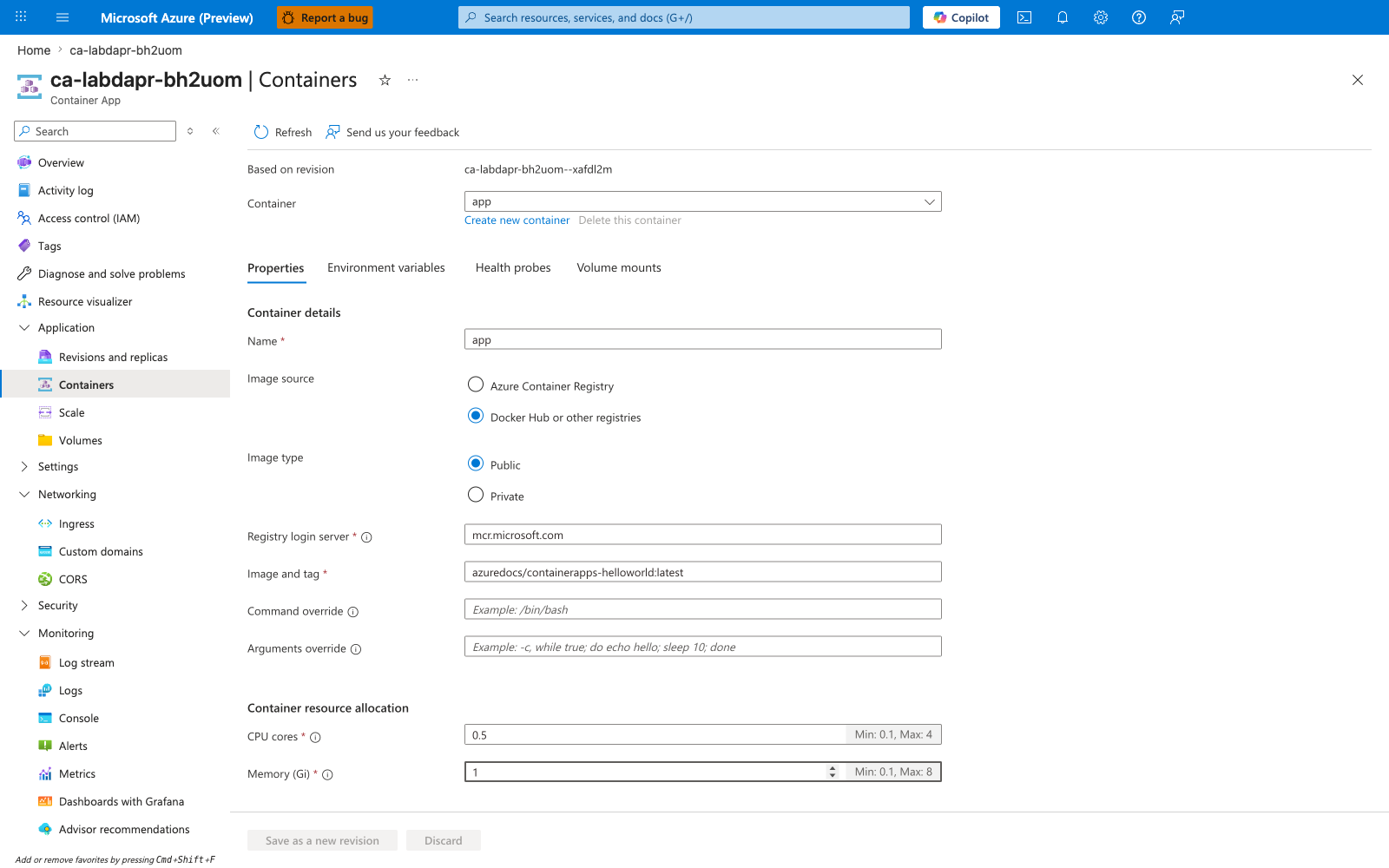
The six Portal captures from 2026-06-03 are kept as additive historical evidence only. That older reproduction used containerapps-helloworld:latest, which listens on port 80, so the sidecar-to-app half of the hypothesis remained [Not Proven] in that historical cohort.
3) Runbook
Deploy baseline infrastructure
Prerequisites:
- Azure CLI with the Container Apps extension
- Basic understanding of Dapr concepts such as sidecars,
appId, andappPort
az extension add --name containerapp --upgrade
az login

export RG="rg-aca-lab-dapr"
export LOCATION="koreacentral"

az group create --name "$RG" --location "$LOCATION"

az deployment group create \
    --name "lab-dapr" \
    --resource-group "$RG" \
    --template-file "./labs/dapr-integration/infra/main.bicep" \
    --parameters baseName="labdapr"
| Command | Why it is used |
|---|---|
az extension add ... | Installs or updates the Container Apps Azure CLI extension. |
Expected output:
- Resource group creation succeeds.
- Deployment completes successfully with Dapr enabled on the app.
Capture deployment outputs
export APP_NAME="$(az deployment group show \
    --resource-group "$RG" \
    --name "lab-dapr" \
    --query "properties.outputs.containerAppName.value" \
    --output tsv)"

export ACA_ENV_NAME="$(az deployment group show \
    --resource-group "$RG" \
    --name "lab-dapr" \
    --query "properties.outputs.containerAppsEnvironmentName.value" \
    --output tsv)"
| Command | Purpose |
|---|---|
export APP_NAME="$(az deployment group show ... --query "properties.outputs.containerAppName.value" --output tsv)" | Captures the deployed app name from ARM outputs so every later Dapr inspection and update command points at the exact lab workload. |
export ACA_ENV_NAME="$(az deployment group show ... --query "properties.outputs.containerAppsEnvironmentName.value" --output tsv)" | Captures the environment name created by the lab deployment so Dapr component and environment-level checks use the correct Container Apps environment. |
Expected output:
- Commands return no console output.
- Variables resolve to the app and environment names.
Verify baseline Dapr configuration
az containerapp show \
    --name "$APP_NAME" \
    --resource-group "$RG" \
    --query "properties.configuration.dapr" \
    --output json
| Command | Why it is used |
|---|---|
az containerapp show ... | Reads the Container App configuration so the documented setting can be verified. |
Expected output:
Trigger the failure
The trigger uses:
| Command | Why it is used |
|---|---|
az containerapp update ... | Updates the existing Container App configuration without recreating the app. |
CLI 2.71.0 workaround
On Azure CLI 2.71.0 the bundled containerapp extension rejects --dapr-app-port on az containerapp update with unrecognized arguments. Use the dedicated az containerapp dapr enable command, which accepts --dapr-app-port directly on this CLI version:
| Command | Why it is used |
|---|---|
az containerapp dapr enable ... | Enables (or re-applies) Dapr on the app while updating appPort in the same call. Works on CLI 2.71.0 where az containerapp update --dapr-app-port fails. |
Expected output:
- The trigger applies the new Dapr
appPortvalue to the Container App. - The active revision's Dapr
appPortchanges from 8000 to 8081 on the next configuration read.
Observe the broken state
az containerapp show \
    --name "$APP_NAME" \
    --resource-group "$RG" \
    --query "properties.configuration.dapr" \
    --output json

az containerapp logs show \
    --name "$APP_NAME" \
    --resource-group "$RG" \
    --type system \
    --tail 50
| Command | Why it is used |
|---|---|
az containerapp show ... | Reads the Container App configuration so the documented setting can be verified. |
Expected output:
Look for errors such as connection refused, port unreachable, or health probe failures on port 8081.
Verify failure and fix the configuration
Before the fix, the verification script should fail with output like:
Restore the correct port:
| Command | Why it is used |
|---|---|
az containerapp update ... | Updates the existing Container App configuration without recreating the app. |
CLI 2.71.0 workaround (restore direction)
On Azure CLI 2.71.0 the bundled containerapp extension rejects --dapr-app-port on az containerapp update in both the trigger and restore directions. Use az containerapp dapr enable --dapr-app-port 8000 for the restore on this CLI version:
| Command | Why it is used |
|---|---|
az containerapp dapr enable ... | Re-applies Dapr on the app with appPort set back to 8000 in the same call. Works on CLI 2.71.0 where az containerapp update --dapr-app-port fails. |
Useful debugging commands:
az containerapp show --name "$APP_NAME" --resource-group "$RG" --query "properties.configuration.dapr"
az containerapp show --name "$APP_NAME" --resource-group "$RG" --query "properties.configuration.ingress.targetPort"
az containerapp logs show --name "$APP_NAME" --resource-group "$RG" --type system --tail 100
az containerapp env dapr-component list --name "$ACA_ENV_NAME" --resource-group "$RG" --output table
| Command | Purpose |
|---|---|
az containerapp show --name "$APP_NAME" --resource-group "$RG" --query "properties.configuration.dapr" | Reads the Container App resource and extracts the field selected by properties.configuration.dapr, which is the specific surface this troubleshooting step needs to confirm. |
az containerapp show --name "$APP_NAME" --resource-group "$RG" --query "properties.configuration.ingress.targetPort" | Reads the Container App resource and extracts the ingress target port, which is the specific surface this troubleshooting step needs to confirm. |
az containerapp logs show --name "$APP_NAME" --resource-group "$RG" --type system --tail 100 | Pulls Container Apps system logs, which is where provisioning, probe, scaler, and image-pull failures appear before application code starts. |
az containerapp env dapr-component list --name "$ACA_ENV_NAME" --resource-group "$RG" --output table | Lists the Dapr components registered in the environment so you can verify whether the sidecar failure is caused by missing or mis-scoped component configuration rather than by the app port mismatch alone. |
Expected output:
appPortreturns to 8000.- In the committed Flask-on-8000 evidence pack, restoring
appPortto 8000 returns the Dapr config to the real listener and the post-fix capture window remainsHealthy / Runningwith ingressHTTP 200.
Verify recovery
Expected output (the committed Phase B Flask-on-8000 cohort):
- The script emits all 17 gate verdicts and exits
0. - Gate 15 proves
appPort: 8081plus failing Dapr invoke while ingress still returnsHTTP 200. - Gate 16 proves the restored
appPort: 8000plus post-fixHTTP 200and healthy/running capture window.
Historical limitation retained honestly
The old 2026-06-03 helloworld cohort is still valuable because it preserves the original Portal-only evidence trail, but only the new Flask-on-8000 cohort is used for the bounded-falsification claim.
4) Experiment Log
| Step | Action | Expected | Actual | Pass/Fail |
|---|---|---|---|---|
| 1 | Deploy baseline infrastructure | Dapr-enabled app deploys successfully | ||
| 2 | Check Dapr configuration | appPort is 8000 and Dapr is enabled | ||
| 3 | Run trigger.sh | appPort changes to 8081 | ||
| 4 | Review Dapr config and logs | Port mismatch evidence appears | ||
| 5 | Run verify.sh before fix | Script fails because appPort is wrong | ||
| 6 | Restore --dapr-app-port 8000 | Update succeeds | ||
| 7 | Run verify.sh after fix | Script passes with 17/17 gates in the Flask-on-8000 cohort |
Expected Evidence
Before trigger
| Evidence Source | Expected State |
|---|---|
az containerapp show --query "properties.configuration.dapr" | appPort: 8000, enabled: true |
| System logs | No Dapr connection errors |
./labs/dapr-integration/verify.sh | PASS |
During incident
| Evidence Source | Expected State |
|---|---|
| Dapr config | appPort: 8081 |
| System logs | Health probe failure / Dapr-sidecar failure evidence while ingress still works |
./labs/dapr-integration/verify.sh | FAIL |
After fix
| Evidence Source | Expected State |
|---|---|
| Dapr config | appPort: 8000, enabled: true |
| Post-fix capture window | appPort: 8000, enabled: true, ingress / returns HTTP 200, revision surface is Healthy / Running |
./labs/dapr-integration/verify.sh | PASS (17/17 gates) |
Observed Evidence (Live Azure Reproduction — Flask-on-8000, 2026-06-26)
Resource group rg-aca-lab-dapr in koreacentral, Container App ca-labdapr-5nichn, Dapr appId: dapr-labdapr-5nichn, single-revision mode, Azure CLI 2.71.0, ACR image acrlabdapr5nichn.azurecr.io/ca-labdapr-5nichn:v1.
[Observed]01-app-spec-pre-fix.jsonrecords ingresstargetPort: 8000while03-dapr-config-pre-fix.jsonrecordsenabled: true,appProtocol: http, andappPort: 8081.[Observed]04-http-response-pre-fix.jsonshowsHTTP/2 200,server: gunicorn, and bodyOK, so ingress remained reachable while the Dapr setting was wrong.[Observed]05-dapr-invoke-pre-fix.jsonpreserves the exact failedaz containerapp exectranscript captured while probing the loopback Dapr invoke path through127.0.0.1:3500; the transcript includesClusterExecFailurewith container-side code500, so it is used as an exec-failure artifact rather than as a direct Dapr-response body.[Observed]06-system-logs-pre-fix.jsonshows repeatedProbeFailedrows on the triggeredappPort: 8081window.[Observed]09-dapr-config-post-fix.jsonrestoresappPort: 8000withenabled: true, and10-http-response-post-fix.jsonagain recordsHTTP/2 200with bodyOKat a later timestamp.[Observed]11-revision-list-post-fix.jsonrecords the post-fix capture window asactive: true,healthState: Healthy, andrunningState: Running.[Measured]15-h1-trigger-produces-failure-gate.json,16-h2-fix-restores-recovery-gate.json, and17-bounded-falsification-gate.jsonall pass in the committed offline verifier.
Historical reproduction (helloworld image, 2026-06-03)
Resource group rg-aca-lab-dapr in koreacentral, Container App ca-labdapr-bh2uom, Dapr appId: dapr-labdapr-bh2uom, active revision ca-labdapr-bh2uom--xafdl2m, single-revision mode. Azure CLI 2.71.0 with containerapp extension; the az containerapp update --dapr-app-port form rejected the flag in both the trigger and restore directions, so both mutations were applied with az containerapp dapr enable --dapr-app-port <PORT> (see CLI 2.71.0 workaround above).
The six PNGs below were captured in sequence during the reproduction. Each paragraph below describes only what is visible inside that single PNG, with no cross-capture comparison.
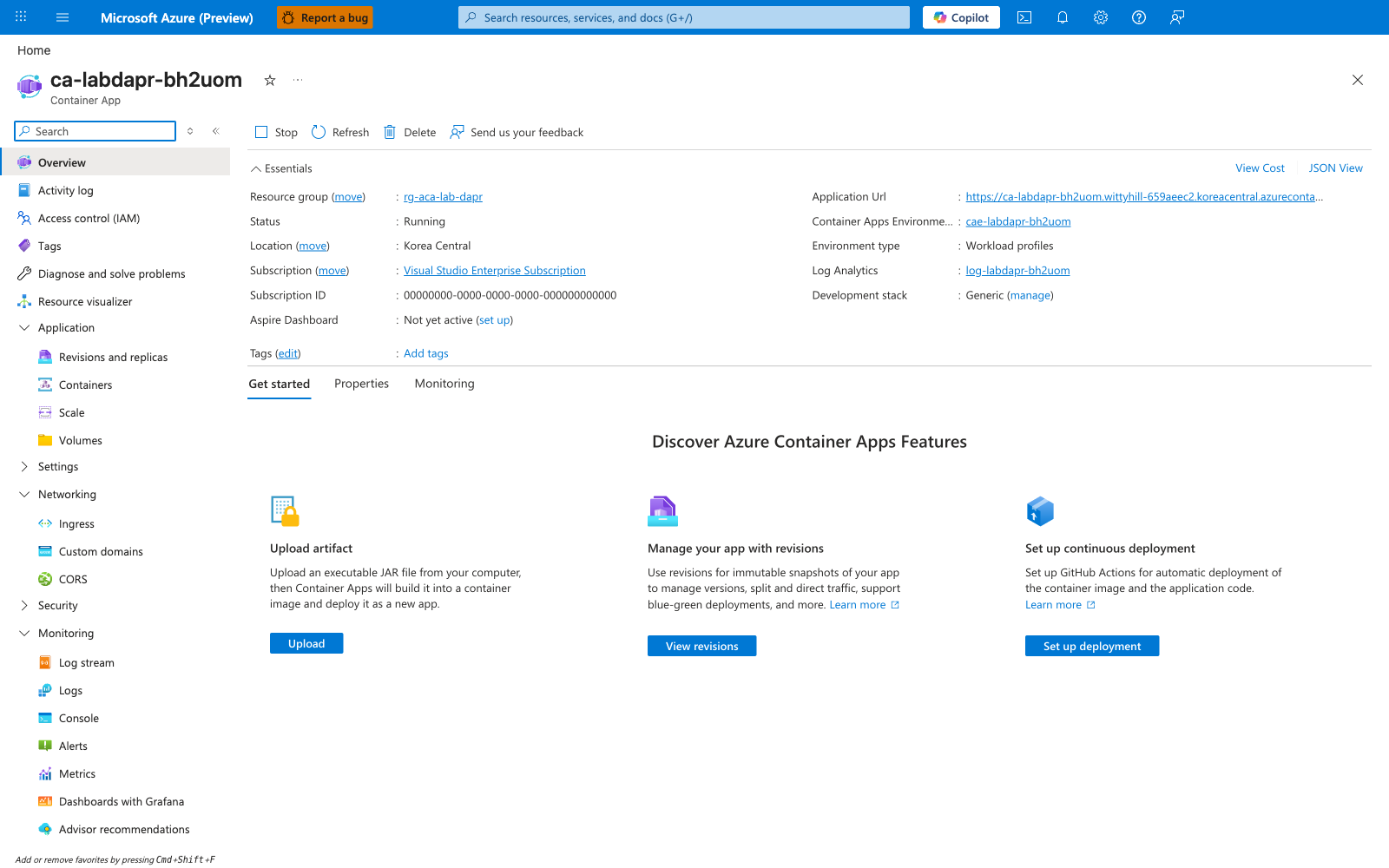
[Observed] Container App Overview blade. The Essentials panel shows Status: Running, Location: Korea Central, Environment type: Workload profiles, Resource group: rg-aca-lab-dapr, and a populated Application Url field. Dapr configuration is not surfaced on the Overview panel.
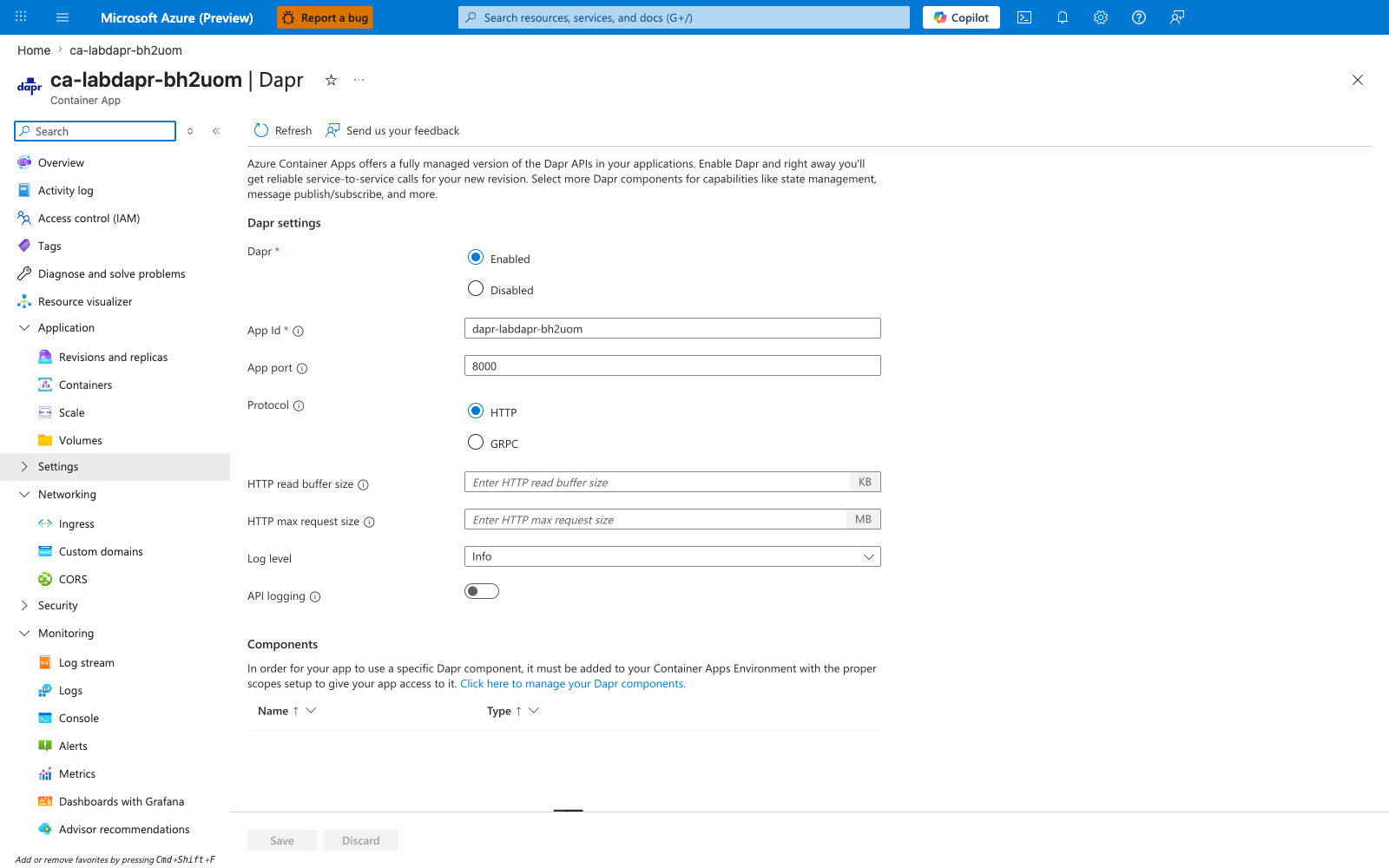
[Observed] Container App Dapr blade. The Dapr radio shows Enabled, the App ID field shows dapr-labdapr-bh2uom, the App port field shows 8000, and the App protocol radio shows HTTP.
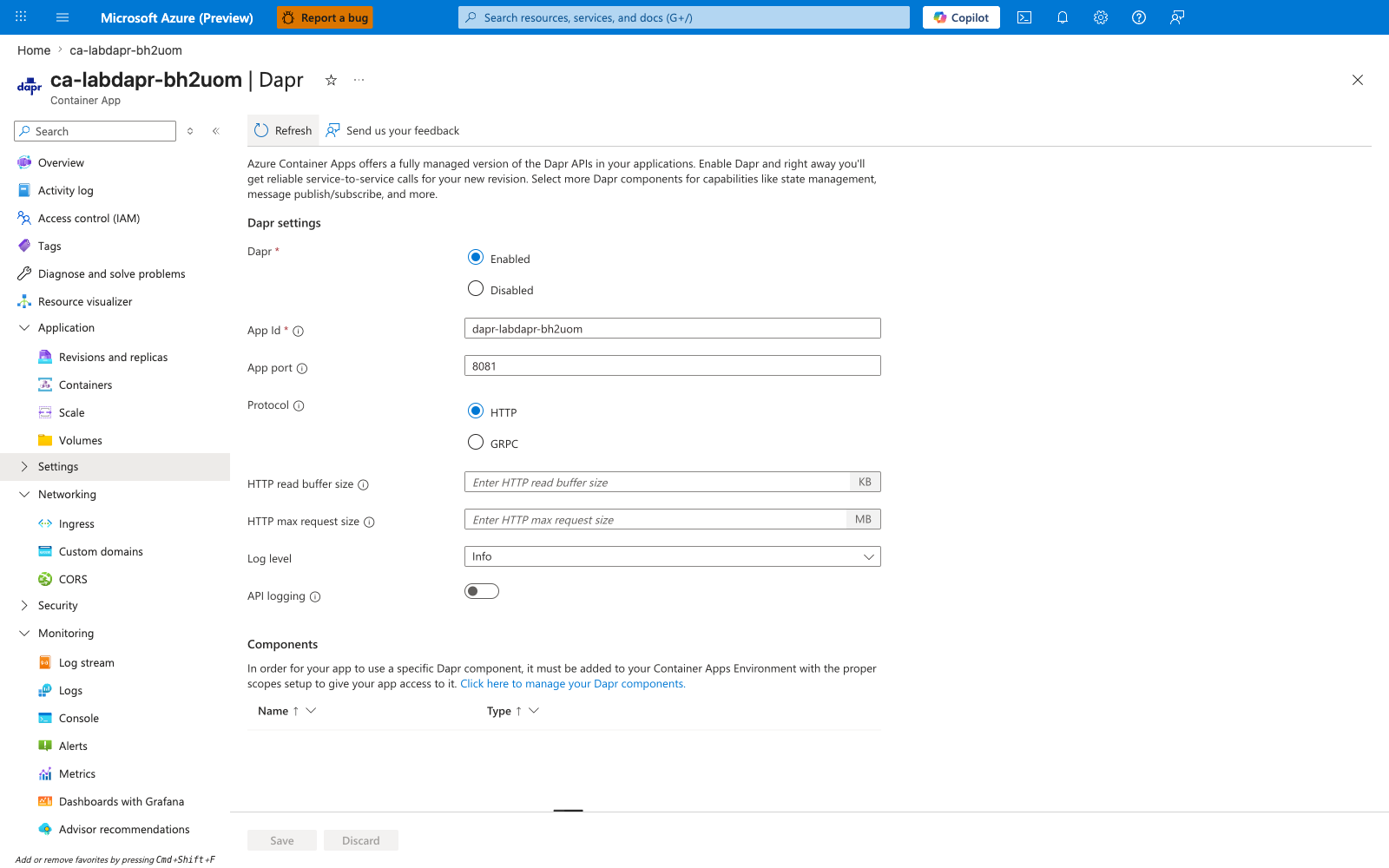
[Observed] Container App Dapr blade. The Dapr radio shows Enabled, the App ID field shows dapr-labdapr-bh2uom, the App port field shows 8081, and the App protocol radio shows HTTP.
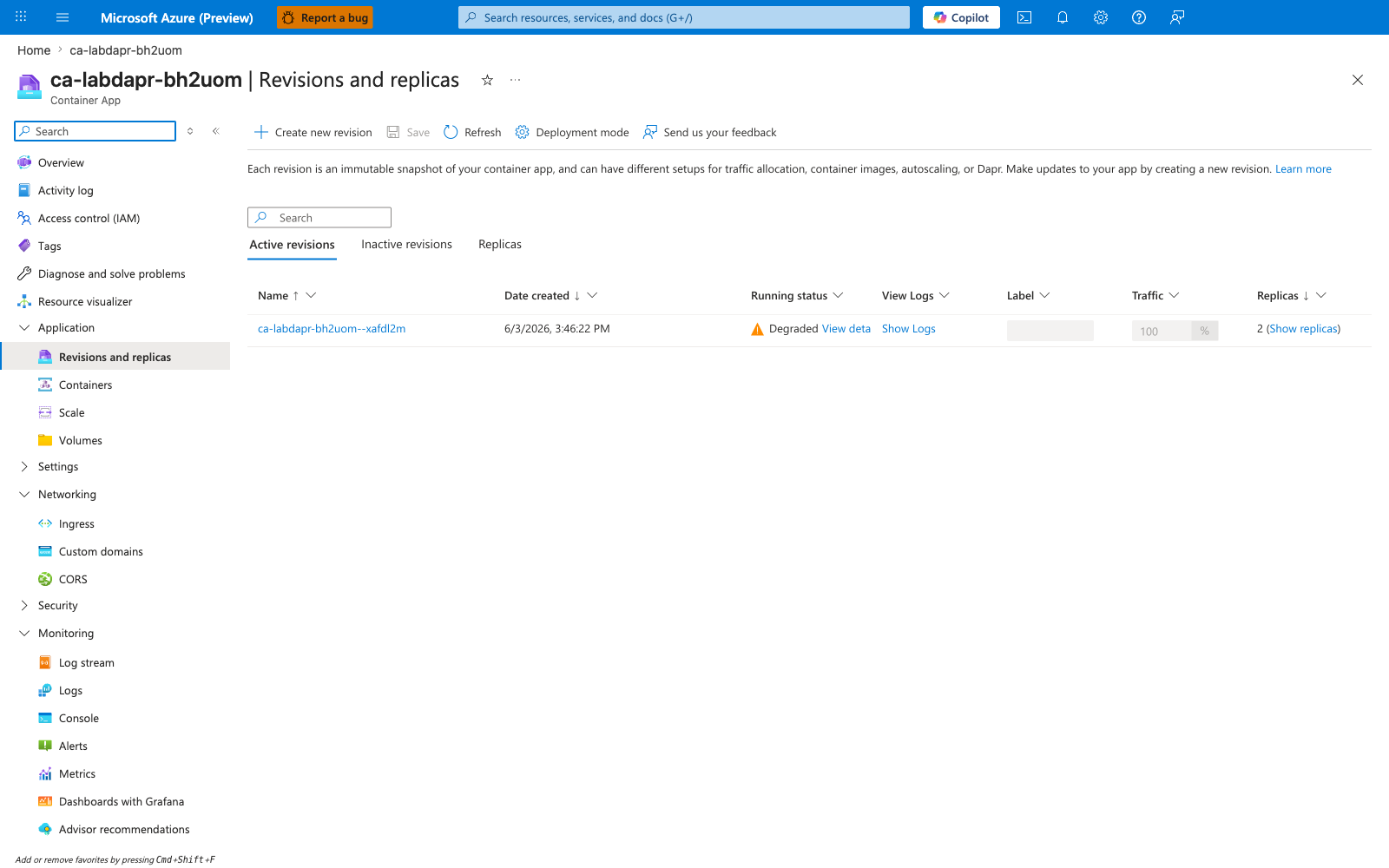
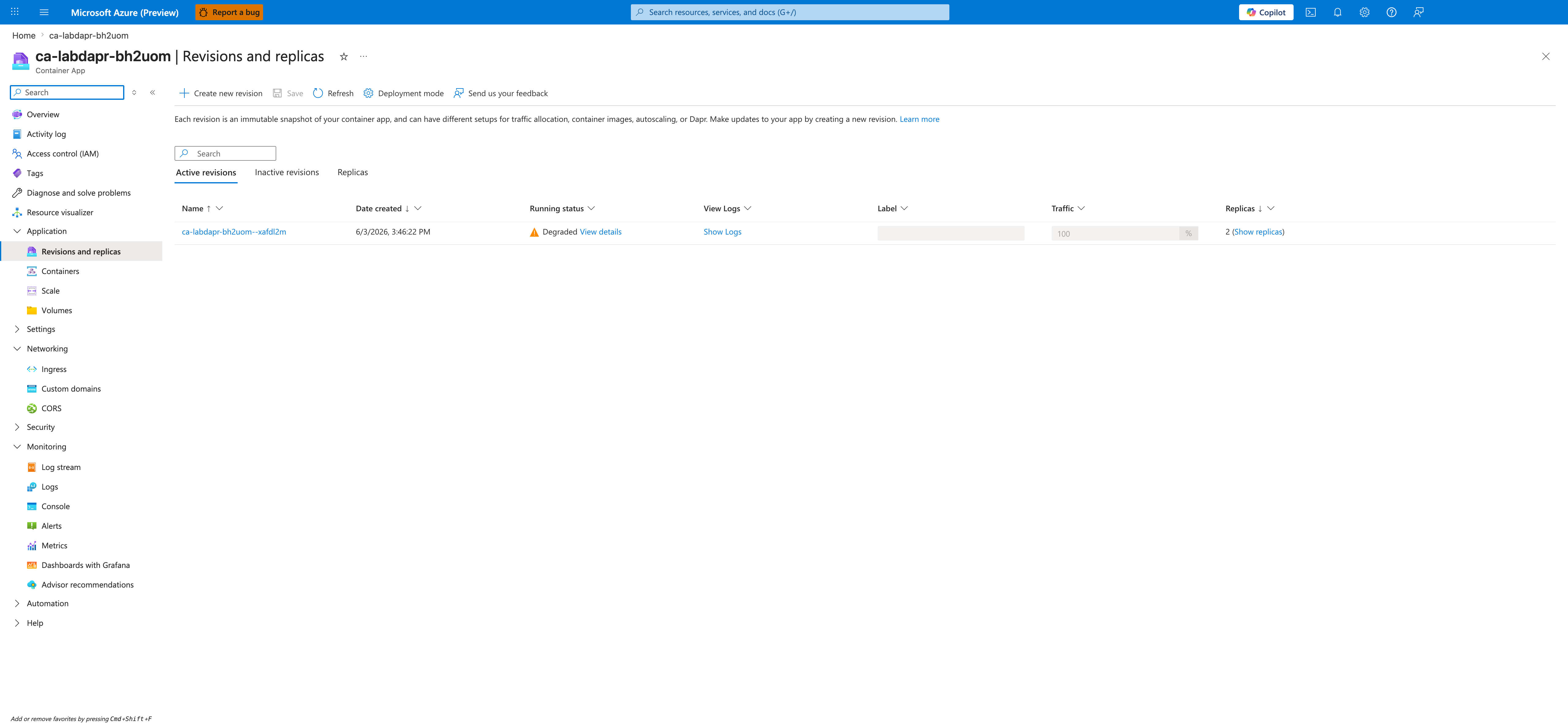
[Observed] Container App Revisions blade. A row for ca-labdapr-bh2uom--xafdl2m shows Date created: 6/3/2026 3:46:22 PM, Running status: Degraded, Traffic: 100%, and Replicas: 2.
[Observed] Container App Containers blade, Properties tab for the container named app. The fields show Registry login server: mcr.microsoft.com, Image and tag: azuredocs/containerapps-helloworld:latest, CPU cores: 0.5, and Memory (Gi): 1. Health-probe ports are not surfaced on this tab; they are on the separate Health probes tab and were not captured.
[Observed] Container App Revisions blade. A row for ca-labdapr-bh2uom--xafdl2m shows Running status: Degraded and Traffic: 100%.
[Inferred] Across captures #2 and #3, the only field that differs on the Dapr blade is App port (8000 vs 8081). This is consistent with --dapr-app-port mutating only properties.configuration.dapr.appPort on the Container App resource and leaving App ID, Dapr enabled, and App protocol unchanged.
[Not Proven] That the Running status: Degraded visible in captures #4 and #6 was caused by a Dapr appPort mismatch. The bundled mcr.microsoft.com/azuredocs/containerapps-helloworld:latest image (capture #5) listens on port 80, not 8000, so a Dapr sidecar→app health probe targeting either appPort=8000 or appPort=8081 would target a port the image does not bind. The revision was not observed Healthy at any point during this reproduction, so the captures show only correlation between an appPort value and a Degraded revision, not causation. To make causation cleanly falsifiable, swap the bicep template's image for one that binds to 0.0.0.0:8000 and re-run the trigger.
Clean Up
| Command | Why it is used |
|---|---|
az group delete ... | Removes the lab resource group and its contained resources. |