Ingress Client Certificates
Use ingress client certificate authentication when Azure Container Apps should require or accept a caller certificate at the edge and forward certificate details to your application for authorization decisions.
Prerequisites
- A container app with HTTP ingress enabled.
- A client certificate and private key for testing.
- Azure CLI installed and authenticated.
- Optional: a custom domain if you want the certificate exchange on your own hostname.
Set reusable variables:
export RG="rg-aca-security"
export APP_NAME="ca-api-mtls"
export ACA_ENV_NAME="cae-security"
export LOCATION="koreacentral"
When to Use
- Partner or B2B APIs that require certificate-based caller authentication.
- APIs fronted by enterprise proxies or gateways that already manage client certificates.
- Workloads that need the app to inspect certificate subject, issuer, or thumbprint after ingress validation.
flowchart TD
    Client[Client with certificate] --> TLS[Ingress TLS handshake]
    TLS --> Envoy[Managed Envoy ingress]
    Envoy --> Header[XFCC header]
    Header --> App[Container App code]
App --> Decision[Allow or reject]Procedure
1. Enable external ingress
If the app does not already have external ingress, enable it first.
az containerapp ingress enable \
  --name "$APP_NAME" \
  --resource-group "$RG" \
  --type external \
  --target-port 8000
| Command | Why it is used |
|---|---|
az containerapp ingress enable ... | Enables ingress for workloads that must receive inbound traffic. |
2. Require client certificates
Microsoft Learn currently documents client certificate mode through the container app template or an ARM-style PATCH. Use require for strict enforcement.
export APP_ID=$(az containerapp show \
  --name "$APP_NAME" \
  --resource-group "$RG" \
  --query id \
  --output tsv)

az rest \
  --method patch \
  --uri "https://management.azure.com${APP_ID}?api-version=2025-01-01" \
  --body '{
    "properties": {
      "configuration": {
        "ingress": {
          "clientCertificateMode": "require"
        }
      }
    }
  }'
| Command | Why it is used |
|---|---|
az containerapp show ... | Reads the Container App configuration so the documented setting can be verified. |
3. Use ARM or Bicep for repeatable configuration
resource app 'Microsoft.App/containerApps@2025-01-01' = {
  name: appName
  location: location
  properties: {
    managedEnvironmentId: environmentId
    configuration: {
      ingress: {
        external: true
        targetPort: 8000
        transport: 'auto'
        clientCertificateMode: 'require'
      }
    }
    template: {
      containers: [
        {
          name: 'api'
          image: imageName
        }
      ]
    }
  }
}
4. Understand what the app receives
Azure Container Apps uses the X-Forwarded-Client-Cert header when clientCertificateMode is require or accept.
Documented format:
Your application should:
- Extract the
Cert=segment. - Decode the PEM certificate.
- Validate thumbprint, subject, issuer, or trust chain according to your policy.
- Return
403when the caller presents a certificate that does not match your allowlist or policy.
5. Treat path exclusions conservatively
No documented per-path mTLS exclusion in Azure Container Apps ingress
The Microsoft Learn sources cited on this page document clientCertificateMode and corsPolicy, but they do not document a per-path exclusion feature for client certificate enforcement. If you need mixed behavior by path, use a separate container app, a separate hostname, or application-level logic after choosing accept mode.
6. Keep CORS separate from mTLS
corsPolicy controls browser cross-origin behavior. It does not replace or bypass client certificate enforcement.
az containerapp ingress cors enable \
  --name "$APP_NAME" \
  --resource-group "$RG" \
  --allowed-origins "https://portal.contoso.com" \
  --allowed-methods "GET" "POST" \
  --allowed-headers "content-type" "x-request-id" \
  --allow-credentials true
| Command | Why it is used |
|---|---|
az containerapp ingress cors ... | Runs the Azure CLI operation required by the documented step. |
Portal view: environment Networking blade (scope boundary)
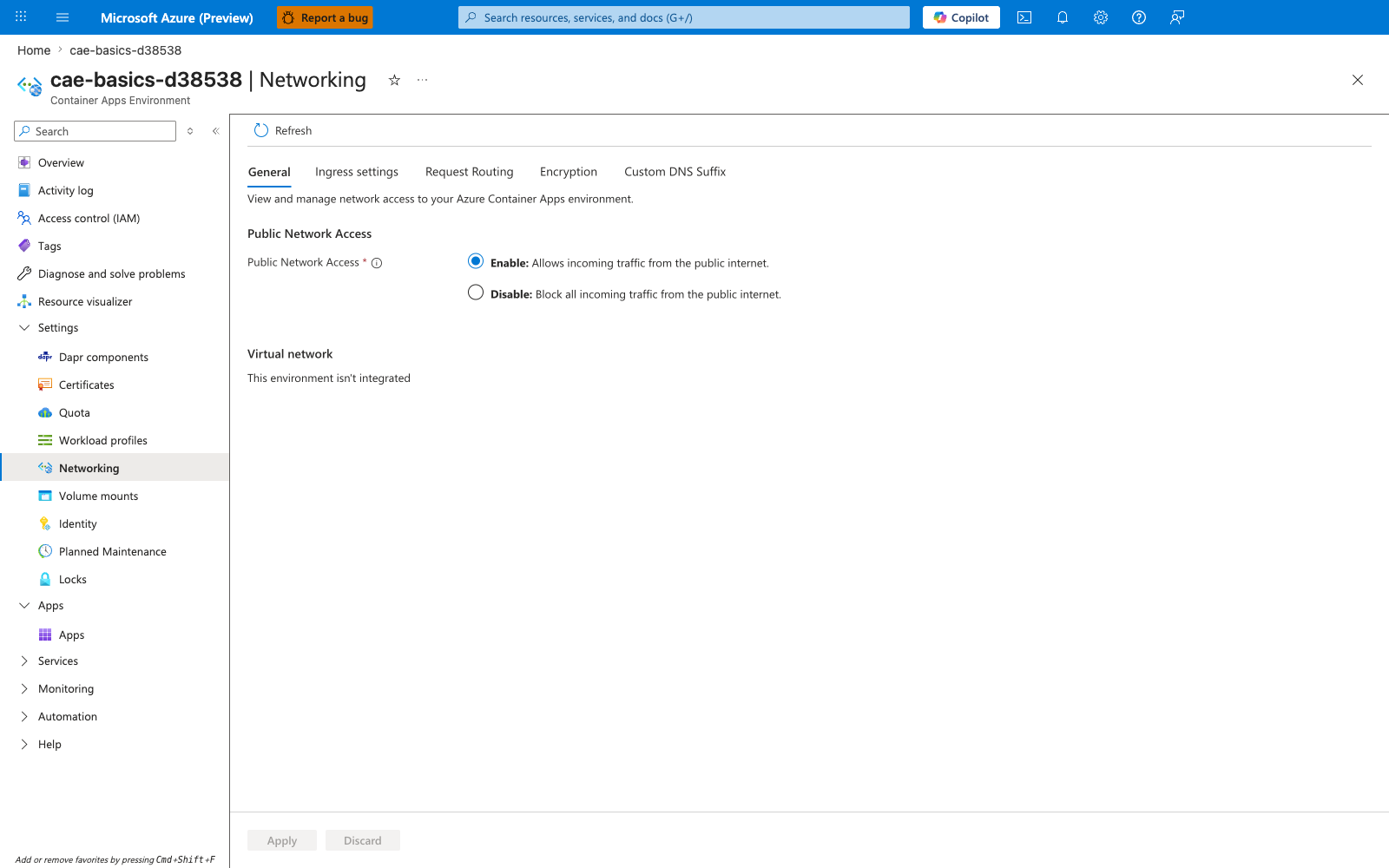
[Observed] The blade subtitle reads Container Apps Environment. The tab strip lists General, Ingress settings, Request Routing, Encryption, and Custom DNS Suffix, with General selected. No tab is labeled Client certificates, and no field labeled clientCertificateMode is visible on the selected General tab.
[Inferred] The presence of an Ingress settings tab on a blade whose subtitle is Container Apps Environment is consistent with this page's framing of ingress configuration as having an environment-scoped surface in addition to the app-scoped clientCertificateMode setting described under Require client certificates. The absence of a tab named Client certificates on this environment blade is consistent with this page's description of clientCertificateMode as a per-app configuration.ingress field set on the container app rather than on the environment.
[Not Proven] This image does not show the contents of the Ingress settings tab, so whatever environment-level ingress fields exist behind that tab are outside the scope of this capture. It does not show any app-level ingress blade, so the clientCertificateMode radio or dropdown surface is not represented here. It does not show the X-Forwarded-Client-Cert header described under Understand what the app receives, and it does not show any per-path exclusion control referenced in the warning above.
Verification
Check ingress configuration
az containerapp show \
  --name "$APP_NAME" \
  --resource-group "$RG" \
  --query "properties.configuration.ingress.clientCertificateMode" \
  --output tsv
| Command | Why it is used |
|---|---|
az containerapp show ... | Reads the Container App configuration so the documented setting can be verified. |
Expected output:
Test with curl
export FQDN=$(az containerapp show \
  --name "$APP_NAME" \
  --resource-group "$RG" \
  --query "properties.configuration.ingress.fqdn" \
  --output tsv)

curl --include \
  --cert "./client.pem" \
  --key "./client.key" \
  "https://${FQDN}/cert-info"
| Command | Purpose |
|---|---|
export FQDN=$(az containerapp show ...) | Reads the app's ingress hostname from the deployed resource so the certificate test targets the real Container Apps endpoint instead of a hardcoded URL that may drift across environments. |
--query "properties.configuration.ingress.fqdn" --output tsv | Extracts only the public FQDN string, which makes it easy to reuse in the subsequent curl request without manual cleanup. |
curl --include --cert "./client.pem" --key "./client.key" "https://${FQDN}/cert-info" | Exercises the full client-certificate path end to end by presenting the client cert and key during TLS negotiation, then shows the HTTP response headers so you can distinguish ingress rejection from application-level authorization failure. |
Expected outcomes:
200 OKwhen the client certificate is accepted and the app authorizes it.403from the app when the certificate reaches the app but fails your policy.403or TLS handshake failure before the app when ingress is set torequireand no certificate is supplied.
Inspect the forwarded header in app logs
Confirm that the app logs the presence of X-Forwarded-Client-Cert, then parse the leaf certificate rather than trusting the raw header string.
Rollback / Troubleshooting
Set the mode back to ignore or accept if you need to relax enforcement:
az rest \
  --method patch \
  --uri "https://management.azure.com${APP_ID}?api-version=2025-01-01" \
  --body '{
    "properties": {
      "configuration": {
        "ingress": {
          "clientCertificateMode": "ignore"
        }
      }
    }
  }'
| Command | Why it is used |
|---|---|
az rest ... | Calls an Azure Resource Manager endpoint that is not covered by a higher-level CLI command. |
Troubleshooting checklist:
- No
X-Forwarded-Client-Certheader: verify the app is inrequireoracceptmode. - Browser preflight issues: review
corsPolicyseparately from mTLS policy. - Direct client rejected at edge: confirm the client is actually sending the certificate and key pair.
- App rejects valid clients: inspect the parsed leaf certificate, not only the raw header.
See Also
- mTLS Architecture in Azure Container Apps
- Security in Azure Container Apps
- Azure Container Apps Networking Best Practices
- mTLS Failures
Sources
- Configure client certificate authentication in Azure Container Apps (Microsoft Learn)
- Ingress overview in Azure Container Apps (Microsoft Learn)
- Ingress for your app in Azure Container Apps (Microsoft Learn)
- Microsoft.App/containerApps@2025-01-01 template reference (Microsoft Learn)
- Configure CORS in Azure Container Apps (Microsoft Learn)