Scaling in Azure Container Apps with KEDA
Azure Container Apps uses KEDA (Kubernetes Event-Driven Autoscaling) to scale replicas based on demand signals such as HTTP requests, queue depth, and custom metrics.
This model enables both reactive scale-out and cost-efficient scale-in, including scale-to-zero in supported scenarios.
This overview introduces the scaling model. Use the deep-dive pages for HTTP Scaler, CPU & Memory Scalers, Event Scalers, Custom Scalers, and the Scaling Rules Reference.
How KEDA-Based Scaling Works
flowchart TD
    M[Metric Source\nHTTP / Queue / Custom] --> K[KEDA Scaler]
    K --> D[Desired Replica Count]
    D --> R[Container App Revision Replicas]
    R --> O[Observed Throughput/Latency]
    O --> M
KEDA continuously evaluates rules and updates desired replica count within configured bounds.
Scaling is revision-scoped
Scale decisions apply to the active revision(s) receiving traffic. During progressive rollouts, evaluate scaling behavior for each active revision mix.
Min and Max Replicas
- minReplicas: lower bound of warm capacity.
- maxReplicas: upper bound to protect cost and downstream dependencies.
Think of these as your scaling guardrails:
| Setting | Primary Effect | Common Use |
|---|---|---|
| minReplicas = 0 | Lowest idle cost, potential cold starts | Event-driven/background workloads |
| minReplicas > 0 | Faster response, warm baseline | Public APIs with latency targets |
| maxReplicas tuned low | Controls blast radius | Protect fragile dependencies |
| maxReplicas tuned high | Handles bursts | High-volume services with resilient backends |
Scale Rule Types (Conceptual)
| Rule Type | Trigger Signal | Typical Workload |
|---|---|---|
| HTTP | Concurrency/request pressure | APIs and web frontends |
| Queue/Event | Queue depth or event lag | Workers and async processing |
| CPU/Memory (supporting signal) | Resource pressure | Compute-heavy containers |
| Custom metrics | Domain KPI | Advanced autoscaling strategies |
Practical Example: API + Worker Pattern
graph TD
    U[Users] --> API[API App\nminReplicas: 1]
    API --> Q[Queue]
Q --> W[Worker App\nminReplicas: 0]- API keeps one warm replica for predictable latency.
- Worker scales from zero when queue depth rises.
- Both apps can scale independently even inside one environment.
Portal View
The Scale blade makes the min/max replica guardrails and scale-rule structure directly visible for any revision of a Container App.
Step 1: Open the Scale blade
In the left navigation of any Container App, open Application → Scale. The blade is revision-scoped: the Based on revision dropdown at the top selects which revision's scale configuration you are viewing or editing.
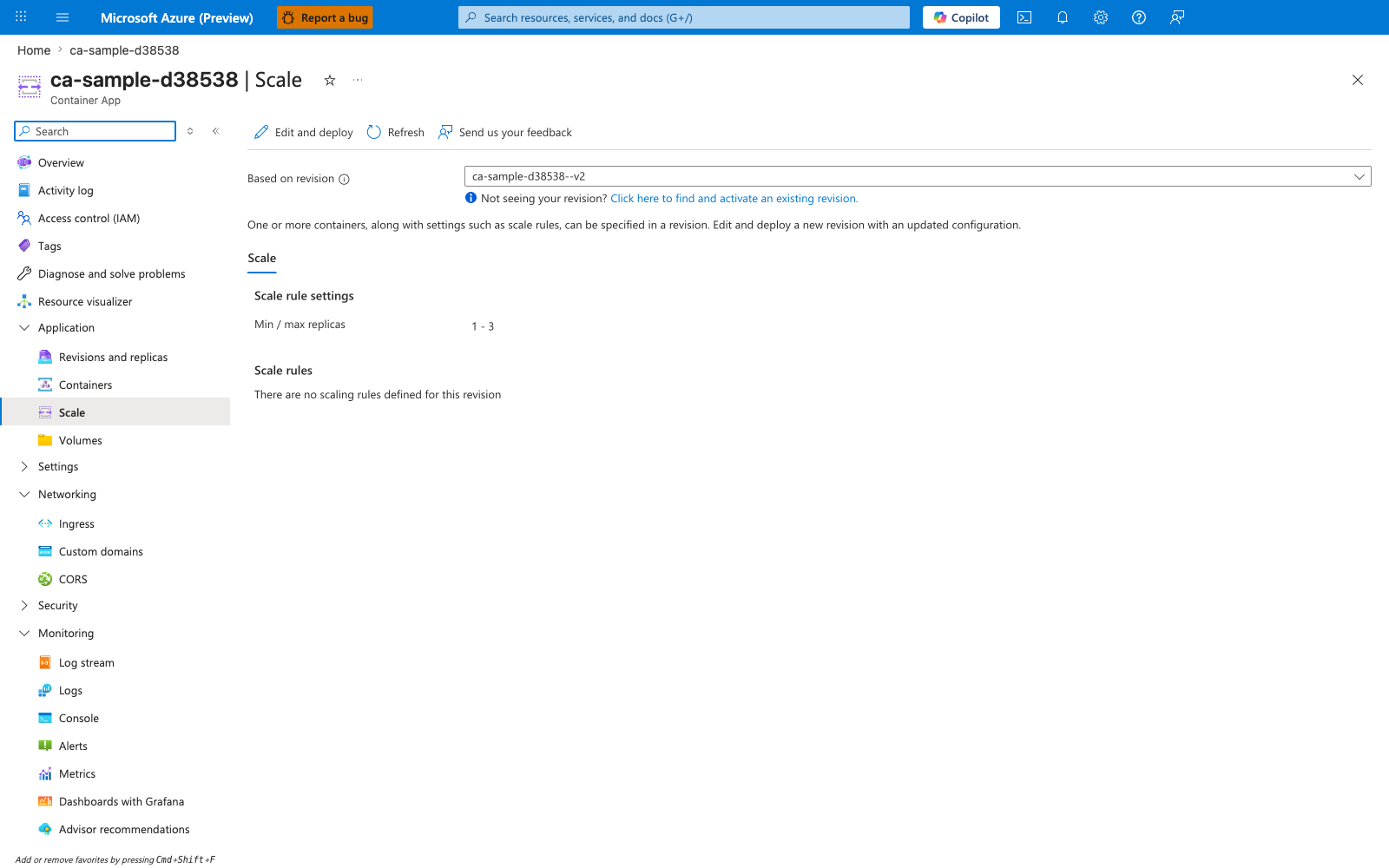
[Observed] The header reads "ca-sample-d38538 | Scale" with command bar actions Edit and deploy, Refresh, and Send us your feedback. The Based on revision dropdown is set to ca-sample-d38538--v2 and an informational notice reads "Not seeing your revision? Click here to find and activate an existing revision." The body shows a Scale tab with two sections: Scale rule settings containing Min / max replicas with value 1 - 3, and Scale rules showing the message "There are no scaling rules defined for this revision."
[Inferred] The revision-scoped dropdown confirms the "Scaling is revision-scoped" note above: each revision carries its own minReplicas, maxReplicas, and scale-rule set, which is why progressive rollouts can mix different scale behaviors across active revisions. The 1 - 3 value places this revision in the minReplicas > 0 row of the Min and Max Replicas table — there is always a warm baseline, so cold starts are avoided at the cost of constant idle compute. The Edit and deploy action (rather than an inline Save) reflects the immutable-revision model: changing scale settings produces a new revision rather than mutating the current one.
[Not Proven] The blade does not show which KEDA scaler types are available for new rules, the per-rule metadata schema (concurrent request count, queue name, polling interval), or runtime metrics such as current replica count and recent scale events. Whether the empty Scale rules section means HTTP scaling is using platform defaults or that no scaling will occur beyond the static 1 - 3 range cannot be determined from this view alone.
Common Scaling Trade-offs
- Lower idle cost vs cold-start sensitivity.
- Aggressive scale-out vs downstream database saturation.
- High max replicas vs budget predictability.
Good scaling design balances user experience, system stability, and cost controls.
Max replicas without dependency limits can cause outages
Aggressive scale-out can overload databases, caches, or third-party APIs. Set max replicas based on downstream capacity, not only frontend demand.
Advanced Topics
- Coordinated scaling policies for multi-service pipelines.
- Using custom metrics to scale on business throughput, not just infrastructure signals.
- Managing revision-level scaling behavior during canary traffic splits.
Deep-Dive Topics
- HTTP Scaler —
concurrentRequests, cold starts, and request-driven scaling - CPU & Memory Scalers — resource-pressure rules and scale-to-zero caveats
- Event Scalers — queue and event-driven patterns
- Custom Scalers — KEDA-backed bring-your-own triggers
- Scaling Rules Reference — defaults, limits, and multi-rule behavior
See Also
- How Container Apps Works
- Environments and Apps
- HTTP Scaler
- CPU & Memory Scalers
- Event Scalers
- Custom Scalers
- Scaling Rules Reference
- Networking
- Revision Management and Traffic Splitting
- KEDA open-source scalers documentation