Traffic Split in Azure Container Apps
Traffic split in Azure Container Apps lets you route ingress requests across active revisions by percentage or by label. It is the core platform feature behind canary, blue/green, and revision-specific validation.
Weighted traffic routing
Traffic configuration is expressed through traffic weight entries. Each entry can target one of these selectors:
revisionNamelabellatestRevision
Each traffic entry also includes a weight percentage.
flowchart TD
    U[Client request] --> I[Container Apps ingress]
    I --> T{Traffic rules}
    T -->|90| R1[stable revision]
    T -->|10| R2[canary revision]
    T -->|label route| L[label endpoint]
    L --> R3[candidate revision]
Core constraints
Microsoft Learn explicitly documents these routing constraints:
- Weighted traffic is for ingress-enabled apps.
- Traffic percentages must total 100.
- Weighted split requires multiple revision mode.
- Label routing targets a single revision per label.
Microsoft Learn does not publish an authoritative maximum number of traffic entries per split
Keep weighted configurations small and explicit. If you need a hard platform limit for a design review, verify it against the current service contract before relying on it.
latestRevision behavior
latestRevision: true tells Container Apps to route traffic to the latest stable revision instead of naming a specific revision.
Use it when:
- You want automatic routing to the newest stable revision.
- You do not need explicit naming in your traffic configuration.
Avoid it when:
- You need deterministic rollback to a specific known-good revision.
- You are running a controlled canary where exact revision identity matters.
Label-based routing
Labels create deterministic revision endpoints without changing main production traffic.
Container Apps generates a label URL in this pattern:
<app>--<label>.<domain>
That makes labels useful for:
- pre-production verification
- partner validation against a stable endpoint
- blue/green swap patterns
az containerapp revision label add \
  --name "$APP_NAME" \
  --resource-group "$RG" \
  --revision "$APP_NAME--20260425-1" \
  --label "green"
| Command | Why it is used |
|---|---|
az containerapp revision label ... | Runs the Azure CLI operation required by the documented step. |
Labels are movable. Reassigning a label changes which revision answers requests for that label URL.
Common traffic operations
Set weighted split by revision name
az containerapp ingress traffic set \
  --name "$APP_NAME" \
  --resource-group "$RG" \
  --revision-weight "$APP_NAME--stable=95" "$APP_NAME--canary=5"
| Command | Purpose |
|---|---|
az containerapp ingress traffic set | Applies a weighted rollout so a small portion of live requests can validate the canary revision before full promotion. |
--revision-weight "$APP_NAME--stable=95" "$APP_NAME--canary=5" | Keeps 95 percent of traffic on the stable revision while exposing only 5 percent to the candidate, which is the core canary safety control. |
Route traffic by label
az containerapp ingress traffic set \
  --name "$APP_NAME" \
  --resource-group "$RG" \
  --label-weight "blue=100"
| Command | Purpose |
|---|---|
az containerapp ingress traffic set --label-weight "blue=100" | Sends all production traffic to the revision currently holding the blue label, which is a clean fit for blue/green swaps where labels represent release roles. |
--label-weight | Routes by movable label instead of by raw revision name, allowing you to repoint the role later without changing client-facing terminology. |
Send all traffic to the latest stable revision
Operational guidance
| Need | Prefer | Why |
|---|---|---|
| Gradual production exposure | revisionName + weight | Explicit and auditable |
| Stable validation URL | label | Deterministic routing outside the main split |
| Automatic newest-stable route | latestRevision: true | Fewer named revisions in config |
| Fast rollback | Named stable revision with retained weight entry | No redeploy required |
Use labels and weights together
Labels solve validation and partner routing. Weights solve production migration. Treat them as complementary controls, not substitutes.
Portal view: Revisions and replicas blade
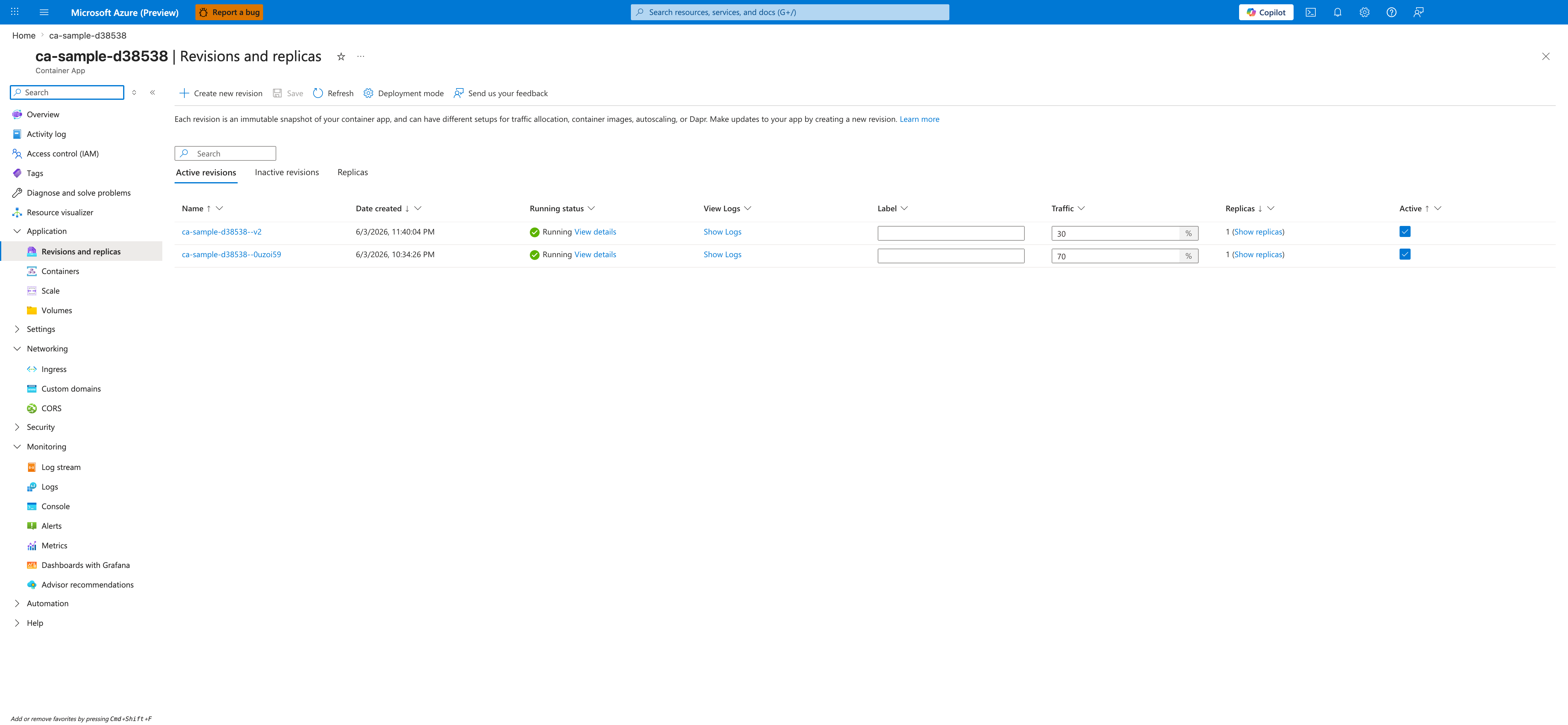
[Observed] The blade header reads ca-sample-d38538 | Revisions and replicas with the subtitle Container App. The command bar exposes + Create new revision, Save, Refresh, Deployment mode, and Send us your feedback. Below the command bar a description reads "Each revision is an immutable snapshot of your container app, and can have different setups for traffic allocation, container images, autoscaling, or Dapr. Make updates to your app by creating a new revision." with a Learn more link. Three tabs are rendered: Active revisions (selected), Inactive revisions, and Replicas. The Active revisions table has columns Name, Date created, Running status, View Logs, Label, Traffic, Replicas, and Active. Two rows are listed: ca-sample-d38538--v2 with Running status, an empty Label text box, Traffic value 30 %, 1 replica, and an Active checkbox marked; and ca-sample-d38538--0uzoi59 with Running status, an empty Label text box, Traffic value 70 %, 1 replica, and an Active checkbox marked.
[Inferred] The two rows with traffic values that sum to 100 are consistent with the "Traffic percentages must total 100" constraint described in the Core constraints section above. The presence of two simultaneously Active revisions appears to map to the "Weighted split requires multiple revision mode" constraint described in that same section. The Label text box rendered inline on each row is consistent with the label selector documented in the Weighted traffic routing section.
[Not Proven] The screenshot does not include the Deployment mode panel contents, so it does not show which revision mode value is currently selected. The empty Label text boxes on both rows are visible but the screenshot does not show whether they are read-only or editable. The Inactive revisions and Replicas tabs are present but their contents are not displayed in this capture.