Health and Recovery Operations
This guide covers production health checks and recovery operations: probe tuning, restart behavior, and incident response patterns.
Prerequisites
- Application exposes a reliable health endpoint (for example,
/health) - SRE runbook defines recovery time objective (RTO)
Health Probe Configuration
Configure startup, liveness, and readiness probes in your Container App template:
flowchart TD
    U[User Traffic] --> R[Readiness Probe]
    P[Platform Runtime] --> L[Liveness Probe]
    S[Container Startup] --> ST[Startup Probe]
    R --> D[Receives Requests]
    L --> E[Restart Decision]
HTTP probes can include dependency-aware logic, but they should reflect the health signal you actually want the platform to act on. Microsoft Learn notes that HTTP probes "let you implement custom logic to check the status of application dependencies before reporting a healthy status," so keep basic process health separate from stricter dependency checks when you don't want every downstream failure to block readiness.
az containerapp update \
  --name "$APP_NAME" \
  --resource-group "$RG" \
  --yaml "./infra/containerapp-health.yaml"
| Command | Purpose |
|---|---|
az containerapp update --yaml "./infra/containerapp-health.yaml" | Applies a full health-related configuration payload in one operation, which is safer than piecemeal flag edits when you are changing multiple probes or related settings together. |
--yaml "./infra/containerapp-health.yaml" | Uses a declarative file as the source of truth for probe settings so recovery changes are reviewable and repeatable. |
| Command | Why it is used |
|---|---|
az containerapp update ... | Updates the existing Container App configuration without recreating the app. |
Validate environment and platform-level status:
az resource show \
  --resource-group "$RG" \
  --resource-type "Microsoft.App/managedEnvironments" \
  --name "$ACA_ENV_NAME" \
  --output json
| Command | Purpose |
|---|---|
az resource show | Reads the managed environment resource directly so you can verify platform-level state before assuming the problem is isolated to one app revision. |
--resource-type "Microsoft.App/managedEnvironments" | Forces the query to the Container Apps environment resource, which is the right scope for environment-wide health or provisioning checks. |
--name "$ACA_ENV_NAME" | Uses the environment variable referenced throughout the page so app-level recovery and environment-level validation stay aligned. |
Portal View: Revision State Before Recovery Actions
The Azure Portal Revisions and replicas blade is the surface that names the revision and reports its running status, which is also the input the recovery commands in this page operate on.
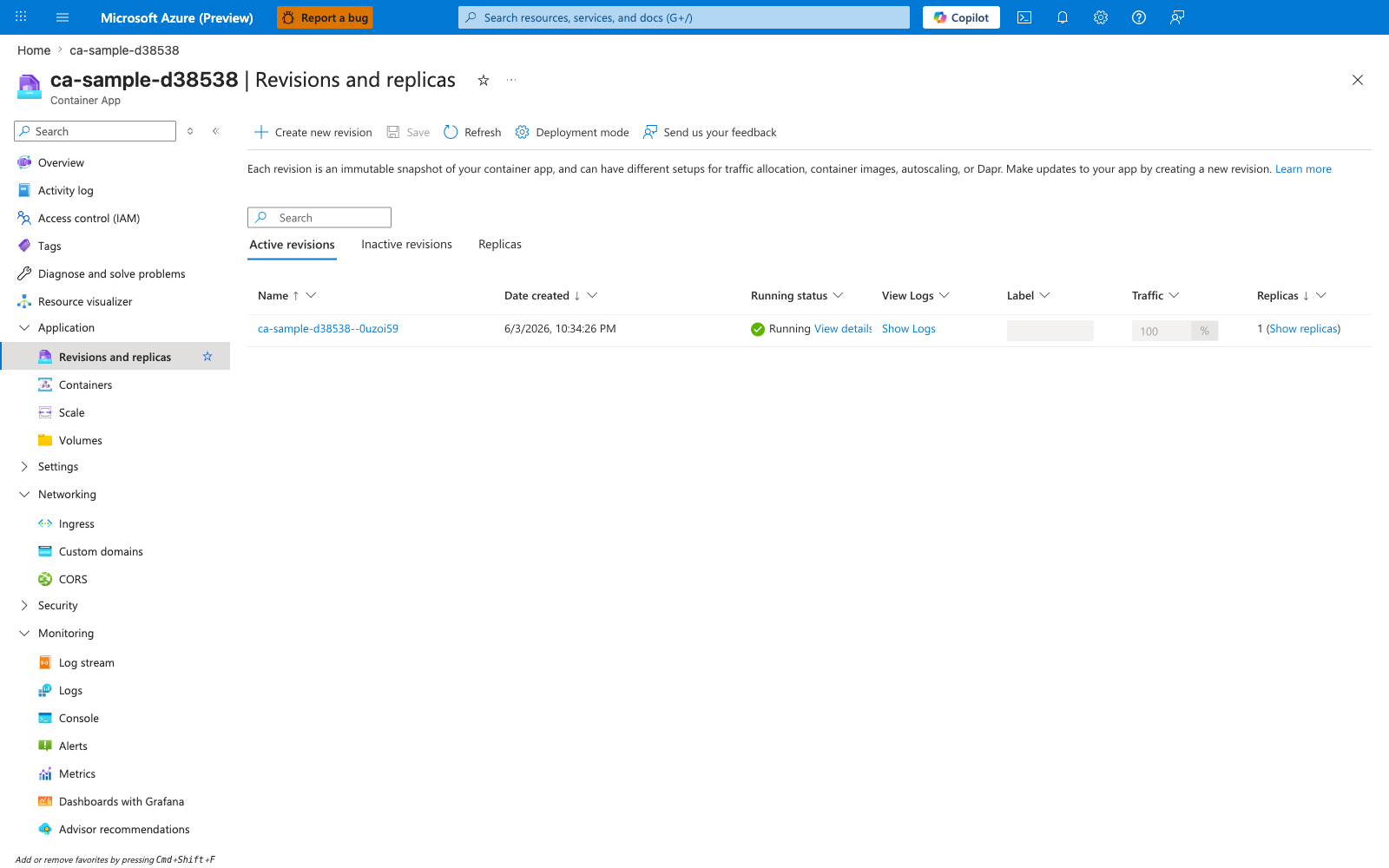
[Observed] Header: ca-sample-d38538 | Revisions and replicas, Container App. Toolbar: Create new revision, Save, Refresh, Deployment mode, Send us your feedback. Body text: Each revision is an immutable snapshot of your container app, and can have different setups for traffic allocation, container images, autoscaling, or Dapr. Make updates to your app by creating a new revision. Learn more. Tabs: Active revisions, Inactive revisions, Replicas. Column headers: Name, Date created, Running status, View Logs, Label, Traffic, Replicas. Row values: ca-sample-d38538--0uzoi59, 6/3/2026, 10:34:26 PM, Running, View details, Show Logs, 100, %, 1 (Show replicas).
[Inferred] The per-revision column Running status with value Running is consistent with this page's Verification Steps reading revision-scoped state via az containerapp revision list --output table. The per-revision identifier under Name (ca-sample-d38538--0uzoi59) appears to map to the --revision argument shape this page's Restart and Recovery Workflows passes to az containerapp revision restart.
[Not Proven] Additional probe detail, restart detail, replica failure history detail, and health-state detail are not shown on this blade.
Restart and Recovery Workflows
Restart a revision when transient faults occur:
az containerapp revision restart \
  --name "$APP_NAME" \
  --resource-group "$RG" \
  --revision "${APP_NAME}--stable"
| Command | Purpose |
|---|---|
az containerapp revision restart | Restarts one specific revision when the failure appears transient, allowing you to recover replicas without changing traffic assignments or redeploying the app. |
--revision "${APP_NAME}--stable" | Limits the action to the affected revision so you do not unnecessarily disrupt other active revisions in multiple-revision mode. |
For persistent failures, roll traffic back to a healthy revision (see revisions guide).
Prefer rollback over repeated restart loops
If failures continue after one restart cycle, route traffic to a known-good revision and investigate offline.
Recovery Action Matrix
| Symptom | First Action | Escalation Action |
|---|---|---|
| Sporadic probe failures | Restart revision once | Increase probe delay and inspect dependency latency |
| All replicas failing readiness | Check configuration/secrets rollout | Shift traffic to prior healthy revision |
| Repeated liveness restarts | Inspect memory/CPU pressure and startup logs | Reduce resource contention and redeploy |
| Clustered multi-replica restart (≥2 replicas replaced within 60s) on a zone-redundant environment | Triage with the zone redundancy mass-reschedule KQL pack before assuming a per-replica zone failure | Apply the four-layer mitigation in the Zone Redundancy Best-Effort playbook |
| Environment-wide instability | Validate managed environment health | Activate incident response and failover runbook |
Verification Steps
Check revision states and recent failures:
| Command | Why it is used |
|---|---|
az containerapp revision list ... | Lists revisions so rollout state, traffic, and health can be verified. |
Review system logs for probe failures:
az containerapp logs show \
  --name "$APP_NAME" \
  --resource-group "$RG" \
  --type system \
  --follow false
| Command | Why it is used |
|---|---|
az containerapp logs show ... | Runs the Azure CLI operation required by the documented step. |
Example output (PII masked):
2026-04-02T09:10:21Z Probe failed: readiness check returned HTTP 503
2026-04-02T09:10:31Z Restarting container due to failed liveness probe
Troubleshooting
Frequent restarts
- Increase
initialDelaySecondsfor slow startup workloads. - Confirm probe path and port match the application listener.
- Check downstream dependency outages causing readiness failures.
App never becomes ready
- Inspect app logs for startup exceptions.
- Verify secrets and configuration are available at startup.
Advanced Topics
- Separate startup and readiness logic to reduce false positives.
- Add synthetic probes from outside the environment for end-to-end health.
- Trigger automated recovery playbooks from alert rules.
See Also
- Revisions
- Observability
- Health Probes
- Zone Redundancy (Operations)
- Zone Redundancy Best-Effort playbook
- Availability and Non-Guarantees — operator-facing enumeration of the five best-effort contracts (zone redundancy, node spread, clustered restart, rolling-rollout transient masking, single-region availability cap) with the Microsoft Learn disclosure for each.