Cost Optimization Operations
This guide describes production cost operations for Azure Container Apps, including profile selection, scale-to-zero strategy, and spend governance.
Prerequisites
- Access to subscription cost and usage data
- Known workload patterns (steady, bursty, event-driven)
Choose the Right Runtime Profile
- Consumption profile: best for variable traffic and scale-to-zero scenarios.
- Workload profiles: best for predictable baseline load and dedicated capacity planning.
flowchart TD
    T[Traffic Pattern] --> P{Profile Choice}
    P -->|Bursty/idle| C[Consumption]
    P -->|Steady baseline| W[Workload Profiles]
    C --> S[Scale-to-zero friendly]
    W --> R[Reserved capacity planning]
Cost optimization without SLO context is risky
Lowering replicas or CPU aggressively can reduce spend but degrade latency and reliability. Validate changes against service objectives.
Portal View: Replica Range and Scaler Type as Cost Levers
The Azure Portal Scale blade is the surface that names the replica range and scaler type that this page's Cost Lever Matrix treats as cost levers.
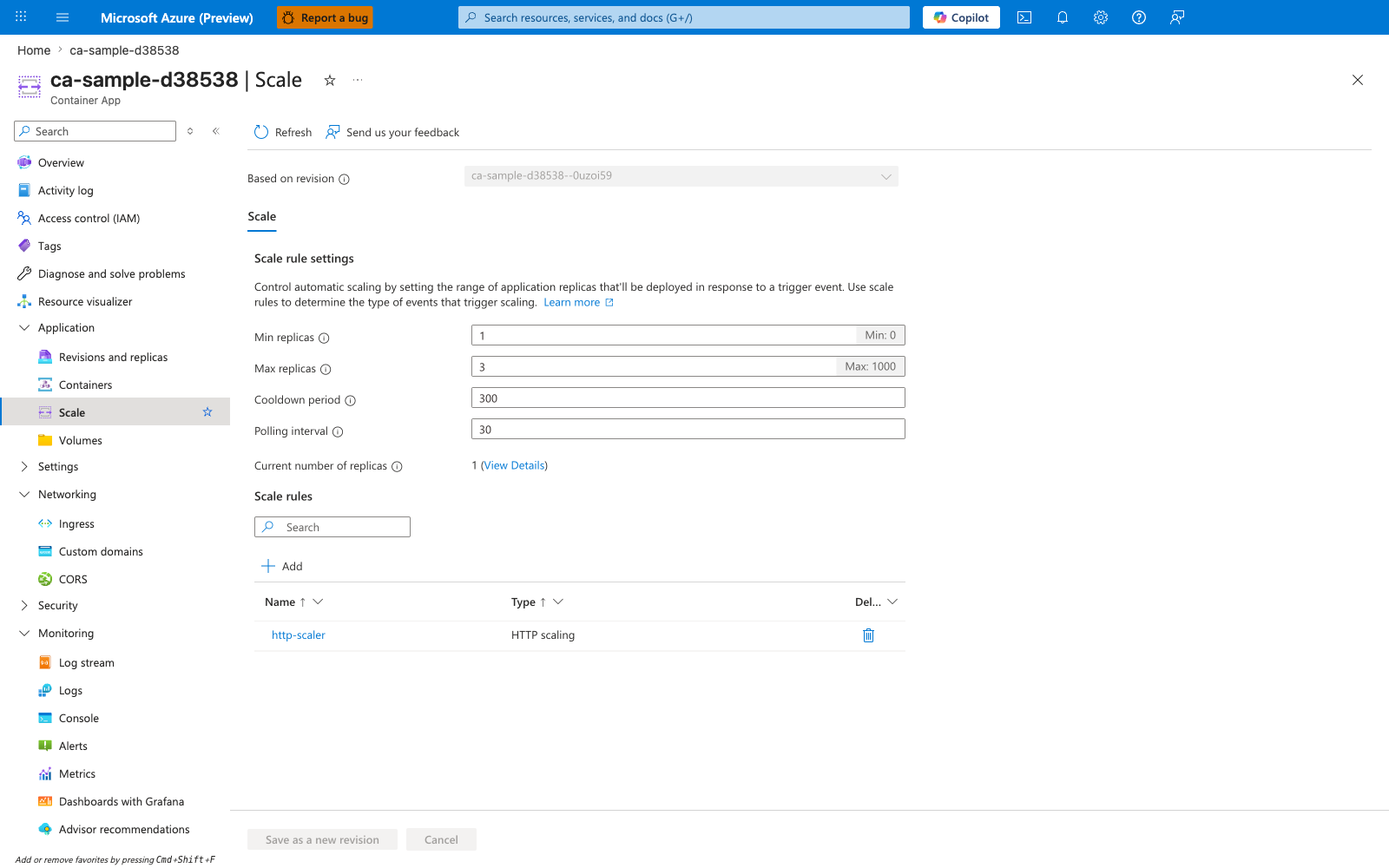
[Observed] ca-sample-d38538 | Scale. Container App. Refresh. Send us your feedback. Based on revision. ca-sample-d38538--0uzoi59. Scale. Scale rule settings. Control automatic scaling by setting the range of application replicas that'll be deployed in response to a trigger event. Use scale rules to determine the type of events that trigger scaling. Learn more. Min replicas. 1. Min: 0. Max replicas. 3. Max: 1000. Cooldown period. 300. Polling interval. 30. Current number of replicas. 1 (View Details). Scale rules. Add. Name. Type. Del.... http-scaler. HTTP scaling. Save as a new revision. Cancel.
[Inferred] The Min replicas and Max replicas fields appear to map to the minReplicas and maxReplicas rows of this page's Cost Lever Matrix. The Min replicas placeholder text Min: 0 is consistent with the floor this page's Scale-to-Zero for Intermittent Workloads section sets via az containerapp update --min-replicas 0.
[Not Proven] Additional replica sizing detail, workload profile detail, scale-rule configuration detail, and cost detail are not shown on this blade.
Cost Lever Matrix
| Lever | Cost Impact | Reliability Impact | Recommended Guardrail |
|---|---|---|---|
minReplicas | High | Cold starts possible when set to 0 | Keep critical APIs at 1+ warm replica |
maxReplicas | Medium to high | Throttling risk if set too low | Tune to dependency capacity |
| CPU/memory per replica | Medium | OOM/restarts if undersized | Observe p95 utilization trends |
| Profile selection | High | Performance isolation varies | Reassess quarterly by workload type |
Inspect environment profile configuration:
az containerapp env show \
  --name "$ACA_ENV_NAME" \
  --resource-group "$RG" \
  --query "properties.workloadProfiles" \
  --output json
| Command | Purpose |
|---|---|
az containerapp env show --query "properties.workloadProfiles" | Inspects the managed environment's workload-profile configuration so you can see which profile options are available before making a cost/performance sizing decision. |
--name "$ACA_ENV_NAME" / --resource-group "$RG" | Points the check at the exact Container Apps environment that hosts the workload, because profile availability is environment-scoped. |
--output json | Returns the full profile objects, which is more useful than a table when you need to compare names, types, and sizing fields. |
Review current app resource allocation:
az containerapp show \
  --name "$APP_NAME" \
  --resource-group "$RG" \
  --query "properties.template.containers[].resources" \
  --output json
| Command | Why it is used |
|---|---|
az containerapp show ... | Reads the Container App configuration so the documented setting can be verified. |
Scale-to-Zero for Intermittent Workloads
az containerapp update \
  --name "$APP_NAME" \
  --resource-group "$RG" \
  --min-replicas 0 \
  --max-replicas 5
| Command | Why it is used |
|---|---|
az containerapp update ... | Updates the existing Container App configuration without recreating the app. |
Set conservative max replicas for non-critical services to cap runaway spend.
Use separate policies for critical vs non-critical apps
Apply tighter cost caps to batch/background services and protect user-facing APIs with stronger availability baselines.
Cost Monitoring and Guardrails
List subscription costs by service for visibility:
| Command | Why it is used |
|---|---|
az consumption usage ... | Runs the Azure CLI operation required by the documented step. |
Track request and replica trends with metrics to identify over-provisioning:
az monitor metrics list \
  --resource "/subscriptions/<subscription-id>/resourceGroups/$RG/providers/Microsoft.App/containerApps/$APP_NAME" \
  --metric "Replicas" \
  --interval "PT1H" \
  --output table
| Command | Why it is used |
|---|---|
az monitor metrics ... | Creates or inspects Azure Monitor alerts, diagnostic settings, or metrics. |
Verification Steps
az containerapp show \
  --name "$APP_NAME" \
  --resource-group "$RG" \
  --query "{minReplicas:properties.template.scale.minReplicas,maxReplicas:properties.template.scale.maxReplicas,resources:properties.template.containers[].resources}" \
  --output json
| Command | Why it is used |
|---|---|
az containerapp show ... | Reads the Container App configuration so the documented setting can be verified. |
Example output (PII masked):
Troubleshooting
Costs increased unexpectedly
- Check if
minReplicaswas changed from0to1+. - Verify new scaler thresholds did not trigger excessive scale-out.
- Review revision rollouts that increased CPU/memory limits.
Advanced Topics
- Use budget alerts and cost anomaly detection for proactive control.
- Separate critical and non-critical services into different cost centers.
- Combine workload profiles for baseline services and consumption for burst paths.