VNet Integration
Deploy Container Apps in a custom virtual network for network isolation.
Overview
Container Apps can be deployed into a custom VNet to: - Isolate traffic from the public internet - Connect to private resources (databases, storage) - Control ingress/egress with NSG rules
Subnet sizing is not optional
The Container Apps infrastructure subnet must be at least /23. Smaller subnets commonly fail at environment provisioning time.
Architecture
flowchart TD
    subgraph VNet ["Virtual Network (10.0.0.0/16)"]
        subgraph CASubnet ["Container Apps Subnet (10.0.0.0/23)"]
            subgraph Environment ["Container Apps Environment"]
                CA1[App 1]
                CA2[App 2]
                INV[Ingress: Envoy]
            end
        end

        subgraph PESubnet ["Private Endpoint Subnet (10.0.2.0/24)"]
            PE[Private Endpoint]
        end
    end

    subgraph Internet [Public Internet]
        U[User]
    end

    U -- External Ingress --> INV
    INV -- Routing --> CA1
    CA1 -- VNet-Local Call --> CA2
    CA1 -- Private Link --> PE
Portal view: non-integrated baseline for the Bicep example
This screenshot is used here as a visual contrast baseline for the Bicep example in Deploy Container Apps Environment with VNet.
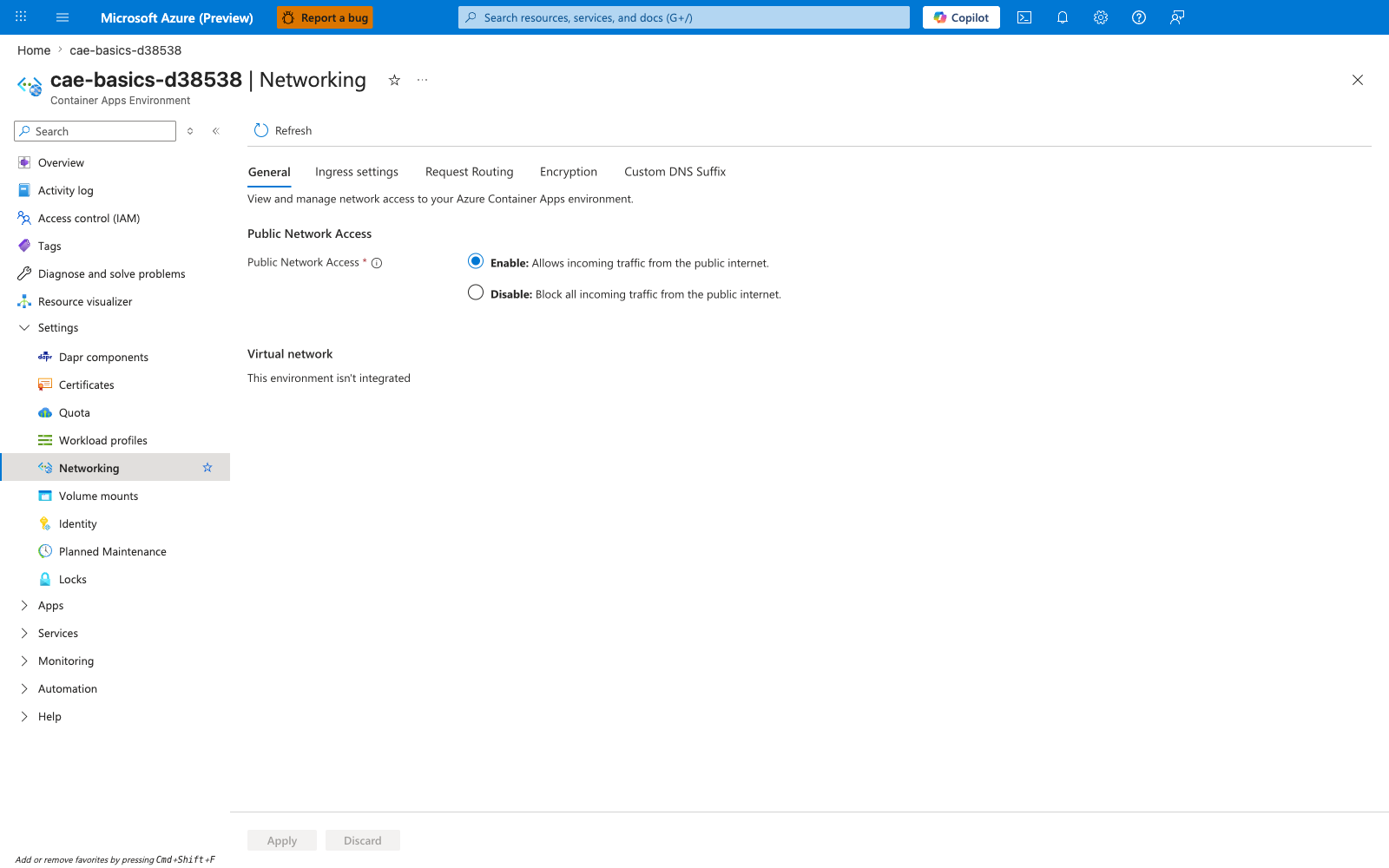
[Observed] The Public Network Access section has Enable: Allows incoming traffic from the public internet. selected. The Virtual network section reads This environment isn't integrated. The tab strip lists General, Ingress settings, Request Routing, Encryption, Custom DNS Suffix. No subnet resource ID or CIDR value is visible in the shown content.
[Inferred] The visible This environment isn't integrated text is consistent with the Bicep example in Deploy Container Apps Environment with VNet introducing networking properties that are not shown on this blade. The absence of any visible subnet resource ID value appears to map to the infrastructureSubnetId property in that same example.
[Not Proven] This image does not show the infrastructureSubnetId property from Deploy Container Apps Environment with VNet. It does not show the internal: true vs internal: false choice from Internal vs External Ingress. It does not show the /23 minimum subnet sizing from Overview. It does not show the NSG rules from Network Security Groups. It does not show the private endpoint connectivity discussed in Access Private Resources.
Prerequisites
- Azure subscription with VNet creation permissions
- Existing VNet or create new one
Create VNet with Subnets
Container Apps requires a dedicated subnet with minimum /23 CIDR block.
Using Azure CLI:
# Create VNet
az network vnet create \
  --name vnet-containerapp \
  --resource-group $RESOURCE_GROUP \
  --location $LOCATION \
  --address-prefix 10.0.0.0/16

# Create subnet for Container Apps (minimum /23)
az network vnet subnet create \
  --name snet-containerapp \
  --vnet-name vnet-containerapp \
  --resource-group $RESOURCE_GROUP \
  --address-prefix 10.0.0.0/23
| Command | Why it is used |
|---|---|
az network vnet create ... | Creates or inspects networking resources such as VNets, DNS zones, routes, or private endpoints. |
Using Bicep:
resource vnet 'Microsoft.Network/virtualNetworks@2023-05-01' = {
  name: 'vnet-containerapp'
  location: location
  properties: {
    addressSpace: {
      addressPrefixes: ['10.0.0.0/16']
    }
    subnets: [
      {
        name: 'snet-containerapp'
        properties: {
          addressPrefix: '10.0.0.0/23'
        }
      }
    ]
  }
}
Deploy Container Apps Environment with VNet
resource containerAppEnv 'Microsoft.App/managedEnvironments@2023-05-01' = {
  name: 'cae-${baseName}'
  location: location
  properties: {
    vnetConfiguration: {
      infrastructureSubnetId: vnet.properties.subnets[0].id
      internal: false  // true for internal-only access
    }
    appLogsConfiguration: {
      destination: 'log-analytics'
      logAnalyticsConfiguration: {
        customerId: logAnalytics.properties.customerId
        sharedKey: logAnalytics.listKeys().primarySharedKey
      }
    }
  }
}
Internal vs External Ingress
For the full ingress model, including the app-level external property, transport selection, TCP rules, headers, and request handling behavior, see Ingress in Azure Container Apps. This section focuses on the environment-level VNet posture.
| Mode | Description | Use Case |
|---|---|---|
internal: false | Public IP + VNet | Public APIs with VNet backend access |
internal: true | Private IP only | Internal microservices, no public access |
Access Private Resources
Once in a VNet, Container Apps can access: - Private Endpoints (Azure SQL, Storage, Key Vault) - VNet-peered resources - On-premises via VPN/ExpressRoute
Treat DNS as part of networking design
Private endpoint connectivity depends on DNS zone linkage and name resolution. Validate DNS records before investigating application code.
Example: Connect to Private Azure SQL
import os
import pyodbc

# Connection string uses private endpoint DNS
conn_str = os.environ['SQL_CONNECTION_STRING']
# Server=myserver.database.windows.net -> resolves to private IP
Network Security Groups
Apply NSG rules to the Container Apps subnet:
resource nsg 'Microsoft.Network/networkSecurityGroups@2023-05-01' = {
  name: 'nsg-containerapp'
  location: location
  properties: {
    securityRules: [
      {
        name: 'AllowHTTPS'
        properties: {
          priority: 100
          direction: 'Inbound'
          access: 'Allow'
          protocol: 'Tcp'
          sourceAddressPrefix: '*'
          sourcePortRange: '*'
          destinationAddressPrefix: '*'
          destinationPortRange: '443'
        }
      }
    ]
  }
}
Troubleshooting
Container can't reach private endpoint
- Check DNS resolution inside container
- Verify private endpoint is in same/peered VNet
- Check NSG rules allow outbound traffic
Public access not working
- Verify
internal: falsein environment config - Check ingress is enabled on container app
- Verify FQDN is correctly configured
See Also
- Ingress in Azure Container Apps
- Private Endpoints
- Application Gateway Integration
- Egress Control
- Service-to-Service Communication
- Environment Networking and CIDR
- Azure SQL