Egress Control
Control outbound traffic from Container Apps.
Default Behavior
By default, Container Apps can access: - Public internet - Azure services via public endpoints - Resources in the same VNet (if VNet integrated)
Uncontrolled egress increases data exfiltration risk
Production workloads should define explicit outbound paths and approved destinations, especially when handling regulated or sensitive data.
Egress Strategy Comparison
| Strategy | Primary Goal | Trade-off | Typical Fit |
|---|---|---|---|
| Default outbound | Fast setup | Minimal governance | Dev/test environments |
| UDR + Azure Firewall | Domain/IP filtering and inspection | Higher complexity and cost | Regulated production workloads |
| NAT Gateway | Static outbound IP for allow-lists | No L7 filtering by itself | SaaS allow-list integrations |
Portal view: non-integrated starting point for UDR and NAT Gateway recipes
This screenshot is used here as a visual starting point for the Bicep examples in User-Defined Routes (UDR) and NAT Gateway for Static Outbound IP.
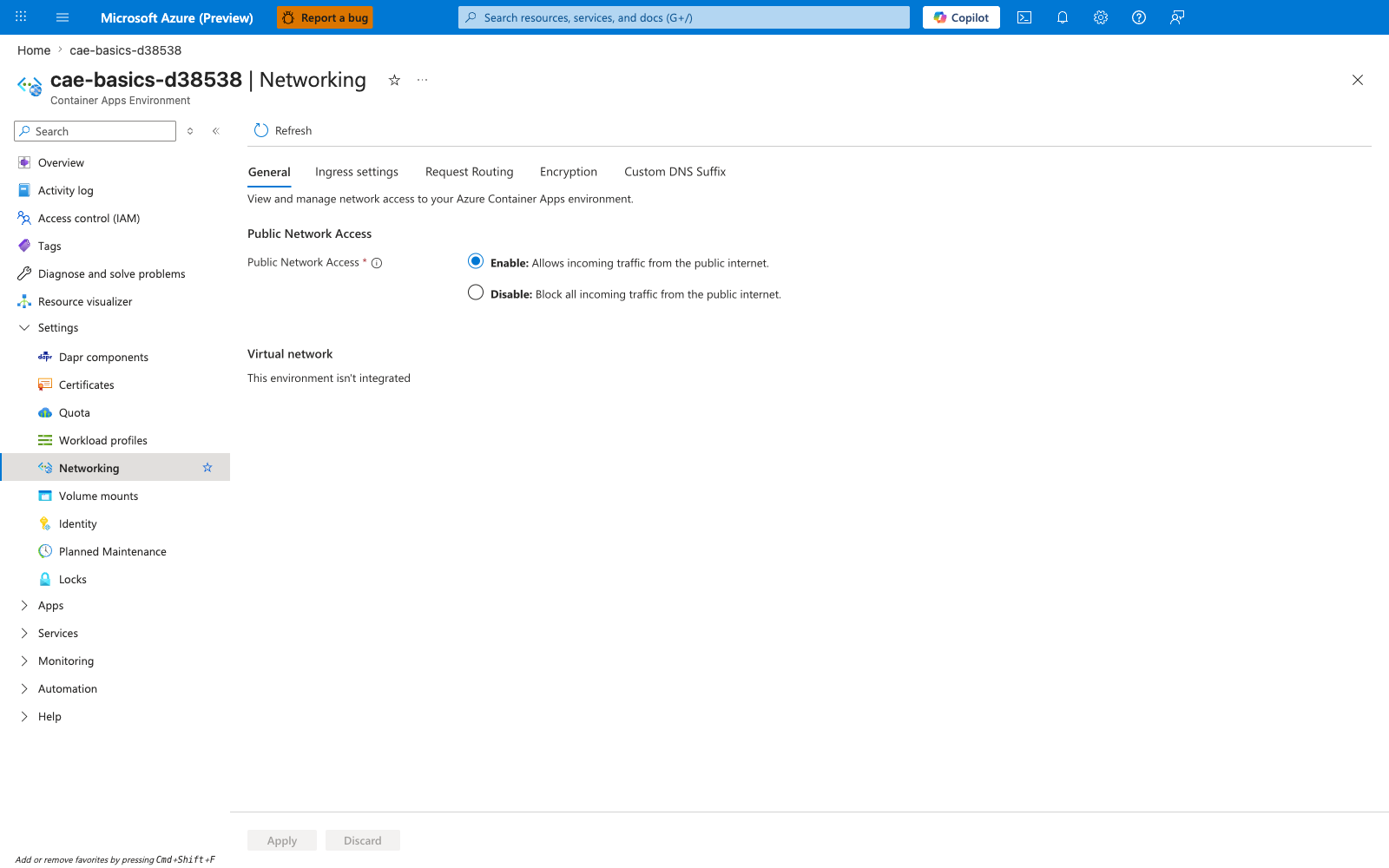
[Observed] The Public Network Access section has Enable: Allows incoming traffic from the public internet. selected. The Virtual network section reads This environment isn't integrated. The tab strip lists General, Ingress settings, Request Routing, Encryption, Custom DNS Suffix. No route table, NAT gateway, or firewall reference is visible in the shown content.
[Inferred] The visible This environment isn't integrated text is consistent with this page using the screenshot as a contrast point for the Bicep examples in User-Defined Routes (UDR) and NAT Gateway for Static Outbound IP. The screenshot appears to map to a configuration context separate from the routeTable and natGateway subnet properties shown in those examples.
[Not Proven] This image does not show the Microsoft.Network/routeTables resource from User-Defined Routes (UDR). It does not show the Microsoft.Network/natGateways resource from NAT Gateway for Static Outbound IP. It does not show the Microsoft.Network/firewallPolicies resource from Azure Firewall Rules. It does not show the service tags listed in Required Outbound Dependencies. It does not show the managed identity ACR egress dependencies discussed later in Required Outbound Dependencies.
User-Defined Routes (UDR)
Route outbound traffic through Azure Firewall or NVA:
flowchart TD
    subgraph VNet [Virtual Network]
        subgraph Subnet [CAE Subnet]
            APP[Container App]
        end

        subgraph FWSubnet [AzureFirewallSubnet]
            FW[Azure Firewall]
        end

        subgraph RT [Route Table]
            R[0.0.0.0/0 -> Firewall IP]
        end
    end

    subgraph Internet [Public Internet]
        EXT[Public API]
    end

    APP -- 1. Outbound Request --> RT
    RT -- 2. Next Hop --> FW
    FW -- 3. Policy Check --> EXT
resource routeTable 'Microsoft.Network/routeTables@2023-05-01' = {
name: 'rt-containerapp'
location: location
properties: {
routes: [
{
name: 'default-route'
properties: {
addressPrefix: '0.0.0.0/0'
nextHopType: 'VirtualAppliance'
nextHopIpAddress: firewallPrivateIp
}
}
]
}
}
Azure Firewall Rules
Allow required outbound traffic:
NAT Gateway Architecture
flowchart TD
    subgraph VNet [Virtual Network]
        subgraph Subnet [CAE Subnet]
            APP[Container App]
        end

        NGW[NAT Gateway]
        PIP[Public IP Address]
    end

    subgraph Internet [Public Internet]
        EXT[Public Dependency]
    end

    APP -- 1. Outbound Traffic --> NGW
    NGW -- 2. Source NAT (PIP) --> EXT
resource firewallPolicy 'Microsoft.Network/firewallPolicies@2023-05-01' = {
name: 'fw-policy'
properties: {
sku: { tier: 'Standard' }
}
}
Azure Firewall Rules
Allow required outbound traffic:
resource firewallPolicy 'Microsoft.Network/firewallPolicies@2023-05-01' = {
  name: 'fw-policy'
  properties: {
    sku: { tier: 'Standard' }
  }
}
resource appRuleCollection 'Microsoft.Network/firewallPolicies/ruleCollectionGroups@2023-05-01' = {
parent: firewallPolicy
name: 'container-apps-rules'
properties: {
priority: 100
ruleCollections: [
{
ruleCollectionType: 'FirewallPolicyFilterRuleCollection'
name: 'allow-external-apis'
priority: 100
action: { type: 'Allow' }
rules: [
{
ruleType: 'ApplicationRule'
name: 'allow-jsonplaceholder'
protocols: [{ protocolType: 'Https', port: 443 }]
targetFqdns: ['jsonplaceholder.typicode.com']
sourceAddresses: ['10.0.0.0/23']
}
]
}
]
}
}
NAT Gateway for Static Outbound IP
Assign static IP for outbound traffic:
resource natGateway 'Microsoft.Network/natGateways@2023-05-01' = {
  name: 'nat-containerapp'
  location: location
  sku: { name: 'Standard' }
  properties: {
    publicIpAddresses: [{ id: publicIp.id }]
  }
}

resource subnet 'Microsoft.Network/virtualNetworks/subnets@2023-05-01' = {
  name: 'snet-containerapp'
  properties: {
    addressPrefix: '10.0.0.0/23'
    natGateway: { id: natGateway.id }
  }
}
Combine NAT and firewall when needed
Use NAT Gateway for predictable source IP and Azure Firewall for destination governance when both compliance and partner allow-list requirements exist.
Verify Outbound IP
import requests

@app.route('/api/my-ip')
def my_ip():
    # Use standard service to verify public outbound IP
    response = requests.get('https://api.ipify.org?format=json')
    return response.json()  # Returns NAT Gateway's public IP
Required Outbound Dependencies
If you restrict egress and pull application images from Azure Container Registry (ACR) by using managed identity, allow the dependency categories that support both token acquisition and image download.
| Service Tag / Dependency | Port | When Required |
|---|---|---|
AzureActiveDirectory | 443 | Required when the container app uses managed identity to obtain an access token for ACR. |
ACR login server | 443 | Required for the registry endpoint (for example, <registry-name>.azurecr.io) unless you use a private endpoint for the registry. |
Storage.<Region> | 443 | Required for ACR-backed image layer downloads from regional storage. |
MicrosoftContainerRegistry | 443 | Required for Microsoft-managed system container dependencies in the environment. |
AzureContainerRegistry | 443 | Required when pulling images from ACR without a private endpoint. When using a private endpoint for ACR, this tag is not required. |
AzureFrontDoor.FirstParty | 443 | Required as a dependency of Microsoft Container Registry. |
When using Azure Firewall application rules instead of (or in addition to) NSG service tags, allow these FQDNs for managed identity token acquisition:
| FQDN | When Required |
|---|---|
login.microsoftonline.com | Token issuance for managed identity |
*.login.microsoftonline.com | Regional token endpoints |
login.microsoft.com | Primary Microsoft login endpoint |
*.login.microsoft.com | Alternative login endpoints |
*.identity.azure.net | Managed identity metadata |
Use service tags where Azure provides them, and use private endpoints or FQDN-aware firewall rules for registry-specific destinations.
flowchart TD
    APP[Container App] --> FW[Firewall / NSG]
    FW --> AAD[Microsoft Entra ID<br/>AzureActiveDirectory token]
    FW --> MCR[Microsoft Container Registry<br/>System containers]
    FW --> ACR[Azure Container Registry<br/>Application image]
    ACR --> STG[Storage.<Region><br/>Image layers]
Private ACR does not remove all outbound requirements
Even when ACR uses a private endpoint, managed identity image pulls still require outbound access to AzureActiveDirectory on port 443 so the platform can acquire a token.
Also keep DNS to 168.63.129.16:53 available; blocking platform DNS breaks name resolution for these dependencies.
For the failure symptoms and validation steps, see Image Pull Failure.
The same egress dependency applies to control-plane operations that authenticate with the app's managed identity — for example, az containerapp secret set --identity ... --key-vault-url ... performs OIDC discovery against login.microsoftonline.com/<tenant>/.well-known/openid-configuration before token acquisition. When a UDR routes the workload subnet through Azure Firewall and the firewall policy lacks an Application Rule for login.microsoftonline.com and login.microsoft.com, the discovery request fails with a transport-level EOF and the secret update returns Unable to get value using Managed identity. For the reproducible falsification proof, see ACA Secret Key Vault Reference — Managed Identity Network Path Lab and Secret and Key Vault Reference Failure — H4.