Scheduled Jobs
Scheduled Jobs run at recurring times and are a good fit for nightly cleanup, hourly materialization, and business-window batch work.
Main Content
Creating a scheduled job
export RG="rg-aca-prod"
export ACA_ENV_NAME="aca-env-prod"
export JOB_NAME="job-nightly-reconcile"
export IMAGE_NAME="acrsharedprod.azurecr.io/jobs/nightly-reconcile:v1.0.0"

az containerapp job create \
  --name "$JOB_NAME" \
  --resource-group "$RG" \
  --environment "$ACA_ENV_NAME" \
  --trigger-type "Schedule" \
  --cron-expression "0 2 * * *" \
  --replica-timeout 3600 \
  --replica-retry-limit 1 \
  --image "$IMAGE_NAME"
| Command | Purpose |
|---|---|
export RG=..., ACA_ENV_NAME=..., JOB_NAME=..., IMAGE_NAME=... | Defines the environment, recurring job name, and image reference used by the scheduled-job example. |
az containerapp job create --trigger-type "Schedule" | Creates a job whose executions are driven by a cron schedule instead of human action or event backlog. |
--cron-expression "0 2 * * *" | Schedules the run for 02:00 UTC every day, which matches the nightly reconciliation scenario discussed in the surrounding text. |
--replica-timeout 3600 / --replica-retry-limit 1 | Keeps long-running batch work bounded while still allowing a single retry for transient failures. |
Cron expression examples
Use readable schedules and document them in the runbook:
| Intent | Example | Meaning |
|---|---|---|
| Hourly | 0 * * * * | At minute 0 every hour |
| Nightly | 0 2 * * * | 02:00 every day |
| Weekly | 0 6 * * 1 | 06:00 every Monday |
| Business-hours-only | 0 8-18 * * 1-5 | Top of the hour, weekdays, 08:00-18:00 |
Cron syntax needs current-source confirmation
Azure CLI examples for Container Apps Jobs use a five-field cron expression, and this guide follows that model. Confirm the latest Microsoft Learn syntax before depending on macros, seconds fields, or provider-specific extensions.
Time zone handling
Schedule docs and operations runbooks should treat the job schedule as UTC unless you have explicitly verified another supported time-zone control in the current product documentation.
Recommended practice:
- Author cron in UTC.
- Document the equivalent local-business time.
- Re-check schedules before daylight-saving transitions and regional policy changes.
Time-zone configurability was not independently verified in this run
No authoritative quote was recovered for alternate time-zone configuration on Container Apps Jobs. Treat UTC as the safe default until you verify otherwise in current Microsoft Learn documentation.
Overlap and missed runs
The platform schedule decides when a new execution is created, but your workload must still tolerate slow previous runs, manual replays, and retries.
Protect scheduled jobs with:
- Idempotent writes
- External locking when overlap would corrupt state
- Measured timeout values
- Alerting on missed windows and long-running executions
Overlap and skip behavior still needs a direct product quote
This page does not claim a guaranteed platform behavior for overlapping or skipped executions because the Microsoft Learn quote collection for that detail did not complete. Assume overlap is a design risk unless you have validated the current platform behavior in your environment.
Scheduling checklist
Before production rollout, answer:
- What is the allowed execution window?
- Can a new run start while the previous run is still active?
- What is the operational response if a window is missed?
Scheduled execution flow
flowchart TD
    A[Cron expression reaches next window] --> B[Container Apps creates execution]
    B --> C[Replicas start]
    C --> D[Work completes or times out]
    D --> E{Success?}
    E -->|Yes| F[Record successful run]
    E -->|No| G[Apply retry policy]
    G --> H[Alert or replay if needed]
Portal View: Schedule Trigger Type and Cron Expression Field
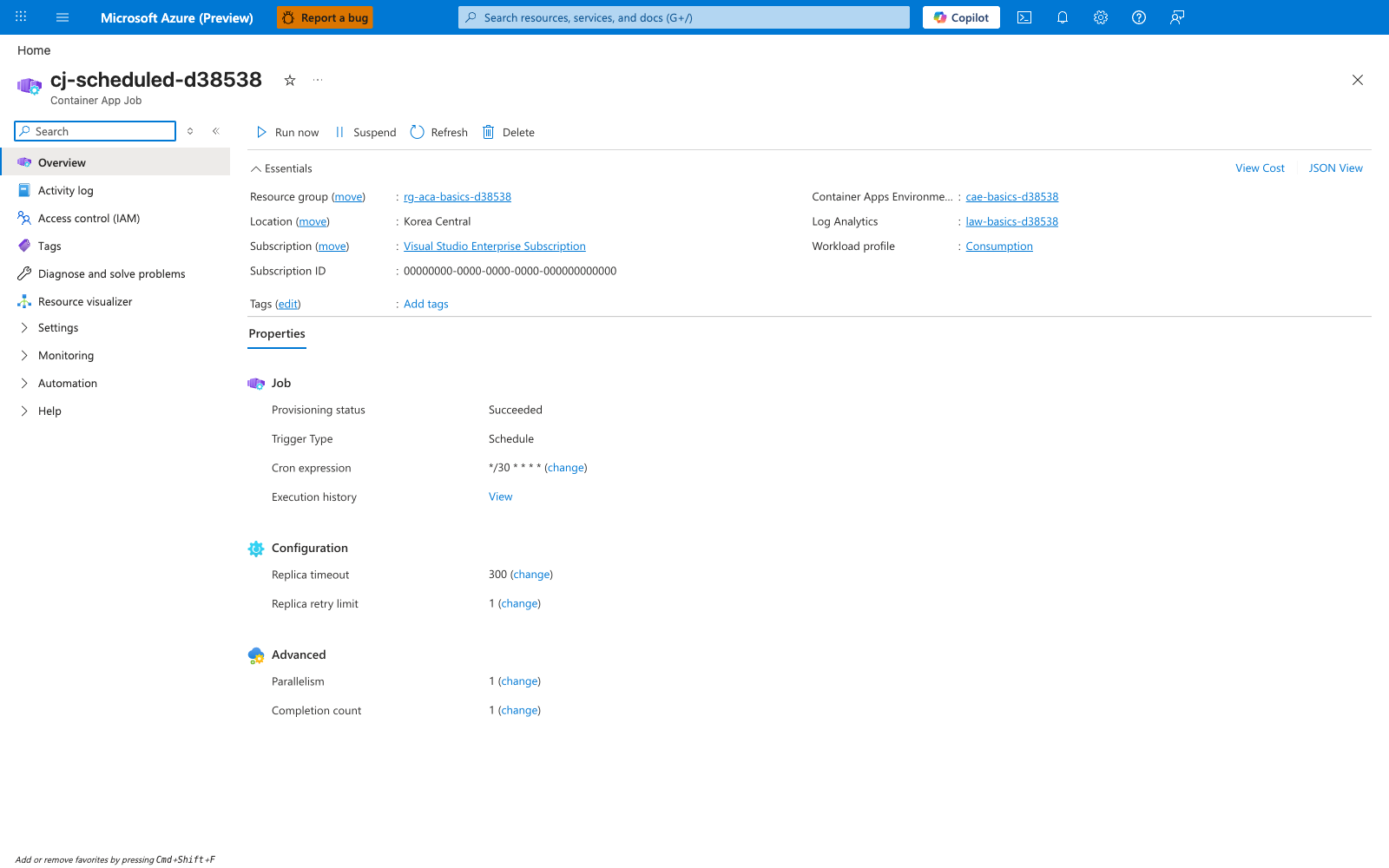
[Observed] cj-scheduled-d38538. Container App Job. Run now. Suspend. Refresh. Delete. Resource group. rg-aca-basics-d38538. Location. Korea Central. Subscription. Visual Studio Enterprise Subscription. Subscription ID. 00000000-0000-0000-0000-000000000000. Container Apps Environme.... cae-basics-d38538. Log Analytics. law-basics-d38538. Workload profile. Consumption. Properties. Job. Provisioning status. Succeeded. Trigger Type. Schedule. Cron expression. */30 * * * *. Execution history. View. Configuration. Replica timeout. 300. Replica retry limit. 1. Advanced. Parallelism. 1. Completion count. 1.
[Inferred] The Trigger Type field appears to map to the same configuration lever set by --trigger-type in Creating a scheduled job. The Cron expression field appears to map to the same lever set by --cron-expression in that same section. The five space-separated tokens shown in the Cron expression value are consistent with the five-field format used by every row of the Cron expression examples table.
[Not Proven] Additional time-zone detail, scheduling-control detail, next-execution detail, and execution history detail are not visible on this view.