Manual Jobs
Manual Jobs are best for ad-hoc execution: data repair, one-time backfills, controlled maintenance windows, and manual replay after a failed run.
Main Content
How a manual job is triggered
Create the job once, then start executions on demand:
export RG="rg-aca-prod"
export ACA_ENV_NAME="aca-env-prod"
export JOB_NAME="job-orders-backfill"
export IMAGE_NAME="acrsharedprod.azurecr.io/jobs/orders-backfill:v1.0.0"

az containerapp job create \
  --name "$JOB_NAME" \
  --resource-group "$RG" \
  --environment "$ACA_ENV_NAME" \
  --trigger-type "Manual" \
  --parallelism 2 \
  --replica-completion-count 2 \
  --replica-retry-limit 1 \
  --replica-timeout 1800 \
  --image "$IMAGE_NAME"

az containerapp job start \
  --name "$JOB_NAME" \
  --resource-group "$RG"
| Command | Purpose |
|---|---|
export RG=..., ACA_ENV_NAME=..., JOB_NAME=..., IMAGE_NAME=... | Establishes the resource group, environment, job name, and immutable image that the manual-run example uses. |
az containerapp job create --trigger-type "Manual" | Registers the reusable manual job definition that operators can invoke for backfills, repair work, or maintenance tasks. |
--parallelism 2 / --replica-completion-count 2 | Shows a fan-out pattern where both replicas must complete, which fits partitioned manual jobs rather than single-threaded repair scripts. |
az containerapp job start --name "$JOB_NAME" --resource-group "$RG" | Launches an execution on demand from the saved job template, which is the core operational difference between manual jobs and scheduled/event-driven ones. |
Execution lifecycle for operator-driven runs
Manual triggering creates a job execution, then the platform starts one or more replicas from the job template.
- The execution is the platform record you inspect later.
- Replicas are the actual container instances that run the work.
- Success or failure is determined by completion rules and retry/timeout policy.
Exact execution state strings need current-source verification
This guide uses operator-friendly labels such as Running, Succeeded, Failed, and Stopped. Before you build automation around API or CLI output, confirm the exact state names currently emitted by Microsoft Learn, Azure CLI, or the ARM/management API.
Parallelism and replicaCompletionCount
Use the two execution fan-out controls together:
| Setting | What it controls | Typical use |
|---|---|---|
--parallelism | Maximum replicas that may run concurrently for one execution | Parallel shard processing |
--replica-completion-count | How many successful replicas are required before the execution is considered complete | All-partitions-required or n-of-m patterns |
Practical patterns:
parallelism=1,replica-completion-count=1: one execution, one worker.parallelism=4,replica-completion-count=4: all four partitions must succeed.parallelism=8,replica-completion-count=3: n-of-m completion semantics, only use this when partial completion is acceptable by design.
Retry behavior with replicaRetryLimit
--replica-retry-limit controls how many times a failed replica may be retried before the execution settles as failed.
Use low retry counts when:
- Failure is data-dependent rather than transient.
- The workload has expensive side effects.
- An operator wants a failed execution to stop quickly for inspection.
Use higher retry counts only when:
- The workload is idempotent.
- Failures are transient, such as short dependency outages.
- You have measured that replay does not overload the downstream system.
Recommended manual-job pattern
Manual Jobs work best when the operator can answer three questions before starting a run:
- What exact input or partition set is being processed?
- Is the job safe to retry if one or more replicas fail?
- What log or dashboard proves that the run completed correctly?
Manual trigger flow
flowchart TD
    A[Operator runs az containerapp job start] --> B[Job execution created]
    B --> C[Platform schedules replicas]
    C --> D[Replicas run in parallel up to parallelism]
    D --> E{replicaCompletionCount reached?}
    E -->|Yes| F[Execution succeeds]
    E -->|No and retries remain| G[Retry failed replicas]
    G --> D
E -->|No and retries exhausted| H[Execution fails]| Command | Why it is used |
|---|---|
az containerapp job start] ... | Creates, updates, starts, or inspects a Container Apps job. |
Portal View: Manual Trigger Type and Run Now Action
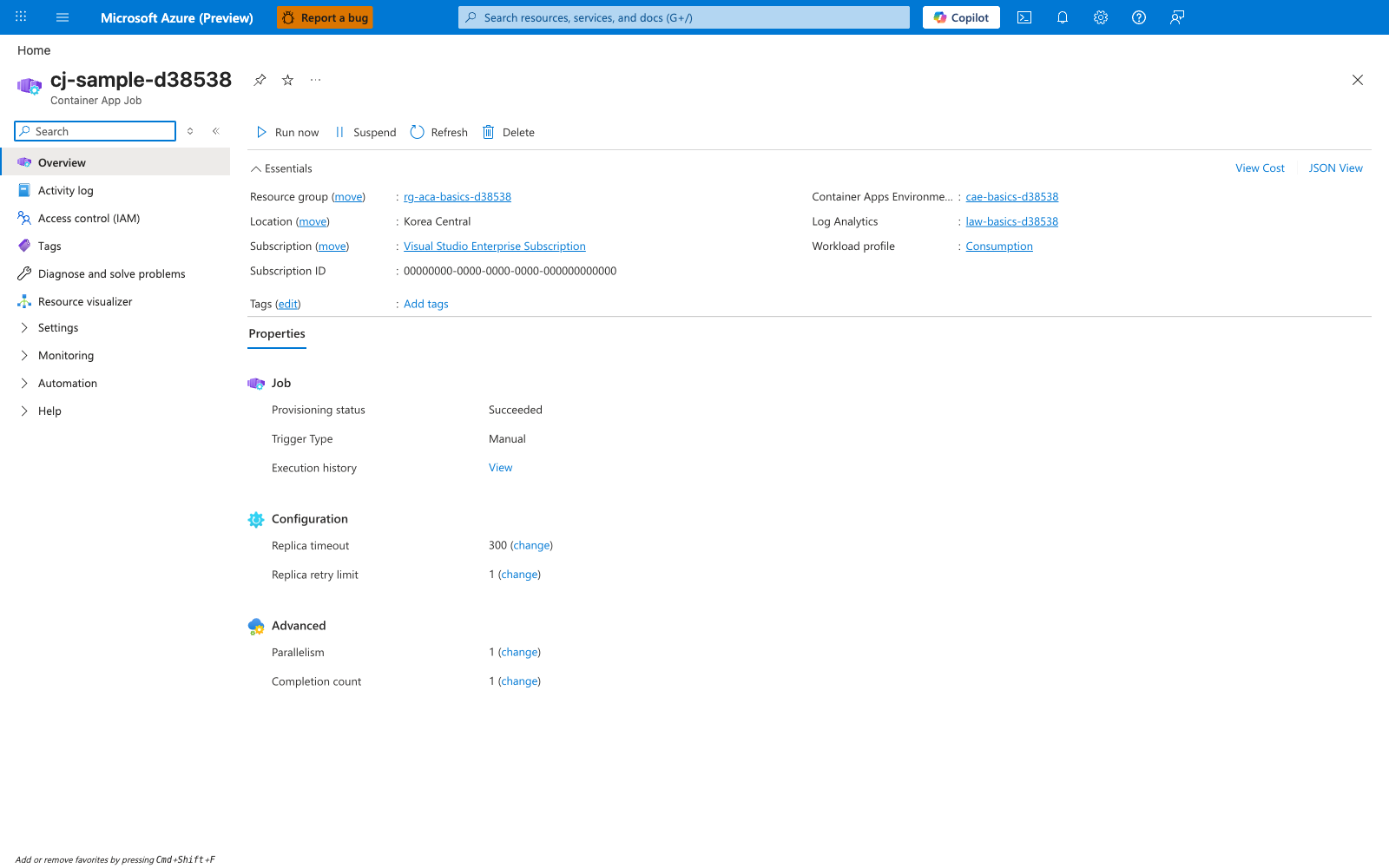
[Observed] cj-sample-d38538. Container App Job. Run now. Suspend. Refresh. Delete. Resource group. rg-aca-basics-d38538. Location. Korea Central. Subscription. Visual Studio Enterprise Subscription. Subscription ID. 00000000-0000-0000-0000-000000000000. Container Apps Environme.... cae-basics-d38538. Log Analytics. law-basics-d38538. Workload profile. Consumption. Properties. Job. Provisioning status. Succeeded. Trigger Type. Manual. Execution history. View. Configuration. Replica timeout. 300. Replica retry limit. 1. Advanced. Parallelism. 1. Completion count. 1.
[Inferred] The Trigger Type field appears to map to the same configuration lever set by --trigger-type in How a manual job is triggered. The Run now toolbar button appears to map to the same start action surfaced by az containerapp job start in How a manual job is triggered. The Replica timeout, Replica retry limit, Parallelism, and Completion count fields appear to map to the same levers as the --replica-timeout, --replica-retry-limit, --parallelism, and --replica-completion-count flags shown in that same section.
[Not Proven] Additional invocation behavior detail, execution-state detail, execution history detail, and runtime semantics detail are not visible on this view.