Event-Driven Jobs
Event-Driven Jobs create discrete executions when an external event source indicates work is available. This model fits queue backlogs, asynchronous integration pipelines, and bursty background workloads.
Main Content
How event triggering works
Event-driven Jobs combine a job definition with KEDA-style scale metadata. Instead of keeping a worker process alive, the platform creates an execution when the event rule indicates work should be pulled.
export RG="rg-aca-prod"
export ACA_ENV_NAME="aca-env-prod"
export JOB_NAME="job-orders-queue"
export IMAGE_NAME="acrsharedprod.azurecr.io/jobs/orders-consumer:v1.0.0"

az containerapp job create \
  --name "$JOB_NAME" \
  --resource-group "$RG" \
  --environment "$ACA_ENV_NAME" \
  --trigger-type "Event" \
  --scale-rule-name "orders-queue" \
  --scale-rule-type "azure-servicebus" \
  --scale-rule-metadata "queueName=orders" "messageCount=10" "namespace=<servicebus-namespace>.servicebus.windows.net" \
  --replica-timeout 900 \
  --replica-retry-limit 2 \
  --image "$IMAGE_NAME"
| Command | Purpose |
|---|---|
export RG=..., ACA_ENV_NAME=..., JOB_NAME=..., IMAGE_NAME=... | Defines the environment, job name, and immutable image used by the event-driven example so the creation command is repeatable. |
az containerapp job create --trigger-type "Event" | Creates a job that starts discrete executions only when the scaler sees available work, instead of running a worker continuously. |
--scale-rule-type "azure-servicebus" with --scale-rule-metadata ... | Configures Service Bus queue depth as the trigger signal, including which queue to watch and the backlog threshold that should start executions. |
--replica-timeout 900 / --replica-retry-limit 2 | Bounds execution length and retry behavior so transient failures can recover without letting a bad event source spin forever. |
Event sources and scaler support
The repository already uses Azure Service Bus as the clearest event-driven Jobs example. Broader scaler support should be treated carefully until you verify the current Jobs-specific support matrix.
| Topic | Conservative guidance |
|---|---|
| Safest documented example in this guide | Azure Service Bus |
| Other likely candidates | Storage Queue, Event Hubs, Kafka, and other KEDA-backed sources may be possible, but verify current Jobs support explicitly |
| Operational rule | Do not assume feature parity with continuously running Container Apps |
Jobs scaler coverage was not fully re-verified
The source-collection run did not complete with direct quotes for the exact event-scaler matrix specific to Jobs. Verify the current Container Apps Jobs documentation before you assume that every scaler available to apps is also supported for event-driven Jobs.
Polling interval and scale rules
Event-driven Jobs depend on the scaler configuration to decide when new executions are created. In practice, the two most important operator inputs are:
- Threshold metadata such as queue length or lag
- Authentication details that let the scaler inspect the source
Polling interval details depend on the scaler
This guide does not assert a universal polling interval for all event-driven Jobs. Confirm the current scaler-specific defaults and tunables before you use queue-latency SLOs or cost projections.
Authentication choices
Prefer this order:
- Managed identity when the scaler and event source support it.
- Secret-backed connection metadata when identity is not available.
- Separate identities or secrets per job when blast radius must stay narrow.
Jobs vs event-driven apps
Use an event-driven Job when:
- Each run should pull a bounded unit of work and exit.
- Cold start per execution is acceptable.
- You want explicit execution history and replay behavior.
Use an event-driven Container App when:
- A long-running worker should keep consuming continuously.
- Warm process state or connection reuse materially improves throughput.
- The consumer should scale existing replicas up and down rather than launch one-shot executions.
Event-driven execution model
flowchart TD
    A[Event source backlog or lag rises] --> B[KEDA-style scale rule evaluates metadata]
    B --> C[Container Apps creates job execution]
    C --> D[Execution starts one or more replicas]
    D --> E[Replica pulls a bounded work unit]
    E --> F[Replica exits after processing]
    F --> G[Execution recorded for replay and monitoring]
Portal view of an event-driven job
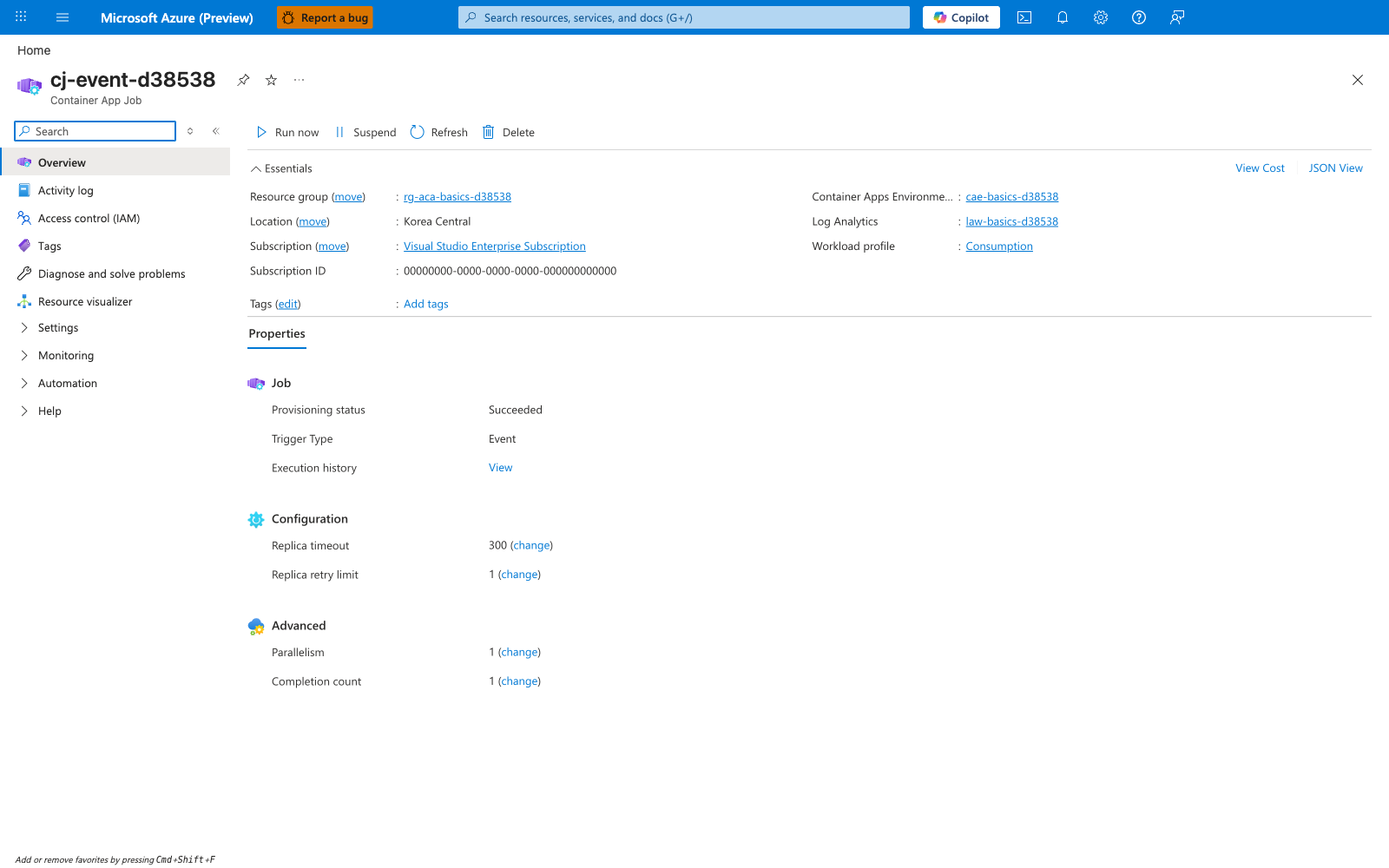
[Observed] cj-event-d38538. Container App Job. Overview. Run now. Suspend. Refresh. Delete. Essentials. Resource group. Location. Korea Central. Subscription. Visual Studio Enterprise Subscription. Subscription ID. Container Apps Environme.... Log Analytics. Workload profile. Consumption. Tags. Add tags. View Cost. JSON View. Properties. Job. Provisioning status. Succeeded. Trigger Type. Event. Execution history. View. Configuration. Replica timeout. 300. Replica retry limit. 1. Advanced. Parallelism. 1. Completion count. 1.
[Inferred] The Trigger Type field value of Event appears to map to the same configuration lever set by --trigger-type "Event" in How event triggering works. The Replica timeout field appears to map to the same lever set by --replica-timeout in that same section. The Replica retry limit field appears to map to the same lever set by --replica-retry-limit in that same section. The Parallelism and Completion count fields appear consistent with the bounded-unit-of-work model described in Jobs vs event-driven apps.
[Not Proven] No scale-rule configuration detail, authentication detail, polling detail, execution history detail, or event-source backlog detail is shown on this blade.