Container Apps Jobs
Azure Container Apps Jobs run bounded background work with a defined start and finish. Use this section to choose a trigger model, understand execution fan-out, and operate jobs safely in production.
Main Content
What this section covers
- Manual Jobs for operator-driven backfills, maintenance, and replay.
- Scheduled Jobs for cron-based recurring execution.
- Event-Driven Jobs for queue- or event-triggered one-shot processing.
- Execution Lifecycle for execution states, retries, timeouts, and retention.
- Jobs vs Apps for workload selection.
When to choose Jobs
Choose Jobs when:
- Work is finite and success is defined by completion.
- Retries can safely re-run the same unit of work.
- Triggering should happen manually, on a schedule, or from an event source.
Choose Container Apps instead when:
- You expose ingress and continuously handle requests.
- A process should stay warm and consume work continuously.
- You want scale decisions to adjust long-running replicas instead of starting discrete executions.
Reading path
- Start with the trigger guide that matches your workload.
- Read Execution Lifecycle before tuning parallelism or retries.
- Use Jobs vs Apps if the workload boundary is still unclear.
- Apply Job Design before production rollout.
- Use Jobs Operations for replay, inspection, and monitoring.
Advanced Jobs details need final source re-verification
During this update, background source collection for exact schema/property quotes did not complete. This section keeps verified high-level concepts, but pages that discuss exact cron semantics, execution state labels, Log Analytics columns, or event-scaler coverage call out those areas explicitly before you automate against them.
Jobs document map
flowchart TD
    A[Container Apps Jobs] --> B[Manual Jobs]
    A --> C[Scheduled Jobs]
    A --> D[Event-Driven Jobs]
    A --> E[Execution Lifecycle]
    A --> F[Jobs vs Apps]
    E --> G[Job Design]
    E --> H[Jobs Operations]
    H --> I[Troubleshooting]
    F --> J[Language Recipes]
Portal View: Job Resource with Trigger and Lifecycle Fields
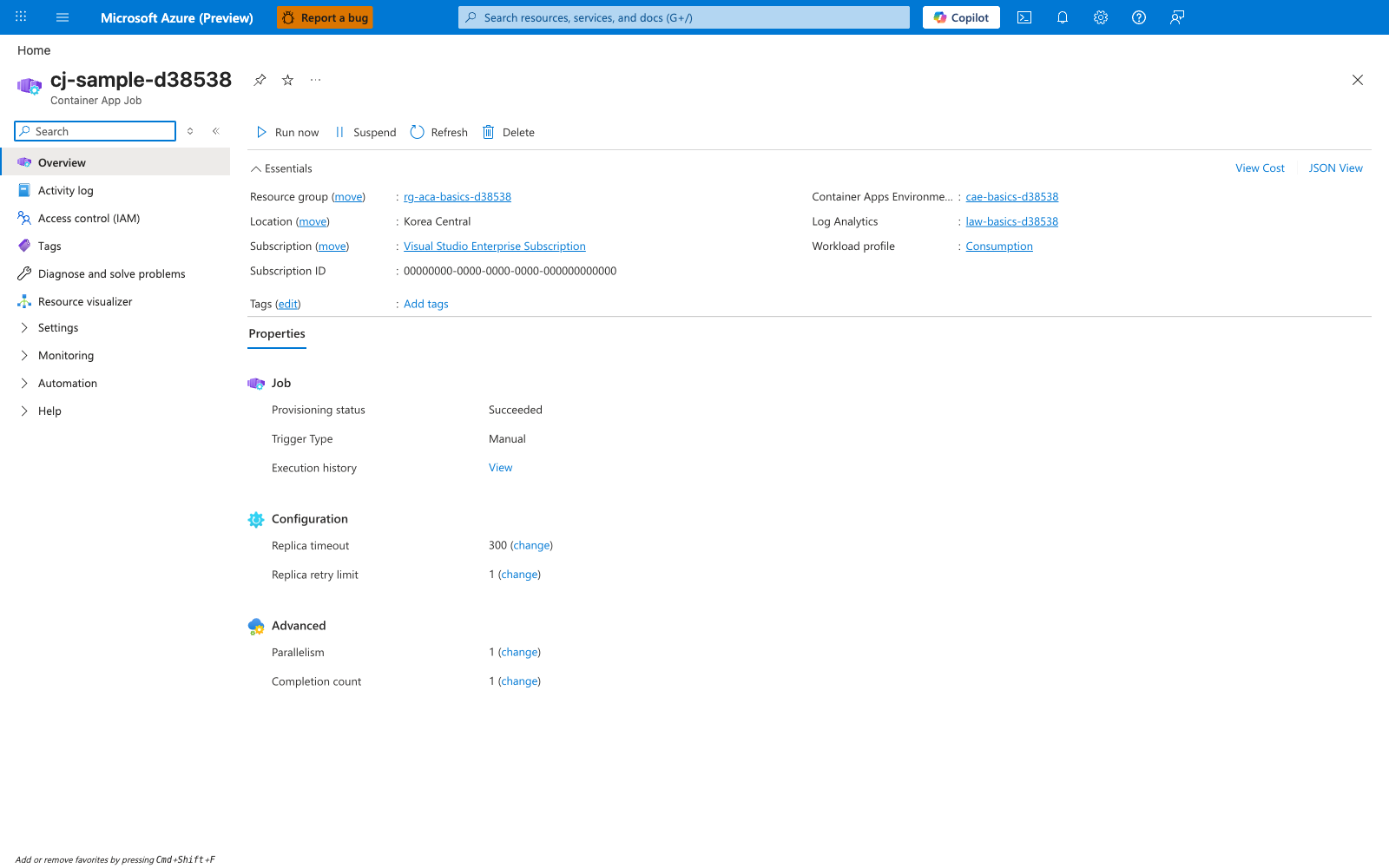
[Observed] cj-sample-d38538. Container App Job. Run now. Suspend. Refresh. Delete. Resource group. rg-aca-basics-d38538. Location. Korea Central. Subscription. Visual Studio Enterprise Subscription. Subscription ID. 00000000-0000-0000-0000-000000000000. Container Apps Environme.... cae-basics-d38538. Log Analytics. law-basics-d38538. Workload profile. Consumption. Properties. Job. Provisioning status. Succeeded. Trigger Type. Manual. Execution history. View. Configuration. Replica timeout. 300. Replica retry limit. 1. Advanced. Parallelism. 1. Completion count. 1.
[Inferred] The Trigger Type field reading Manual appears to map to the trigger taxonomy enumerated under What this section covers, which lists Manual, Scheduled, and Event-Driven trigger pages. The Replica timeout, Replica retry limit, Parallelism, and Completion count fields appear to map to the execution parameters covered by Execution Lifecycle, which the Reading path calls out as the next step before tuning. The dedicated Container App Job resource type label is consistent with Jobs vs Apps being a distinct workload boundary documented on this page.
[Not Proven] Additional trigger configuration detail and runtime action behavior detail are not visible on this view.
Review Matrix
| Review area | Page-specific check |
|---|---|
| Scope | Confirm the guidance applies to Container Apps Jobs. |
| Source basis | Validate the recommendation against the Microsoft Learn sources in this page. |
| Evidence | Capture command output, portal state, metrics, logs, or screenshots before treating the result as proven. |