Security Operations
This guide covers daily and periodic security operations: managed identity lifecycle, secret rotation, and Easy Auth policy management.
Prerequisites
- A user-assigned or system-assigned managed identity strategy
- Secret owners and rotation intervals documented
Managed Identity Operations
Enable system-assigned managed identity:
flowchart TD
    A[Container App] --> B[Managed Identity]
    B --> C[Microsoft Entra ID]
    C --> D[Access Token]
    D --> E[Key Vault/Storage/SQL]
Identity and secret changes must be auditable
Apply security operations through automation and change records. Ad-hoc portal changes make incident forensics difficult.
| Command | Why it is used |
|---|---|
az containerapp identity assign ... | Assigns or inspects managed identity configuration for the Container App. |
Check principal details:
| Command | Why it is used |
|---|---|
az containerapp identity show ... | Assigns or inspects managed identity configuration for the Container App. |
Example output (PII masked):
{
  "type": "SystemAssigned",
  "principalId": "xxxxxxxx-xxxx-xxxx-xxxx-xxxxxxxxxxxx",
  "tenantId": "<tenant-id>"
}
Grant least-privilege role assignment:
az role assignment create \
  --assignee-object-id "<object-id>" \
  --assignee-principal-type ServicePrincipal \
  --role "Key Vault Secrets User" \
  --scope "/subscriptions/<subscription-id>/resourceGroups/$RG/providers/Microsoft.KeyVault/vaults/<key-vault-name>"
| Command | Purpose |
|---|---|
az role assignment create | Grants the app identity the Azure RBAC permission required to read secrets from Key Vault during runtime or rotation workflows. |
--assignee-object-id "<object-id>" | Targets the managed identity object directly so access is bound to the workload, not to an operator account. |
--role "Key Vault Secrets User" | Chooses the least-privilege read role needed for secret retrieval rather than a broader vault management role. |
--scope "/subscriptions/.../vaults/<key-vault-name>" | Restricts access to one vault, which contains blast radius if other vaults exist in the same resource group. |
Secret Operations
Set or rotate secret values in Container Apps configuration:
az containerapp secret set \
  --name "$APP_NAME" \
  --resource-group "$RG" \
  --secrets "db-connection=<redacted-secret>"
| Command | Purpose |
|---|---|
az containerapp secret set | Adds or rotates an app-level secret in the Container Apps secret store without hardcoding it in the revision template. |
--name "$APP_NAME" / --resource-group "$RG" | Applies the change to the intended workload so later revision updates can reference the new secret value safely. |
--secrets "db-connection=<redacted-secret>" | Defines the secret by name, which is the identifier your environment variables or scale-rule auth mappings will reference later. |
Reference the secret as an environment variable in app template updates.
Security Operations Cadence
| Operation | Suggested Frequency | Validation Signal |
|---|---|---|
| Managed identity review | Monthly | Unused roles removed |
| Secret rotation | Per policy (for example, 30-90 days) | Apps remain healthy after rotation |
| Easy Auth policy review | Monthly or after app route changes | Unauthorized access paths denied |
| RBAC scope audit | Quarterly | Least-privilege posture maintained |
Rotate secrets with staged rollout
Introduce new values, validate app health, then retire old values to avoid abrupt runtime failures.
Portal view: Access control (IAM) blade
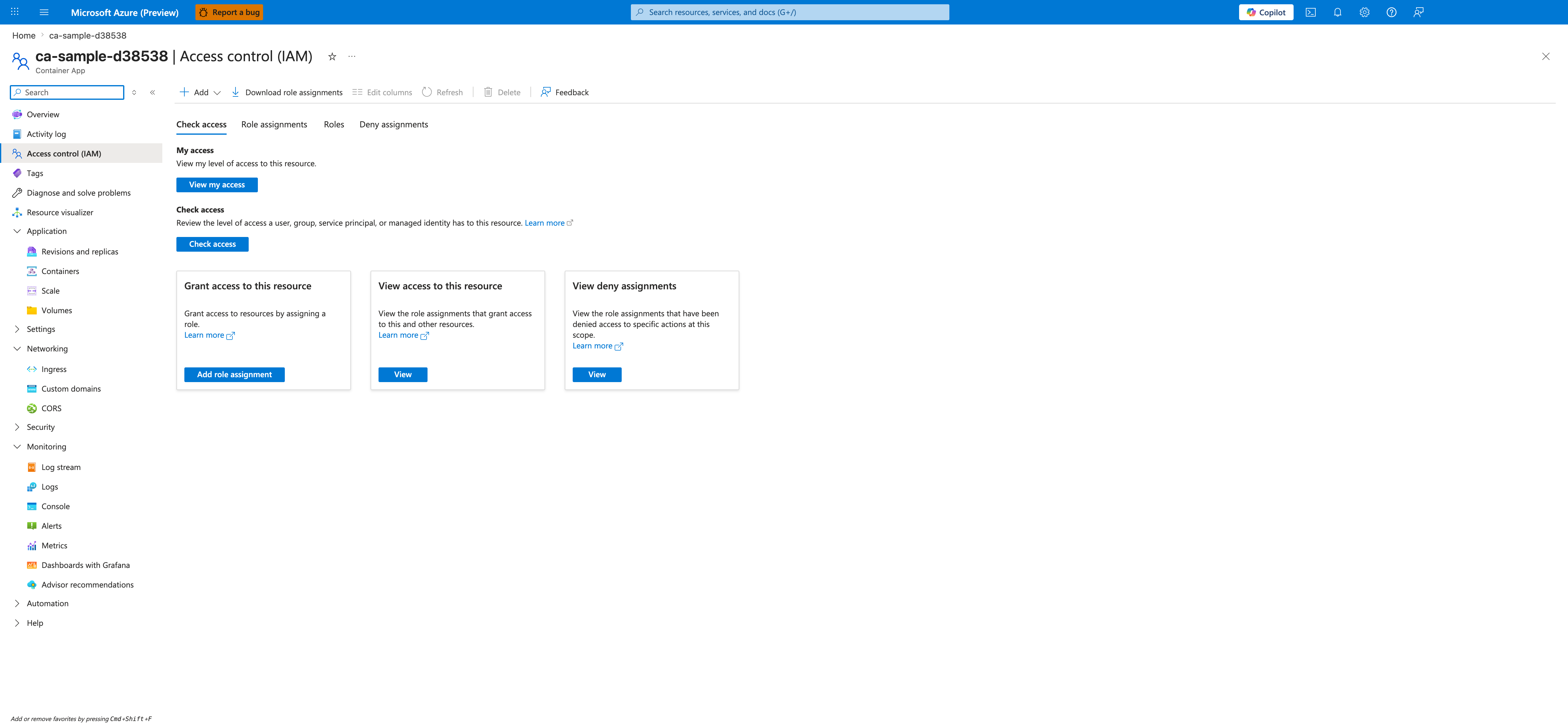
[Observed] The blade header reads ca-sample-d38538 | Access control (IAM) with the subtitle Container App. The command bar exposes + Add, Download role assignments, Edit columns, Refresh, Delete, and Feedback controls. Four tabs are rendered: Check access (selected), Role assignments, Roles, and Deny assignments. The selected tab shows a My access section with a View my access button, a Check access section with a Check access button, and three cards titled Grant access to this resource (with an Add role assignment button), View access to this resource (with a View button), and View deny assignments (with a View button). The left navigation lists Overview, Activity log, Access control (IAM) (highlighted), Tags, Diagnose and solve problems, Resource visualizer, and grouped sections for Application, Settings, Networking, Security, Monitoring, Automation, and Help.
[Inferred] The four tabs (Check access, Role assignments, Roles, Deny assignments) and the three cards (Grant access, View access, View deny assignments) appear to map to the RBAC scope-audit cadence described in the table above. The + Add command and the Add role assignment card button are consistent with the role-creation surface invoked by az role assignment create shown in the Managed Identity Operations section.
[Not Proven] The screenshot does not include any Role assignments tab content, so the captured surface does not reveal which principals or roles are bound to this Container App. The Check access and View my access buttons are present but their result panels are not visible in this capture, so the rendered shape of those panels is outside the scope of this image.
Easy Auth Operations
Review and enforce authentication settings:
| Command | Why it is used |
|---|---|
az containerapp auth show ... | Runs the Azure CLI operation required by the documented step. |
Update auth to require login by default:
az containerapp auth update \
  --name "$APP_NAME" \
  --resource-group "$RG" \
  --enabled true \
  --unauthenticated-client-action Return401
| Command | Why it is used |
|---|---|
az containerapp auth update ... | Runs the Azure CLI operation required by the documented step. |
Verification Steps
az containerapp show \
  --name "$APP_NAME" \
  --resource-group "$RG" \
  --query "{identity:identity,auth:properties.configuration.auth}" \
  --output json
| Command | Why it is used |
|---|---|
az containerapp show ... | Reads the Container App configuration so the documented setting can be verified. |
Example output (PII masked):
{
  "identity": {
    "type": "SystemAssigned",
    "principalId": "xxxxxxxx-xxxx-xxxx-xxxx-xxxxxxxxxxxx",
    "tenantId": "<tenant-id>"
  },
  "auth": {
    "platform": {
      "enabled": true
    }
  }
}
Troubleshooting
Managed identity token requests fail
- Confirm identity is assigned to the app.
- Verify target resource role assignment scope.
- Wait for RBAC propagation, then retry.
Easy Auth blocks expected traffic
- Validate allowed redirect URI and issuer configuration.
- Exclude health endpoints from auth if required by probes.
Advanced Topics
- Use user-assigned identities for shared access policies.
- Rotate secrets via Key Vault references and automation.
- Add policy enforcement with Azure Policy for auth and identity baselines.