Workload Profiles
Workload profiles let one Azure Container Apps environment host different compute shapes at the same time. This is the core reason Workload profiles (v2) is the default environment type for new deployments.
Main Content
Profile types inside a v2 environment
Microsoft Learn currently lists three workload profile types:
| Profile type | Current status | Best fit |
|---|---|---|
| Consumption | GA | Bursty, idle-prone, scale-to-zero workloads |
| Dedicated | GA | Steady workloads that need reserved compute or larger shapes |
| Flex | Preview | Single-tenant style profile with larger replica sizes, but no scale-to-zero |
Each v2 environment includes a default Consumption profile. You can then add specialized profiles for apps that need different resource behavior.
Current dedicated profile families
| Classification | Current profile names | Allocation model |
|---|---|---|
| General purpose | D4, D8, D16, D32 | Per node |
| Memory optimized | E4, E8, E16, E32 | Per node |
| GPU | NC24-A100, NC48-A100, NC96-A100 | Per node |
Flexible is preview
Microsoft Learn lists Flexible as a preview profile type. This page focuses on the generally available Consumption and Dedicated placement options first.
Profile properties and app targeting
At environment level, workload profiles are configured with:
- A profile name.
- A workloadProfileType.
- Minimum and maximum node counts.
At app level, a container app targets a profile with workloadProfileName.
resource env 'Microsoft.App/managedEnvironments@2026-01-01' = {
  name: 'cae-prod'
  location: location
  properties: {
    workloadProfiles: [
      {
        name: 'gp-steady'
        workloadProfileType: 'D4'
        minimumCount: 2
        maximumCount: 6
      }
      {
        name: 'memory-heavy'
        workloadProfileType: 'E8'
        minimumCount: 1
        maximumCount: 3
      }
    ]
  }
}

resource app 'Microsoft.App/containerApps@2026-01-01' = {
  name: 'ca-api-prod'
  location: location
  properties: {
    environmentId: env.id
    workloadProfileName: 'gp-steady'
    configuration: {
      activeRevisionsMode: 'Single'
      ingress: {
        external: true
        targetPort: 8080
      }
    }
    template: {
      containers: [
        {
          name: 'api'
          image: 'mcr.microsoft.com/azuredocs/containerapps-helloworld:latest'
          resources: {
            cpu: 1
            memory: '2Gi'
          }
        }
      ]
      scale: {
        minReplicas: 2
        maxReplicas: 20
      }
    }
  }
}
Scaling model: profile nodes vs app replicas
Workload profiles add a second scaling layer:
- Profile scale adds or removes nodes within the profile's min/max node range.
- App scale adds or removes replicas according to the app's scale rules.
flowchart TD
    ENV[Workload profiles environment] --> P1[Consumption profile]
    ENV --> P2[Dedicated profile D4]
    ENV --> P3[Dedicated profile E8]
    P1 --> A1[Bursty app]
    P2 --> A2[Steady API]
    P3 --> A3[Memory-heavy worker]
    A1 --> R1[Replicas scale by demand]
    A2 --> R2[Replicas share dedicated nodes]
    A3 --> R3[Replicas share memory-optimized nodes]
When to use Dedicated profiles
Dedicated profiles are the better fit when you need:
- Reserved compute for steady workloads.
- Larger instance sizes than the default Consumption profile.
- Memory-optimized shapes.
- GPU-enabled dedicated hardware.
- Networking features that require a Workload profiles environment, such as UDR or NAT Gateway egress.
Portal view: profiles and per-profile app counts
The Workload profiles blade on a v2 environment is the surface where profile types appear and where a per-profile app count is shown.
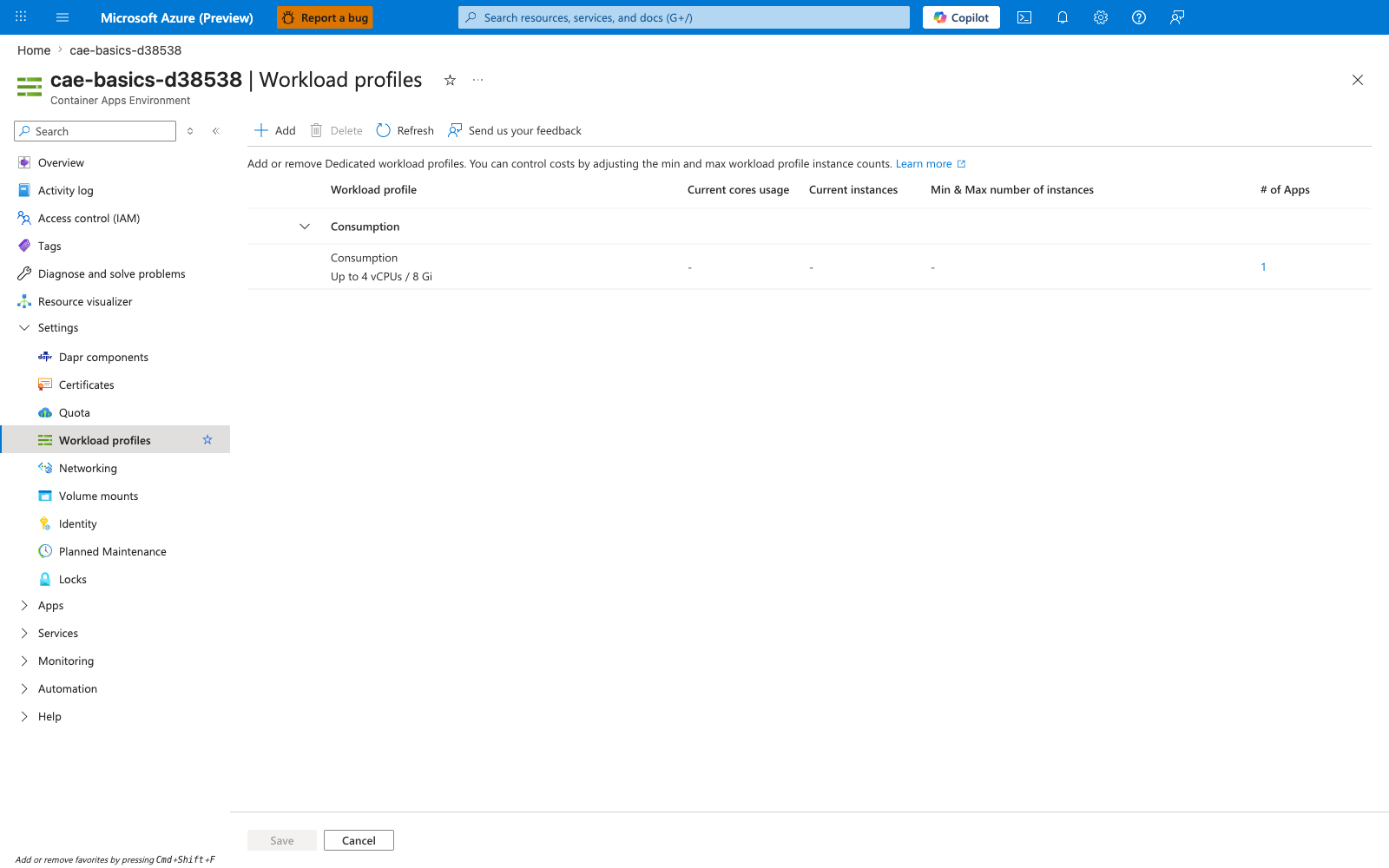
[Observed] The blade renders one row grouped under a Consumption header: profile Consumption, capacity Up to 4 vCPUs / 8 Gi, # of Apps : 1. No Dedicated or Flex group header is visible. The Add button is enabled in the command bar. The Current cores usage, Current instances, and Min & Max number of instances columns are dashed for the visible row.
[Inferred] The single Consumption-grouped row aligns with this page's Profile types inside a v2 environment statement that each v2 environment includes a default Consumption profile, and the absence of any Dedicated or Flex group is consistent with this page's framing of those profile types as ones you add. The per-profile # of Apps column appears consistent with this page's Profile properties and app targeting note that an app targets a profile via workloadProfileName.
[Not Proven] This image does not visualize any D4/D8/D16/D32, E4/E8/E16/E32, or NC24-A100/NC48-A100/NC96-A100 profile rows enumerated in this page's Current dedicated profile families table. It does not visualize the minimumCount or maximumCount Bicep properties shown in this page's Profile properties and app targeting snippet. It does not visualize per-app workloadProfileName values for the one app counted in the # of Apps column.
See Also
Sources
- Workload profiles in Azure Container Apps (Microsoft Learn)
- Create a Container Apps environment with the Azure CLI (Microsoft Learn)
- Microsoft.App/managedEnvironments template reference (Microsoft Learn)
- Microsoft.App/containerApps template reference (Microsoft Learn)
- Networking in Azure Container Apps environment (Microsoft Learn)