Plans and Workload Profiles
Azure Container Apps separates environment type, plan type, and workload profile. This page connects those terms so you can pick the right environment model before you design app placement, networking, and scaling.
Main Content
Current Microsoft Learn taxonomy
Current Microsoft Learn pages use these environment names:
| Current term | Status | Notes |
|---|---|---|
| Workload profiles (v2) | Default | Recommended for new environments |
| Consumption-only (v1) | Legacy | Still available, but no longer the default |
Use current Learn terminology
The current Microsoft Learn pages reviewed for this guide use Workload profiles (v2) and Consumption-only (v1). Older Premium or Standard wording is not the active environment taxonomy in the current Learn pages cited below.
How the layers fit together
- Environment type decides the broad capability set.
- Plan type decides how billing is calculated.
- Workload profile decides the compute shape where an app runs.
In practice:
- A Consumption-only (v1) environment runs only on the Consumption plan.
- A Workload profiles (v2) environment includes a built-in Consumption workload profile and can add Dedicated workload profiles.
flowchart TD
    ENV[Workload profiles environment] --> C[Consumption profile]
    ENV --> D1[Dedicated profile D-series]
    ENV --> D2[Dedicated profile E-series]
    ENV --> G[GPU profile]
    C --> CAPP1[Bursty API replicas]
    C --> CAPP2[Scale-to-zero worker replicas]
    D1 --> DAPP[Steady-state API replicas]
    D2 --> MAPP[Memory-heavy replicas]
    G --> GAPP[GPU inference replicas]
Capability comparison
| Capability | Workload profiles (v2) | Consumption-only (v1) |
|---|---|---|
| Environment status | Default | Legacy |
| Supported plan types | Consumption, Dedicated | Consumption |
| Built-in consumption option | Yes | Yes |
| Dedicated SKUs | Yes | No |
| Multiple profile mix in one environment | Yes | No |
| UDR support | Yes | No |
| NAT Gateway egress | Yes | No |
| Private endpoints on the environment | Yes | No |
| Minimum subnet size for custom VNet | /27 | /23 |
| GPU support | Yes, via Consumption GPU or Dedicated GPU profiles | No |
| Scale-to-zero | Yes on Consumption profile apps | Yes |
| Replica ceiling per revision | Up to 1,000 configurable replicas, subject to quota and subnet realities | Up to 1,000 configurable replicas, subject to quota and subnet realities |
When to choose which
Choose Workload profiles (v2) when you need:
- Long-term flexibility between usage-based and dedicated compute.
- UDR, NAT Gateway, or private endpoints on the environment.
- Different app classes in one environment, such as bursty APIs and steady backends.
- GPU or larger dedicated shapes.
Choose Consumption-only (v1) only when:
- You already run legacy environments and need to understand or maintain them.
- Your workloads fit within the Consumption-only limits and you don't need the newer networking features.
Consumption pricing no longer requires a Consumption-only environment
Microsoft Learn recommends using a Workload profiles (v2) environment with the built-in Consumption profile when you want consumption-style billing. That keeps the option to add dedicated resources later without redesigning the environment type first.
Portal view: built-in Consumption profile on a v2 environment
The Workload profiles blade on an existing v2 environment shows the built-in Consumption profile and lets you add Dedicated profiles. The capture below is the same environment used elsewhere in this guide.
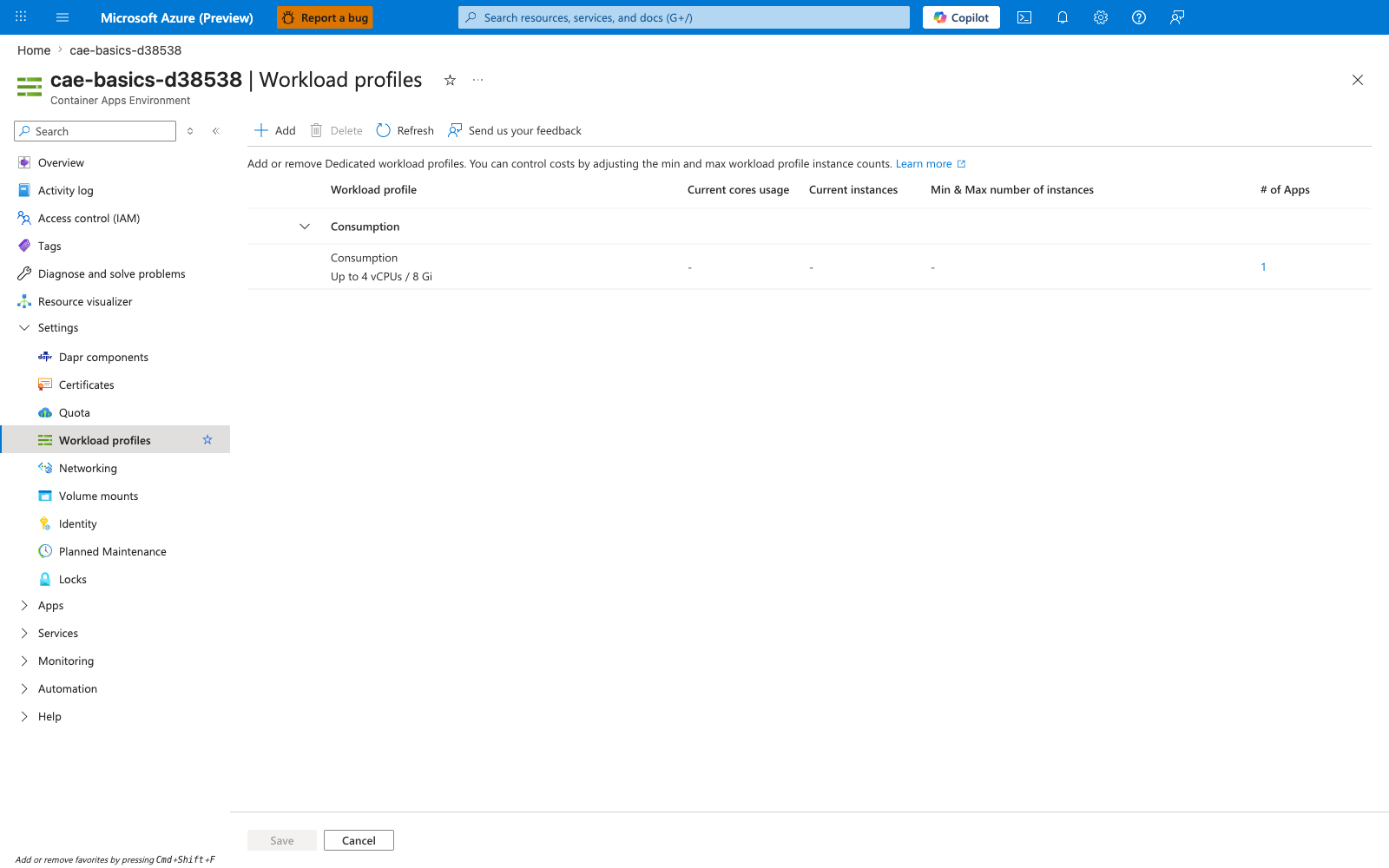
[Observed] The blade renders one row under a Consumption group header: profile Consumption, capacity Up to 4 vCPUs / 8 Gi, # of Apps : 1. No Dedicated group header or Dedicated profile row is rendered on the blade. The Add button is enabled in the command bar. The columns Current cores usage, Current instances, and Min & Max number of instances are dashed.
[Inferred] The single visible Consumption row without any Dedicated row is consistent with this page's Capability comparison entry that Workload profiles (v2) environments expose a built-in Consumption option while Dedicated SKUs are listed as a separate Yes capability rather than an automatic one. The Add button being enabled in the command bar is consistent with this page's How the layers fit together framing of Dedicated workload profiles as additions a v2 environment can take on top of the built-in Consumption profile.
[Not Proven] This image does not visualize any D-series, E-series, or GPU profile rows shown in this page's one-environment-many-workload-profiles diagram. It does not visualize any pricing or billing surface corresponding to the Consumption vs Dedicated plan-type distinction in the Capability comparison table. It does not visualize per-app workloadProfileName placement for the one app counted in the # of Apps column.
See Also
- Environments in Azure Container Apps
- Consumption Plan
- Workload Profiles
- Networking and CIDR
- Limits and Quotas
- Replica Node-Spread Lab — reproducible lab measuring Consumption vs Dedicated D8 placement spread using kernel-signal proxies
Sources
- Compute and billing structures in Azure Container Apps (Microsoft Learn)
- Consumption-only environment type in Azure Container Apps (legacy) (Microsoft Learn)
- Workload profiles in Azure Container Apps (Microsoft Learn)
- Networking in Azure Container Apps environment (Microsoft Learn)
- Scaling in Azure Container Apps (Microsoft Learn)