Environment Migration
Environment migration in Azure Container Apps is usually a controlled rebuild and cutover exercise, not a live in-place flip. This page covers the conservative playbook for moving between environment models, regions, and subscriptions.
Prerequisites
- Source environment configuration is captured in IaC or exportable configuration.
- DNS, certificates, secrets, and image registry dependencies are inventoried.
- Target region and workload profile availability are confirmed.
- Quota and subnet headroom are validated before cutover.
When to Use
Use this playbook for:
- Consumption-only (v1) to Workload profiles (v2) modernization.
- Cross-region rebuilds and disaster-recovery-style cutovers.
- Cross-subscription moves when governance boundaries change.
Procedure
Scenario guidance
| Scenario | Learn-backed guidance | Conservative recommendation |
|---|---|---|
| Consumption-only → Workload profiles | Learn recommends v2 for new environments, but the reviewed Learn pages do not document an in-place conversion path | Build a parallel v2 environment and redeploy apps |
| Cross-region | Microsoft.App/managedEnvironments region move support is No | Recreate in target region and cut over |
| Cross-subscription | Microsoft.App/managedEnvironments subscription move support is Yes | Validate dependencies carefully; parallel redeploy is often safer for app-by-app testing |
Prefer parallel environments for predictable cutover
Even where a raw resource move is supported, app dependencies such as VNets, DNS, certificates, registries, identities, and private endpoints often make a rebuild-and-validate workflow easier to reason about.
Parallel environment cutover
flowchart TD
    A[Inventory source environment] --> B[Create target environment]
    B --> C[Redeploy apps with IaC]
    C --> D[Validate ingress, identity, and dependencies]
    D --> E[Cut DNS or upstream routing]
    E --> F[Observe health and rollback window]
    F --> G[Decommission source environment]
Reference Bicep pattern for app recreation
param location string
param environmentId string
param appName string
param image string
param workloadProfileName string = 'Consumption'

resource app 'Microsoft.App/containerApps@2026-01-01' = {
  name: appName
  location: location
  properties: {
    environmentId: environmentId
    workloadProfileName: workloadProfileName
    configuration: {
      activeRevisionsMode: 'Single'
      ingress: {
        external: true
        targetPort: 8080
      }
    }
    template: {
      containers: [
        {
          name: 'main'
          image: image
          resources: {
            cpu: 0.5
            memory: '1Gi'
          }
        }
      ]
      scale: {
        minReplicas: 1
        maxReplicas: 5
      }
    }
  }
}
Verification
Before final cutover, verify:
- App URLs and ingress exposure match the target design.
- Managed identity, Key Vault, storage, and private dependency paths work.
- Workload profile placement and replica scaling behave as expected.
- DNS, certificates, and upstream routing point to the target environment.
Rollback / Troubleshooting
If the target environment fails validation:
- Keep traffic on the source environment.
- Fix the target environment in isolation.
- Re-run smoke tests and dependency tests.
- Only restart cutover when the target passes again.
For cross-region or major network changes, keep the source environment alive until log, metric, and business-transaction health remain stable through the agreed rollback window.
Portal view: the network type that a migration cannot flip in place
The Networking blade on an existing environment shows the network type that was selected at creation. Per this page's Scenario guidance framing, changes that touch this surface are the ones that drive the parallel-environment cutover pattern.
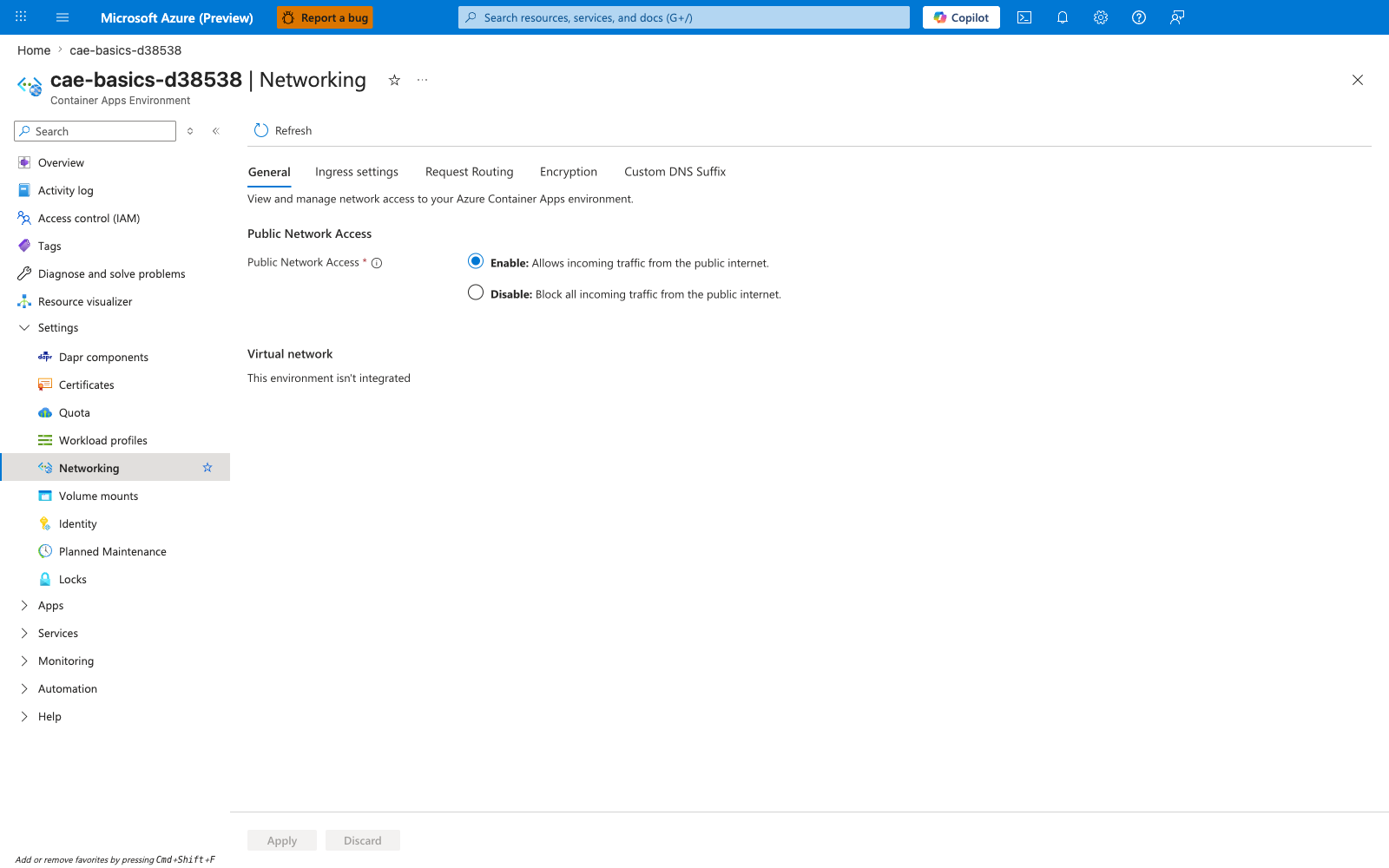
[Observed] The General tab shows Public Network Access : Enable - Allows incoming traffic from the public internet (radio button selected). The Virtual network section reads This environment isn't integrated. The tab strip lists General, Ingress settings, Request Routing, Encryption, Custom DNS Suffix. No subnet picker, Save button, or in-place VNet integration control is visible.
[Inferred] The visible This environment isn't integrated text alongside the absence of a subnet picker or VNet integration control on the blade appears to map to this page's Scenario guidance recommendation to build a parallel v2 environment rather than attempting an in-place conversion. The Public Network Access and Virtual network settings being grouped on one tab is consistent with this page's Verification checkpoint that DNS, ingress exposure, and dependency paths must match the target design after cutover.
[Not Proven] This image does not visualize the Move resource action used for the cross-subscription scenario in this page's Scenario guidance table. It does not visualize the environmentId or workloadProfileName Bicep properties shown in this page's Reference Bicep pattern for app recreation snippet. It does not visualize the Mermaid steps from this page's Parallel environment cutover flow, such as DNS cutover or source decommissioning.
See Also
- Plans and Workload Profiles
- Consumption Plan
- Networking and CIDR
- Recovery and Incident Readiness
- VNet Integration
Sources
- Compute and billing structures in Azure Container Apps (Microsoft Learn)
- Consumption-only environment type in Azure Container Apps (legacy) (Microsoft Learn)
- Networking in Azure Container Apps environment (Microsoft Learn)
- Azure resource types for move operations (Microsoft Learn)
- Microsoft.App/containerApps template reference (Microsoft Learn)