Secret Rotation
Secret rotation in Container Apps should be planned as an operational routine, not an emergency-only action. This guide outlines secure rotation patterns with minimal downtime.
Secret Types in Container Apps
Container Apps supports two common secret patterns:
- Manual secret values stored directly in Container Apps configuration
- Key Vault references resolved from Azure Key Vault
Manual secrets are simple but require explicit update workflows. Key Vault references improve central governance and auditing.
Rotation Strategies
Use one of these patterns based on dependency behavior:
- Dual secret versioning (active + next)
- Blue/green secret cutover via new revision
- Rolling replacement with health-validated traffic shifting
Design applications to re-read credentials on restart so a new revision can apply fresh secret values deterministically.
Key Vault Integration for Automatic Rotation
Best-practice flow:
- Rotate secret in Key Vault.
- Update secret version reference or allow latest-version policy.
- Trigger app/job revision rollout.
- Validate authentication and transaction success.
Grant managed identity the minimum required Key Vault permissions.
Connection String Rotation Patterns
For data stores that support multiple active credentials:
- Create new credential first.
- Deploy with new secret while old credential remains valid.
- Confirm successful reads/writes.
- Revoke old credential after validation window.
For single-credential systems, schedule maintenance window and prepare rollback credential artifacts.
Zero-Downtime Secret Updates
Use revisions to avoid hard cutovers:
az containerapp secret set \
  --name "$APP_NAME" \
  --resource-group "$RG" \
  --secrets "db-conn=<new-connection-string>"
| Command | Why it is used |
|---|---|
az containerapp secret set ... | Manages Container Apps secrets without exposing secret values in plain configuration. |
az containerapp update \
  --name "$APP_NAME" \
  --resource-group "$RG" \
  --set-env-vars "DB_CONNECTION=secretref:db-conn"
| Command | Why it is used |
|---|---|
az containerapp update ... | Updates the existing Container App configuration without recreating the app. |
Then shift traffic gradually to the new healthy revision.
Monitoring Secret Expiry
Operational controls:
- Alert before certificate/client-secret expiry (30/14/7 days)
- Track authentication failure spikes after rotation windows
- Audit Key Vault secret version changes and access logs
Document secret owners and rotation cadence per dependency.
Secret Rotation Lifecycle
sequenceDiagram
    participant Ops as Operations Team
    participant KV as Azure Key Vault
    participant ACA as Azure Container Apps
    participant App as Application Revision
    Ops->>KV: Create new secret version
    Ops->>ACA: Update secret reference/value
    ACA->>App: Create new revision with updated secretref
    App->>Ops: Health checks and smoke tests
    Ops->>KV: Disable old secret version after validation window
Rotation Pattern Decision Matrix
| Pattern | Downtime Risk | Complexity | Best Fit |
|---|---|---|---|
| Dual secret versioning | Low | Medium | Services supporting parallel credentials |
| Blue/green cutover | Low | Medium | User-facing APIs requiring traffic control |
| Immediate replacement | Medium/High | Low | Non-critical internal tools only |
Use revision-based cutover for safer rotations
Secret updates should create a new revision and pass readiness checks before traffic shifts. This provides a clean rollback path.
Do not revoke old credentials immediately
Keep the previous credential active until post-rotation validation confirms successful reads/writes and no authentication errors.
Key Vault Reference Example
az containerapp secret set \
  --name "$APP_NAME" \
  --resource-group "$RG" \
  --secrets "db-conn=keyvaultref:https://<key-vault-name>.vault.azure.net/secrets/db-conn,identityref:system"

az containerapp update \
  --name "$APP_NAME" \
  --resource-group "$RG" \
  --set-env-vars "DB_CONNECTION=secretref:db-conn"
| Command | Purpose |
|---|---|
az containerapp secret set ... "db-conn=keyvaultref:...,identityref:system" | Registers a Key Vault-backed secret reference in Container Apps so the platform resolves the credential at runtime instead of embedding a static value in the revision. |
identityref:system | Tells Container Apps to use the app's system-assigned identity when reading the secret from Key Vault, which is the critical auth path for this rotation pattern. |
az containerapp update ... --set-env-vars "DB_CONNECTION=secretref:db-conn" | Creates the new revision that binds the application setting to the rotated secret reference, giving you a safe validation and rollback point. |
Post-Rotation Verification Checklist
| Check | Command | Expected Result |
|---|---|---|
| New revision created | az containerapp revision list --name "$APP_NAME" --resource-group "$RG" --output table | Latest revision is healthy |
| Auth errors not increasing | az containerapp logs show --name "$APP_NAME" --resource-group "$RG" --type console --follow false | No spike in auth failures |
| Traffic served by new revision | az containerapp ingress traffic show --name "$APP_NAME" --resource-group "$RG" --output table | Target revision receives expected weight |
| Old secret can be retired | Key Vault audit review | No calls using old version |
Rotation Run Command Set
az containerapp secret list \
  --name "$APP_NAME" \
  --resource-group "$RG" \
  --output table

az containerapp revision list \
  --name "$APP_NAME" \
  --resource-group "$RG" \
  --output table
| Command | Purpose |
|---|---|
az containerapp secret list --name "$APP_NAME" --resource-group "$RG" --output table | Confirms that the expected secret name is present in Container Apps before you verify traffic or retire the previous credential version. |
az containerapp revision list --name "$APP_NAME" --resource-group "$RG" --output table | Shows whether the secret update produced a new revision and whether that revision is healthy, which is the core post-rotation checkpoint in this runbook. |
--output table | Keeps both checks easy to scan during a live rotation window when operators need fast human-readable confirmation. |
Portal Walkthrough
Use the Azure Portal to inspect the four surfaces involved in a Key Vault-backed rotation: the Key Vault secrets list, the secret versions blade, the Container App secrets blade, and the Revisions and replicas blade. Capture screenshots at each step so the rotation can be audited after the fact.
Portal view: Key Vault Secrets list
From the Azure Portal home, open the Key Vault that holds the application credential (kv-ops-cgedjv in this lab), then select Objects → Secrets in the left navigation.
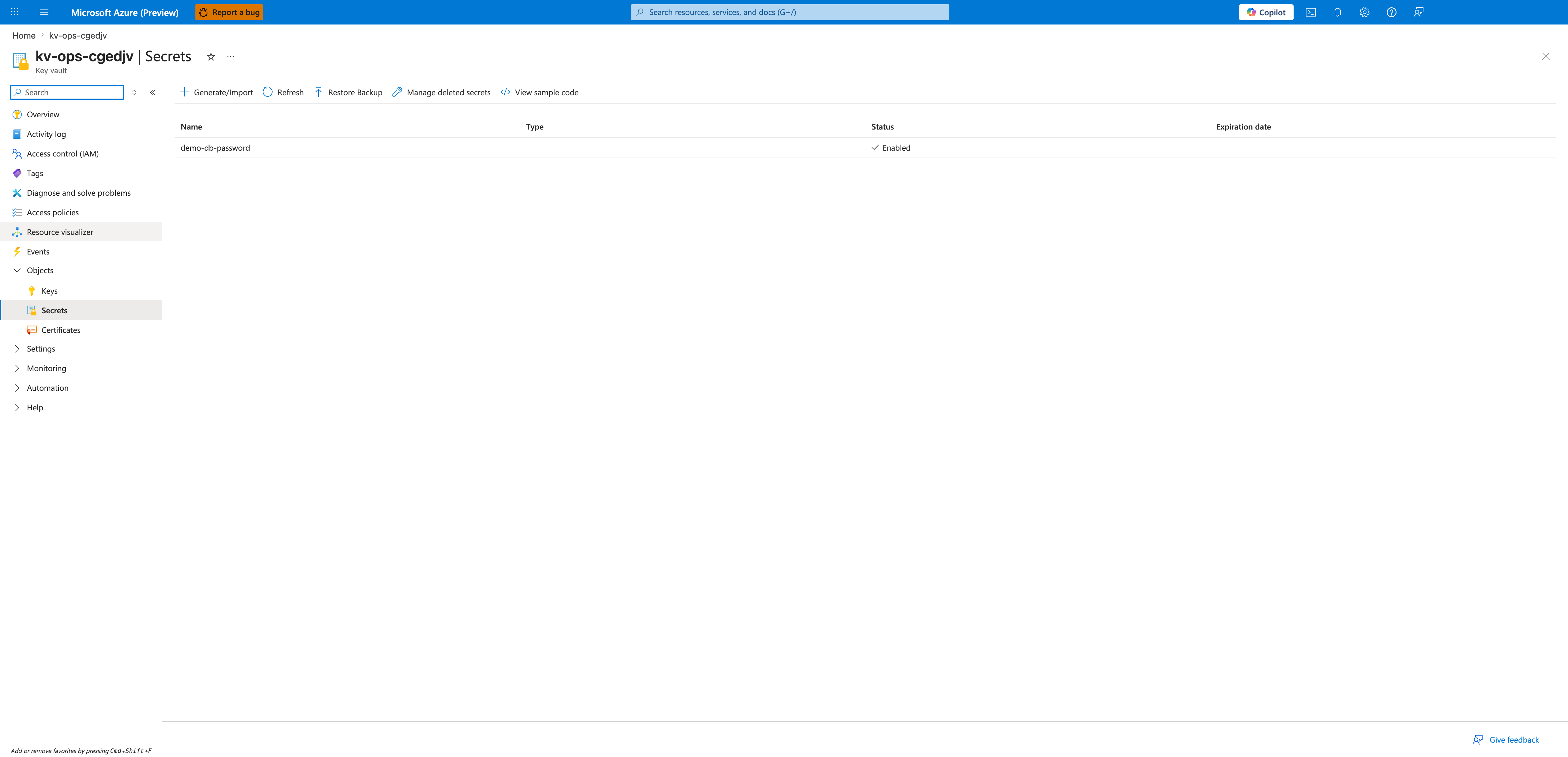
[Observed] The blade header is kv-ops-cgedjv | Secrets under the Key vault resource type. The command bar exposes Generate/Import, Refresh, Restore Backup, Manage deleted secrets, and View sample code. The grid columns are Name, Type, Status, and Expiration date. One row is present: demo-db-password with Status ✓ Enabled and empty Type and Expiration date cells.
[Inferred] The single enabled secret indicates that Key Vault is the central source of truth for the application's database credential, matching the Key Vault reference pattern recommended in Key Vault Integration for Automatic Rotation above. The empty Expiration date column means no expiry policy is set on this secret, which is the operational risk that the Monitoring Secret Expiry section instructs you to alert on.
[Not Proven] This blade does not show which Container App or revision currently resolves this secret, nor which managed identity has Get permission on the vault. Those bindings must be verified separately on the Container App secrets blade and the Key Vault Access policies (or RBAC) blade.
Portal view: Secret Versions
From the Secrets list, click demo-db-password to open the per-secret Versions blade.
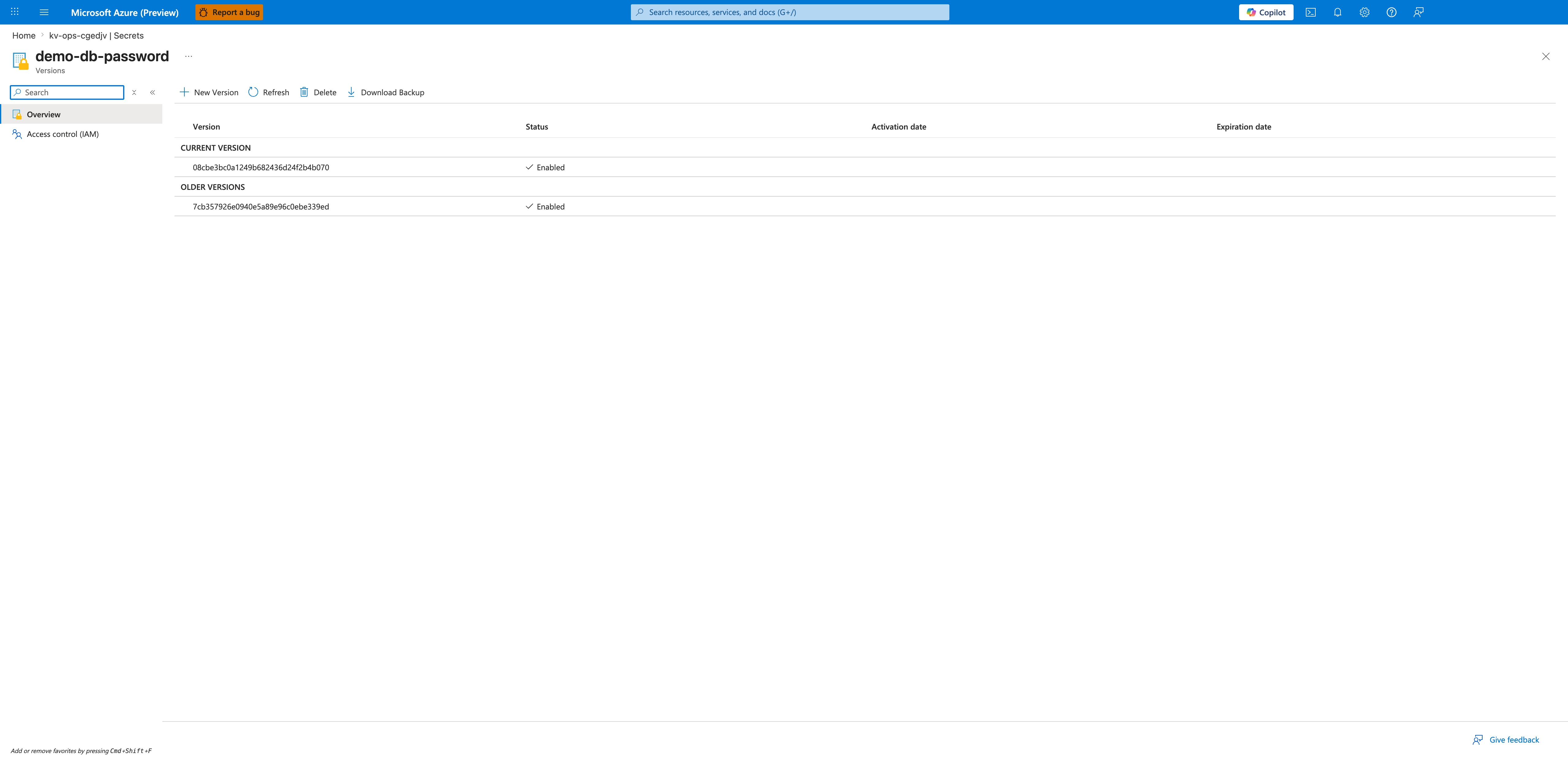
[Observed] The breadcrumb reads Home > kv-ops-cgedjv | Secrets, with blade title demo-db-password under the Versions subtitle. The command bar shows New Version, Refresh, Delete, and Download Backup. Two sections are visible: CURRENT VERSION lists version 08cbe3bc0a1249b682436d24f2b4b070 with Status ✓ Enabled, and OLDER VERSIONS lists version 7cb357926e0940e5a89e96c0ebe339ed also with Status ✓ Enabled. Both Activation date and Expiration date columns are empty for both versions.
[Inferred] Two versions of the same secret are simultaneously Enabled, which is the dual-version state required by the Dual secret versioning strategy and by the warning Do not revoke old credentials immediately. The newer version is promoted to CURRENT (used by keyvaultref: references without an explicit version), while the older version remains resolvable for any workload still pinned to that specific version GUID. Once the post-rotation validation window in the Post-Rotation Verification Checklist completes, the older version should be disabled (not deleted) using the toggle reachable from this blade.
[Not Proven] The Versions blade does not show which Container App revisions or replicas are actively reading each version. The fact that the older version is Enabled does not prove any workload is still calling it — to confirm that, correlate Key Vault audit logs (AzureDiagnostics | where ResourceProvider == "MICROSOFT.KEYVAULT") with the revision in capture 04.
Portal view: Container App Secrets
In the same subscription, open the Container App (ca-ops-cgedjv) and select Security → Secrets in the left navigation.
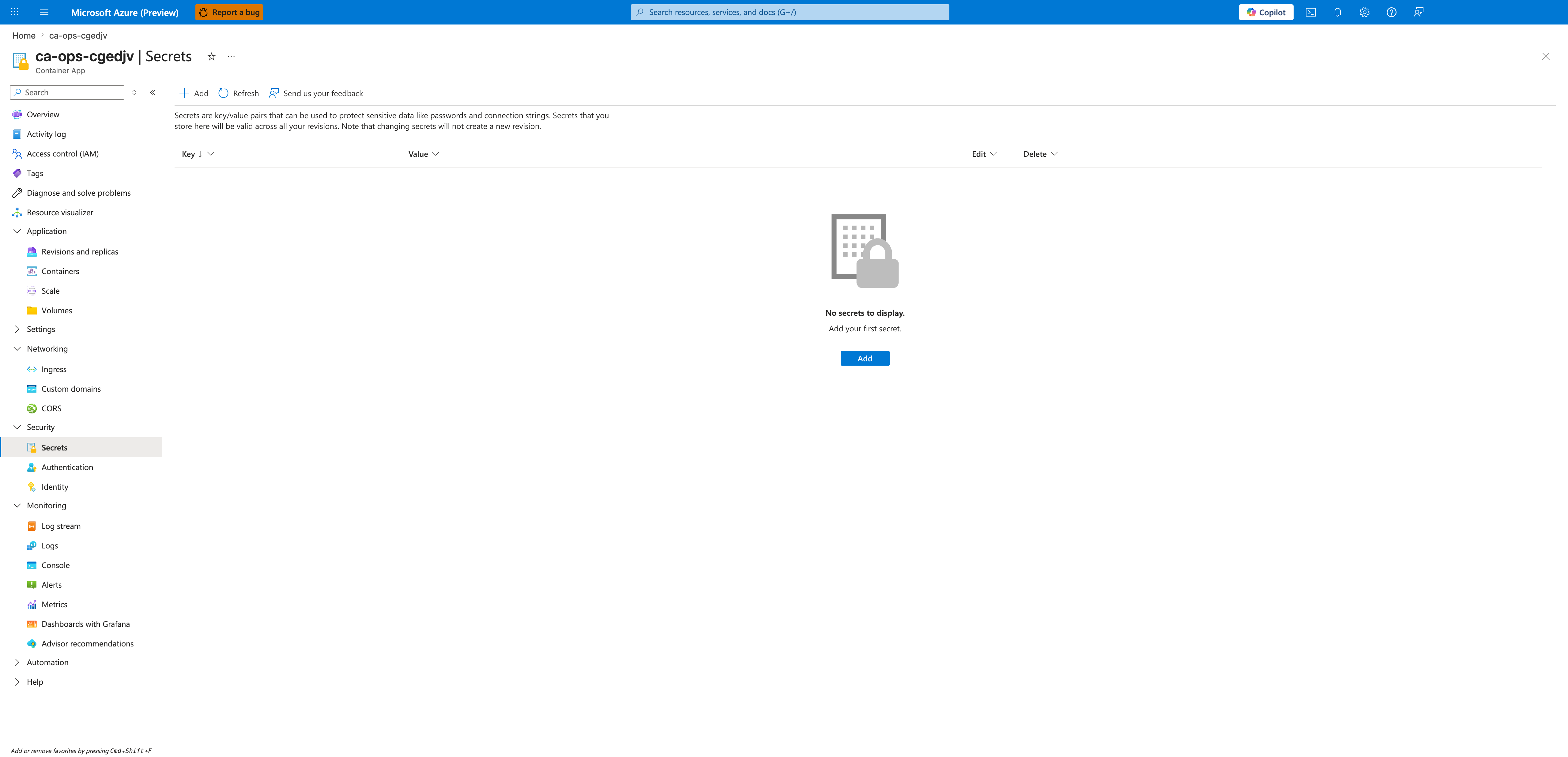
[Observed] The blade header is ca-ops-cgedjv | Secrets under the Container App resource type. The command bar shows Add, Refresh, and Send us your feedback. The page caption reads "Secrets are key/value pairs that can be used to protect sensitive data like passwords and connection strings. Secrets that you store here will be valid across all your revisions. Note that changing secrets will not create a new revision." The grid columns are Key, Value, Edit, and Delete. An empty-state icon is displayed with the text No secrets to display. Add your first secret. and an Add button.
[Inferred] The empty list confirms this Container App stores no app-level secret values directly — credentials are sourced from Key Vault via the keyvaultref: syntax shown in Key Vault Reference Example. The caption "changing secrets will not create a new revision" is the operational warning that justifies the Zero-Downtime Secret Updates pattern: updating a secret at the Container App level in place does not trigger a rollout, so a manual az containerapp update --revision-suffix is required to pick up the new value.
[Not Proven] This blade does not display the environment variable bindings on the container definition or whether each secretref: resolves to a keyvaultref: or to a literal value defined elsewhere. To verify the actual binding, inspect properties.template.containers[].env via az containerapp show or open the Containers blade.
Portal view: Revisions and replicas
From the Container App overview, select Application → Revisions and replicas in the left navigation to confirm which revision is currently serving traffic.
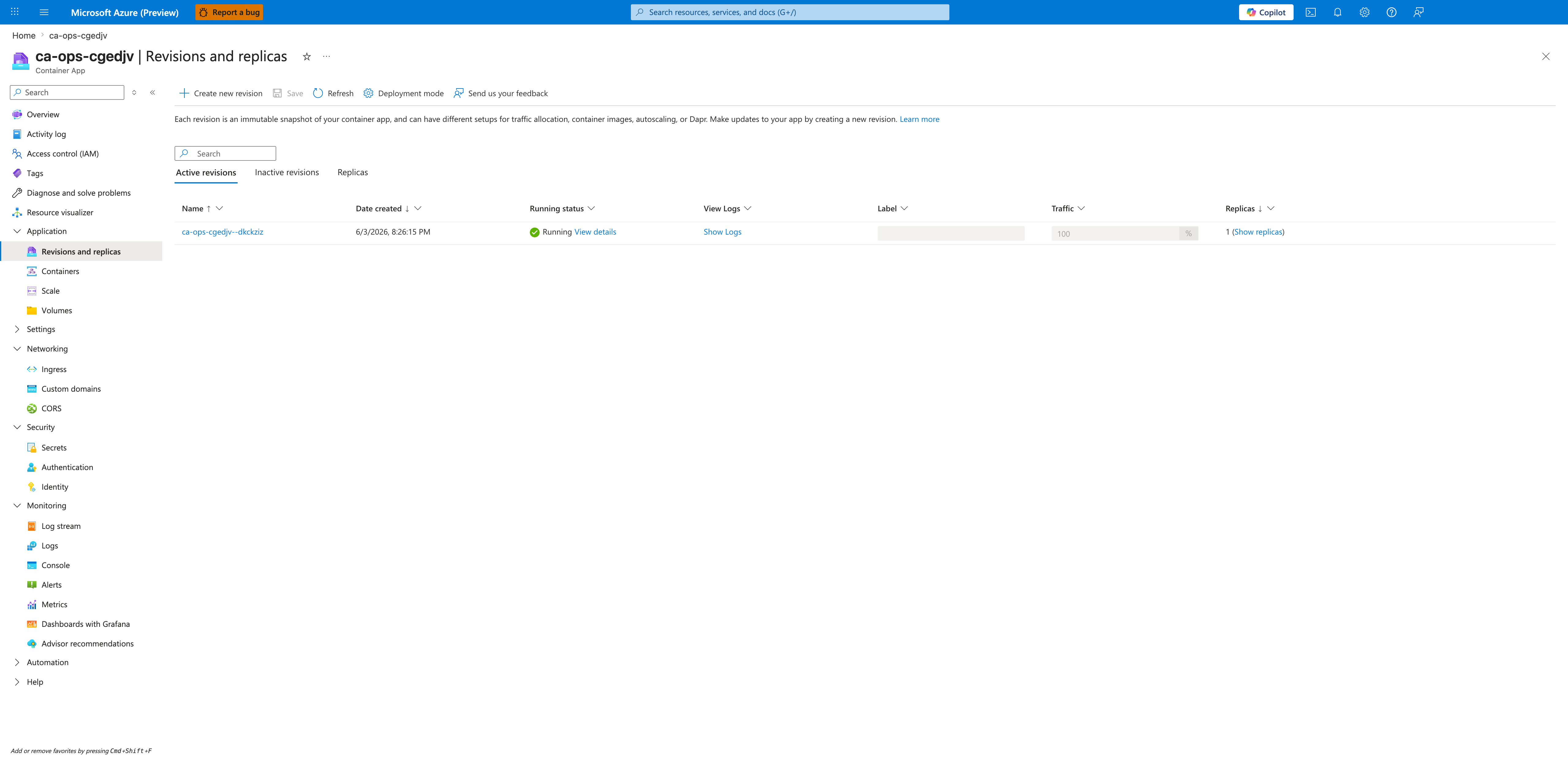
[Observed] The blade header is ca-ops-cgedjv | Revisions and replicas. The command bar shows Create new revision, Save, Refresh, Deployment mode, and Send us your feedback. The page caption reads "Each revision is an immutable snapshot of your container app, and can have different setups for traffic allocation, container images, autoscaling, or Dapr." Three tabs are visible: Active revisions, Inactive revisions, Replicas. The Active revisions tab shows one row: Name ca-ops-cgedjv--dkckziz, Date created 6/3/2026, 8:26:15 PM, Running status ✓ Running with a View details link, View Logs Show Logs, Label column empty, Traffic 100%, Replicas 1 (Show replicas).
[Inferred] A single active revision is serving 100% of traffic, which is the baseline state before any rotation. After running the az containerapp update --set-env-vars command from the Zero-Downtime Secret Updates section, a second row should appear here representing the new revision; the Traffic column is the control surface used for the Blue/green cutover strategy. The empty Label column means no traffic label has been pinned to this revision — labels are a prerequisite for the safer label-based traffic shift described in the Rotation Pattern Decision Matrix.
[Not Proven] This blade does not display the Key Vault secret version that the running replica resolved at startup, nor the value of any secretref: environment variable. The Revisions and replicas blade alone cannot prove that a rotation occurred — it must be cross-checked with the CURRENT VERSION GUID from capture 02 and the revision's environment variable bindings from the Containers blade.