04 - Logging, Monitoring, and Observability
This tutorial step shows how to inspect console logs, query Log Analytics, and add OpenTelemetry-based observability for production operations.
Infrastructure Context
Service: Container Apps (Consumption) | Network: VNet integrated | VNet: ✅
This tutorial assumes a production-ready Container Apps deployment with a custom VNet, ACR with managed identity pull, and private endpoints for backend services.
flowchart TD
    INET[Internet] -->|HTTPS| CA["Container App\nConsumption\nLinux Python 3.11"]

    subgraph VNET["VNet 10.0.0.0/16"]
        subgraph ENV_SUB["Environment Subnet 10.0.0.0/23\nDelegation: Microsoft.App/environments"]
            CAE[Container Apps Environment]
            CA
        end
        subgraph PE_SUB["Private Endpoint Subnet 10.0.2.0/24"]
            PE_ACR[PE: ACR]
            PE_KV[PE: Key Vault]
            PE_ST[PE: Storage]
        end
    end

    PE_ACR --> ACR[Azure Container Registry]
    PE_KV --> KV[Key Vault]
    PE_ST --> ST[Storage Account]

    subgraph DNS[Private DNS Zones]
        DNS_ACR[privatelink.azurecr.io]
        DNS_KV[privatelink.vaultcore.azure.net]
        DNS_ST[privatelink.blob.core.windows.net]
    end

    PE_ACR -.-> DNS_ACR
    PE_KV -.-> DNS_KV
    PE_ST -.-> DNS_ST

    CA -.->|System-Assigned MI| ENTRA[Microsoft Entra ID]
    CAE --> LOG[Log Analytics]
    CA --> AI[Application Insights]

    style CA fill:#107c10,color:#fff
    style VNET fill:#E8F5E9,stroke:#4CAF50
    style DNS fill:#E3F2FD
How Observability Works in Container Apps
flowchart TD
    APP[App container stdout/stderr] --> CONSOLE[Console logs]
    DAPR[Dapr sidecar stdout/stderr] --> CONSOLE
    PLATFORM[Platform/revision/auth events] --> SYSTEM[System logs]
    CONSOLE --> LAW[Log Analytics workspace]
    SYSTEM --> LAW
    OTEL[App instrumentation<br/>OpenTelemetry SDK] --> AI[Application Insights]
    AZMON[Azure Monitor] --> METRICS[Metrics: requests, CPU, memory, replicas]
Distributed Tracing with Dapr
sequenceDiagram
    participant Client
    participant Ingress
    participant AppA as App A
    participant DaprA as Dapr sidecar A
    participant DaprB as Dapr sidecar B
    participant AppB as App B
    participant AppInsights as Application Insights

    Client->>Ingress: HTTPS request
    Ingress->>AppA: Route request
    AppA->>DaprA: Invoke service method
    DaprA->>DaprB: Service-to-service call
    DaprB->>AppB: Deliver invocation
    AppA->>AppInsights: Telemetry via OpenTelemetry
AppB->>AppInsights: Telemetry via OpenTelemetryPrerequisites
- Completed 03 - Configuration, Secrets, and Dapr
- Log Analytics connected to your Container Apps environment
Step-by-step
-
Set standard variables (reuse Bicep outputs from Step 02)
```bash RG="rg-myapp" BASE_NAME="myapp" DEPLOYMENT_NAME="main"
APP_NAME=$(az deployment group show \ --name "$DEPLOYMENT_NAME" \ --resource-group "$RG" \ --query "properties.outputs.containerAppName.value" \ --output tsv)
ACA_ENV_NAME=$(az deployment group show \ --name "$DEPLOYMENT_NAME" \ --resource-group "$RG" \ --query "properties.outputs.containerAppEnvName.value" \ --output tsv)
ACR_NAME=$(az deployment group show \
  --name "$DEPLOYMENT_NAME" \
  --resource-group "$RG" \
  --query "properties.outputs.containerRegistryName.value" \
  --output tsv)
```

| Command | Purpose |
|---|---|
| `APP_NAME=$(az deployment group show --name "$DEPLOYMENT_NAME" --resource-group "$RG" --query "properties.outputs.containerAppName.value" --output tsv)` | Captures the deployed Python app name from the Bicep outputs so the logging commands query the correct app. |
| `ACA_ENV_NAME=$(az deployment group show --name "$DEPLOYMENT_NAME" --resource-group "$RG" --query "properties.outputs.containerAppEnvName.value" --output tsv)` | Captures the environment name so workspace and system-log lookups stay tied to the same deployment. |
| `ACR_NAME=$(az deployment group show --name "$DEPLOYMENT_NAME" --resource-group "$RG" --query "properties.outputs.containerRegistryName.value" --output tsv)` | Captures the registry name used by the deployed tutorial image, which is often useful context when debugging startup or logging issues. |
???+ example "Expected output"
- Stream console logs
| Command | Why it is used |
|---|---|
az containerapp logs show ... | Runs the Azure CLI operation required by the documented step. |
???+ example "Expected output"
{"TimeStamp":"2024-01-15T10:30:01","Log":"Connecting to the container 'app'..."}
{"TimeStamp":"2024-01-15T10:30:01","Log":"Successfully Connected to container: 'app' [Revision: '<your-app-name>--xxxxxxx', Replica: '<your-app-name>--xxxxxxx-<replica-id>']"}
{"TimeStamp":"2024-01-15T10:30:00+00:00","Log":"[2024-01-15 10:30:00 +0000] [1] [INFO] Starting gunicorn 21.2.0"}
{"TimeStamp":"2024-01-15T10:30:00+00:00","Log":"[2024-01-15 10:30:00 +0000] [1] [INFO] Listening at: http://0.0.0.0:8000 (1)"}
{"TimeStamp":"2024-01-15T10:30:00+00:00","Log":"[2024-01-15 10:30:00 +0000] [7] [INFO] Booting worker with pid: 7"}
{"TimeStamp":"2024-01-15T10:30:00+00:00","Log":"[2024-01-15 10:30:00 +0000] [8] [INFO] Booting worker with pid: 8"}
!!! note Use Ctrl+C to stop following logs.
- Check system logs for startup or image issues
| Command | Why it is used |
|---|---|
az containerapp logs show ... | Runs the Azure CLI operation required by the documented step. |
???+ example "Expected output"
{"TimeStamp":"2024-01-15T10:30:00Z","Type":"Normal","ContainerAppName":"<your-app-name>","RevisionName":"<your-app-name>--xxxxxxx","ReplicaName":null,"Msg":"Successfully connected to events server","Reason":"ConnectedToEventsServer","EventSource":"ContainerAppController","Count":1}
- Query Log Analytics via CLI
First, get the Log Analytics workspace ID:
WORKSPACE_ID=$(az containerapp env show \
  --name "$ACA_ENV_NAME" \
  --resource-group "$RG" \
  --query "properties.appLogsConfiguration.logAnalyticsConfiguration.customerId" \
  --output tsv)
| Command | Purpose |
|---|---|
| `WORKSPACE_ID=$(az containerapp env show --name "$ACA_ENV_NAME" --resource-group "$RG" --query "properties.appLogsConfiguration.logAnalyticsConfiguration.customerId" --output tsv)` | Extracts the Log Analytics workspace customer ID from the environment configuration so the next KQL queries run against the workspace actually receiving app logs. |
Run a KQL query to fetch recent console logs:
az monitor log-analytics query \
  --workspace "$WORKSPACE_ID" \
  --analytics-query "ContainerAppConsoleLogs_CL | where ContainerAppName_s == '$APP_NAME' | project TimeGenerated, ContainerAppName_s, Log_s | take 5" \
  --output table
| Command | Why it is used |
|---|---|
az monitor log-analytics ... | Creates or inspects Azure Monitor alerts, diagnostic settings, or metrics. |
???+ example "Expected output"
TableName      TimeGenerated                    ContainerAppName_s           Log_s
-------------  -------------------------------  ---------------------------  ------------------------------------------------
PrimaryResult  2026-04-04T17:15:00.000Z         <your-app-name>              [2026-04-04 17:15:00 +0000] [1] [INFO] Starting gunicorn
PrimaryResult  2026-04-04T17:15:01.000Z         <your-app-name>              [2026-04-04 17:15:01 +0000] [1] [INFO] Listening at: http://0.0.0.0:8000
- Query for errors via CLI
az monitor log-analytics query \
  --workspace "$WORKSPACE_ID" \
  --analytics-query "ContainerAppConsoleLogs_CL | where ContainerAppName_s == '$APP_NAME' | where Log_s has_any ('error', 'exception', 'traceback') | project TimeGenerated, Log_s | take 10" \
  --output table
| Command | Why it is used |
|---|---|
az monitor log-analytics ... | Creates or inspects Azure Monitor alerts, diagnostic settings, or metrics. |
???+ example "Expected output"
TableName      TimeGenerated                    Log_s
-------------  -------------------------------  ------------------------------------------------
PrimaryResult  2026-04-04T11:35:12.000Z         [ERROR] Connection refused: redis://localhost:6379
PrimaryResult  2026-04-04T11:34:58.000Z         Traceback (most recent call last): ...
   !!! tip
       If no errors exist, the query returns an empty result set — which is the healthy baseline.
!!! note "KQL Table Names" Some Log Analytics workspaces use ContainerAppConsoleLogs_CL (custom log schema), while newer workspaces may use ContainerAppConsoleLogs. If queries return no results, try the alternate table name. See KQL Queries Reference for details.
- Add OpenTelemetry for traces and metrics
from azure.monitor.opentelemetry import configure_azure_monitor

configure_azure_monitor(
    connection_string="InstrumentationKey=<instrumentation-key>;IngestionEndpoint=https://<region>.in.applicationinsights.azure.com/"
)
-
Correlate scaling behavior with telemetry
-
Watch request bursts and KEDA scale-out events.
- Verify reduced replica count during idle periods.
- Compare latency before and after scale events.
Verify log stream in Azure Portal
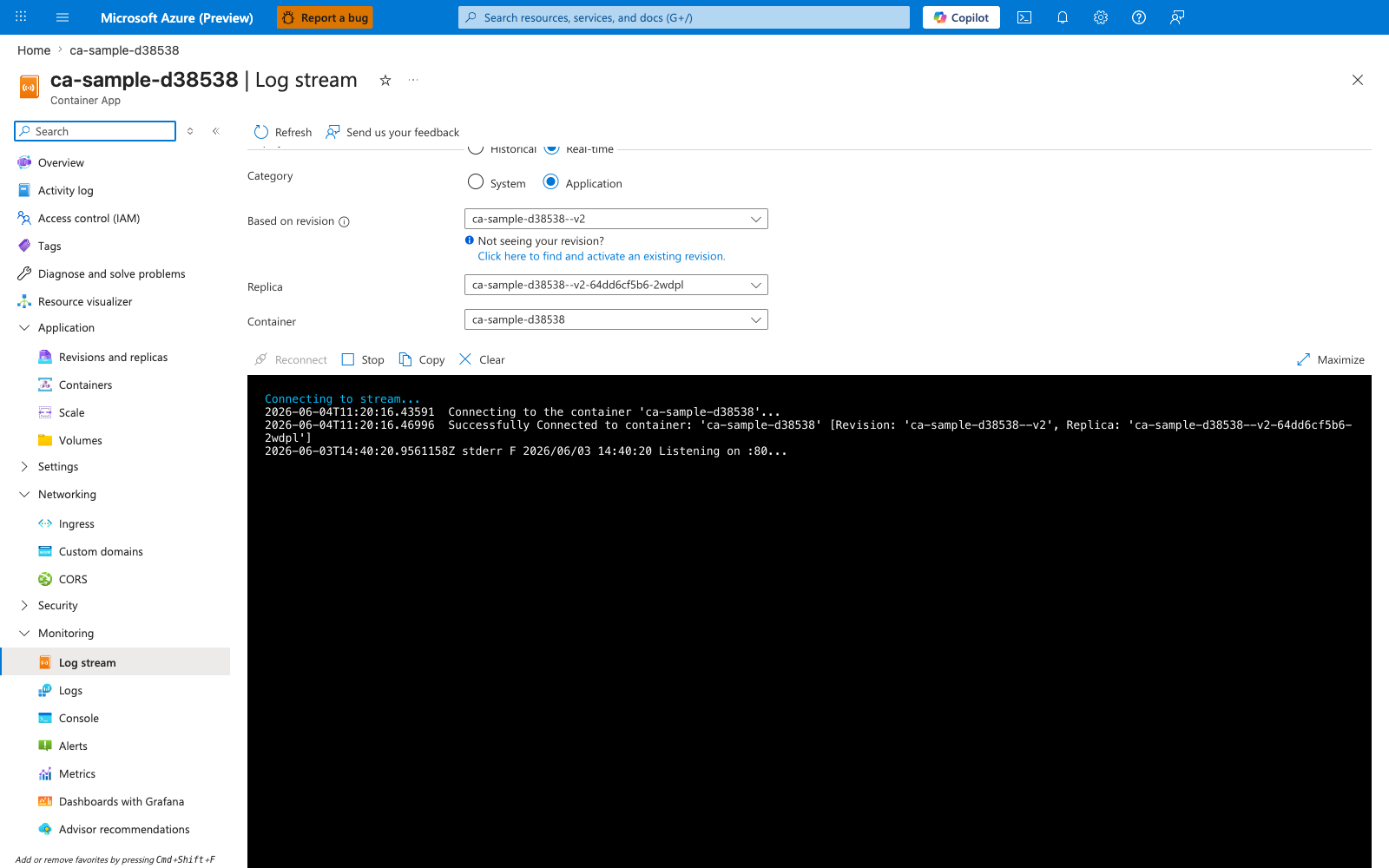
[Observed] ca-sample-d38538. Container App. Log stream. Refresh. Send us your feedback. Historical. Real-time. Category. System. Application. Based on revision. ca-sample-d38538--v2. Not seeing your revision?. Click here to find and activate an existing revision.. Replica. ca-sample-d38538--v2-64dd6cf5b6-2wdpl. Container. ca-sample-d38538. Reconnect. Stop. Copy. Clear. Maximize. Connecting to stream.... 2026-06-04T11:20:16.43591. Connecting to the container 'ca-sample-d38538'.... 2026-06-04T11:20:16.46996. Successfully Connected to container: 'ca-sample-d38538' [Revision: 'ca-sample-d38538--v2', Replica: 'ca-sample-d38538--v2-64dd6cf5b6-2wdpl']. 2026-06-03T14:40:20.9561158Z stderr F 2026/06/03 14:40:20 Listening on :80.... Application. Revisions and replicas. Containers. Scale. Volumes. Settings. Networking. Ingress. Custom domains. CORS. Security. Monitoring. Log stream. Logs. Console. Alerts. Metrics.
[Inferred] The Real-time radio appears to map to the live tail behavior triggered by az containerapp logs show --follow in Step-by-step Step 2. The Category toggle value Application appears consistent with the default console-log stream from Step-by-step Step 2, and the System option appears consistent with the --type system selector exercised in Step-by-step Step 3. The Based on revision selector value ca-sample-d38538--v2 appears consistent with the Revision: identifier embedded inside the Step 2 expected log output line in Step-by-step Step 2. The Replica selector value ca-sample-d38538--v2-64dd6cf5b6-2wdpl appears consistent with the Replica: identifier embedded inside the same Step 2 expected log output line.
[Not Proven] Additional log query output, trace export detail, and scaling telemetry detail are not visible on this view.
Observability practices
- Emit structured JSON logs with correlation IDs.
- Capture dependency traces for outbound HTTP and database calls.
- Monitor revision-specific failures during rollout windows.
Advanced Topics
- Deploy an OpenTelemetry Collector sidecar to route telemetry to multiple backends.
- Add custom business metrics (for example,
orders_total,queue_depth). - Use Dapr tracing to follow service-to-service calls across apps.