03 - Configuration, Secrets, and Dapr
This step configures runtime settings in Azure Container Apps, including environment variables, secrets, KEDA scaling rules, and Dapr sidecar options.
Infrastructure Context
Service: Container Apps (Consumption) | Network: VNet integrated | VNet: ✅
This tutorial assumes a production-ready Container Apps deployment with a custom VNet, ACR with managed identity pull, and private endpoints for backend services.
flowchart TD
    INET[Internet] -->|HTTPS| CA["Container App\nConsumption\nLinux Python 3.11"]

    subgraph VNET["VNet 10.0.0.0/16"]
        subgraph ENV_SUB["Environment Subnet 10.0.0.0/23\nDelegation: Microsoft.App/environments"]
            CAE[Container Apps Environment]
            CA
        end
        subgraph PE_SUB["Private Endpoint Subnet 10.0.2.0/24"]
            PE_ACR[PE: ACR]
            PE_KV[PE: Key Vault]
            PE_ST[PE: Storage]
        end
    end

    PE_ACR --> ACR[Azure Container Registry]
    PE_KV --> KV[Key Vault]
    PE_ST --> ST[Storage Account]

    subgraph DNS[Private DNS Zones]
        DNS_ACR[privatelink.azurecr.io]
        DNS_KV[privatelink.vaultcore.azure.net]
        DNS_ST[privatelink.blob.core.windows.net]
    end

    PE_ACR -.-> DNS_ACR
    PE_KV -.-> DNS_KV
    PE_ST -.-> DNS_ST

    CA -.->|System-Assigned MI| ENTRA[Microsoft Entra ID]
    CAE --> LOG[Log Analytics]
    CA --> AI[Application Insights]

    style CA fill:#107c10,color:#fff
    style VNET fill:#E8F5E9,stroke:#4CAF50
    style DNS fill:#E3F2FD
Configuration Flow
graph TD
    ENV[Env Vars] --> ACA[Container App]
    SEC[Secrets] --> ACA
    DAPR[Dapr] --> ACA
ACA --> APP[Application]Prerequisites
- Completed 02 - First Deploy to Azure Container Apps
- A running Container App
Step-by-step
- Set standard variables (reuse Bicep outputs from Step 02)
RG="rg-aca-python-demo"
BASE_NAME="pycontainer"
DEPLOYMENT_NAME="main"

APP_NAME=$(az deployment group show \
  --name "$DEPLOYMENT_NAME" \
  --resource-group "$RG" \
  --query "properties.outputs.containerAppName.value" \
  --output tsv)

ACA_ENV_NAME=$(az deployment group show \
  --name "$DEPLOYMENT_NAME" \
  --resource-group "$RG" \
  --query "properties.outputs.containerAppEnvName.value" \
  --output tsv)

ACR_NAME=$(az deployment group show \
  --name "$DEPLOYMENT_NAME" \
  --resource-group "$RG" \
  --query "properties.outputs.containerRegistryName.value" \
  --output tsv)
| Command | Purpose |
|---|---|
| `APP_NAME=$(az deployment group show --name "$DEPLOYMENT_NAME" --resource-group "$RG" --query "properties.outputs.containerAppName.value" --output tsv)` | Captures the existing Container App name from the deployment outputs so configuration changes apply to the correct Python app. |
| `ACA_ENV_NAME=$(az deployment group show --name "$DEPLOYMENT_NAME" --resource-group "$RG" --query "properties.outputs.containerAppEnvName.value" --output tsv)` | Captures the environment name from the same deployment so later config and secret examples stay aligned with the deployed environment. |
| `ACR_NAME=$(az deployment group show --name "$DEPLOYMENT_NAME" --resource-group "$RG" --query "properties.outputs.containerRegistryName.value" --output tsv)` | Captures the registry name used by the app image so subsequent configuration and deployment examples reference the same registry. |
???+ example "Expected output" The commands above set shell variables silently. Verify them with:
   ```bash
   echo "APP_NAME=$APP_NAME"
   echo "ACA_ENV_NAME=$ACA_ENV_NAME"
   echo "ACR_NAME=$ACR_NAME"
   ```

   ```text
   APP_NAME=<your-app-name>
   ACA_ENV_NAME=<your-env-name>
   ACR_NAME=<acr-name>
   ```
- Set environment variables
az containerapp update \
  --name "$APP_NAME" \
  --resource-group "$RG" \
   --set-env-vars "LOG_LEVEL=INFO" "FEATURE_FLAG=true"
| Command | Why it is used |
|---|---|
az containerapp update ... | Updates the existing Container App configuration without recreating the app. |
???+ example "Expected output"
- Store and reference a secret
az containerapp secret set \
  --name "$APP_NAME" \
  --resource-group "$RG" \
   --secrets "db-password=<secret-value>"
| Command | Why it is used |
|---|---|
az containerapp secret set ... | Manages Container Apps secrets without exposing secret values in plain configuration. |
???+ example "Expected output"
[
  {
    "name": "appinsights-connection-string"
  },
  {
    "name": "registry-password"
  },
  {
    "name": "db-password"
  }
]
az containerapp update \
  --name "$APP_NAME" \
  --resource-group "$RG" \
  --set-env-vars "DB_PASSWORD=secretref:db-password"
| Command | Why it is used |
|---|---|
az containerapp update ... | Updates the existing Container App configuration without recreating the app. |
???+ example "Expected output"
- Configure KEDA HTTP autoscaling
az containerapp update \
  --name "$APP_NAME" \
  --resource-group "$RG" \
  --min-replicas 0 \
  --max-replicas 10 \
  --scale-rule-name "http-scale" \
  --scale-rule-type "http" \
   --scale-rule-http-concurrency 50
| Command | Why it is used |
|---|---|
az containerapp update ... | Updates the existing Container App configuration without recreating the app. |
???+ example "Expected output"
Choosing HTTP concurrency threshold
A lower value (e.g., 50) triggers scale-out more aggressively, suitable for latency-sensitive APIs. A higher value (e.g., 100, used in infra/main.bicep) delays scale-out for cost efficiency. Choose based on your latency SLO and budget. The Bicep template in infra/main.bicep defaults to maxReplicas=3 for cost safety. Override with --parameters maxReplicas=10 when deploying infrastructure.
- Configure queue-driven KEDA scaling (example)
az containerapp update \
  --name "$APP_NAME" \
  --resource-group "$RG" \
  --scale-rule-name "queue-scale" \
  --scale-rule-type "azure-servicebus" \
  --scale-rule-metadata "queueName=orders" "namespace=sb-namespace" \
  --scale-rule-auth "connection=servicebus-connection"
| Command | Why it is used |
|---|---|
az containerapp update ... | Updates the existing Container App configuration without recreating the app. |
???+ example "Expected output"
Verify pushed repositories in ACR:
| Command | Why it is used |
|---|---|
az acr repository list ... | Inspects or manages repositories and tags inside Azure Container Registry. |
???+ example "Expected output"
- Enable Dapr sidecar
az containerapp dapr enable \
  --name "$APP_NAME" \
  --resource-group "$RG" \
  --dapr-app-id "$APP_NAME" \
  --dapr-app-port 8000
| Command | Why it is used |
|---|---|
az containerapp dapr enable ... | Configures Dapr sidecar settings for the Container App. |
???+ example "Expected output"
{
  "appId": "ca-pycontainer-<unique-suffix>",
  "appPort": 8000,
  "appProtocol": "http",
  "enableApiLogging": false,
  "enabled": true,
  "httpMaxRequestSize": null,
  "httpReadBufferSize": null,
  "logLevel": "info"
}
Verify configuration in Azure Portal
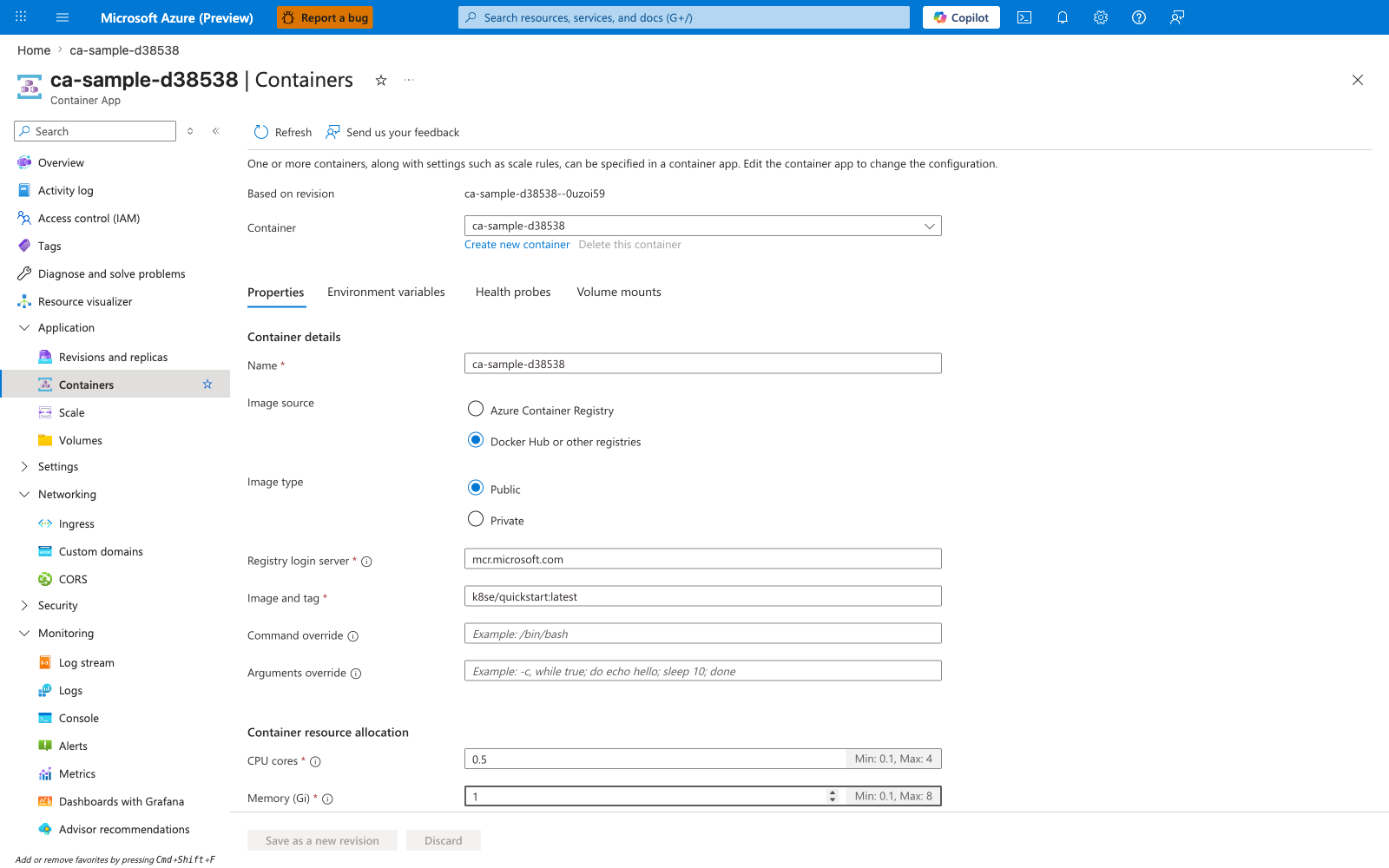
[Observed] ca-sample-d38538. Container App. Containers. Refresh. Send us your feedback. Based on revision. ca-sample-d38538--0uzoi59. Container. Create new container. Delete this container. Properties. Environment variables. Health probes. Volume mounts. Container details. Name. Image source. Azure Container Registry. Docker Hub or other registries. Image type. Public. Private. Registry login server. mcr.microsoft.com. Image and tag. k8se/quickstart:latest. Command override. Arguments override. Container resource allocation. CPU cores. 0.5. Min: 0.1, Max: 4. Memory (Gi). 1. Min: 0.1, Max: 8. Save as a new revision. Discard. Application. Revisions and replicas. Containers. Scale. Volumes. Settings. Networking. Ingress. Custom domains. CORS. Security. Monitoring. Log stream. Logs. Console. Alerts. Metrics.
[Inferred] The Environment variables tab appears to map to the same name=value pairs supplied via --set-env-vars in Step-by-step Step 2. The left-navigation entry Scale is consistent with the --scale-rule-* levers configured in Step-by-step Steps 4 and 5. The Based on revision field is consistent with the az containerapp update operations issued throughout Step-by-step. The Save as a new revision action is consistent with the revision-creating effect of az containerapp update invoked across Step-by-step.
[Not Proven] Additional configuration detail, secret-binding detail, and integration detail are not visible on this view.
Python example: read config safely
import os

LOG_LEVEL = os.environ.get("LOG_LEVEL", "INFO")
FEATURE_FLAG = os.environ.get("FEATURE_FLAG", "false").lower() == "true"
DB_PASSWORD = os.environ.get("DB_PASSWORD", "")
Advanced Topics
- Use Key Vault + managed identity instead of direct secret values.
- Tune KEDA thresholds differently for API and background worker apps.
- Add Dapr pub/sub and state store components for event-driven workflows.
See Also
- 04 - Logging, Monitoring, and Observability
- 07 - Revisions and Traffic Splitting
- Dapr Integration Recipe