Python Tutorial Index
This tutorial path walks you from local development to safe production rollout for Python apps on Azure Container Apps. It is the Python-specific companion to the series-standard Learning Paths page.
Prerequisites
Before starting, install and verify:
- Python 3.11+
- Docker (for local build and run)
- Azure CLI 2.57+ with the Container Apps extension
- An Azure subscription
- A Python web app that exposes
/health
| Command | Purpose |
|---|---|
az extension add --name containerapp --upgrade | Ensures the Container Apps CLI extension is installed and current before you begin the Python tutorial sequence. |
az login | Starts an authenticated Azure CLI session so the tutorial commands can create and inspect Azure resources. |
Prerequisite-to-Module Mapping
| Prerequisite | Why It Matters | First Module That Uses It | Quick Validation |
|---|---|---|---|
| Azure subscription | Required for all az containerapp operations | Python 02 | az account show --output table |
| Azure CLI + extension | Needed to create app, revisions, and jobs | Python 02 | az extension add --name containerapp --upgrade |
| Docker | Needed for local image build and run | Python 01 | docker build --tag "$APP_NAME:local" . |
Health endpoint (/health) | Required for stable probe behavior | Python 01 and best-practices container design | curl --fail "http://localhost:8000/health" |
| Log Analytics awareness | Required for production debugging | Python 04 and operations/monitoring | Run any starter KQL in troubleshooting/kql |
Tutorial Progression
flowchart TD
    S01[01 Local Development] --> S02[02 First Deploy]
    S02 --> S03[03 Configuration]
    S03 --> S04[04 Logging & Monitoring]
    S04 --> S05[05 Infrastructure as Code]
    S05 --> S06[06 CI/CD]
S06 --> S07[07 Revisions & Traffic]Steps
| Step | Title | Purpose |
|---|---|---|
| 01-local-development | Local Development | Build and run the app locally with Docker. |
| 02-first-deploy | First Deploy | Publish the container image and create the first Container App. |
| 03-configuration | Configuration | Set environment variables and secrets safely. |
| 04-logging-monitoring | Logging & Monitoring | Collect logs, metrics, and traces for the app. |
| 05-infrastructure-as-code | Infrastructure as Code | Provision the environment with Bicep. |
| 06-ci-cd | CI/CD | Automate build and deployment with GitHub Actions. |
| 07-revisions-traffic | Revisions & Traffic | Use revisions and traffic splitting for safe releases. |
Recommended Command Sequence for New Environments
Run this once when provisioning a fresh environment, then continue tutorial modules with the same variable names.
az group create --name "$RG" --location "$LOCATION"

az containerapp env create \
  --name "$ACA_ENV_NAME" \
  --resource-group "$RG" \
  --location "$LOCATION"

az acr create \
  --name "$ACR_NAME" \
  --resource-group "$RG" \
  --location "$LOCATION" \
  --sku Basic
| Command | Purpose |
|---|---|
az group create --name "$RG" --location "$LOCATION" | Creates the resource group that will hold the tutorial environment, app, and registry resources. |
az containerapp env create --name "$ACA_ENV_NAME" --resource-group "$RG" --location "$LOCATION" | Creates the Container Apps environment that hosts your tutorial app revisions and ingress endpoint. |
az acr create --name "$ACR_NAME" --resource-group "$RG" --location "$LOCATION" --sku Basic | Creates the registry used to store tutorial images before deploying them into Container Apps. |
Use reusable variables from day one
Keep command examples consistent with this guide's variables: $RG, $APP_NAME, $ACA_ENV_NAME, $ACR_NAME, and $LOCATION.
Suggested 2-Week Learning Plan
| Day Range | Focus | Deliverable |
|---|---|---|
| Day 1-2 | Start Here + platform basics | Team-level architecture notes and service choice |
| Day 3-4 | Python 01-03 | First deployed revision with secrets/config |
| Day 5 | Python 04 | Basic dashboard + log query for error rate |
| Day 6-7 | Python 05-06 | Reproducible IaC deploy + CI/CD pipeline |
| Day 8 | Python 07 | Revision split test plan |
| Day 9-10 | operations + troubleshooting | Incident runbook draft and recovery drill |
Do not skip observability setup
Teams that delay logging and alert basics usually struggle during the first production incident. Complete logging and monitoring before scaling traffic.
Avoid premature multi-service complexity
Start with one container app and one clear API workflow. Add Dapr sidecars, jobs, and private networking after the baseline deployment is stable.
Skill Checkpoints
Before moving from one phase to the next, validate these checkpoints:
| Phase | Checkpoint | Evidence |
|---|---|---|
| Build | App listens on configured port | Successful local run and /health response |
| Deploy | Revision becomes healthy | az containerapp revision list --name "$APP_NAME" --resource-group "$RG" --output table |
| Operate | Logs are queryable and structured | KQL query returns expected JSON schema |
| Improve | Safe rollout behavior | Successful traffic split or rollback simulation |
Advanced Topics
- Use Dapr integration for service invocation, pub/sub, and state APIs.
- Add VNet and private networking patterns from networking recipes.
- Standardize environment provisioning with reusable Bicep modules.
Verify in Azure Portal
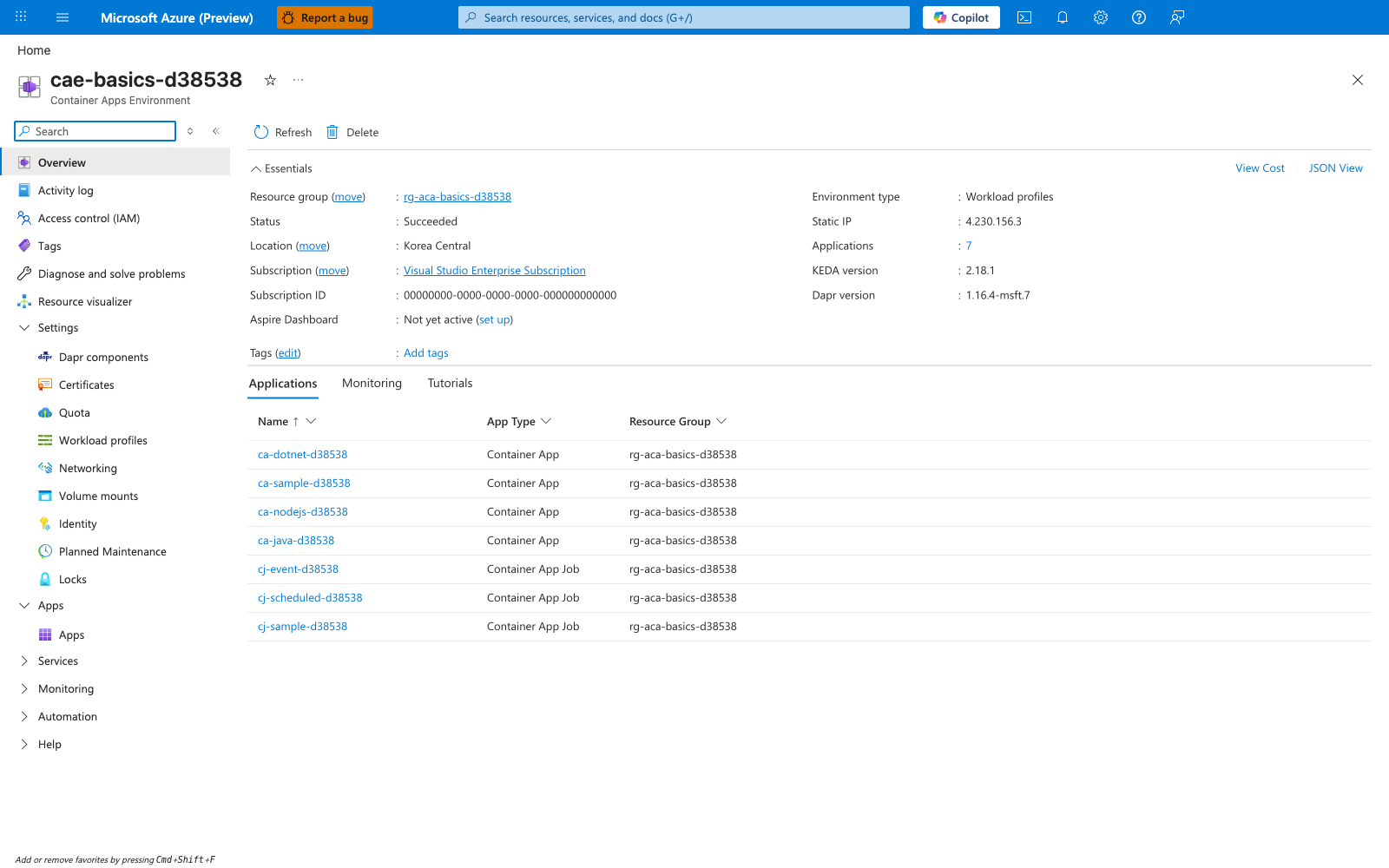
Purpose: Confirm the environment provisioned in Step 05-infrastructure-as-code is healthy and hosts the app you deployed in Step 02-first-deploy. Look for: Status = Succeeded, Environment type = Workload profiles, and your Container App (ca-sample-d38538) listed in the Applications tab. Expected result: The environment reports Succeeded and your Container App appears in the applications list. Next step: If Status is not Succeeded, re-run and verify Step 05-infrastructure-as-code before continuing.
Evidence notes
[Observed] Environment cae-basics-d38538 reports Status Succeeded, Environment type Workload profiles, and lists ca-sample-d38538 in the Applications tab.
[Inferred] ca-sample-d38538 corresponds to the Container App created in Step 02-first-deploy, and the environment matches the one provisioned by the Bicep run in Step 05-infrastructure-as-code.
[Not Proven] This blade does not show the per-step CLI output from earlier tutorial steps.