Recipe: Jobs in Python on Azure Container Apps
Use this recipe to package a Python script as a manual Job, adapt it to a one-message Service Bus consumer, and add a dedup table pattern for safe replay.
Prerequisites
- Azure Container Apps environment (
$ACA_ENV_NAME) - Azure Container Registry (
$ACR_NAME) - Azure Service Bus namespace and queue for the event-driven example
- Python 3.11+, Docker, and Azure CLI
export RG="rg-aca-python-prod"
export ACA_ENV_NAME="aca-env-python-prod"
export ACR_NAME="acrpythonprod"
export JOB_NAME="job-python-manual"
export EVENT_JOB_NAME="job-python-servicebus"
export SERVICEBUS_NAMESPACE="sb-aca-prod"
export SERVICEBUS_QUEUE="orders"
What You'll Build
- a manual Python Job with a script entrypoint
- an event-driven Service Bus consumer that processes one message and exits
- a dedup-table pattern you can move to a durable database in production
Steps
flowchart TD
    A[Write Python job script] --> B[Build container image]
    B --> C[Create manual job]
    C --> D[Start execution]
    D --> E[Adapt to one-message Service Bus consumer]
    E --> F[Add dedup table guard]
1. Package a manual Python job
job.py:
import json
import os
import sys
from datetime import datetime, timezone


def main() -> int:
    payload = {
        "event": "job-start",
        "execution": os.getenv("CONTAINER_APP_JOB_EXECUTION_NAME", "local"),
        "task": os.getenv("TASK_NAME", "reconcile-orders"),
        "started_at": datetime.now(timezone.utc).isoformat(),
    }
    print(json.dumps(payload))

    print(json.dumps({"event": "job-work", "message": "processing batch"}))
    print(json.dumps({"event": "job-end", "status": "Succeeded"}))
    return 0


if __name__ == "__main__":
    sys.exit(main())
requirements.txt:
Dockerfile:
FROM python:3.11-slim

WORKDIR /app
COPY requirements.txt .
RUN pip install --no-cache-dir -r requirements.txt
COPY job.py .

CMD ["python", "job.py"]
Build and deploy the manual Job:
az acr build \
  --registry "$ACR_NAME" \
  --image "python-jobs/manual:v1" \
  --file "Dockerfile" \
  "."

az containerapp job create \
  --name "$JOB_NAME" \
  --resource-group "$RG" \
  --environment "$ACA_ENV_NAME" \
  --trigger-type "Manual" \
  --image "$ACR_NAME.azurecr.io/python-jobs/manual:v1" \
  --parallelism 1 \
  --replica-completion-count 1 \
  --replica-retry-limit 1 \
  --replica-timeout 600

az containerapp job start \
  --name "$JOB_NAME" \
  --resource-group "$RG"
| Command | Why it is used |
|---|---|
az acr build ... | Builds and pushes the container image to Azure Container Registry. |
2. Adapt the container to an event-driven Service Bus consumer
Replace job.py with:
import json
import os
from azure.identity import DefaultAzureCredential
from azure.servicebus import ServiceBusClient


fully_qualified_namespace = f"{os.environ['SERVICEBUS_NAMESPACE']}.servicebus.windows.net"
queue_name = os.environ["SERVICEBUS_QUEUE"]

credential = DefaultAzureCredential()
client = ServiceBusClient(fully_qualified_namespace=fully_qualified_namespace, credential=credential)

with client:
    receiver = client.get_queue_receiver(queue_name=queue_name, max_wait_time=15)
    with receiver:
        messages = receiver.receive_messages(max_message_count=1, max_wait_time=15)
        if not messages:
            print(json.dumps({"event": "empty-queue"}))
        else:
            message = messages[0]
            print(json.dumps({"event": "message-received", "message_id": message.message_id}))
            receiver.complete_message(message)
            print(json.dumps({"event": "message-completed", "message_id": message.message_id}))
Create the event-driven Job:
az acr build \
  --registry "$ACR_NAME" \
  --image "python-jobs/servicebus:v1" \
  --file "Dockerfile" \
  "."

az containerapp job create \
  --name "$EVENT_JOB_NAME" \
  --resource-group "$RG" \
  --environment "$ACA_ENV_NAME" \
  --trigger-type "Event" \
  --image "$ACR_NAME.azurecr.io/python-jobs/servicebus:v1" \
  --scale-rule-name "orders-queue" \
  --scale-rule-type "azure-servicebus" \
  --scale-rule-metadata "queueName=$SERVICEBUS_QUEUE" "messageCount=1" "namespace=$SERVICEBUS_NAMESPACE.servicebus.windows.net" \
  --replica-timeout 300 \
  --replica-retry-limit 1 \
  --env-vars SERVICEBUS_NAMESPACE="$SERVICEBUS_NAMESPACE" SERVICEBUS_QUEUE="$SERVICEBUS_QUEUE"
| Command | Why it is used |
|---|---|
az acr build ... | Builds and pushes the container image to Azure Container Registry. |
3. Add an idempotency guard with a dedup table
For a runnable local example, add a SQLite-backed dedup table. In production, move the same pattern to Azure SQL, PostgreSQL, or another shared durable store.
import sqlite3


def should_process(message_id: str) -> bool:
    conn = sqlite3.connect("/tmp/dedup.db")
    conn.execute("create table if not exists processed_messages (message_id text primary key)")
    cursor = conn.execute(
        "insert or ignore into processed_messages(message_id) values (?)",
        (message_id,),
    )
    conn.commit()
    conn.close()
    return cursor.rowcount == 1
Call it before completing the message:
if should_process(str(message.message_id)):
    print(json.dumps({"event": "process-message", "message_id": message.message_id}))
    receiver.complete_message(message)
else:
    print(json.dumps({"event": "duplicate-message", "message_id": message.message_id}))
    receiver.complete_message(message)
Verification
az containerapp job execution list \
  --name "$JOB_NAME" \
  --resource-group "$RG" \
  --output table

az containerapp job execution list \
  --name "$EVENT_JOB_NAME" \
  --resource-group "$RG" \
  --output table
| Command | Why it is used |
|---|---|
az containerapp job execution ... | Creates, updates, starts, or inspects a Container Apps job. |
Verify job in Azure Portal
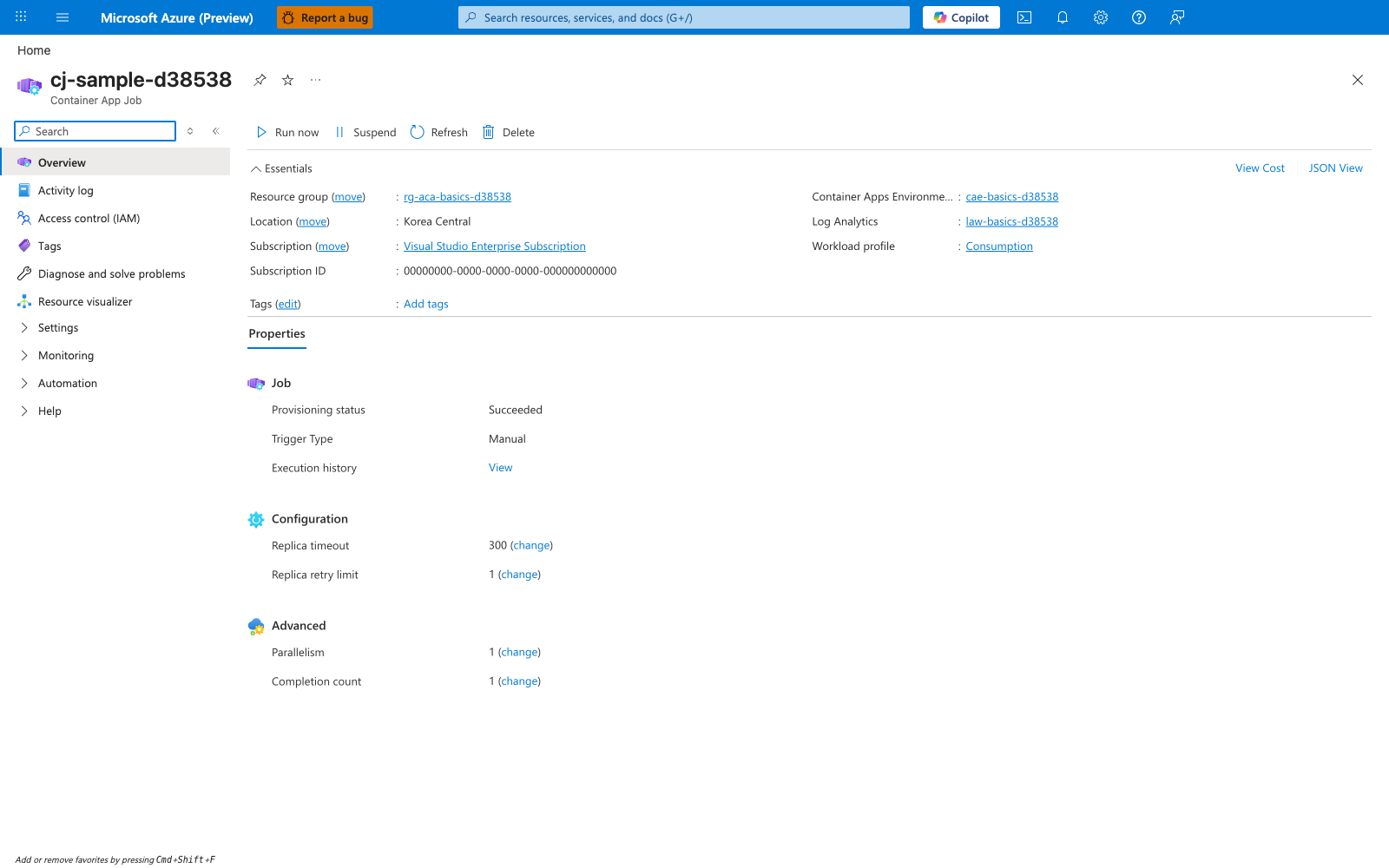
[Observed] cj-sample-d38538. Container App Job. Run now. Suspend. Refresh. Delete. Resource group. rg-aca-basics-d38538. Location. Korea Central. Subscription. Visual Studio Enterprise Subscription. Subscription ID. 00000000-0000-0000-0000-000000000000. Container Apps Environme.... cae-basics-d38538. Log Analytics. law-basics-d38538. Workload profile. Consumption. Properties. Job. Provisioning status. Succeeded. Trigger Type. Manual. Execution history. View. Configuration. Replica timeout. 300. Replica retry limit. 1. Advanced. Parallelism. 1. Completion count. 1.
[Inferred] The Trigger Type field reading Manual appears to map to the --trigger-type "Manual" lever passed to az containerapp job create in Steps Step 1. The Replica timeout value 300 appears to map to the --replica-timeout 300 lever passed to az containerapp job create in Steps Step 2. The Replica retry limit value 1 appears to map to the --replica-retry-limit 1 lever passed in Steps Steps 1 and 2. The Parallelism value 1 and Completion count value 1 appear to map to --parallelism 1 and --replica-completion-count 1 passed in Steps Step 1. The Run now toolbar action is consistent with the az containerapp job start invocation in Steps Step 1.
[Not Proven] Additional job trigger configuration, runtime parameter, and execution detail are not visible on this view.
Next Steps / Clean Up
- Move the dedup table from SQLite to a shared durable database.
- Add Application Insights correlation fields to every log line.
- Revisit Jobs Operations before production rollout.