07 - Revisions and Traffic Splitting
Azure Container Apps revisions provide immutable deployment snapshots. Use them for safe releases, canary traffic, and quick rollback.
Infrastructure Context
Service: Container Apps (Consumption) | Network: VNet integrated | VNet: ✅
This tutorial assumes a production-ready Container Apps deployment with a custom VNet, ACR with managed identity pull, and private endpoints for backend services.
flowchart TD
    INET[Internet] -->|HTTPS| CA["Container App\nConsumption\nLinux Node 18 LTS"]

    subgraph VNET["VNet 10.0.0.0/16"]
        subgraph ENV_SUB["Environment Subnet 10.0.0.0/23\nDelegation: Microsoft.App/environments"]
            CAE[Container Apps Environment]
            CA
        end
        subgraph PE_SUB["Private Endpoint Subnet 10.0.2.0/24"]
            PE_ACR[PE: ACR]
            PE_KV[PE: Key Vault]
            PE_ST[PE: Storage]
        end
    end

    PE_ACR --> ACR[Azure Container Registry]
    PE_KV --> KV[Key Vault]
    PE_ST --> ST[Storage Account]

    subgraph DNS[Private DNS Zones]
        DNS_ACR[privatelink.azurecr.io]
        DNS_KV[privatelink.vaultcore.azure.net]
        DNS_ST[privatelink.blob.core.windows.net]
    end

    PE_ACR -.-> DNS_ACR
    PE_KV -.-> DNS_KV
    PE_ST -.-> DNS_ST

    CA -.->|System-Assigned MI| ENTRA[Microsoft Entra ID]
    CAE --> LOG[Log Analytics]
    CA --> AI[Application Insights]

    style CA fill:#107c10,color:#fff
    style VNET fill:#E8F5E9,stroke:#4CAF50
    style DNS fill:#E3F2FD
Revision Traffic Splitting
graph TD
    INGRESS[Ingress] -->|90%| V1[Revision v1]
INGRESS -->|10%| V2[Revision v2]Prerequisites
- Completed 06 - CI/CD with GitHub Actions
- At least two deployed images/tags
Define promotion criteria before traffic split
Decide in advance which metrics (error rate, latency percentile, saturation) must stay within threshold before increasing canary traffic.
Step-by-step
-
Set standard variables
RG="rg-nodejs-guide"
BASE_NAME="nodejs-guide"
DEPLOYMENT_NAME="main"

APP_NAME=$(az deployment group show \
  --name "$DEPLOYMENT_NAME" \
  --resource-group "$RG" \
  --query "properties.outputs.containerAppName.value" \
  --output tsv)
Command Purpose APP_NAME=$(az deployment group show --name "$DEPLOYMENT_NAME" --resource-group "$RG" --query "properties.outputs.containerAppName.value" --output tsv)Captures the deployed app name so revision-mode and traffic-splitting commands apply to the correct Node.js app. -
Switch to multiple revision mode
Command Why it is used az containerapp revision set-mode --name "$APP_NAME" --resource-group "$RG" --mode multipleSwitches the app into multiple revision mode so you can keep old and new Node.js revisions active at the same time for traffic splitting. -
Deploy a new version to create a new revision
az acr build --registry "$ACR_NAME" --image "$BASE_NAME:v3" ./apps/nodejs

az containerapp update \
  --name "$APP_NAME" \
  --resource-group "$RG" \
  --image "$ACR_LOGIN_SERVER/$BASE_NAME:v3"
Command Why it is used az acr build --registry ...Builds and pushes the container image to Azure Container Registry. -
List revisions and choose targets
az containerapp revision list \
  --name "$APP_NAME" \
  --resource-group "$RG" \
  --query "[].{name:name,active:properties.active,createdTime:properties.createdTime}" \
  --output table
Command Why it is used az containerapp revision list ...Lists revisions so rollout state, traffic, and health can be verified. -
Apply canary traffic split (90/10)
# Capture revision names from the list above
STABLE_REV="${APP_NAME}--0000001"
CANARY_REV="${APP_NAME}--0000002"

az containerapp ingress traffic set \
  --name "$APP_NAME" \
  --resource-group "$RG" \
  --revision-weight "$STABLE_REV=90" "$CANARY_REV=10"
Command Why it is used az containerapp ingress traffic ...Runs the Azure CLI operation required by the documented step. -
Rollback instantly if errors increase
az containerapp ingress traffic set \
  --name "$APP_NAME" \
  --resource-group "$RG" \
  --revision-weight "$STABLE_REV=100"
Command Why it is used az containerapp ingress traffic ...Runs the Azure CLI operation required by the documented step. -
Deactivate bad revision after confirmation
az containerapp revision deactivate \
  --name "$APP_NAME" \
  --resource-group "$RG" \
  --revision "$CANARY_REV"
Command Why it is used az containerapp revision deactivate ...Runs the Azure CLI operation required by the documented step.
Verify revisions and traffic in Azure Portal
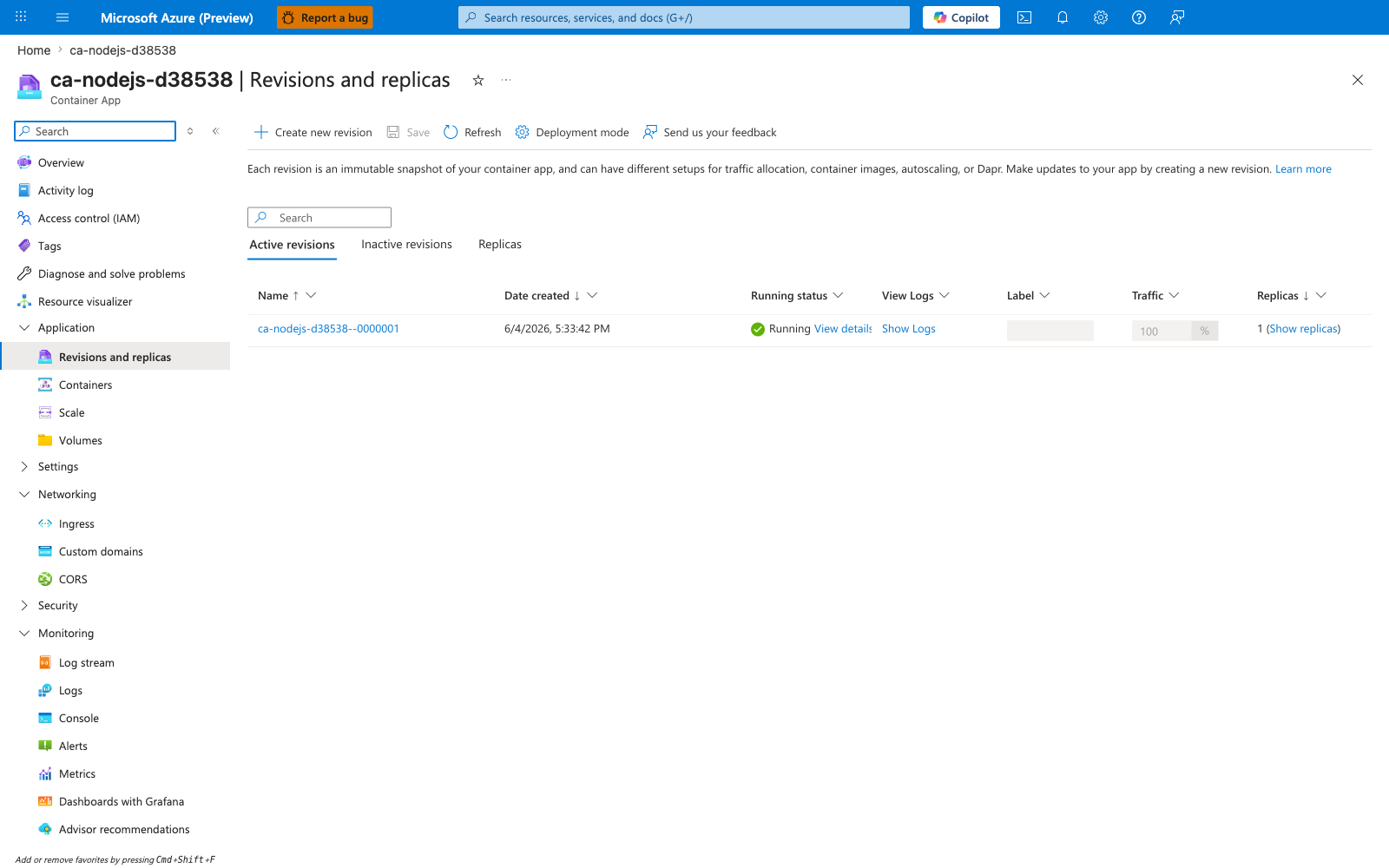
[Observed] ca-nodejs-d38538. Container App. Revisions and replicas. Create new revision. Save. Refresh. Deployment mode. Send us your feedback. Learn more. Active revisions. Inactive revisions. Replicas. Name. Date created. Running status. View Logs. Label. Traffic. ca-nodejs-d38538--0000001. 6/4/2026, 5:33:42 PM. Running. View details. Show Logs. 100. %. 1. Show replicas. Application. Revisions and replicas. Containers. Scale. Volumes. Settings. Networking. Ingress. Custom domains. CORS. Security. Monitoring. Log stream. Logs. Console. Alerts. Metrics.
[Inferred] The Deployment mode toolbar action appears to map to the same lever set by az containerapp revision set-mode --mode multiple in Step-by-step Step 2. The Create new revision toolbar action is consistent with the new-revision effect of az containerapp update --image in Step-by-step Step 3. The Active revisions and Inactive revisions tabs are consistent with the revision list and revision deactivate operations in Step-by-step Steps 4 and 7. The Traffic column value 100 % for ca-nodejs-d38538--0000001 appears to map to the per-revision weight set by az containerapp ingress traffic set --revision-weight in Step-by-step Steps 5 and 6.
[Not Proven] Additional revision detail and traffic-split detail are not visible on this view.
Node.js Revision Management
When using multiple revisions with Node.js, ensure your application handles statelessness correctly. Session data should be stored in an external cache like Azure Cache for Redis to prevent user impact when traffic is split between different revisions.
Operational guidance
- Pair canary rollout with telemetry checks (errors, latency, saturation).
- Keep one prior known-good revision for emergency rollback.
- Use KEDA metrics and revision health together for rollout decisions.
Do not leave stale canary revisions active
After rollback or promotion, deactivate obsolete revisions to reduce operational confusion and prevent unintended traffic assignment during future updates.
Advanced Topics
- Route traffic by labels for blue/green style releases.
- Combine revisions with Dapr service invocation for progressive migration.
- Automate canary promotion in CI/CD using policy checks.