07 - Revisions and Traffic
Azure Container Apps supports multiple revisions, allowing you to run multiple versions of your Spring Boot application simultaneously. This guide covers how to manage revisions and split traffic between them for zero-downtime releases and safe rollouts.
Infrastructure Context
Service: Container Apps (Consumption) | Network: VNet integrated | VNet: ✅
This tutorial assumes a production-ready Container Apps deployment with a custom VNet, ACR with managed identity pull, and private endpoints for backend services.
flowchart TD
    INET[Internet] -->|HTTPS| CA["Container App\nConsumption\nLinux Java 17"]

    subgraph VNET["VNet 10.0.0.0/16"]
        subgraph ENV_SUB["Environment Subnet 10.0.0.0/23\nDelegation: Microsoft.App/environments"]
            CAE[Container Apps Environment]
            CA
        end
        subgraph PE_SUB["Private Endpoint Subnet 10.0.2.0/24"]
            PE_ACR[PE: ACR]
            PE_KV[PE: Key Vault]
            PE_ST[PE: Storage]
        end
    end

    PE_ACR --> ACR[Azure Container Registry]
    PE_KV --> KV[Key Vault]
    PE_ST --> ST[Storage Account]

    subgraph DNS[Private DNS Zones]
        DNS_ACR[privatelink.azurecr.io]
        DNS_KV[privatelink.vaultcore.azure.net]
        DNS_ST[privatelink.blob.core.windows.net]
    end

    PE_ACR -.-> DNS_ACR
    PE_KV -.-> DNS_KV
    PE_ST -.-> DNS_ST

    CA -.->|System-Assigned MI| ENTRA[Microsoft Entra ID]
    CAE --> LOG[Log Analytics]
    CA --> AI[Application Insights]

    style CA fill:#107c10,color:#fff
    style VNET fill:#E8F5E9,stroke:#4CAF50
    style DNS fill:#E3F2FD
Revision Workflow
graph TD
    APP_V1[App v1] --> REV_V1[Revision 1]
    APP_V2[App v2] --> REV_V2[Revision 2]
    REV_V1 --> TRAFFIC_50[Traffic 50%]
    REV_V2 --> TRAFFIC_50[Traffic 50%]
TRAFFIC_50 --> USER[User]Prerequisites
- Existing Azure Container App (created in 02 - First Deploy)
- Azure CLI 2.57+
Revision Modes
By default, Container Apps are in Single revision mode, where only one revision is active at a time. To enable multiple revisions, switch to Multiple mode.
| Command | Why it is used |
|---|---|
az containerapp revision set-mode ... | Runs the Azure CLI operation required by the documented step. |
Creating New Revisions
Every time you update the container image or configuration, a new revision is created.
az containerapp update \
  --resource-group $RG \
  --name $APP_NAME \
  --image $ACR_NAME.azurecr.io/java-guide:v2
| Command | Why it is used |
|---|---|
az containerapp update ... | Updates the existing Container App configuration without recreating the app. |
Managing Traffic Splitting
When multiple revisions are active, you can split traffic between them by percentage or name.
1. Simple 50/50 Split
az containerapp ingress traffic set \
  --resource-group $RG \
  --name $APP_NAME \
  --traffic-weight "$APP_NAME--0000001=50" "$APP_NAME--0000002=50"
| Command | Why it is used |
|---|---|
az containerapp ingress traffic ... | Runs the Azure CLI operation required by the documented step. |
2. Full Rollout (100% to Latest)
az containerapp ingress traffic set \
  --resource-group $RG \
  --name $APP_NAME \
  --traffic-weight "latest=100"
| Command | Why it is used |
|---|---|
az containerapp ingress traffic ... | Runs the Azure CLI operation required by the documented step. |
3. Canary Deployment (10% to New)
az containerapp ingress traffic set \
  --resource-group $RG \
  --name $APP_NAME \
  --traffic-weight "$APP_NAME--0000001=90" "$APP_NAME--0000002=10"
| Command | Why it is used |
|---|---|
az containerapp ingress traffic ... | Runs the Azure CLI operation required by the documented step. |
Cleaning Up Old Revisions
Deactivate old revisions to save resources and keep your environment clean.
az containerapp revision deactivate \
  --resource-group $RG \
  --name $APP_NAME \
  --revision $APP_NAME--0000001
| Command | Why it is used |
|---|---|
az containerapp revision deactivate ... | Runs the Azure CLI operation required by the documented step. |
Revision Checklist
- [x] Revision mode is set to
Multiple - [x] Every deployment creates a unique revision name
- [x] Traffic weight sums up to 100%
- [x] New revisions are verified via their unique URL before receiving production traffic
- [x] Old revisions are deactivated after a successful rollout
Use unique labels for testing
Assign a label to a specific revision to test it independently of production traffic. Use az containerapp ingress traffic set --label testing=$APP_NAME--xxxxxxx and visit https://testing---$APP_NAME.<random-suffix>.<region>.azurecontainerapps.io.
Verify revisions and traffic in Azure Portal
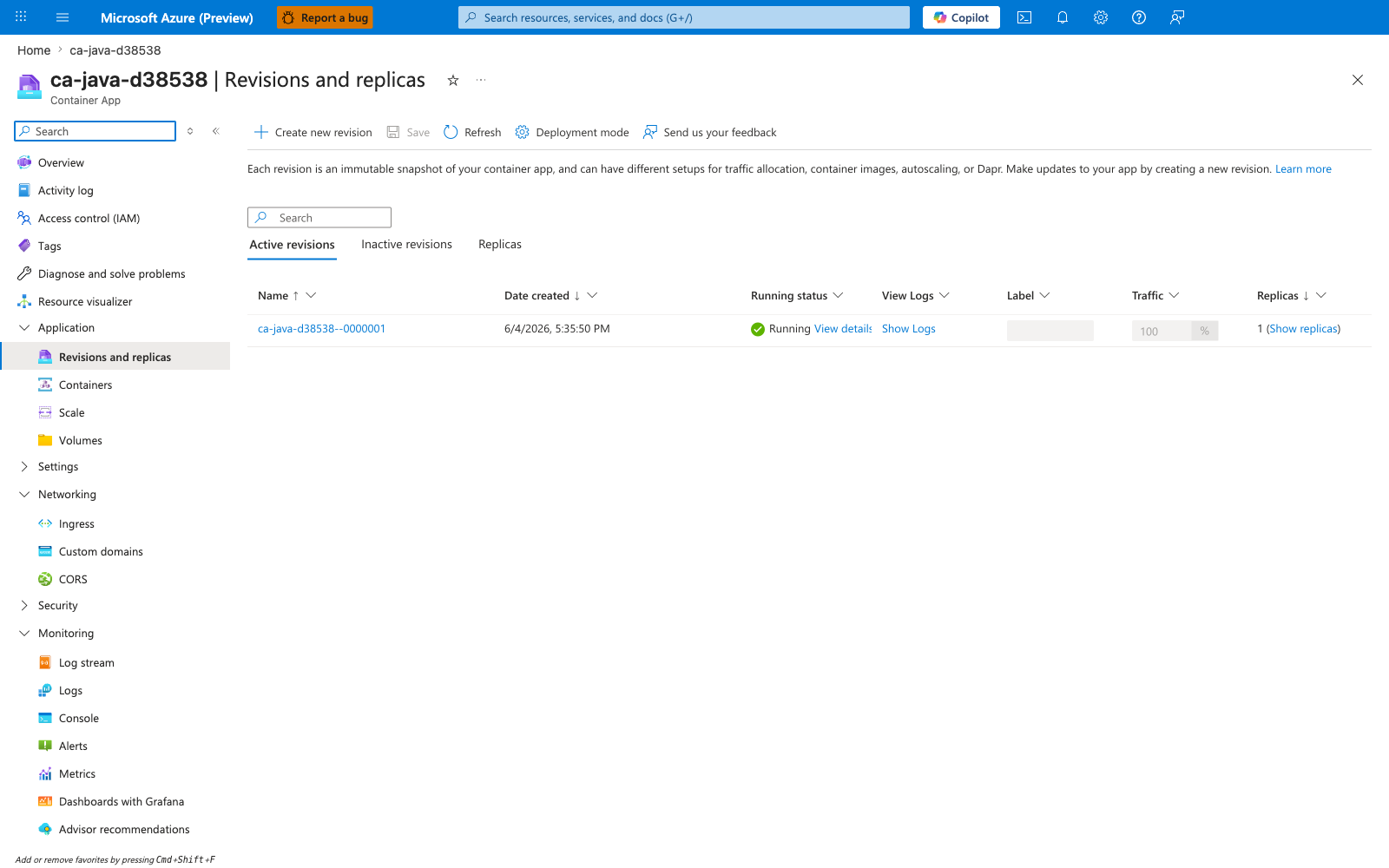
[Observed] ca-java-d38538. Container App. Revisions and replicas. Create new revision. Save. Refresh. Deployment mode. Send us your feedback. Learn more. Active revisions. Inactive revisions. Replicas. Name. Date created. Running status. View Logs. Label. Traffic. ca-java-d38538--0000001. Running. View details. Show Logs. 100. %. 1. Show replicas. Application. Revisions and replicas. Containers. Scale. Volumes. Settings. Networking. Ingress. Custom domains. CORS. Security. Monitoring. Log stream. Logs. Console. Alerts. Metrics.
[Inferred] The Deployment mode toolbar action appears to map to the same lever discussed in Revision Modes. The Create new revision toolbar action is consistent with the new-revision effect of az containerapp update --image documented in Creating New Revisions. The Active revisions and Inactive revisions tabs are consistent with the revision list and revision deactivate operations in Cleaning Up Old Revisions. The Traffic column value 100 % for ca-java-d38538--0000001 appears to map to the per-revision weight set by az containerapp ingress traffic set --traffic-weight in Managing Traffic Splitting.
[Not Proven] Additional revision detail and traffic-split detail are not visible on this view.