05 - Infrastructure as Code
Azure Bicep provides a declarative way to define and manage your Azure Container Apps resources. This guide covers how to define your Spring Boot environment, registry, and application using Bicep templates.
Infrastructure Context
Service: Container Apps (Consumption) | Network: VNet integrated | VNet: ✅
This tutorial assumes a production-ready Container Apps deployment with a custom VNet, ACR with managed identity pull, and private endpoints for backend services.
flowchart TD
    INET[Internet] -->|HTTPS| CA["Container App\nConsumption\nLinux Java 17"]

    subgraph VNET["VNet 10.0.0.0/16"]
        subgraph ENV_SUB["Environment Subnet 10.0.0.0/23\nDelegation: Microsoft.App/environments"]
            CAE[Container Apps Environment]
            CA
        end
        subgraph PE_SUB["Private Endpoint Subnet 10.0.2.0/24"]
            PE_ACR[PE: ACR]
            PE_KV[PE: Key Vault]
            PE_ST[PE: Storage]
        end
    end

    PE_ACR --> ACR[Azure Container Registry]
    PE_KV --> KV[Key Vault]
    PE_ST --> ST[Storage Account]

    subgraph DNS[Private DNS Zones]
        DNS_ACR[privatelink.azurecr.io]
        DNS_KV[privatelink.vaultcore.azure.net]
        DNS_ST[privatelink.blob.core.windows.net]
    end

    PE_ACR -.-> DNS_ACR
    PE_KV -.-> DNS_KV
    PE_ST -.-> DNS_ST

    CA -.->|System-Assigned MI| ENTRA[Microsoft Entra ID]
    CAE --> LOG[Log Analytics]
    CA --> AI[Application Insights]

    style CA fill:#107c10,color:#fff
    style VNET fill:#E8F5E9,stroke:#4CAF50
    style DNS fill:#E3F2FD
IaC Workflow
graph TD
    CODE[Bicep Templates] --> VALIDATE[az deployment validate]
    VALIDATE --> DEPLOY[az deployment group create]
    DEPLOY --> AZURE[Azure Resources]
AZURE --> VERIFY[az containerapp show]Prerequisites
- Existing Azure Subscription
- Azure CLI 2.57+
- Bicep CLI (included in Azure CLI)
Defining the Container App Environment
The environment provides the networking and logging boundary for your container apps.
// Container Apps Environment with Log Analytics
resource logAnalyticsWorkspace 'Microsoft.OperationalInsights/workspaces@2022-10-01' = {
  name: 'law-${baseName}'
  location: location
  properties: {
    sku: { name: 'PerGB2018' }
    retentionInDays: 30
  }
}

resource environment 'Microsoft.App/managedEnvironments@2023-05-01' = {
  name: 'cae-${baseName}'
  location: location
  properties: {
    appLogsConfiguration: {
      destination: 'log-analytics'
      logAnalyticsConfiguration: {
        customerId: logAnalyticsWorkspace.properties.customerId
        sharedKey: logAnalyticsWorkspace.listKeys().primarySharedKey
      }
    }
  }
}
Defining the Spring Boot Container App
Configure the container app with appropriate CPU, memory, and port settings for a Java application.
// Container App for Spring Boot
resource containerApp 'Microsoft.App/containerApps@2023-05-01' = {
  name: 'ca-${baseName}'
  location: location
  identity: {
    type: 'SystemAssigned'
  }
  properties: {
    managedEnvironmentId: environment.id
    configuration: {
      ingress: {
        external: true
        targetPort: 8000
      }
      secrets: [
        {
          name: 'db-password'
          value: dbPassword
        }
      ]
    }
    template: {
      containers: [
        {
          name: 'java-app'
          image: '${acrName}.azurecr.io/java-guide:latest'
          resources: {
            cpu: json('0.5')
            memory: '1.0Gi'
          }
          env: [
            {
              name: 'SPRING_PROFILES_ACTIVE'
              value: 'prod'
            }
            {
              name: 'DB_PASSWORD'
              secretRef: 'db-password'
            }
          ]
          probes: [
            {
              type: 'Liveness'
              httpGet: {
                path: '/health'
                port: 8000
              }
            }
            {
              type: 'Readiness'
              httpGet: {
                path: '/health'
                port: 8000
              }
            }
          ]
        }
      ]
    }
  }
}
Deploying with the Azure CLI
-
Create a Bicep template file
Create a
main.bicepfile with the environment and container app resources defined above, or use the sharedinfra/main.biceptemplate in this repository as a reference. -
Validate the deployment
az deployment group validate \
  --resource-group $RG \
  --template-file infra/main.bicep \
  --parameters baseName="java-guide"
Command Why it is used az deployment group validate ...Runs the Azure CLI operation required by the documented step. -
Deploy the infrastructure
az deployment group create \
  --resource-group $RG \
  --template-file infra/main.bicep \
  --parameters baseName="java-guide"
Command Why it is used az deployment group create ...Deploys the Bicep or ARM template into the target resource group.
Expected output
Infrastructure Checklist
- [x] Azure Container Apps Environment is defined with Log Analytics
- [x] Container App specifies
targetPort: 8000 - [x] Liveness and readiness probes point to
/health - [x] System-assigned managed identity is enabled for Key Vault or ACR access
- [x] Parameters are used for environment-specific values (e.g., SKU, region)
Use what-if to preview changes
Before deploying updates, use az deployment group what-if to see exactly what resources will be created, modified, or deleted without actually making the changes.
CLI Alternative (No Bicep)
Use these commands when you need an imperative deployment path without Bicep.
Step 1: Set variables
RG="rg-springboot-containerapp"
LOCATION="koreacentral"
APP_NAME="ca-springboot-demo"
BASE_NAME="springboot-app"
ACA_ENV_NAME="cae-springboot-demo"
ACR_NAME="crspringbootdemo"
LOG_NAME="log-springboot-demo"
Step 2: Create resource group and Log Analytics workspace
az group create --name $RG --location $LOCATION
az monitor log-analytics workspace create --resource-group $RG --workspace-name $LOG_NAME --location $LOCATION
| Command | Why it is used |
|---|---|
az group create ... | Creates the isolated resource group used by the example. |
Expected output
{
  "name": "rg-springboot-containerapp",
  "properties": {
    "provisioningState": "Succeeded"
  }
}
{
  "name": "log-springboot-demo",
  "customerId": "a1b2c3d4-e5f6-7890-abcd-ef1234567890",
  "id": "/subscriptions/<subscription-id>/resourceGroups/rg-springboot-containerapp/providers/Microsoft.OperationalInsights/workspaces/log-springboot-demo"
}
Step 3: Create ACR and Container Apps environment
az acr create --resource-group $RG --name $ACR_NAME --sku Basic
LOG_ID=$(az monitor log-analytics workspace show --resource-group $RG --workspace-name $LOG_NAME --query customerId --output tsv)
LOG_KEY=$(az monitor log-analytics workspace get-shared-keys --resource-group $RG --workspace-name $LOG_NAME --query primarySharedKey --output tsv)
az containerapp env create --resource-group $RG --name $ACA_ENV_NAME --location $LOCATION --logs-workspace-id $LOG_ID --logs-workspace-key $LOG_KEY
| Command | Why it is used |
|---|---|
az acr create --resource-group ... | Creates Azure Container Registry for container image storage. |
Expected output
{
  "name": "crspringbootdemo",
  "loginServer": "crspringbootdemo.azurecr.io",
  "provisioningState": "Succeeded"
}
{
  "name": "cae-springboot-demo",
  "id": "/subscriptions/<subscription-id>/resourceGroups/rg-springboot-containerapp/providers/Microsoft.App/managedEnvironments/cae-springboot-demo",
  "provisioningState": "Succeeded"
}
Step 4: Create Container App with environment variables
az containerapp create --resource-group $RG --name $APP_NAME --environment $ACA_ENV_NAME --image $ACR_NAME.azurecr.io/$BASE_NAME:v1 --target-port 8000 --ingress external --env-vars SPRING_PROFILES_ACTIVE=prod --query "properties.configuration.ingress.fqdn"
| Command | Why it is used |
|---|---|
az containerapp create --resource-group ... | Creates the Container App with the documented image, ingress, scale, and environment settings. |
Step 5: Validate configuration
az containerapp show --resource-group $RG --name $APP_NAME --query "{fqdn:properties.configuration.ingress.fqdn,targetPort:properties.configuration.ingress.targetPort,environmentVariables:properties.template.containers[0].env}"
| Command | Why it is used |
|---|---|
az containerapp show --resource-group ... | Reads the Container App configuration so the documented setting can be verified. |
Expected output
Verify resource group in Azure Portal
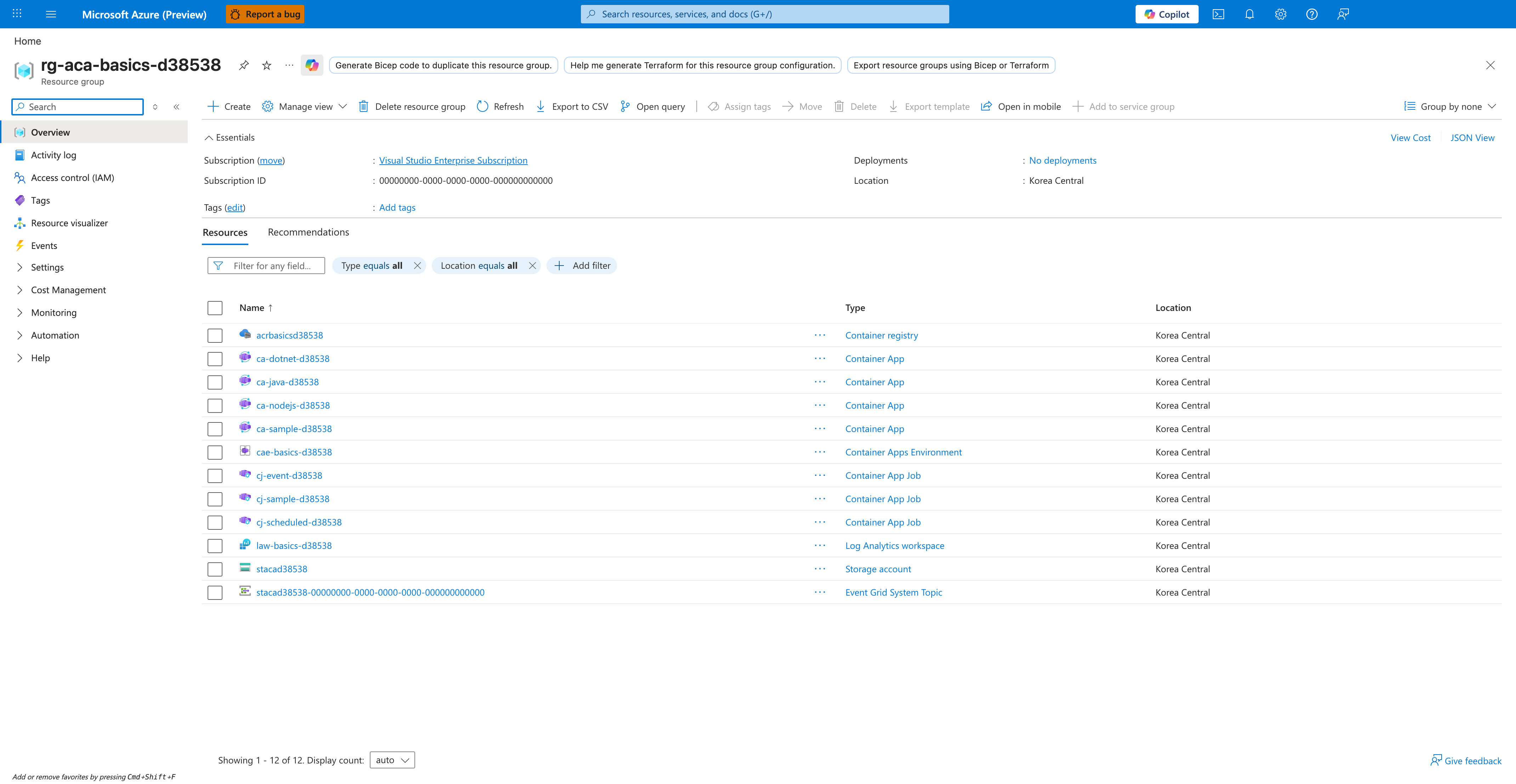
[Observed] Microsoft Azure (Preview). Report a bug. Search resources, services, and docs (G+/). Copilot. Home. rg-aca-basics-d38538. Resource group. Generate Bicep code to duplicate this resource group.. Help me generate Terraform for this resource group configuration.. Export resource groups using Bicep or Terraform. Create. Manage view. Delete resource group. Refresh. Export to CSV. Open query. Assign tags. Move. Delete. Export template. Open in mobile. Add to service group. Group by none. Essentials. Subscription (move). Visual Studio Enterprise Subscription. Subscription ID. 00000000-0000-0000-0000-000000000000. Tags (edit). Add tags. Deployments. No deployments. Location. Korea Central. View Cost. JSON View. Resources. Recommendations. Filter for any field.... Type equals all. Location equals all. Add filter. Name. Type. acrbasicsd38538. Container registry. ca-dotnet-d38538. Container App. ca-java-d38538. ca-nodejs-d38538. ca-sample-d38538. cae-basics-d38538. Container Apps Environment. cj-event-d38538. Container App Job. cj-sample-d38538. cj-scheduled-d38538. law-basics-d38538. Log Analytics workspace. stacad38538. Storage account. stacad38538-00000000-0000-0000-0000-000000000000. Event Grid System Topic. Overview. Activity log. Access control (IAM). Tags. Resource visualizer. Events. Settings. Cost Management. Monitoring. Automation. Help. Showing 1 - 12 of 12.
[Inferred] The Container App row ca-java-d38538 appears consistent with the Spring Boot Container App resource declared in Defining the Spring Boot Container App and deployed by az deployment group create in Deploying with the Azure CLI. The Container Apps Environment row cae-basics-d38538 appears consistent with the environment resource declared in Defining the Container App Environment. The Container registry row acrbasicsd38538 appears consistent with the ACR resource provisioned by az acr create in Step 3: Create ACR and Container Apps environment. The Log Analytics workspace row law-basics-d38538 appears consistent with the workspace resource provisioned by az monitor log-analytics workspace create in Step 2: Create resource group and Log Analytics workspace.
[Not Proven] Additional template body, deployment command, and deployment history detail are not visible on this view.