04 - Logging and Monitoring
Azure Container Apps provides native support for observability through Azure Monitor, Log Analytics, and Application Insights. This guide covers how to configure structured logging and monitor your Spring Boot application in production.
Infrastructure Context
Service: Container Apps (Consumption) | Network: VNet integrated | VNet: ✅
This tutorial assumes a production-ready Container Apps deployment with a custom VNet, ACR with managed identity pull, and private endpoints for backend services.
flowchart TD
    INET[Internet] -->|HTTPS| CA["Container App\nConsumption\nLinux Java 17"]

    subgraph VNET["VNet 10.0.0.0/16"]
        subgraph ENV_SUB["Environment Subnet 10.0.0.0/23\nDelegation: Microsoft.App/environments"]
            CAE[Container Apps Environment]
            CA
        end
        subgraph PE_SUB["Private Endpoint Subnet 10.0.2.0/24"]
            PE_ACR[PE: ACR]
            PE_KV[PE: Key Vault]
            PE_ST[PE: Storage]
        end
    end

    PE_ACR --> ACR[Azure Container Registry]
    PE_KV --> KV[Key Vault]
    PE_ST --> ST[Storage Account]

    subgraph DNS[Private DNS Zones]
        DNS_ACR[privatelink.azurecr.io]
        DNS_KV[privatelink.vaultcore.azure.net]
        DNS_ST[privatelink.blob.core.windows.net]
    end

    PE_ACR -.-> DNS_ACR
    PE_KV -.-> DNS_KV
    PE_ST -.-> DNS_ST

    CA -.->|System-Assigned MI| ENTRA[Microsoft Entra ID]
    CAE --> LOG[Log Analytics]
    CA --> AI[Application Insights]

    style CA fill:#107c10,color:#fff
    style VNET fill:#E8F5E9,stroke:#4CAF50
    style DNS fill:#E3F2FD
Monitoring Workflow
graph TD
    APP[Spring Boot App] --> STDOUT[Console Output]
    APP --> OTLP[OpenTelemetry]
    STDOUT --> LOGS[Log Analytics]
    OTLP --> APPI[Application Insights]
    LOGS --> DASH[Azure Monitor Dashboards]
APPI --> DASHPrerequisites
- Existing Azure Container App (created in 02 - First Deploy)
- Azure CLI 2.57+
- Azure Monitor Workspace (created automatically with Azure Container Apps environment)
Structured Logging
For production, Spring Boot should output logs to stdout in a format that's easy for log collectors to parse. JSON format is recommended.
1. Logback Configuration
The reference application includes a src/main/resources/logback-spring.xml file configured for structured logging.
<!-- Example logback-spring.xml snippet -->
<configuration>
    <appender name="CONSOLE" class="ch.qos.logback.core.ConsoleAppender">
        <encoder class="net.logstash.logback.encoder.LogstashEncoder">
            <!-- Custom fields for Azure integration -->
            <field name="containerApp">${CONTAINER_APP_NAME}</field>
            <field name="revision">${CONTAINER_APP_REVISION}</field>
        </encoder>
    </appender>
    <root level="INFO">
        <appender-ref ref="CONSOLE" />
    </root>
</configuration>
2. View Logs via CLI
Stream logs directly from your container app for real-time debugging:
| Command | Why it is used |
|---|---|
az containerapp logs show ... | Runs the Azure CLI operation required by the documented step. |
Expected output
Application Insights Integration
Azure Monitor's Application Insights provides distributed tracing, performance monitoring, and live metrics.
1. Enable Application Insights
The easiest way to enable Application Insights for Spring Boot is using the Java In-Process Agent.
# Add Application Insights Connection String
INSTRUMENTATION_KEY=$(az monitor app-insights component show --app $APP_NAME --resource-group $RG --query "connectionString" --output tsv)

az containerapp update \
  --resource-group $RG \
  --name $APP_NAME \
  --set-env-vars "APPLICATIONINSIGHTS_CONNECTION_STRING=$INSTRUMENTATION_KEY"
| Command | Why it is used |
|---|---|
az monitor app-insights ... | Creates or inspects Azure Monitor alerts, diagnostic settings, or metrics. |
2. Spring Boot Actuator
Ensure Spring Boot Actuator endpoints are exposed to provide health and metrics data to Azure Monitor.
# application.yml
management:
  endpoints:
    web:
      exposure:
        include: health,info,metrics,prometheus
  endpoint:
    health:
      show-details: always
Querying Logs with KQL via CLI
Use the Azure CLI to query logs directly from the command line. This is essential for automated monitoring and CI/CD pipelines.
Get Log Analytics Workspace ID
WORKSPACE_ID=$(az monitor log-analytics workspace list \
  --resource-group $RG \
  --query "[0].customerId" \
  --output tsv)
| Command | Purpose |
|---|---|
WORKSPACE_ID=$(az monitor log-analytics workspace list --resource-group $RG --query "[0].customerId" --output tsv) | Captures the customer ID of the first Log Analytics workspace returned in the resource group, which is sufficient here because this tutorial provisions a single workspace and then queries it from the CLI. |
Query Console Logs
# Use the APP_NAME variable set in 02-first-deploy.md
az monitor log-analytics query \
  --workspace $WORKSPACE_ID \
  --analytics-query "ContainerAppConsoleLogs_CL | where ContainerAppName_s == '$APP_NAME' | project TimeGenerated, ContainerAppName_s, Log_s | take 5" \
  --output table
| Command | Why it is used |
|---|---|
az monitor log-analytics ... | Creates or inspects Azure Monitor alerts, diagnostic settings, or metrics. |
Expected output
ContainerAppName_s    Log_s                                      TimeGenerated
--------------------  -----------------------------------------  ----------------------------
<your-app-name>       .   ____          _            __ _ _      2026-04-04T16:03:47.659Z
<your-app-name>       /\\ / ___'_ __ _ _(_)_ __  __ _ \ \ \ \    2026-04-04T16:03:47.659Z
<your-app-name>       Started DemoApplication in 8.67 seconds    2026-04-04T16:04:00.123Z
Query Error Logs
az monitor log-analytics query \
  --workspace $WORKSPACE_ID \
  --analytics-query "ContainerAppConsoleLogs_CL | where ContainerAppName_s == '$APP_NAME' | where Log_s contains 'ERROR' | project TimeGenerated, Log_s | take 10" \
  --output table
| Command | Why it is used |
|---|---|
az monitor log-analytics ... | Creates or inspects Azure Monitor alerts, diagnostic settings, or metrics. |
Query System Logs (Startup Events)
az monitor log-analytics query \
  --workspace $WORKSPACE_ID \
  --analytics-query "ContainerAppSystemLogs_CL | where ContainerAppName_s == '$APP_NAME' | project TimeGenerated, Reason_s, Log_s | take 5" \
  --output table
| Command | Why it is used |
|---|---|
az monitor log-analytics ... | Creates or inspects Azure Monitor alerts, diagnostic settings, or metrics. |
Expected output
Log_s                                                                         Reason_s            TimeGenerated
----------------------------------------------------------------------------  ------------------  ----------------------------
Updating containerApp: <your-app-name>                                        ContainerAppUpdate  2026-04-04T16:03:06.835Z
Replica '<your-app-name>--9kvcb6d-...' has been scheduled to run on a node.   AssigningReplica    2026-04-04T16:03:06.835Z
KEDA is starting a watch for revision '<your-app-name>--9kvcb6d'...           KEDAScalersStarted  2026-04-04T16:03:06.835Z
Monitoring Checklist
- [x] Application logs are written to
stdout(not to a local file) - [x] Log level is configurable via environment variable (
LOGGING_LEVEL_ROOT) - [x] Application Insights is receiving data (Traces, Exceptions, Requests)
- [x] Spring Boot Actuator endpoints are accessible and returning metrics
Avoid excessive logging
In a high-throughput production environment, avoid logging large request/response bodies or sensitive information (PII). Use INFO level for normal operations and DEBUG only when troubleshooting.
Verify log stream in Azure Portal
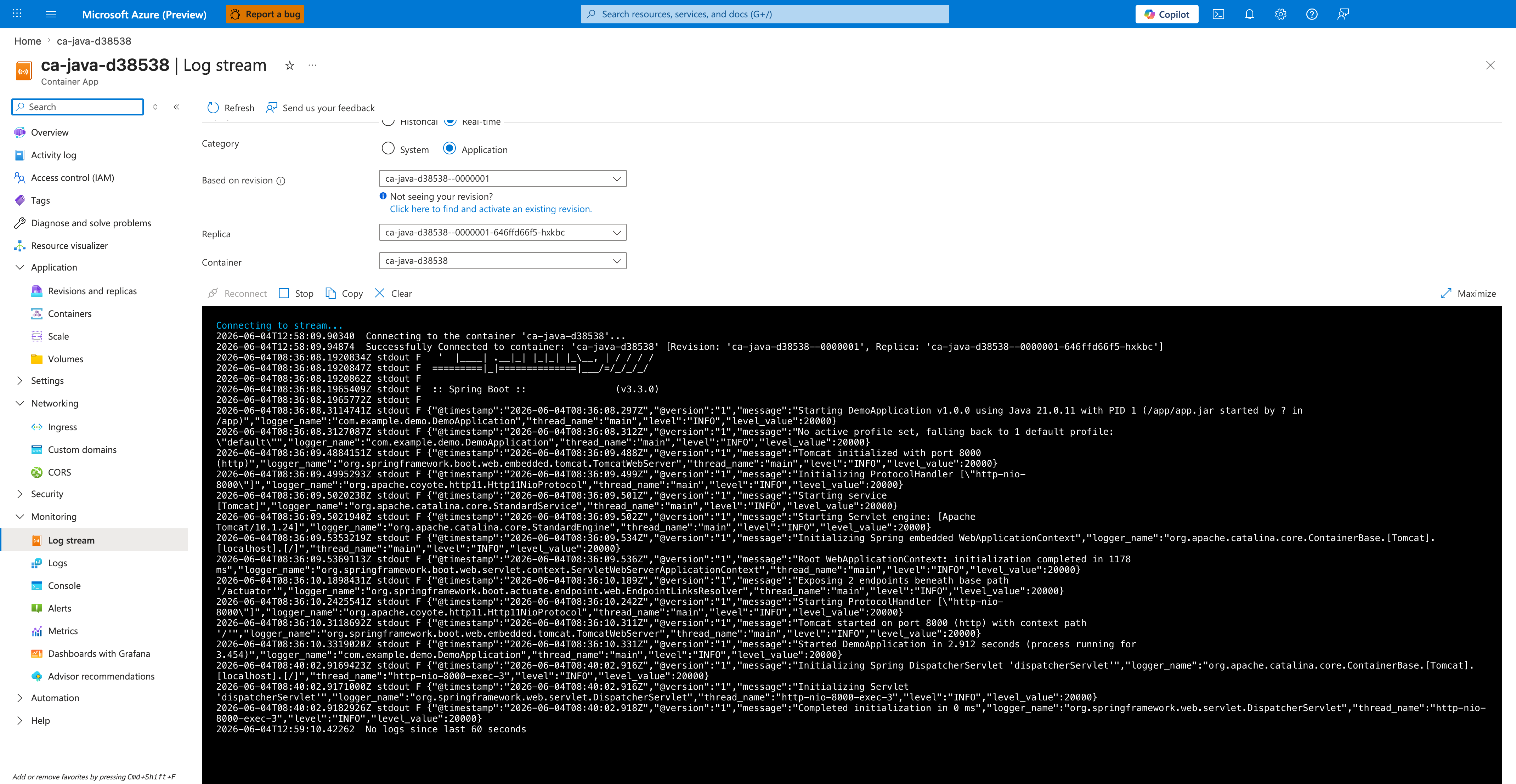
[Observed] Microsoft Azure (Preview). Report a bug. Search resources, services, and docs (G+/). Copilot. Home. ca-java-d38538. Container App. Log stream. Refresh. Send us your feedback. Historical. Real-time. Category. System. Application. Based on revision. ca-java-d38538--0000001. Not seeing your revision?. Click here to find and activate an existing revision.. Replica. ca-java-d38538--0000001-646ffd66f5-hxkbc. Container. ca-java-d38538. Reconnect. Stop. Copy. Clear. Maximize. Connecting to stream.... Connecting to the container 'ca-java-d38538'.... Successfully Connected to container: 'ca-java-d38538' [Revision: 'ca-java-d38538--0000001', Replica: 'ca-java-d38538--0000001-646ffd66f5-hxkbc']. Spring Boot. (v3.3.0). Starting DemoApplication v1.0.0 using Java 21.0.11 with PID 1. com.example.demo.DemoApplication. Tomcat initialized with port 8000 (http). Tomcat started on port 8000 (http) with context path '/'. Started DemoApplication in 2.912 seconds. No logs since last 60 seconds. Overview. Activity log. Access control (IAM). Tags. Diagnose and solve problems. Resource visualizer. Application. Revisions and replicas. Containers. Scale. Volumes. Settings. Networking. Ingress. Custom domains. CORS. Security. Monitoring. Log stream. Logs. Console. Alerts. Metrics. Dashboards with Grafana. Advisor recommendations.
[Inferred] The Real-time radio appears to map to the live tail behavior triggered by az containerapp logs show --follow in View Logs via CLI. The Category toggle value Application appears consistent with the stdout JSON output produced by the net.logstash.logback.encoder.LogstashEncoder CONSOLE appender configured in Logback Configuration. The Based on revision selector value ca-java-d38538--0000001 appears consistent with the revision-scoped log stream surfaced by az containerapp logs show in View Logs via CLI. The Successfully Connected to container: 'ca-java-d38538' line appears consistent with the live tail connection initiated by az containerapp logs show --follow in View Logs via CLI.
[Not Proven] Additional log query output and monitoring configuration detail are not visible on this view.