03 - Configuration and Secrets
Spring Boot applications on Azure Container Apps use environment variables, secrets, and Azure Key Vault for flexible, secure configuration management. This guide covers the essential patterns for configuring your Java application in production.
Infrastructure Context
Service: Container Apps (Consumption) | Network: VNet integrated | VNet: ✅
This tutorial assumes a production-ready Container Apps deployment with a custom VNet, ACR with managed identity pull, and private endpoints for backend services.
flowchart TD
    INET[Internet] -->|HTTPS| CA["Container App\nConsumption\nLinux Java 17"]

    subgraph VNET["VNet 10.0.0.0/16"]
        subgraph ENV_SUB["Environment Subnet 10.0.0.0/23\nDelegation: Microsoft.App/environments"]
            CAE[Container Apps Environment]
            CA
        end
        subgraph PE_SUB["Private Endpoint Subnet 10.0.2.0/24"]
            PE_ACR[PE: ACR]
            PE_KV[PE: Key Vault]
            PE_ST[PE: Storage]
        end
    end

    PE_ACR --> ACR[Azure Container Registry]
    PE_KV --> KV[Key Vault]
    PE_ST --> ST[Storage Account]

    subgraph DNS[Private DNS Zones]
        DNS_ACR[privatelink.azurecr.io]
        DNS_KV[privatelink.vaultcore.azure.net]
        DNS_ST[privatelink.blob.core.windows.net]
    end

    PE_ACR -.-> DNS_ACR
    PE_KV -.-> DNS_KV
    PE_ST -.-> DNS_ST

    CA -.->|System-Assigned MI| ENTRA[Microsoft Entra ID]
    CAE --> LOG[Log Analytics]
    CA --> AI[Application Insights]

    style CA fill:#107c10,color:#fff
    style VNET fill:#E8F5E9,stroke:#4CAF50
    style DNS fill:#E3F2FD
Configuration Workflow
graph TD
    APP[Spring Boot App] --> ENV[Environment Variables]
    APP --> SECRETS[ACA Secrets]
    SECRETS --> KV[Azure Key Vault]
ENV --> ARGS[Spring Arguments]Prerequisites
- Existing Azure Container App (created in 02 - First Deploy)
- Azure CLI 2.57+
Environment Variables
Spring Boot automatically maps environment variables to application properties using relaxed binding.
1. Mapping Properties
| Application Property | Environment Variable |
|---|---|
spring.application.name | SPRING_APPLICATION_NAME |
management.endpoint.health.show-details | MANAGEMENT_ENDPOINT_HEALTH_SHOW_DETAILS |
logging.level.com.example | LOGGING_LEVEL_COM_EXAMPLE |
2. Setting Environment Variables via CLI
Update your container app with new environment variables:
az containerapp update \
  --resource-group $RG \
  --name $APP_NAME \
  --set-env-vars "APP_VERSION=1.0.0" "RUNTIME_MODE=production"
| Command | Why it is used |
|---|---|
az containerapp update ... | Updates the existing Container App configuration without recreating the app. |
Secrets Management
Container Apps Secrets are encrypted and stored at the application level. They are often mapped to environment variables or referenced from Azure Key Vault.
1. Add a Local Secret
az containerapp secret set \
  --resource-group $RG \
  --name $APP_NAME \
  --secrets "db-password=<secret-value>"
| Command | Why it is used |
|---|---|
az containerapp secret set ... | Manages Container Apps secrets without exposing secret values in plain configuration. |
2. Map Secret to Environment Variable
Once a secret is created, map it to an environment variable in your container:
az containerapp update \
  --resource-group $RG \
  --name $APP_NAME \
  --set-env-vars "SPRING_DATASOURCE_PASSWORD=secretref:db-password"
| Command | Why it is used |
|---|---|
az containerapp update ... | Updates the existing Container App configuration without recreating the app. |
Azure Key Vault Integration
For production, store your secrets in Azure Key Vault and reference them from Container Apps.
1. Create a Key Vault
KV_NAME="kv-java-$(date +%s)"
az keyvault create --resource-group $RG --name $KV_NAME --location $LOCATION
| Command | Why it is used |
|---|---|
az keyvault create ... | Creates or inspects Key Vault resources used by managed identity or secret references. |
2. Configure Managed Identity
To access Key Vault securely, enable a System-Assigned Managed Identity for your Container App.
# Enable Managed Identity
az containerapp identity assign \
  --resource-group $RG \
  --name $APP_NAME \
  --system-assigned

# Grant Key Vault Secret User permissions
PRINCIPAL_ID=$(az containerapp identity show --resource-group $RG --name $APP_NAME --query "principalId" --output tsv)
az role assignment create \
  --role "Key Vault Secrets User" \
  --assignee $PRINCIPAL_ID \
  --scope /subscriptions/<subscription-id>/resourceGroups/$RG/providers/Microsoft.KeyVault/vaults/$KV_NAME
| Command | Why it is used |
|---|---|
az containerapp identity assign ... | Assigns or inspects managed identity configuration for the Container App. |
3. Reference Key Vault Secrets
# Add a secret to Key Vault
az keyvault secret set --vault-name $KV_NAME --name "db-password" --value "<secret-value>"

# Update ACA to reference Key Vault
az containerapp secret set \
  --resource-group $RG \
  --name $APP_NAME \
  --secrets "db-password=keyvaultref:https://$KV_NAME.vault.azure.net/secrets/db-password"
| Command | Why it is used |
|---|---|
az keyvault secret ... | Creates or inspects Key Vault resources used by managed identity or secret references. |
Best Practices for Java Apps
- Spring Profiles: Use
SPRING_PROFILES_ACTIVEto switch betweendev,test, andprodconfigurations. - Config Server: Consider using Spring Cloud Config or Azure App Configuration for centralized configuration management in larger microservice architectures.
- Property Precedence: Spring Boot prioritizes environment variables over
application.propertiesandapplication.ymlfiles, which is ideal for cloud-native deployments.
Relaxed Binding in Java
Spring Boot is very flexible with environment variable naming. Both SPRING_DATASOURCE_URL and spring_datasource_url will map to the spring.datasource.url property. Use ALL_CAPS with underscores for standard Docker and Azure compatibility.
Verify configuration in Azure Portal
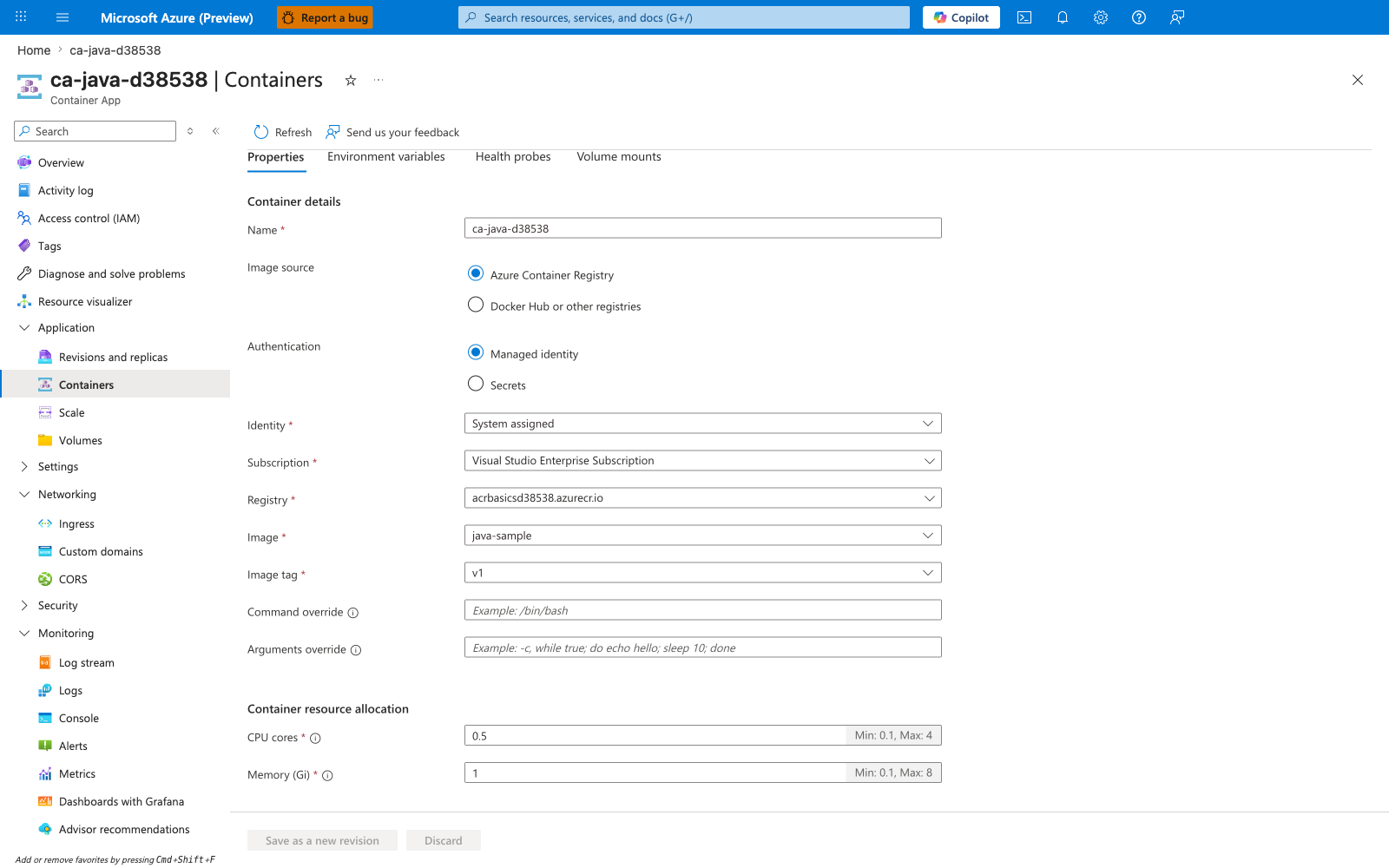
[Observed] ca-java-d38538. Container App. Containers. Refresh. Send us your feedback. Container. Properties. Environment variables. Health probes. Volume mounts. Container details. Name. ca-java-d38538. Image source. Azure Container Registry. Docker Hub or other registries. Authentication. Managed identity. Secrets. Identity. System assigned. Subscription. Visual Studio Enterprise Subscription. Registry. acrbasicsd38538.azurecr.io. Image. java-sample. Image tag. v1. Command override. Arguments override. Application. Revisions and replicas. Containers. Scale. Volumes. Settings. Networking. Ingress. Custom domains. CORS. Security. Monitoring. Log stream. Logs. Console. Alerts. Metrics.
[Inferred] The Environment variables tab appears to map to the --set-env-vars lever exercised in Setting Environment Variables via CLI. The mapping between any rows on the Environment variables tab and Spring Boot property keys appears consistent with the relaxed-binding rules described in Mapping Properties. The Secrets left-side entry appears related to the secret-to-environment-variable flow exercised in Map Secret to Environment Variable. The Authentication value Managed identity appears consistent with the managed-identity configuration in Configure Managed Identity.
[Not Proven] Additional configuration detail and runtime parameter detail are not visible on this view.