02 - First Deploy to Azure
This guide walks you through the initial deployment of your Spring Boot application to Azure Container Apps. We'll use the Azure CLI to create a Container Registry, build the image in the cloud, and provision a Container App environment.
Infrastructure Context
Service: Container Apps (Consumption) | Network: VNet integrated | VNet: ✅
This tutorial assumes a production-ready Container Apps deployment with a custom VNet, ACR with managed identity pull, and private endpoints for backend services.
flowchart TD
    INET[Internet] -->|HTTPS| CA["Container App\nConsumption\nLinux Java 17"]

    subgraph VNET["VNet 10.0.0.0/16"]
        subgraph ENV_SUB["Environment Subnet 10.0.0.0/23\nDelegation: Microsoft.App/environments"]
            CAE[Container Apps Environment]
            CA
        end
        subgraph PE_SUB["Private Endpoint Subnet 10.0.2.0/24"]
            PE_ACR[PE: ACR]
            PE_KV[PE: Key Vault]
            PE_ST[PE: Storage]
        end
    end

    PE_ACR --> ACR[Azure Container Registry]
    PE_KV --> KV[Key Vault]
    PE_ST --> ST[Storage Account]

    subgraph DNS[Private DNS Zones]
        DNS_ACR[privatelink.azurecr.io]
        DNS_KV[privatelink.vaultcore.azure.net]
        DNS_ST[privatelink.blob.core.windows.net]
    end

    PE_ACR -.-> DNS_ACR
    PE_KV -.-> DNS_KV
    PE_ST -.-> DNS_ST

    CA -.->|System-Assigned MI| ENTRA[Microsoft Entra ID]
    CAE --> LOG[Log Analytics]
    CA --> AI[Application Insights]

    style CA fill:#107c10,color:#fff
    style VNET fill:#E8F5E9,stroke:#4CAF50
    style DNS fill:#E3F2FD
Deployment Workflow
graph TD
    CODE[Local Source] --> ACR_BUILD[ACR Build]
    ACR_BUILD --> IMAGE[ACR Image]
    IMAGE --> CAE[ACA Environment]
    CAE --> ACA[Container App]
ACA --> LIVE[FQDN /health]Prerequisites
- Azure CLI 2.57+
- Active Azure Subscription
- Terminal with common variables set
Step 1: Environment Setup
Before running commands, set your common variables to ensure consistency.
# Variables
RG="rg-java-guide"
LOCATION="koreacentral"
ACA_ENV_NAME="cae-java-guide"
ACR_NAME="crjava$(date +%s)"
APP_NAME="ca-java-guide"
Step 2: Create Infrastructure
-
Create a Resource Group
Command Why it is used az group create ...Creates the isolated resource group used by the example. -
Create a Container Registry (ACR)
Command Why it is used az acr create --resource-group ...Creates Azure Container Registry for container image storage. -
Create a Container Apps Environment
Command Why it is used az containerapp env create ...Creates the managed Container Apps environment that hosts the app replicas.
Step 3: Build and Push Image
Instead of building locally and pushing, use ACR Tasks to build the image directly in Azure from your source code.
| Command | Why it is used |
|---|---|
az acr build --registry ... | Builds and pushes the container image to Azure Container Registry. |
Expected output
Step 4: Create the Container App
Deploy the application using the image from your ACR. We'll configure it to listen on port 8000 with public ingress.
az containerapp create \
  --resource-group $RG \
  --name $APP_NAME \
  --environment $ACA_ENV_NAME \
  --image $ACR_NAME.azurecr.io/java-guide:latest \
  --target-port 8000 \
  --ingress external \
  --query "properties.configuration.ingress.fqdn"
| Command | Why it is used |
|---|---|
az containerapp create ... | Creates the Container App with the documented image, ingress, scale, and environment settings. |
Step 5: Verification
-
Check the application URL
Visit the FQDN returned by the previous command. You should see the application's home page.
-
Verify health endpoint
FQDN=$(az containerapp show --resource-group $RG --name $APP_NAME --query "properties.configuration.ingress.fqdn" --output tsv)
curl https://$FQDN/health
Command Purpose FQDN=$(az containerapp show --resource-group $RG --name $APP_NAME --query "properties.configuration.ingress.fqdn" --output tsv)Reads the live ingress hostname from Azure so the verification request targets the actual deployed Java app endpoint. curl https://$FQDN/healthCalls the health endpoint to confirm the deployed Spring Boot revision is reachable and healthy. -
Verify info endpoint
Deployment Verification Checklist
- [x] ACR Image build succeeded
- [x] Container App is in
Provisionedstate - [x] Ingress FQDN is accessible
- [x]
/healthreturns HTTP 200
Managed Identity for ACR Pull
In this first deployment, the CLI handles authentication between ACR and Azure Container Apps. For production-ready templates, use a User-Assigned Managed Identity for the container app to pull images from the registry.
CLI Alternative (No Bicep)
Use these commands to deploy without Bicep templates. This creates the same resources imperatively.
Step 1: Set variables
RG="rg-springboot-containerapp"
LOCATION="koreacentral"
APP_NAME="ca-springboot-demo"
BASE_NAME="springboot-app"
ACA_ENV_NAME="cae-springboot-demo"
ACR_NAME="crspringbootdemo"
LOG_NAME="log-springboot-demo"
Expected output
Step 2: Create resource group
| Command | Why it is used |
|---|---|
az group create ... | Creates the isolated resource group used by the example. |
Expected output
Step 3: Create Log Analytics workspace
az monitor log-analytics workspace create --resource-group $RG --workspace-name $LOG_NAME --location $LOCATION
| Command | Why it is used |
|---|---|
az monitor log-analytics ... | Creates or inspects Azure Monitor alerts, diagnostic settings, or metrics. |
Expected output
{
  "customerId": "a1b2c3d4-e5f6-7890-abcd-ef1234567890",
  "id": "/subscriptions/<subscription-id>/resourceGroups/rg-springboot-containerapp/providers/Microsoft.OperationalInsights/workspaces/log-springboot-demo",
  "location": "koreacentral",
  "name": "log-springboot-demo",
  "provisioningState": "Succeeded"
}
Step 4: Create Azure Container Registry
| Command | Why it is used |
|---|---|
az acr create --resource-group ... | Creates Azure Container Registry for container image storage. |
Expected output
Step 5: Create Container Apps environment
LOG_ID=$(az monitor log-analytics workspace show --resource-group $RG --workspace-name $LOG_NAME --query customerId --output tsv)
LOG_KEY=$(az monitor log-analytics workspace get-shared-keys --resource-group $RG --workspace-name $LOG_NAME --query primarySharedKey --output tsv)
az containerapp env create --resource-group $RG --name $ACA_ENV_NAME --location $LOCATION --logs-workspace-id $LOG_ID --logs-workspace-key $LOG_KEY
| Command | Why it is used |
|---|---|
az monitor log-analytics ... | Creates or inspects Azure Monitor alerts, diagnostic settings, or metrics. |
Expected output
Step 6: Build and push image with ACR Tasks
| Command | Why it is used |
|---|---|
az acr build --registry ... | Builds and pushes the container image to Azure Container Registry. |
Expected output
Step 7: Create Container App
az containerapp create --resource-group $RG --name $APP_NAME --environment $ACA_ENV_NAME --image $ACR_NAME.azurecr.io/$BASE_NAME:v1 --target-port 8000 --ingress external --query "properties.configuration.ingress.fqdn"
| Command | Why it is used |
|---|---|
az containerapp create --resource-group ... | Creates the Container App with the documented image, ingress, scale, and environment settings. |
Step 8: Verify deployment
FQDN=$(az containerapp show --resource-group $RG --name $APP_NAME --query "properties.configuration.ingress.fqdn" --output tsv)
curl https://$FQDN/health
| Command | Purpose |
|---|---|
FQDN=$(az containerapp show --resource-group $RG --name $APP_NAME --query "properties.configuration.ingress.fqdn" --output tsv) | Reads the app's current ingress hostname from Azure so the final deployment check uses the live endpoint instead of a copied URL. |
curl https://$FQDN/health | Verifies the health endpoint on the deployed Java app before you move on to portal-based validation. |
Step 9: Verify deployment in Azure Portal
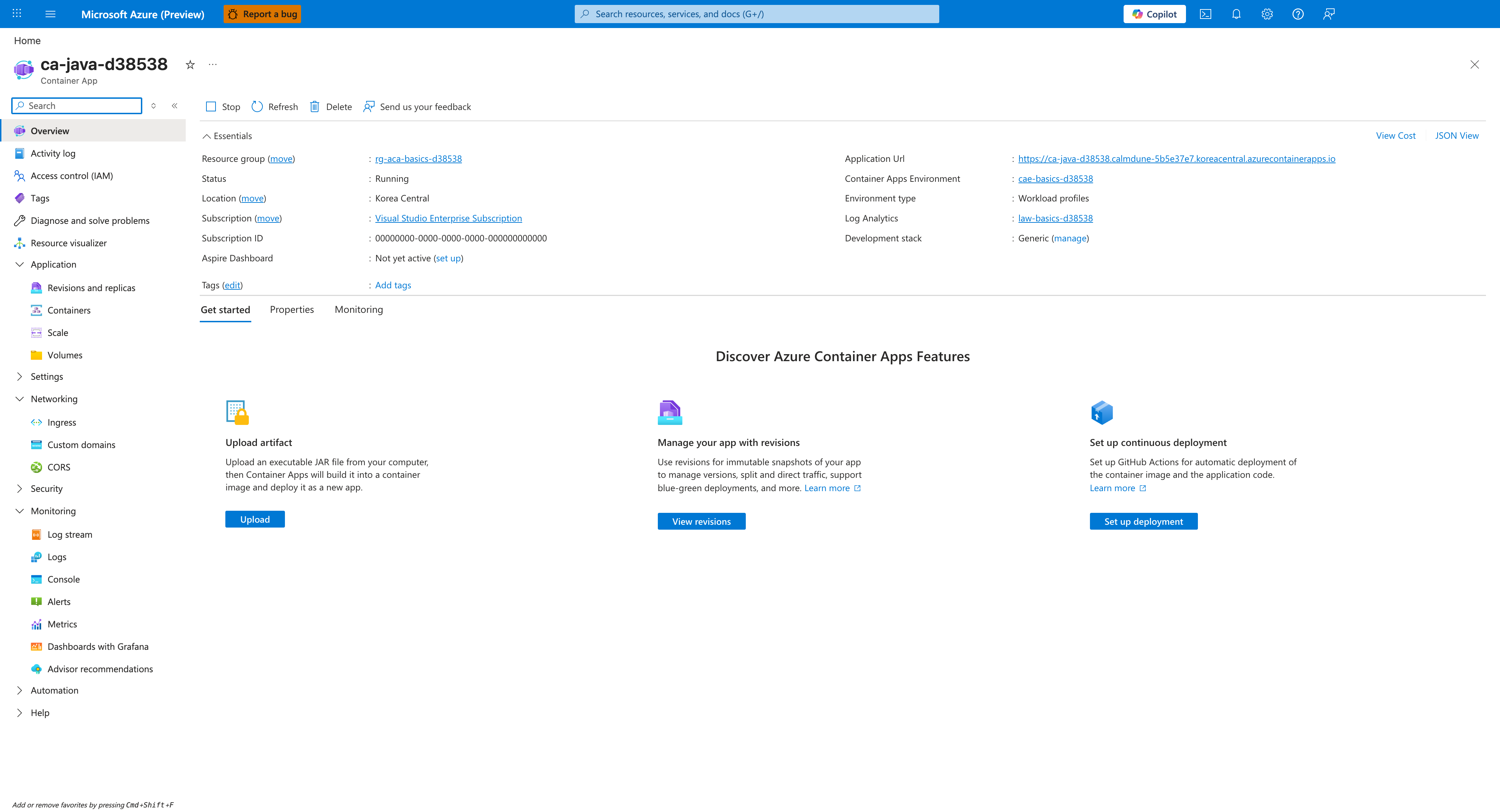
[Observed] ca-java-d38538 | Container App Overview Stop Refresh Delete Send us your feedback Essentials Resource group rg-aca-basics-d38538 Status Running Location Korea Central Subscription Visual Studio Enterprise Subscription Subscription ID 00000000-0000-0000-0000-000000000000 Aspire Dashboard Not yet active Tags Add tags Application Url https://<app-name>.<unique-id>.<region>.azurecontainerapps.io Container Apps Environment cae-basics-d38538 Environment type Workload profiles Log Analytics law-basics-d38538 Development stack Generic View Cost JSON View Get started Properties Monitoring Discover Azure Container Apps Features Upload artifact Manage your app with revisions Set up continuous deployment Application Revisions and replicas Containers Scale Volumes Networking Ingress Custom domains CORS Security Settings Monitoring Log stream Logs Console Alerts Metrics.
[Inferred] The Status field value of Running appears consistent with the state:properties.provisioningState of Succeeded returned by the CLI verification in Step 8: Verify deployment. The Application Url value https://<app-name>.<unique-id>.<region>.azurecontainerapps.io appears to surface the same properties.configuration.ingress.fqdn value queried in Step 7: Create Container App. The Container Apps Environment link value cae-basics-d38538 appears to map to the $ACA_ENV_NAME value supplied to --environment in Step 7: Create Container App. The left-navigation entries Containers, Scale, Ingress, and Logs are consistent with the artifacts created across Step 5: Create Container Apps environment and Step 7: Create Container App.
[Not Proven] Additional runtime detail and revision detail are not visible on this view.