06 - CI/CD with GitHub Actions
Automate the build and deployment of your .NET application so every commit produces a new Container App revision. This tutorial uses GitHub Actions, Azure Container Registry (ACR), and the Azure Container Apps deploy action.
Infrastructure Context
Service: Container Apps (Consumption) | Network: VNet integrated | VNet: ✅
This tutorial assumes a production-ready Container Apps deployment with a custom VNet, ACR with managed identity pull, and private endpoints for backend services.
flowchart TD
    INET[Internet] -->|HTTPS| CA["Container App\nConsumption\nLinux .NET 8"]

    subgraph VNET["VNet 10.0.0.0/16"]
        subgraph ENV_SUB["Environment Subnet 10.0.0.0/23\nDelegation: Microsoft.App/environments"]
            CAE[Container Apps Environment]
            CA
        end
        subgraph PE_SUB["Private Endpoint Subnet 10.0.2.0/24"]
            PE_ACR[PE: ACR]
            PE_KV[PE: Key Vault]
            PE_ST[PE: Storage]
        end
    end

    PE_ACR --> ACR[Azure Container Registry]
    PE_KV --> KV[Key Vault]
    PE_ST --> ST[Storage Account]

    subgraph DNS[Private DNS Zones]
        DNS_ACR[privatelink.azurecr.io]
        DNS_KV[privatelink.vaultcore.azure.net]
        DNS_ST[privatelink.blob.core.windows.net]
    end

    PE_ACR -.-> DNS_ACR
    PE_KV -.-> DNS_KV
    PE_ST -.-> DNS_ST

    CA -.->|System-Assigned MI| ENTRA[Microsoft Entra ID]
    CAE --> LOG[Log Analytics]
    CA --> AI[Application Insights]

    style CA fill:#107c10,color:#fff
    style VNET fill:#E8F5E9,stroke:#4CAF50
    style DNS fill:#E3F2FD
CI/CD Pipeline Flow
graph TD
    PUSH[Push to main] --> GHA[GitHub Actions]
    GHA --> DOTNET[dotnet publish]
    DOTNET --> ACR[ACR Build]
    ACR --> DEPLOY[Deploy Revision]
DEPLOY --> HEALTH[Health Check]Prerequisites
- Completed 05 - Infrastructure as Code with Bicep
- GitHub repository with your .NET source code
- Azure service principal stored as a GitHub secret
Never expose credentials in workflow logs
Keep all credential material in GitHub Secrets and avoid printing secret-derived values in shell steps. Use masked placeholders in documentation and workflow examples.
Step-by-step
-
Configure repository variables and secrets
-
Variables:
RESOURCE_GROUP,APP_NAME,ACR_NAME - Secrets:
AZURE_CREDENTIALS,REGISTRY_USERNAME,REGISTRY_PASSWORD
Example AZURE_CREDENTIALS JSON (masked):
{
  "clientId": "xxxxxxxx-xxxx-xxxx-xxxx-xxxxxxxxxxxx",
  "clientSecret": "<client-secret>",
  "subscriptionId": "<subscription-id>",
  "tenantId": "<tenant-id>"
}
- Create the GitHub Actions workflow file
Save this as .github/workflows/deploy.yml:
name: Deploy .NET App to Azure Container Apps

on:
  push:
    branches: [ main ]
  workflow_dispatch:

jobs:
  build-and-deploy:
    runs-on: ubuntu-latest
    steps:
      - name: Checkout code
        uses: actions/checkout@v4

      - name: Setup .NET
        uses: actions/setup-dotnet@v4
        with:
          dotnet-version: '8.0.x'

      - name: Azure Login
        uses: azure/login@v2
        with:
          creds: ${{ secrets.AZURE_CREDENTIALS }}

      - name: Build and Push to ACR
        uses: azure/docker-login@v2
        with:
          login-server: ${{ vars.ACR_NAME }}.azurecr.io
          username: ${{ secrets.REGISTRY_USERNAME }}
          password: ${{ secrets.REGISTRY_PASSWORD }}

      - name: Build container image
        run: |
          docker build -t ${{ vars.ACR_NAME }}.azurecr.io/${{ vars.APP_NAME }}:${{ github.sha }} ./apps/dotnet-aspnetcore
          docker push ${{ vars.ACR_NAME }}.azurecr.io/${{ vars.APP_NAME }}:${{ github.sha }}

      - name: Deploy to Container App
        uses: azure/container-apps-deploy-action@v1
        with:
          imageToDeploy: ${{ vars.ACR_NAME }}.azurecr.io/${{ vars.APP_NAME }}:${{ github.sha }}
          resourceGroup: ${{ vars.RESOURCE_GROUP }}
          containerAppName: ${{ vars.APP_NAME }}
- Add unit tests to the pipeline (Recommended)
Before building the container, ensure your .NET tests pass:
      - name: Run Tests
        run: dotnet test ./apps/dotnet-aspnetcore/AzureContainerApps.csproj --configuration Release
-
Validate rollout behavior
- Trigger the workflow by pushing a change to
main. - Confirm a new revision was created in the Azure Portal or via CLI.
- Confirm traffic moved to the healthy new revision.
az containerapp revision list \
  --name "$APP_NAME" \
  --resource-group "$RESOURCE_GROUP" \
  --query "[].{name:name,active:properties.active,trafficWeight:properties.trafficWeight,healthState:properties.healthState}"
Command Why it is used az containerapp revision list ...Lists revisions so rollout state, traffic, and health can be verified. ???+ example "Expected output"
- Trigger the workflow by pushing a change to
Advanced Topics
- Environment-based deployments: Use GitHub Environments with protection rules for manual approval before deploying to production.
- Bicep integration: Run
az deployment group createwithin the workflow to ensure infrastructure stays in sync with code. - Canary releases: Use the
azure/container-apps-deploy-actionto deploy with 0% traffic initially, then gradually ramp up after verification.
Use immutable image tags
Always tag your images with ${{ github.sha }} or a semantic version. This ensures that every revision in Container Apps can be traced back to a specific commit in your repository.
Verify deployment activity in Azure Portal
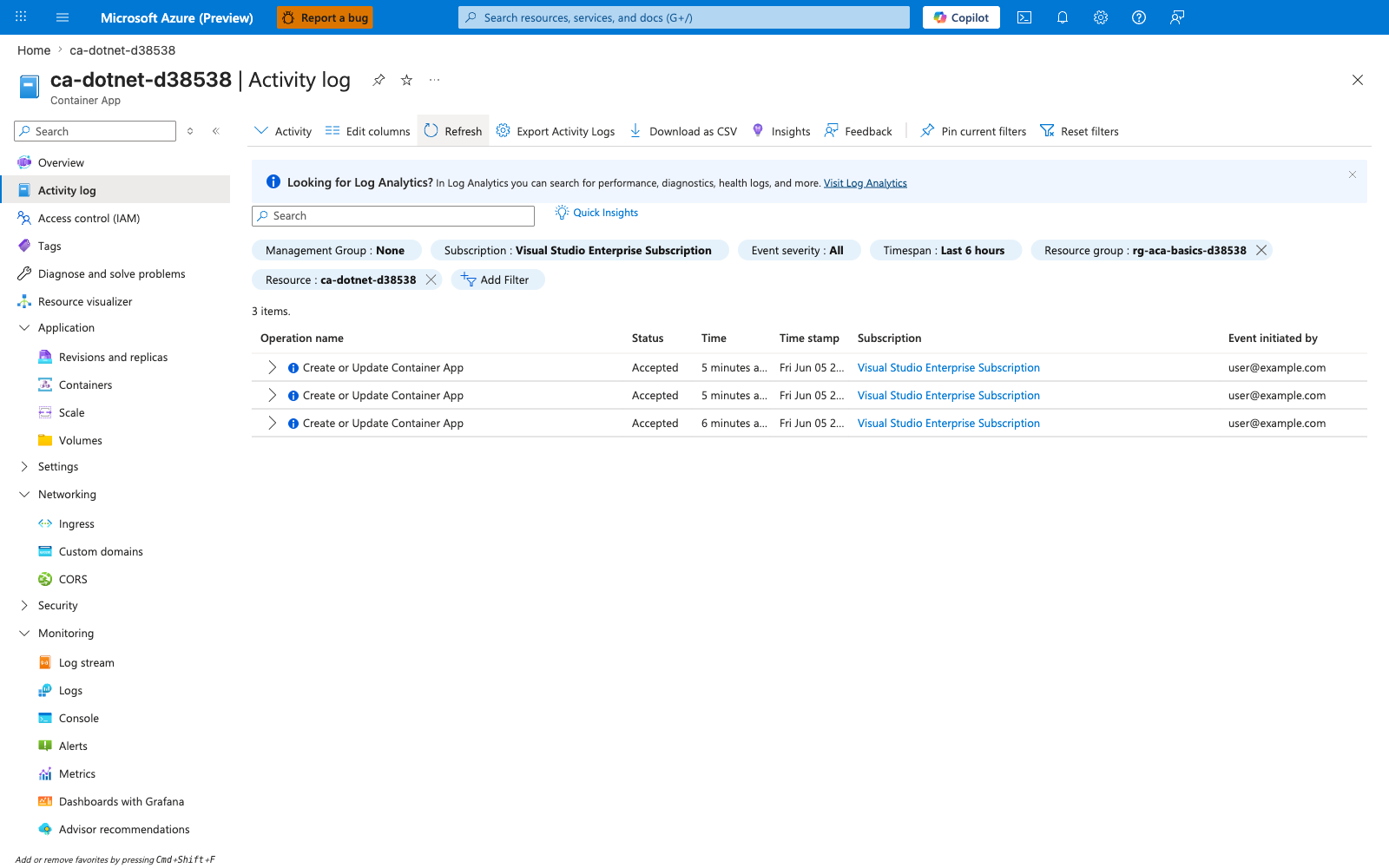
[Observed] Microsoft Azure (Preview). Report a bug. Search resources, services, and docs (G+/). Copilot. Home. ca-dotnet-d38538. Container App. Activity log. Activity. Edit columns. Refresh. Export Activity Logs. Download as CSV. Insights. Feedback. Pin current filters. Reset filters. Looking for Log Analytics?. Visit Log Analytics. Search. Quick Insights. Management Group. None. Subscription. Visual Studio Enterprise Subscription. Event severity. All. Timespan. Last 6 hours. Resource group. rg-aca-basics-d38538. Resource. ca-dotnet-d38538. Add Filter. 3 items.. Operation name. Status. Time. Time stamp. Subscription. Event initiated by. Create or Update Container App. Accepted. 5 minutes a.... 6 minutes a.... Fri Jun 05 2.... Visual Studio Enterprise Subscription. user@example.com. Overview. Activity log. Access control (IAM). Tags. Diagnose and solve problems. Resource visualizer. Application. Revisions and replicas. Containers. Scale. Volumes. Settings. Networking. Ingress. Custom domains. CORS. Security. Monitoring. Log stream. Logs. Console. Alerts. Metrics. Dashboards with Grafana. Advisor recommendations.
[Inferred] The resource-scoped filter chips Resource group value rg-aca-basics-d38538 and Resource value ca-dotnet-d38538 appear to map to the same ${{ vars.RESOURCE_GROUP }} and ${{ vars.APP_NAME }} values passed to resourceGroup and containerAppName by the azure/container-apps-deploy-action@v1 step in Step-by-step Step 2. The Create or Update Container App rows appear consistent with the deployment outcome that the same azure/container-apps-deploy-action@v1 step in Step-by-step Step 2 is expected to trigger when the workflow runs against the configured containerAppName. The Accepted Status appears consistent with the long-running deployment-acceptance signal that precedes the healthy rollout state that Step-by-step Step 4 looks for via az containerapp revision list, where healthState: "Healthy" and trafficWeight: 100 are expected on the active revision after the operation completes. The repeated Create or Update Container App rows within the Last 6 hours Timespan appear consistent with multiple workflow runs invoking the azure/container-apps-deploy-action@v1 step in Step-by-step Step 2 against the same containerAppName. The Subscription column value Visual Studio Enterprise Subscription is consistent across all three Create or Update Container App rows, which appears consistent with the single-subscription target encoded by the subscriptionId field of the AZURE_CREDENTIALS JSON in Step-by-step Step 1 and inherited by every workflow run that uses that secret.
[Not Proven] Additional GitHub Actions workflow output and CLI command output are not visible on this view.
See Also
- 02 - First Deploy to Azure Container Apps
- 05 - Infrastructure as Code with Bicep
- GitHub Actions for Azure (Microsoft Learn)