03 - Configuration, Secrets, and Dapr
This step configures runtime settings in Azure Container Apps for your .NET application, including environment variables, secrets, KEDA scaling rules, and Dapr sidecar options.
Infrastructure Context
Service: Container Apps (Consumption) | Network: VNet integrated | VNet: ✅
This tutorial assumes a production-ready Container Apps deployment with a custom VNet, ACR with managed identity pull, and private endpoints for backend services.
flowchart TD
    INET[Internet] -->|HTTPS| CA["Container App\nConsumption\nLinux .NET 8"]

    subgraph VNET["VNet 10.0.0.0/16"]
        subgraph ENV_SUB["Environment Subnet 10.0.0.0/23\nDelegation: Microsoft.App/environments"]
            CAE[Container Apps Environment]
            CA
        end
        subgraph PE_SUB["Private Endpoint Subnet 10.0.2.0/24"]
            PE_ACR[PE: ACR]
            PE_KV[PE: Key Vault]
            PE_ST[PE: Storage]
        end
    end

    PE_ACR --> ACR[Azure Container Registry]
    PE_KV --> KV[Key Vault]
    PE_ST --> ST[Storage Account]

    subgraph DNS[Private DNS Zones]
        DNS_ACR[privatelink.azurecr.io]
        DNS_KV[privatelink.vaultcore.azure.net]
        DNS_ST[privatelink.blob.core.windows.net]
    end

    PE_ACR -.-> DNS_ACR
    PE_KV -.-> DNS_KV
    PE_ST -.-> DNS_ST

    CA -.->|System-Assigned MI| ENTRA[Microsoft Entra ID]
    CAE --> LOG[Log Analytics]
    CA --> AI[Application Insights]

    style CA fill:#107c10,color:#fff
    style VNET fill:#E8F5E9,stroke:#4CAF50
    style DNS fill:#E3F2FD
Configuration Flow
graph TD
    ENV[Env Vars] --> ACA[Container App]
    SEC[Secrets] --> ACA
    DAPR[Dapr] --> ACA
    ACA --> APP[ASP.NET Core App]
APP --> KESTREL[Kestrel Server]Prerequisites
- Completed 02 - First Deploy to Azure Container Apps
- A running Container App (deployed in 02 - First Deploy)
Step-by-step
- Set standard variables (reuse Bicep outputs from Step 02)
RG="rg-dotnet-guide"
DEPLOYMENT_NAME="main"

APP_NAME=$(az deployment group show \
  --name "$DEPLOYMENT_NAME" \
  --resource-group "$RG" \
  --query "properties.outputs.containerAppName.value" \
  --output tsv)

ACR_NAME=$(az deployment group show \
  --name "$DEPLOYMENT_NAME" \
  --resource-group "$RG" \
  --query "properties.outputs.containerRegistryName.value" \
  --output tsv)
| Command | Purpose |
|---|---|
APP_NAME=$(az deployment group show --name "$DEPLOYMENT_NAME" --resource-group "$RG" --query "properties.outputs.containerAppName.value" --output tsv) | Captures the existing Container App name from the deployment outputs so configuration updates target the right app. |
ACR_NAME=$(az deployment group show --name "$DEPLOYMENT_NAME" --resource-group "$RG" --query "properties.outputs.containerRegistryName.value" --output tsv) | Captures the registry name from the same deployment so later image and secret examples stay aligned with the deployed resources. |
- Set environment variables
ASP.NET Core automatically reads environment variables into its configuration system.
az containerapp update \
  --name "$APP_NAME" \
  --resource-group "$RG" \
  --set-env-vars "Logging__LogLevel__Default=Information" "FeatureManagement__NewUI=true"
| Command | Why it is used |
|---|---|
az containerapp update ... | Updates the existing Container App configuration without recreating the app. |
???+ example "Expected output"
- Store and reference a secret
az containerapp secret set \
  --name "$APP_NAME" \
  --resource-group "$RG" \
  --secrets "db-connection-string=Server=tcp:sql.database.windows.net;Database=mydb;"
| Command | Why it is used |
|---|---|
az containerapp secret set ... | Manages Container Apps secrets without exposing secret values in plain configuration. |
???+ example "Expected output"
Map the secret to an environment variable:
az containerapp update \
  --name "$APP_NAME" \
  --resource-group "$RG" \
  --set-env-vars "ConnectionStrings__DefaultConnection=secretref:db-connection-string"
| Command | Why it is used |
|---|---|
az containerapp update ... | Updates the existing Container App configuration without recreating the app. |
- Configure KEDA HTTP autoscaling
az containerapp update \
  --name "$APP_NAME" \
  --resource-group "$RG" \
  --min-replicas 0 \
  --max-replicas 10 \
  --scale-rule-name "http-scale" \
  --scale-rule-type "http" \
  --scale-rule-http-concurrency 50
| Command | Why it is used |
|---|---|
az containerapp update ... | Updates the existing Container App configuration without recreating the app. |
???+ example "Expected output"
- Enable Dapr sidecar
az containerapp dapr enable \
  --name "$APP_NAME" \
  --resource-group "$RG" \
  --dapr-app-id "dotnet-api" \
  --dapr-app-port 8000
| Command | Why it is used |
|---|---|
az containerapp dapr enable ... | Configures Dapr sidecar settings for the Container App. |
???+ example "Expected output"
Verify configuration in Azure Portal
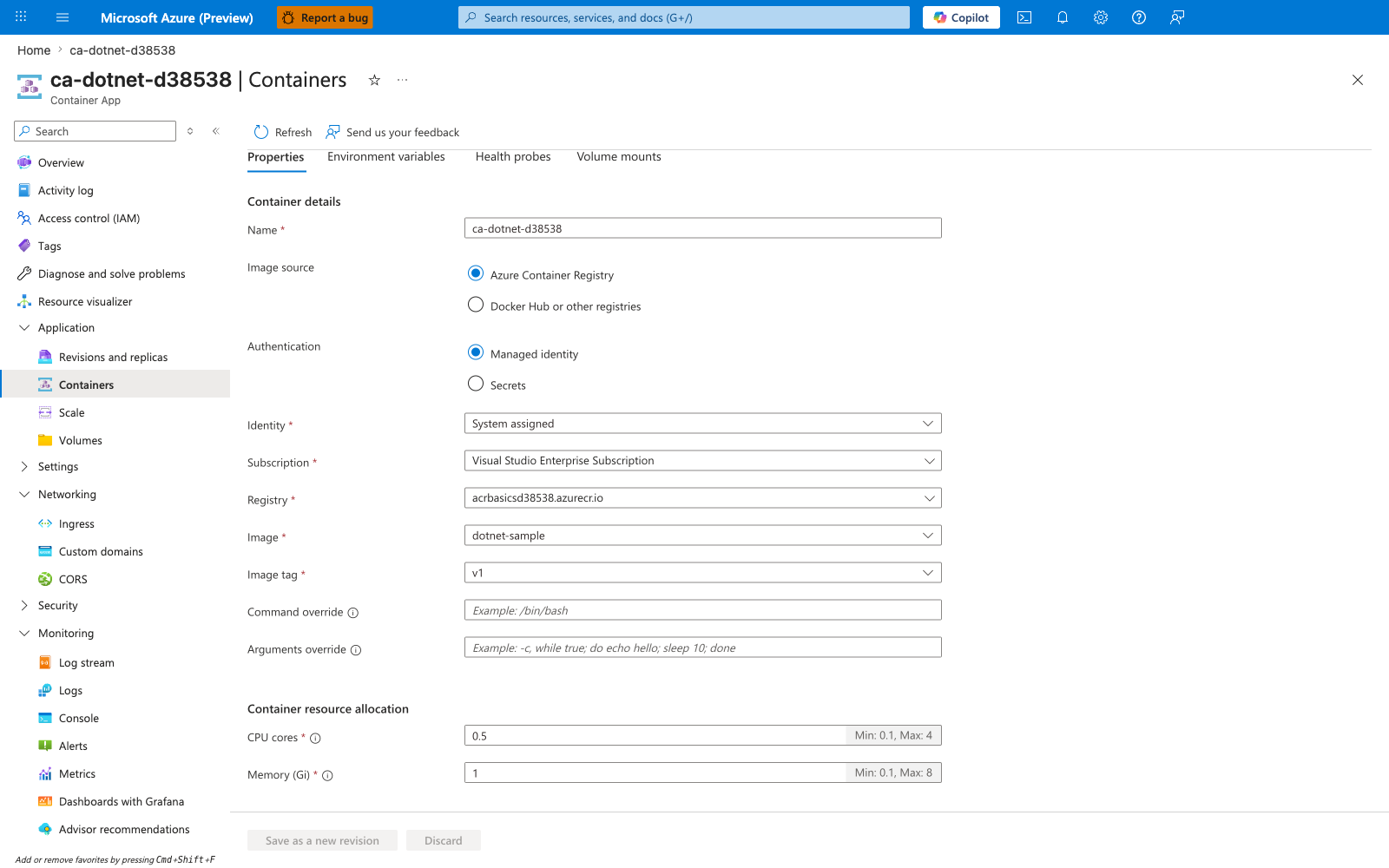
[Observed] ca-dotnet-d38538. Container App. Containers. Refresh. Send us your feedback. Container. Properties. Environment variables. Health probes. Volume mounts. Container details. Name. ca-dotnet-d38538. Image source. Azure Container Registry. Docker Hub or other registries. Authentication. Managed identity. Secrets. Identity. System assigned. Subscription. Visual Studio Enterprise Subscription. Registry. acrbasicsd38538.azurecr.io. Image. dotnet-sample. Image tag. v1. Command override. Arguments override. Application. Revisions and replicas. Containers. Scale. Volumes. Settings. Networking. Ingress. Custom domains. CORS. Security. Monitoring. Log stream. Logs. Console. Alerts. Metrics.
[Inferred] The Environment variables tab appears to map to the same name=value pairs supplied via --set-env-vars in Step-by-step. The Image field value dotnet-sample and Image tag value v1 appear consistent with the --image reference set across Step-by-step. The Registry field value acrbasicsd38538.azurecr.io is consistent with the ACR login server referenced throughout Step-by-step. The left-navigation entry Scale is consistent with the --scale-rule-* levers configurable via the operations referenced in Step-by-step.
[Not Proven] Additional configuration detail and runtime parameter detail are not visible on this view.
.NET example: read config safely
ASP.NET Core's IConfiguration makes it easy to read these values.
// In Program.cs or a Controller
var logLevel = configuration["Logging:LogLevel:Default"];
var isNewUIEnabled = configuration.GetValue<bool>("FeatureManagement:NewUI");
var connectionString = configuration.GetConnectionString("DefaultConnection");
Environment Variable Naming
Use double underscores (__) in environment variable names to represent hierarchical configuration keys in .NET (e.g., Logging__LogLevel__Default maps to Logging:LogLevel:Default).
Advanced Topics
- Managed Identity: Use
DefaultAzureCredentialfrom the Azure Identity SDK to access Key Vault without managing client secrets. - KEDA Scalers: Explore .NET specific scalers like
azure-servicebusorrabbitmqfor background processing. - Dapr SDK: Use the
Dapr.ClientNuGet package for advanced Dapr features like state store and pub/sub.