Azure Container Apps Security Best Practices
This guide provides actionable security hardening patterns for Azure Container Apps production workloads. It consolidates network, identity, image, and access control practices into a single operational checklist with CLI commands.
Prerequisites
- You reviewed the security architecture concepts:
- Azure CLI is installed and authenticated.
- You have Contributor (or equivalent) permissions on your resource group.
Set reusable variables:
export RG="rg-aca-prod"
export APP_NAME="ca-api-prod"
export ACA_ENV_NAME="cae-prod"
export ACR_NAME="acrprodshared"
export LOCATION="koreacentral"
Why This Matters
Security misconfigurations in Container Apps often result from convenience defaults carried into production:
- External ingress left open on internal services.
- Admin credentials used for ACR image pulls.
- Secrets stored in environment variables instead of Key Vault.
- No egress filtering — unrestricted outbound access.
- Overly broad RBAC assignments at the subscription level.
Each of these creates an exploitable surface. The patterns below address them systematically.
Recommended Practices
Network Hardening
Use internal environments for sensitive workloads
Create environments with no public endpoint. Front with Application Gateway or API Management for controlled entry.
flowchart TD
    subgraph Public ["Public Internet"]
        U[Client]
    end

    subgraph Azure ["Azure"]
        AG[Application Gateway / WAF]

        subgraph VNet ["Virtual Network"]
            subgraph Subnet ["Container Apps Subnet"]
                subgraph Env ["Internal Environment"]
                    APP1[API App - Internal Ingress]
                    APP2[Worker - No Ingress]
                end
            end

            subgraph PESubnet ["PE Subnet"]
                PE1["PE: Key Vault"]
                PE2["PE: Storage"]
            end
        end
    end

    U -- "HTTPS" --> AG
    AG -- "Private IP" --> APP1
    APP1 -- "MI + Private Link" --> PE1
    APP1 -- "MI + Private Link" --> PE2
Verify environment is internal:
az containerapp env show \
  --name "$ACA_ENV_NAME" \
  --resource-group "$RG" \
  --query "properties.vnetConfiguration.internal" \
  --output tsv
| Command | Why it is used |
|---|---|
az containerapp env show ... | Reads managed environment settings for networking, logging, or workload profile verification. |
Expected output:
Restrict ingress to internal for backend services
| Command | Why it is used |
|---|---|
az containerapp update ... | Updates the existing Container App configuration without recreating the app. |
Verify ingress mode:
az containerapp show \
  --name "ca-orders-internal" \
  --resource-group "$RG" \
  --query "properties.configuration.ingress.external" \
  --output tsv
| Command | Why it is used |
|---|---|
az containerapp show ... | Reads the Container App configuration so the documented setting can be verified. |
Expected output:
Enable private endpoints for all Azure dependencies
# Create private endpoint for Key Vault
az network private-endpoint create \
  --name "pe-keyvault" \
  --resource-group "$RG" \
  --vnet-name "vnet-aca" \
  --subnet "snet-pe" \
  --private-connection-resource-id "/subscriptions/<subscription-id>/resourceGroups/$RG/providers/Microsoft.KeyVault/vaults/<keyvault-name>" \
  --group-id "vault" \
  --connection-name "kv-connection"
| Command | Why it is used |
|---|---|
az network private-endpoint create ... | Creates or inspects networking resources such as VNets, DNS zones, routes, or private endpoints. |
Configure egress filtering
Route outbound traffic through Azure Firewall and allow-list only required FQDNs:
# Attach route table to Container Apps subnet
az network vnet subnet update \
  --name "snet-cae" \
  --vnet-name "vnet-aca" \
  --resource-group "$RG" \
  --route-table "rt-cae-egress"
| Command | Why it is used |
|---|---|
az network vnet subnet ... | Creates or inspects networking resources such as VNets, DNS zones, routes, or private endpoints. |
Validate platform dependencies before enforcing egress rules
Overly restrictive egress breaks image pulls, telemetry, and control-plane communication. Test with a canary app first.
Identity Hardening
Use managed identity for all service access
Eliminate passwords and connection strings from application configuration:
# Enable system-assigned managed identity
az containerapp identity assign \
  --name "$APP_NAME" \
  --resource-group "$RG" \
  --system-assigned
| Command | Why it is used |
|---|---|
az containerapp identity assign ... | Assigns or inspects managed identity configuration for the Container App. |
Grant least-privilege role assignments
# Get the managed identity principal ID
PRINCIPAL_ID=$(az containerapp identity show \
  --name "$APP_NAME" \
  --resource-group "$RG" \
  --query "principalId" \
  --output tsv)

# Assign narrow role at resource scope
az role assignment create \
  --assignee-object-id "$PRINCIPAL_ID" \
  --assignee-principal-type ServicePrincipal \
  --role "Key Vault Secrets User" \
  --scope "/subscriptions/<subscription-id>/resourceGroups/$RG/providers/Microsoft.KeyVault/vaults/<keyvault-name>"
| Command | Why it is used |
|---|---|
az containerapp identity show ... | Assigns or inspects managed identity configuration for the Container App. |
Avoid Contributor role for managed identities
Managed identities should have the narrowest role possible. Use data-plane roles like "Key Vault Secrets User", "Storage Blob Data Reader", or "Azure SQL Database Contributor" instead of broad Contributor.
Use managed identity for ACR image pulls
# Enable managed identity pull from ACR
az containerapp registry set \
  --name "$APP_NAME" \
  --resource-group "$RG" \
  --server "$ACR_NAME.azurecr.io" \
  --identity system
| Command | Why it is used |
|---|---|
az containerapp registry set ... | Runs the Azure CLI operation required by the documented step. |
Verify ACR authentication method:
az containerapp registry show \
  --name "$APP_NAME" \
  --resource-group "$RG" \
  --server "$ACR_NAME.azurecr.io" \
  --query "identity" \
  --output tsv
| Command | Why it is used |
|---|---|
az containerapp registry show ... | Runs the Azure CLI operation required by the documented step. |
Expected output:
Image Hardening
Use specific image tags or digests
Never deploy with :latest in production. Pin to a specific version or use a digest:
az containerapp update \
  --name "$APP_NAME" \
  --resource-group "$RG" \
  --image "$ACR_NAME.azurecr.io/api:2026-04-09-sha-abc1234"
| Command | Why it is used |
|---|---|
az containerapp update ... | Updates the existing Container App configuration without recreating the app. |
Enable vulnerability scanning
flowchart TD
    DEV[Developer] -- "Push" --> ACR[ACR]
    ACR -- "Scan on push" --> DEF[Defender for Containers]
    DEF -- "Critical CVE found" --> ALERT[Security Alert]
    DEF -- "No critical CVEs" --> APPROVED[Approved for Deploy]
    APPROVED --> ENV[Container Apps]
Enable Defender for Containers at the subscription level:
| Command | Why it is used |
|---|---|
az security pricing ... | Runs the Azure CLI operation required by the documented step. |
Restrict ACR network access
# Disable public access to ACR
az acr update \
  --name "$ACR_NAME" \
  --resource-group "$RG" \
  --public-network-enabled false
| Command | Why it is used |
|---|---|
az acr update ... | Runs the Azure CLI operation required by the documented step. |
Authentication Hardening
Enable Easy Auth to require authentication
az containerapp auth update \
  --name "$APP_NAME" \
  --resource-group "$RG" \
  --enabled true \
  --unauthenticated-client-action Return401
| Command | Why it is used |
|---|---|
az containerapp auth update ... | Runs the Azure CLI operation required by the documented step. |
Verify auth configuration:
az containerapp auth show \
  --name "$APP_NAME" \
  --resource-group "$RG" \
  --query "{enabled:platform.enabled,unauthenticatedAction:globalValidation.unauthenticatedClientAction}" \
  --output json
| Command | Why it is used |
|---|---|
az containerapp auth show ... | Runs the Azure CLI operation required by the documented step. |
Expected output:
Enable Dapr mTLS for service-to-service encryption
az containerapp update \
  --name "$APP_NAME" \
  --resource-group "$RG" \
  --enable-dapr true \
  --dapr-app-id "api-service" \
  --dapr-app-port 8000
| Command | Why it is used |
|---|---|
az containerapp update ... | Updates the existing Container App configuration without recreating the app. |
mTLS requires Dapr on both sides
Both the caller and callee apps must have Dapr enabled for mTLS to be effective. Direct HTTP calls bypass Dapr encryption.
RBAC Hardening
Apply least-privilege role assignments
flowchart TD
    subgraph Roles ["Production RBAC Model"]
        ADMIN[Platform Admin] -- "Contributor" --> RG[Resource Group]
        DEV[Developer] -- "Reader" --> RG
        CI[CI/CD Service Principal] -- "Container Apps Contributor + AcrPush" --> RG
        SRE[SRE] -- "Monitoring Reader + Log Analytics Reader" --> RG
    end
Assign CI/CD pipeline with minimal deployment permissions:
# Create service principal with Container Apps Contributor
az ad sp create-for-rbac \
  --name "sp-cicd-aca" \
  --role "Contributor" \
  --scopes "/subscriptions/<subscription-id>/resourceGroups/$RG" \
  --output json
| Command | Why it is used |
|---|---|
az ad sp create-for-rbac ... | Creates or inspects service principal settings for automation identity. |
Rotate service principal credentials
If using service principal for CI/CD, rotate credentials on a regular schedule (90 days recommended). Prefer workload identity federation (OIDC) with GitHub Actions to eliminate credential management entirely.
Audit role assignments regularly
| Command | Why it is used |
|---|---|
az role assignment list ... | Lists Azure RBAC assignments to verify access or diagnose conflicts. |
Review for:
- Assignments at broader scope than necessary.
- Unused or orphaned service principal assignments.
- Direct user assignments that should be group-based.
Secret Management Hardening
Use Key Vault references instead of platform secrets
# Set Key Vault reference as a secret
az containerapp secret set \
  --name "$APP_NAME" \
  --resource-group "$RG" \
  --secrets "db-password=keyvaultref:/subscriptions/<subscription-id>/resourceGroups/$RG/providers/Microsoft.KeyVault/vaults/<keyvault-name>/secrets/db-password,identityref:/subscriptions/<subscription-id>/resourceGroups/$RG/providers/Microsoft.ManagedIdentity/userAssignedIdentities/<identity-name>"
| Command | Why it is used |
|---|---|
az containerapp secret set ... | Manages Container Apps secrets without exposing secret values in plain configuration. |
Enable Key Vault audit logging
az monitor diagnostic-settings create \
  --name "kv-audit" \
  --resource "/subscriptions/<subscription-id>/resourceGroups/$RG/providers/Microsoft.KeyVault/vaults/<keyvault-name>" \
  --workspace "/subscriptions/<subscription-id>/resourceGroups/$RG/providers/Microsoft.OperationalInsights/workspaces/<workspace-name>" \
  --logs '[{"category":"AuditEvent","enabled":true}]'
| Command | Why it is used |
|---|---|
az monitor diagnostic-settings ... | Creates or inspects Azure Monitor alerts, diagnostic settings, or metrics. |
Monitoring for Security Events
Enable diagnostic settings on Container Apps environment
az monitor diagnostic-settings create \
  --name "cae-security-logs" \
  --resource "/subscriptions/<subscription-id>/resourceGroups/$RG/providers/Microsoft.App/managedEnvironments/$ACA_ENV_NAME" \
  --workspace "/subscriptions/<subscription-id>/resourceGroups/$RG/providers/Microsoft.OperationalInsights/workspaces/<workspace-name>" \
  --logs '[{"category":"ContainerAppSystemLogs","enabled":true},{"category":"ContainerAppConsoleLogs","enabled":true}]'
| Command | Purpose |
|---|---|
az monitor diagnostic-settings create | Streams managed environment system and console logs into Log Analytics so security investigations have a retained audit trail outside ephemeral container output. |
--resource "/subscriptions/.../managedEnvironments/$ACA_ENV_NAME" | Attaches diagnostics to the Container Apps environment layer, which is where platform-generated security-relevant events are emitted. |
--logs '[{"category":"ContainerAppSystemLogs"...}]' | Explicitly enables both system and console log categories so you capture control-plane/runtime signals together during incident response. |
Monitor authentication failures
Query Easy Auth rejection events in Log Analytics:
az monitor log-analytics query \
  --workspace "<workspace-id>" \
  --analytics-query "ContainerAppSystemLogs_CL | where Reason_s == 'AuthFailure' | summarize count() by bin(TimeGenerated, 1h)" \
  --output table
| Command | Purpose |
|---|---|
az monitor log-analytics query | Runs a targeted investigation query against the workspace so you can measure authentication failures without opening the portal. |
--analytics-query "...Reason_s == 'AuthFailure'..." | Filters Container Apps system logs to hourly auth rejection counts, which helps distinguish sporadic user mistakes from sustained access-control issues. |
--output table | Formats the result for quick incident review and handoff in operational runbooks. |
Verify security hardening surfaces in Azure Portal
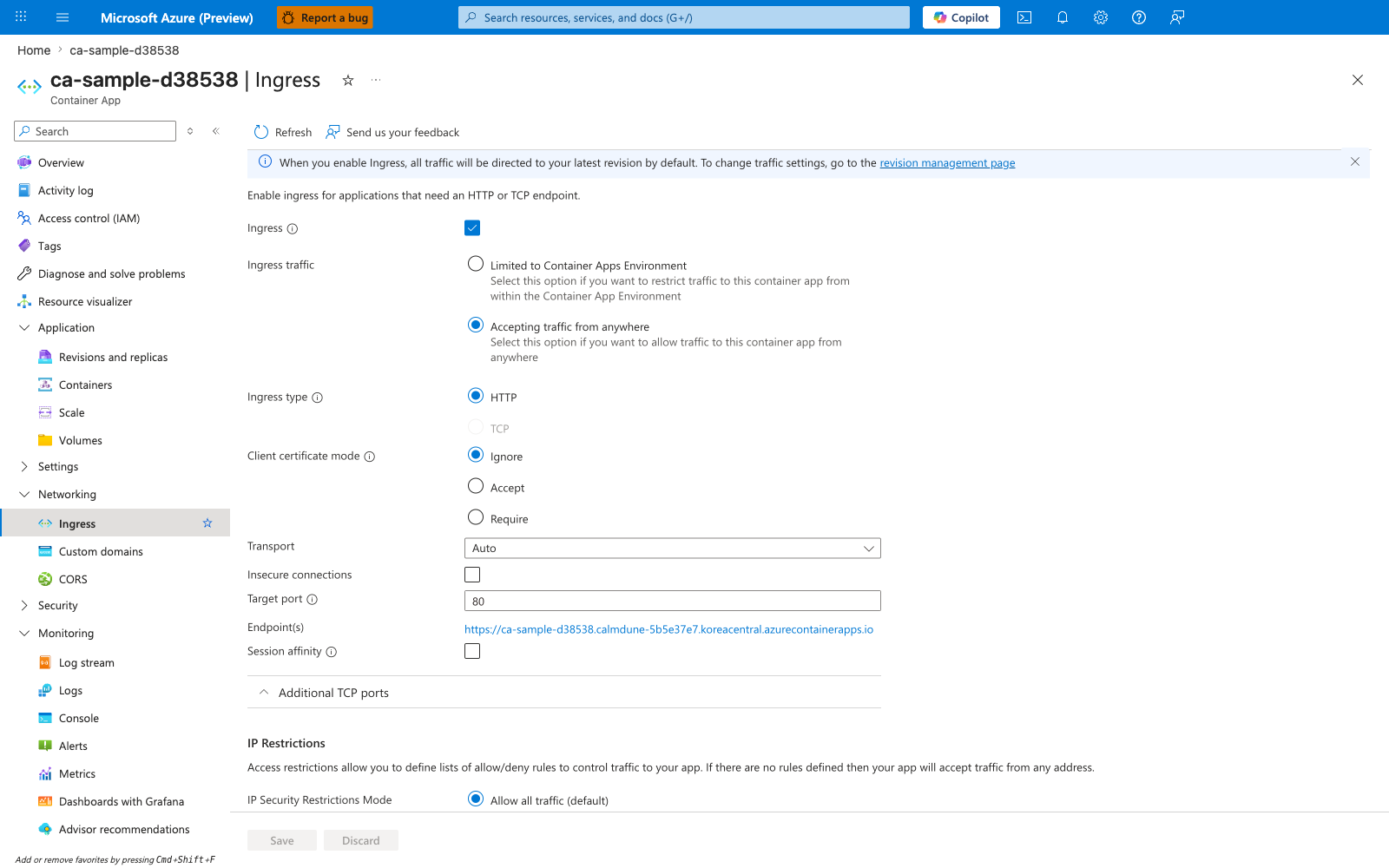
[Observed] ca-sample-d38538 | Ingress Container App Refresh Send us your feedback Ingress Ingress traffic Limited to Container Apps Environment Accepting traffic from anywhere Ingress type HTTP TCP Client certificate mode Ignore Accept Require Transport Auto Insecure connections Target port 80 Endpoint(s) https://<app-name>.<unique-id>.<region>.azurecontainerapps.io Session affinity Additional TCP ports IP Restrictions IP Security Restrictions Mode Allow all traffic (default) Save Discard.
[Inferred] The Limited to Container Apps Environment radio option is consistent with the internal-scope expectation in Use internal environments for sensitive workloads. The Accepting traffic from anywhere radio paired with the external Endpoint(s) value is consistent with the externally-reachable scope discussed in Restrict ingress to internal for backend services. The external Endpoint(s) value https://<app-name>.<unique-id>.<region>.azurecontainerapps.io is consistent with the public-DNS dependency referenced in Enable private endpoints for all Azure dependencies. The IP Restrictions section paired with the IP Security Restrictions Mode Allow all traffic (default) value is consistent with the ingress-scope concern discussed in Restrict ingress to internal for backend services.
[Not Proven] Additional ingress security detail, restriction detail, identity detail, and secret-binding detail are not visible on this view.
Common Mistakes / Anti-Patterns
| Anti-Pattern | Risk | Fix |
|---|---|---|
| All apps with external ingress | Unnecessary public attack surface | Default to internal ingress, expose only edge apps |
| ACR admin credentials in secrets | Shared password, no audit trail | Use managed identity for image pulls |
:latest tag in production | Unpredictable deployments, no rollback target | Pin image tags or use digests |
| Secrets in environment variables | No rotation, no audit, visible in config | Use Key Vault references |
| Subscription-level Contributor for CI/CD | Blast radius across all resources | Scope to resource group, use narrow roles |
| No egress filtering | Unrestricted outbound — data exfiltration risk | Route through firewall with allow-list |
| Disabled diagnostic settings | No security event retention | Enable logs to Log Analytics workspace |
| Direct HTTP between apps (no Dapr) | Unencrypted service-to-service traffic | Enable Dapr mTLS on all inter-service communication |
Validation Checklist
Use this checklist before promoting to production:
- [ ] Environment uses VNet integration with dedicated subnet.
- [ ] Internal services use internal ingress (no external exposure).
- [ ] All Azure dependencies accessed via private endpoints.
- [ ] Egress filtered through firewall with allow-listed FQDNs.
- [ ] System-assigned or user-assigned managed identity enabled on all apps.
- [ ] ACR image pull uses managed identity (no admin credentials).
- [ ] Role assignments scoped to resource or resource group level (not subscription).
- [ ] Images tagged with specific versions or digests (no
:latest). - [ ] Defender for Containers enabled for vulnerability scanning.
- [ ] Easy Auth enabled on public-facing apps.
- [ ] Dapr mTLS enabled for service-to-service communication.
- [ ] Secrets stored in Key Vault with references (not platform secrets).
- [ ] Key Vault audit logging enabled.
- [ ] Diagnostic settings configured for Container Apps environment.
- [ ] RBAC assignments reviewed within last quarter.
Advanced Topics
- Workload identity federation for GitHub Actions OIDC — eliminate service principal secrets entirely.
- Azure Policy initiatives for Container Apps security baselines at scale.
- Microsoft Defender for Cloud security posture dashboard integration.
- Automated compliance reporting with Azure Resource Graph queries.
- Network micro-segmentation with multiple environments and separate VNets.
- Container runtime threat detection with Defender for Containers runtime protection.
See Also
- Security Overview (Platform)
- Networking Best Practices
- Identity and Secrets Best Practices
- Networking Overview (Platform)
- VNet Integration
- Private Endpoints
- Managed Identity
- Security Operations
- Image Security Best Practices
- Compliance Baseline
- Landing Zone Accelerator
- Image Security (Platform)
- Secrets (Platform)
- Network Isolation (Platform)
- Customer-Managed Keys (Platform)
Sources
- Security in Azure Container Apps (Microsoft Learn)
- Authentication and Authorization in Azure Container Apps (Microsoft Learn)
- Managed Identity in Azure Container Apps (Microsoft Learn)
- Networking in Azure Container Apps (Microsoft Learn)
- Microsoft Defender for Containers (Microsoft Learn)
- Azure RBAC Overview (Microsoft Learn)
- Azure Policy for Container Apps (Microsoft Learn)
- Key Vault References in Container Apps (Microsoft Learn)