Scaling Best Practices for Azure Container Apps
This guide provides practical scaling patterns for Azure Container Apps using KEDA-backed rules, replica boundaries, and production validation techniques. It focuses on tuning decisions that balance latency, reliability, and cost under real workload variability.
Use this page for operational strategy and tuning heuristics, then use the platform deep dives for rule shapes and documented defaults: HTTP Scaler, CPU & Memory Scalers, Event Scalers, Custom Scalers, and Scaling Rules Reference.
Why This Matters
Production Container Apps behavior depends on explicit platform choices for ingress, scale, identity, observability, and release safety. This page turns the cited Microsoft Learn guidance into reviewable practices that can be checked before promotion.
Prerequisites
- Azure CLI 2.57+ with Container Apps extension
- Existing app (
$APP_NAME) deployed in resource group ($RG) and environment ($ACA_ENV_NAME) - Log Analytics connected to the Container Apps environment
- Baseline load profile for your service (steady and peak)
az extension add --name containerapp --upgrade
az containerapp show --name "$APP_NAME" --resource-group "$RG" --output table
az containerapp revision list --name "$APP_NAME" --resource-group "$RG" --output table
| Command | Why it is used |
|---|---|
az extension add ... | Installs or updates the Container Apps Azure CLI extension. |
Recommended Practices
Start with scaling objectives, not scaler defaults
Before setting rules, define objective boundaries:
- Target latency (for example, P95 under 300 ms).
- Maximum allowed backlog age for queue workloads.
- Cost envelope for expected peak periods.
- Safe load ceiling for downstream dependencies.
Without explicit objectives, scaling rules become arbitrary and unstable.
flowchart TD
    W[Workload Demand] --> K[KEDA Rule Evaluation]
    K --> D[Desired Replicas]
    D --> R[Running Replicas]
    R --> U[User Experience and Queue Lag]
    U --> O[Observability Feedback]
    O --> K
Tune HTTP scaling with concurrency and response behavior in mind
HTTP-driven apps often fail from poor concurrency targets, not from missing scale rules.
Practical method:
- Measure per-replica sustainable concurrency under normal CPU/memory usage.
- Set HTTP concurrency threshold below saturation point.
- Validate with burst traffic and observe error/latency slope.
az containerapp update \
  --name "$APP_NAME" \
  --resource-group "$RG" \
  --min-replicas 1 \
  --max-replicas 20 \
  --scale-rule-name "http-concurrency" \
  --scale-rule-type http \
  --scale-rule-metadata "concurrentRequests=50"
| Command | Why it is used |
|---|---|
az containerapp update ... | Updates the existing Container App configuration without recreating the app. |
HTTP tuning guidance:
- Lower threshold for CPU-heavy request handlers.
- Higher threshold for lightweight I/O-bound handlers.
- Re-evaluate after significant code-path changes.
High concurrency thresholds can hide overload
If concurrency is set above real application capacity, scale-out arrives too late and user latency spikes before replicas increase.
Understand request-count vs concurrency behavior
In practice, request pressure is experienced as concurrent in-flight work. Design thresholds around in-flight work, not raw request totals over long windows.
Use controlled tests to determine:
- Point where latency inflects sharply.
- Point where error rate starts increasing.
- CPU and memory usage at those points.
Choose scaler types by workload signal quality
KEDA offers many scalers. The best one is the most direct signal of pending work.
| Workload type | Preferred scaler signal | Why |
|---|---|---|
| Public API | HTTP concurrency | Direct user-facing pressure |
| Async workers | Queue depth or lag | Backlog reflects pending work |
| Event processing | Event source lag/count | Indicates unprocessed demand |
| Compute tasks | CPU or memory + backlog | Resource pressure plus demand context |
Selection principles:
- Prefer backlog-based triggers for asynchronous systems.
- Use CPU/memory as supporting signals, not sole demand proxy.
- Avoid combining unrelated triggers without clear precedence expectations.
Configure Service Bus scaler with realistic thresholds
For Service Bus-driven workers, queue length and message age are primary indicators.
az containerapp update \
  --name "$APP_NAME" \
  --resource-group "$RG" \
  --min-replicas 0 \
  --max-replicas 30 \
  --scale-rule-name "servicebus-orders" \
  --scale-rule-type azure-servicebus \
  --scale-rule-metadata "queueName=orders" "namespace=$SERVICEBUS_NAMESPACE" "messageCount=25" \
  --scale-rule-auth "connection=servicebus-connection"
| Command | Purpose |
|---|---|
az containerapp update | Adds a Service Bus-based autoscale rule to the app so replica count follows queue pressure instead of fixed capacity assumptions. |
--min-replicas 0 / --max-replicas 30 | Defines the cost floor and scale ceiling, balancing scale-to-zero savings against a hard limit that protects downstream dependencies from unbounded fan-out. |
--scale-rule-metadata "queueName=orders" "namespace=$SERVICEBUS_NAMESPACE" "messageCount=25" | Tells the scaler which queue to watch and how much backlog one replica group should tolerate before scaling out. |
--scale-rule-auth "connection=servicebus-connection" | Maps the scaler to the secret containing Service Bus connection details so KEDA can inspect the queue securely. |
| Command | Why it is used |
|---|---|
az containerapp update ... | Updates the existing Container App configuration without recreating the app. |
Threshold planning example:
- If one replica reliably processes 10 messages/second, and acceptable queue drain target is 60 seconds, backlog threshold should reflect desired response time and burst profile.
Configure Azure Storage Queue scaler for batch workers
Storage Queue scaling should align with message processing cost per item.
az containerapp update \
  --name "$APP_NAME" \
  --resource-group "$RG" \
  --min-replicas 0 \
  --max-replicas 40 \
  --scale-rule-name "storagequeue-ingest" \
  --scale-rule-type azure-queue \
  --scale-rule-metadata "queueName=ingest" "queueLength=50" "accountName=$STORAGE_ACCOUNT" \
  --scale-rule-auth "connection=storage-connection"
| Command | Purpose |
|---|---|
az containerapp update | Configures Storage Queue-driven autoscaling for batch workers so replica count grows only when queue backlog justifies more cost. |
--min-replicas 0 / --max-replicas 40 | Lets the worker scale to zero when idle while still setting a hard upper bound for burst processing and downstream protection. |
--scale-rule-metadata "queueName=ingest" "queueLength=50" "accountName=$STORAGE_ACCOUNT" | Identifies the queue to watch, the backlog target per scale decision, and the storage account that owns that queue. |
--scale-rule-auth "connection=storage-connection" | Connects the scaler to the secret containing Storage Queue credentials so the platform can inspect backlog securely. |
Operational tuning tips:
- Increase
queueLengthwhen each message is lightweight. - Decrease
queueLengthwhen each message is expensive or latency-sensitive. - Verify poison/dead-letter handling to prevent endless retries driving unnecessary scale.
Plan min and max replicas as reliability guardrails
Replica boundaries are not optional; they are safety controls.
| Setting | Effect | Tradeoff |
|---|---|---|
| min replicas = 0 | Lowest idle cost | Cold starts on new demand |
| min replicas > 0 | Faster first response | Baseline cost persists |
| high max replicas | Better burst absorption | Higher dependency and spend risk |
| low max replicas | Cost containment | Potential backlog/latency growth |
Planning approach:
- Set
max-replicasfrom downstream safe capacity, not from optimism. - Set
min-replicasfrom latency SLO and cold-start tolerance. - Review bounds after each major traffic shape change.
Decide explicitly on scale-to-zero
Scale-to-zero is ideal for intermittent workloads but can be harmful for strict latency APIs.
| Criteria | minReplicas: 0 | minReplicas: 1+ |
|---|---|---|
| Idle cost | Zero runtime cost | Baseline cost persists |
| Cold start | Yes — startup delay on first request | No — always warm |
| Best for | Event-driven, batch, admin tools | User-facing APIs, strict SLO |
| Startup probe | Must tolerate full cold boot | Only on new revision deploy |
| Queue processing | Acceptable lag on first message | Immediate processing |
flowchart TD
    Q{Latency SLO strict?}
    Q -->|Yes| M1[minReplicas >= 1]
    Q -->|No| Q2{Event-driven or batch?}
    Q2 -->|Yes| M0[minReplicas = 0]
    Q2 -->|No| Q3{Cold start < 3s?}
    Q3 -->|Yes| M0
    Q3 -->|No| M1
Use min-replicas: 0 when:
- Workload is event-driven and tolerant of startup delay.
- Cost minimization during idle windows is primary.
Use min-replicas > 0 when:
- API latency SLO is strict.
- Cold start penalties are visible to end users.
- Startup includes heavy dependency initialization.
az containerapp update \
  --name "$APP_NAME" \
  --resource-group "$RG" \
  --min-replicas 1 \
  --max-replicas 15
| Command | Why it is used |
|---|---|
az containerapp update ... | Updates the existing Container App configuration without recreating the app. |
Mitigate cold starts for user-facing services
Cold start mitigation techniques:
- Keep at least one warm replica.
- Reduce image size and startup dependency chain.
- Ensure startup probe allows realistic warm-up time.
- Preload critical caches if startup cost is predictable.
Use CPU and memory triggers carefully
CPU/memory signals capture resource saturation, but they are lagging indicators for demand spikes.
Use cases:
- CPU rule to protect against sustained compute pressure.
- Memory rule to prevent OOM-prone growth patterns.
- Combined with backlog/HTTP rules for complete behavior.
az containerapp update \
  --name "$APP_NAME" \
  --resource-group "$RG" \
  --scale-rule-name "cpu-protect" \
  --scale-rule-type cpu \
  --scale-rule-metadata "type=Utilization" "value=70"
| Command | Why it is used |
|---|---|
az containerapp update ... | Updates the existing Container App configuration without recreating the app. |
Resource-only scaling can miss incoming bursts
CPU and memory often rise after queues or request concurrency already spike. Pair them with demand-proximate scalers for faster response.
Understand scale rule interaction and effective behavior
When multiple scale rules are configured, replica decisions are driven by the highest demanded scale outcome among active triggers.
Implications:
- A single aggressive rule can dominate scaling.
- Inconsistent thresholds produce oscillation risk.
- Validation must cover combined-rule behavior, not isolated rules.
Rule interaction checklist:
- Are thresholds aligned with one coherent capacity model?
- Does any rule force excessive scale-out for transient noise?
- Are min/max bounds preventing runaway growth?
Test scaling rules before production promotion
Scaling must be load-tested as part of release validation.
| Test Scenario | What to Measure | Pass Criteria |
|---|---|---|
| Steady-state normal load | Replica count stability | No oscillation, latency within SLO |
| Sudden burst (2-5x peak) | Time to first scale-out | Scale-out within 30-60s |
| Dependency slowdown | Replica growth vs error rate | No runaway scale-out |
| Recovery after burst drops | Scale-in timing | Smooth cooldown, no premature termination |
| Scale-from-zero (if enabled) | First request latency | Cold start within acceptable budget |
Validation outcomes to capture:
- Time to first scale-out.
- Peak replica count.
- Queue drain time.
- Error and timeout rate during transitions.
Observe scaling events with KQL
Use KQL to correlate scaling behavior with latency and failures.
Example: correlate replica changes with errors.
ContainerAppConsoleLogs_CL
| where TimeGenerated > ago(2h)
| where ContainerAppName_s == "$APP_NAME"
| project TimeGenerated, RevisionName_s, Log_s
| order by TimeGenerated asc
Example: inspect system-level scaling signals from Container Apps logs.
ContainerAppSystemLogs_CL
| where TimeGenerated > ago(2h)
| where ContainerAppName_s == "$APP_NAME"
| where Log_s has "Scale" or Log_s has "replica"
| project TimeGenerated, RevisionName_s, Log_s
| order by TimeGenerated asc
Example: detect periods of repeated rapid scaling.
ContainerAppSystemLogs_CL
| where TimeGenerated > ago(6h)
| where ContainerAppName_s == "$APP_NAME"
| where Log_s has "Scale"
| summarize ScaleEvents = count() by bin(TimeGenerated, 5m)
| where ScaleEvents > 5
| order by TimeGenerated asc
Protect downstream systems from scaler-induced surges
Autoscaling can overwhelm databases, caches, and third-party APIs if replica growth is unconstrained.
Protection patterns:
- Set max replicas from dependency capacity limits.
- Add connection pool caps per replica.
- Use circuit breakers and bounded retries.
- Enforce queue backpressure where possible.
Coordinate scaling with revision rollout strategy
Scaling and revisions interact strongly during canaries and blue-green deployments.
Recommendations:
- Give canary revisions enough min replicas to avoid cold-start-biased results.
- Compare scaling behavior across old/new revisions before full cutover.
- Keep rollback revision warm during early rollout window.
Maintain scaling runbooks and ownership boundaries
Document who can change thresholds, max replica caps, and scaler credentials.
Runbook essentials:
- Current scale rules and rationale.
- Known safe and unsafe threshold ranges.
- Emergency cap-reduction command.
- Rollback plan for faulty scale-rule updates.
Emergency containment example:
| Command | Why it is used |
|---|---|
az containerapp update ... | Updates the existing Container App configuration without recreating the app. |
Scaling governance checklist
Use this checklist for recurring scale reviews:
- Are objective thresholds still aligned with current traffic profile?
- Did recent releases change per-request compute cost?
- Are cold starts affecting measured user latency?
- Are scale events correlated with dependency incidents?
- Is cost trend consistent with demand growth?
Verify scale configuration in Azure Portal
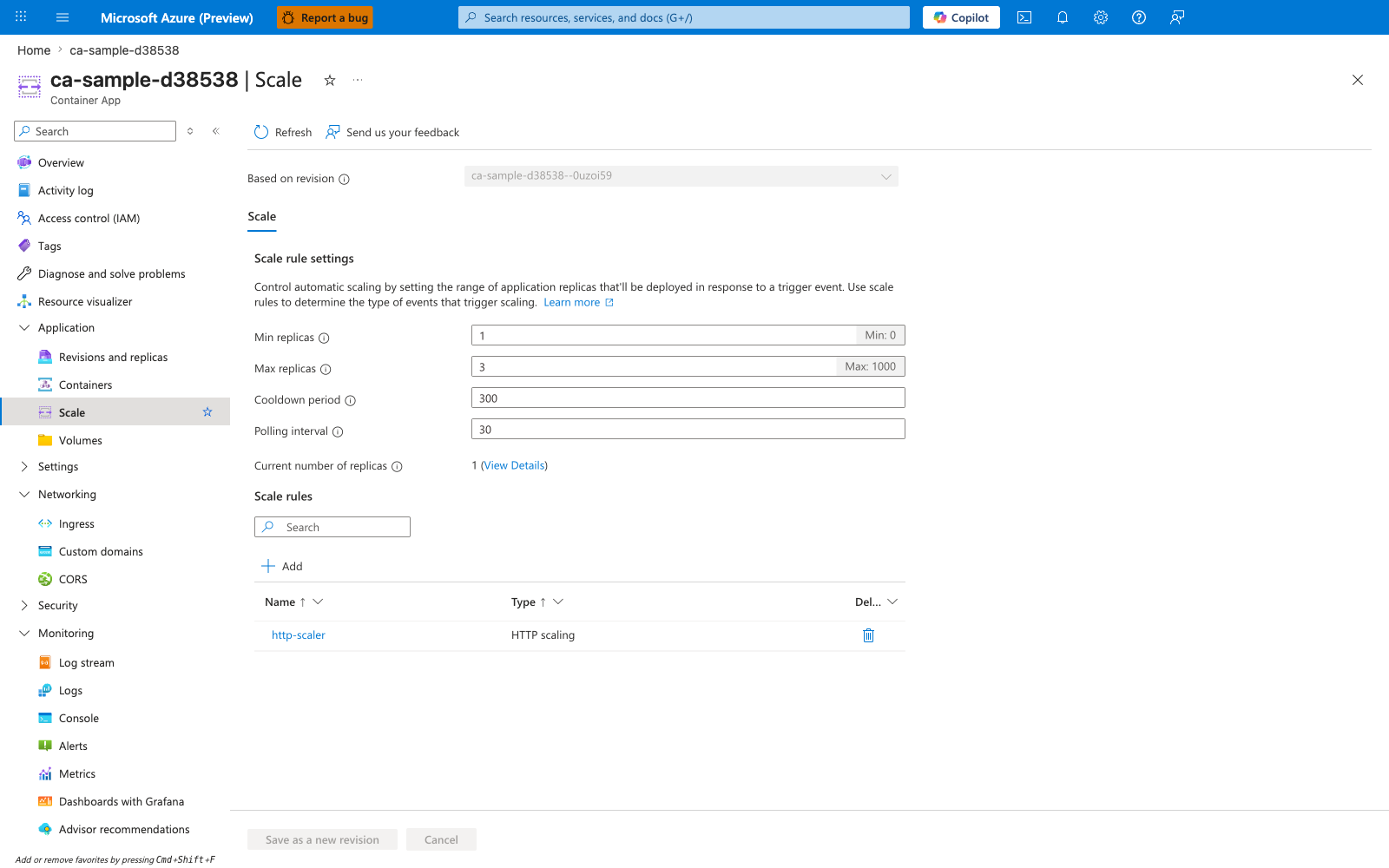
[Observed] ca-sample-d38538 | Scale Container App Refresh Send us your feedback Based on revision ca-sample-d38538--0uzoi59 Scale Scale rule settings Min replicas 1 Min: 0 Max replicas 3 Max: 1000 Cooldown period 300 Polling interval 30 Current number of replicas 1 (View Details) Scale rules Name Type http-scaler HTTP scaling Save as a new revision Cancel Overview Activity log Access control (IAM) Tags Application Revisions and replicas Containers Volumes Settings Networking Ingress Custom domains CORS Security Monitoring Log stream Logs Console Alerts Metrics.
[Inferred] The Min replicas 1 and Max replicas 3 fields appear to map to the --min-replicas and --max-replicas flags shown in the az containerapp update example in Tune HTTP scaling with concurrency and response behavior in mind. The http-scaler row under Scale rules with Type HTTP scaling is consistent with the --scale-rule-name "http-concurrency" and --scale-rule-type http pair documented in the same section. The non-zero Min replicas 1 value is consistent with the minReplicas: 1+ column in the criteria table in Decide explicitly on scale-to-zero. The presence of a single rule named http-scaler is consistent with the single-signal guidance in Choose scaler types by workload signal quality.
[Not Proven] Additional scale-rule configuration detail, historical detail, authentication detail, and provisioning detail are not visible on this view.
Advanced Topics
Adaptive threshold tuning by time window
Some workloads have predictable daily or weekly cycles. Advanced teams tune thresholds or min replicas based on schedule to reduce oscillation and improve efficiency.
Multi-signal scaler strategy
For complex systems, combine HTTP, queue, and resource triggers with clear ownership and documented precedence expectations.
Synthetic load as continuous scaling validation
Run controlled synthetic bursts in non-production environments after significant runtime or dependency changes to detect scaling regressions early.
Capacity modeling with dependency budgets
Model safe replica ranges from downstream dependency limits (database connections, API rate limits, cache throughput), then derive max replicas and scaler thresholds from those budgets.
Common Mistakes / Anti-Patterns
- Treating sample defaults as production-ready without checking ingress, scale, identity, and monitoring requirements.
- Applying a configuration change without verifying the resulting revision, logs, and metrics.
- Leaving ownership for certificates, private DNS, secrets, or rollout decisions undocumented.
Validation Checklist
- [ ] Required Container Apps settings are represented in infrastructure as code.
- [ ] The active revision, ingress, scale, identity, and monitoring state match the intended design.
- [ ] Rollback or cleanup commands have been tested in a non-production environment.
See Also
- Platform: Scaling
- Platform: HTTP Scaler
- Platform: CPU & Memory Scalers
- Platform: Event Scalers
- Platform: Custom Scalers
- Platform: Scaling Rules Reference
- Platform: Revisions
- Operations: Monitoring
- Operations: Alerts
- Troubleshooting: Playbooks
- Microsoft Learn: Set scaling rules in Azure Container Apps