Revision Strategy Best Practices for Azure Container Apps
This guide explains how to operate revisions as a controlled release mechanism in Azure Container Apps, including rollout safety, rollback speed, and lifecycle hygiene. It focuses on practical decision patterns you can apply in production pipelines.
Use this page for the decision framework, then go deeper with the dedicated Blue/Green Deployment and Canary Deployment playbooks.
Why This Matters
Production Container Apps behavior depends on explicit platform choices for ingress, scale, identity, observability, and release safety. This page turns the cited Microsoft Learn guidance into reviewable practices that can be checked before promotion.
Prerequisites
- Azure CLI 2.57+ with Container Apps extension
- Existing app (
$APP_NAME) in resource group ($RG) and environment ($ACA_ENV_NAME) - Container image in Azure Container Registry (
$ACR_NAME) - Team agreement on release gates and rollback criteria
az extension add --name containerapp --upgrade
az containerapp show --name "$APP_NAME" --resource-group "$RG" --output table
az containerapp revision list --name "$APP_NAME" --resource-group "$RG" --output table
| Command | Why it is used |
|---|---|
az extension add ... | Installs or updates the Container Apps Azure CLI extension. |
Recommended Practices
Treat revisions as the unit of release risk
A revision is immutable once created. That immutability gives you repeatability if and only if your release process is revision-first.
Revision-first release means:
- Build one immutable image tag.
- Deploy that image to create one revision candidate.
- Validate health and telemetry on that specific revision.
- Shift traffic only when release criteria pass.
flowchart TD
    I[Immutable Image Tag] --> C[Create New Revision]
    C --> V[Validate Revision]
    V -->|Pass| S[Shift Traffic]
    V -->|Fail| R[Rollback to Prior Revision]
Decide single vs multiple revision mode by release complexity
Use revision mode as a product of operational complexity, not developer preference.
| Decision point | Single mode | Multiple mode |
|---|---|---|
| Deployment simplicity | Highest | Moderate |
| Canary and staged rollout | Not suitable | Native fit |
| Rollback speed | Fast for simple replace | Fast with pre-warmed old revision |
| Operational overhead | Low | Higher |
| Experimentation (A/B) | Limited | Strong |
Use single revision mode when:
- The app is low-risk and stateless.
- You deploy frequently with narrow blast radius.
- You do not need partial traffic exposure.
Use multiple revision mode when:
- You need canary, blue-green, or A/B routing.
- You want quick rollback by weight reassignment.
- You must run controlled side-by-side validation.
| Command | Why it is used |
|---|---|
az containerapp revision set-mode ... | Runs the Azure CLI operation required by the documented step. |
Switching revision mode changes release behavior
In single mode, old revisions are automatically deactivated after successful replacement. In multiple mode, you must manage deactivation and traffic intentionally to avoid drift and unnecessary cost.
Use a revision suffix convention that is machine-sortable
Revision suffixes should encode release chronology and source identity.
Recommended suffix examples:
20260404-120260404-2git-8f2c1d4
Avoid opaque suffixes that force manual lookup.
az containerapp update \
  --name "$APP_NAME" \
  --resource-group "$RG" \
  --image "$ACR_NAME.azurecr.io/$APP_NAME:20260404-1" \
  --revision-suffix "20260404-1"
| Command | Purpose |
|---|---|
az containerapp update | Creates a new revision from a specifically versioned image so rollout history can be tied to a distinct release artifact. |
--image "$ACR_NAME.azurecr.io/$APP_NAME:20260404-1" | Pins the revision to an immutable image tag rather than a moving target, which is essential for rollback and forensic traceability. |
--revision-suffix "20260404-1" | Makes the Azure-generated revision name human-meaningful and machine-sortable so operators can quickly map portal/CLI revision lists back to release chronology. |
Naming policy recommendations:
- Keep suffix length short enough for readability in dashboards.
- Include sortable date token for timeline reconstruction.
- Include release sequence if multiple deployments per day occur.
Use labels for stable endpoints and weights for controlled migration
Labels and traffic weights solve different operational problems.
| Need | Preferred mechanism | Why |
|---|---|---|
| Stable URL for specific revision | Revision label | Deterministic route for validation or partner integration |
| Gradual production shift | Traffic weights | Fine-grained progressive exposure |
| Instant failback | Traffic weights to previous revision | Fast rollback without redeploy |
| Parallel test environments | Labels | Isolated testing without affecting weighted production flow |
Label assignment example:
az containerapp revision label add \
  --name "$APP_NAME" \
  --resource-group "$RG" \
  --revision "$APP_NAME--20260404-1" \
  --label "candidate"
| Command | Purpose |
|---|---|
az containerapp revision label add | Binds a stable label URL to one specific revision so you can run smoke tests and partner validation without affecting production traffic weights. |
--revision "$APP_NAME--20260404-1" | Targets the exact candidate revision you want to validate, which avoids ambiguity when multiple active revisions exist. |
--label "candidate" | Creates a memorable endpoint role name that can move later, separating validation routing from raw revision IDs. |
Traffic weighting example:
az containerapp ingress traffic set \
  --name "$APP_NAME" \
  --resource-group "$RG" \
  --revision-weight "$APP_NAME--20260404-1=10" "$APP_NAME--20260403-4=90"
| Command | Why it is used |
|---|---|
az containerapp ingress traffic ... | Runs the Azure CLI operation required by the documented step. |
Apply repeatable traffic splitting patterns
Canary rollout pattern
Use canary when you want statistical confidence before full migration.
Typical progression:
- 5% for smoke + error budget check.
- 25% for medium-volume observation.
- 50% for sustained behavior under normal load.
- 100% when SLO and dependency metrics remain healthy.
graph TD
    U[Users] --> I[Ingress]
    I --> O[Old Revision 95%]
    I --> N[New Revision 5%]
Promotion criteria examples:
- Error rate delta < 0.3% vs baseline.
- P95 latency increase < 15%.
- No sustained liveness probe failures.
Blue-green pattern
Use blue-green when cutover must be fast and binary.
Flow:
- Keep blue revision at 100% production traffic.
- Deploy green revision with 0% traffic.
- Validate green via revision label endpoint.
- Switch traffic to green in one operation.
- Keep blue active temporarily for immediate failback.
az containerapp ingress traffic set \
  --name "$APP_NAME" \
  --resource-group "$RG" \
  --revision-weight "$APP_NAME--green=100" "$APP_NAME--blue=0"
| Command | Why it is used |
|---|---|
az containerapp ingress traffic ... | Runs the Azure CLI operation required by the documented step. |
A/B pattern
Use A/B when comparing behavior across revision variants.
- Keep experiment duration bounded.
- Define explicit success metrics in advance.
- Avoid long-lived A/B states that complicate operations.
Design rollback as a first-class fast path
Rollback should be one command and one decision, not a multi-step scramble.
Rollback readiness checklist:
- Previous stable revision remains active during rollout window.
- Traffic command is scripted in pipeline.
- Alert routing includes release context.
- On-call has clear rollback threshold.
Rollback command pattern:
az containerapp ingress traffic set \
  --name "$APP_NAME" \
  --resource-group "$RG" \
  --revision-weight "$APP_NAME--20260403-4=100" "$APP_NAME--20260404-1=0"
| Command | Why it is used |
|---|---|
az containerapp ingress traffic ... | Runs the Azure CLI operation required by the documented step. |
Do not rollback by rebuilding old image
Rebuild-based rollback is slower and may not reproduce the same artifact. Route traffic back to an existing known-good revision whenever possible.
Build a zero-downtime deployment workflow
Zero-downtime in Container Apps depends on health-gated promotion and controlled traffic movement.
Recommended workflow:
- Deploy new image with explicit revision suffix.
- Keep traffic on current stable revision.
- Validate startup/readiness and key telemetry on new revision.
- Shift traffic gradually or switch atomically by strategy.
- Observe post-cutover SLO window.
- Deactivate stale revisions after confidence window ends.
sequenceDiagram
    participant CI as CI/CD
    participant ACA as Container Apps
    participant OBS as Monitoring
    CI->>ACA: Deploy image + revision suffix
    ACA-->>CI: Revision created
    CI->>OBS: Validate health and error signals
    OBS-->>CI: Gate decision
    CI->>ACA: Shift traffic weights
    CI->>OBS: Confirm post-shift stability
Manage revision lifecycle to control cost and cognitive load
Active revisions consume resources and operational attention. Keep only what is useful.
Lifecycle policy suggestions:
- Keep at least one known-good fallback revision active during rollout.
- Deactivate superseded revisions after release confidence window.
- Regularly review inactive revision count and retention policy.
- Annotate release records with revision names for incident forensics.
List and deactivate example:
az containerapp revision list \
  --name "$APP_NAME" \
  --resource-group "$RG" \
  --output table

az containerapp revision deactivate \
  --name "$APP_NAME" \
  --resource-group "$RG" \
  --revision "$APP_NAME--20260328-2"
| Command | Why it is used |
|---|---|
az containerapp revision list ... | Lists revisions so rollout state, traffic, and health can be verified. |
Avoid schema-coupled rollouts without compatibility windows
Multiple revisions can run concurrently against shared dependencies.
Compatibility practices:
- Use expand-and-contract schema changes.
- Make new code tolerate old fields and vice versa.
- Delay destructive migrations until old revision traffic reaches zero.
Combine revision strategy with autoscaling behavior
Traffic split affects load per revision, which affects scale events.
Operational implications:
- A small canary weight may still trigger autoscaling if request profile is bursty.
- Min replicas for canary revisions can reduce false negatives due to cold starts.
- Separate scale rule tuning may be needed for low-percentage revisions.
Use release guardrails in automation
Codify release safety in CI/CD:
- Enforce immutable image tags.
- Require revision suffix on production deploy.
- Block traffic shift if health checks fail.
- Require explicit rollback plan per release.
Example update command in pipeline:
az containerapp update \
  --name "$APP_NAME" \
  --resource-group "$RG" \
  --image "$ACR_NAME.azurecr.io/$APP_NAME:$IMAGE_TAG" \
  --revision-suffix "$IMAGE_TAG"
| Command | Why it is used |
|---|---|
az containerapp update ... | Updates the existing Container App configuration without recreating the app. |
Operational checklist for every release
Pre-deploy:
- Stable revision identified and documented.
- Rollback command prepared.
- Alert thresholds confirmed.
Deploy:
- New revision created successfully.
- Probe health stable.
- Candidate telemetry baseline collected.
Promote:
- Traffic shifted according to chosen pattern.
- Error and latency deltas within threshold.
Post-deploy:
- Old revision retained only for defined fallback period.
- Release notes include final traffic state.
- Cleanup task scheduled.
Verify revision state in Azure Portal
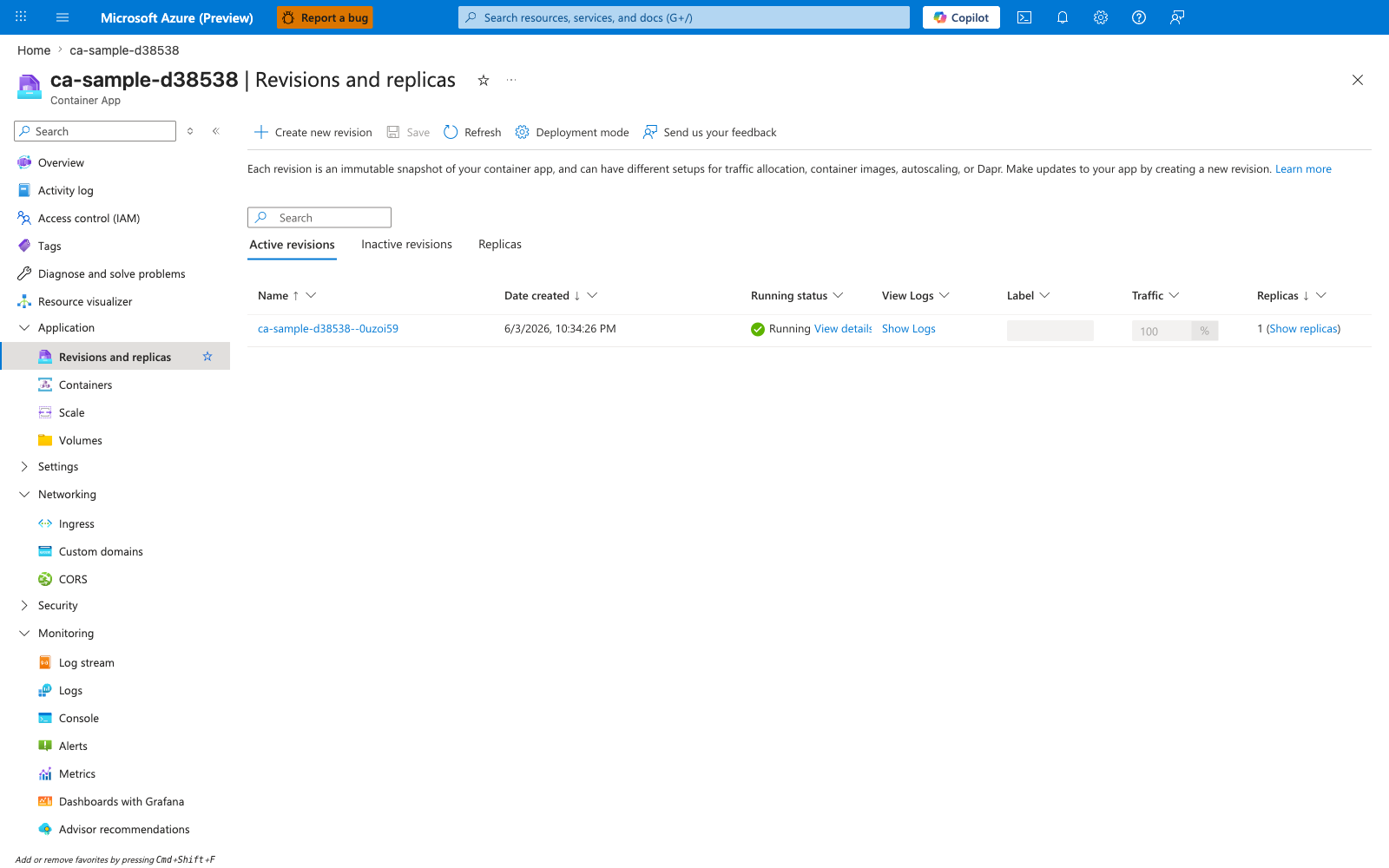
[Observed] ca-sample-d38538 | Revisions and replicas Container App Create new revision Save Refresh Deployment mode Send us your feedback Active revisions Inactive revisions Replicas Name Date created Running status View Logs Label Traffic Replicas ca-sample-d38538--0uzoi59 6/3/2026, 10:34:26 PM Running View details Show Logs 100 % 1 (Show replicas) Overview Activity log Access control (IAM) Tags Application Containers Scale Volumes Settings Networking Ingress Custom domains CORS Security Monitoring Log stream Logs Console Alerts Metrics.
[Inferred] The Deployment mode command-bar entry appears to map to the az containerapp revision set-mode --mode multiple operation documented in Decide single vs multiple revision mode by release complexity. The revision row ca-sample-d38538--0uzoi59 is consistent with the --revision-suffix convention discussed in Use a revision suffix convention that is machine-sortable. The empty Label column and the 100 % value in Traffic are consistent with the az containerapp revision label add and weight-shifting flow documented in Use labels for stable endpoints and weights for controlled migration. The Active revisions and Inactive revisions tabs are consistent with the az containerapp revision list and az containerapp revision deactivate operations documented in Manage revision lifecycle to control cost and cognitive load.
[Not Proven] Additional revision configuration detail, history detail, replica detail, and provisioning detail are not visible on this view.
Advanced Topics
Weighted promotion automation with safety windows
Automate canary progression with timed hold periods and automatic halt conditions when SLO deltas exceed thresholds.
Revision labels for external contract testing
Use stable labels for partner validation endpoints to avoid coupling external tests to transient revision names.
Incident forensics with revision-scoped telemetry
Correlate errors, latency spikes, and dependency failures by revision name to isolate whether issues are release-induced or platform/environmental.
Coordinating revision rollout across multiple apps
For distributed systems, sequence rollouts by dependency direction and maintain compatibility windows so mixed-revision states remain safe.
Common Mistakes / Anti-Patterns
- Treating sample defaults as production-ready without checking ingress, scale, identity, and monitoring requirements.
- Applying a configuration change without verifying the resulting revision, logs, and metrics.
- Leaving ownership for certificates, private DNS, secrets, or rollout decisions undocumented.
Validation Checklist
- [ ] Required Container Apps settings are represented in infrastructure as code.
- [ ] The active revision, ingress, scale, identity, and monitoring state match the intended design.
- [ ] Rollback or cleanup commands have been tested in a non-production environment.
See Also
- Platform: Revisions
- Blue/Green Deployment
- Canary Deployment
- Platform: Scaling
- Operations: Revision Management
- Operations: Deployment
- Python Guide: Revisions and Traffic
- Microsoft Learn: Revisions in Azure Container Apps