Azure Container Apps Reliability Best Practices
This guide covers production reliability patterns for Azure Container Apps, including probe design, graceful termination, revision rollback, and disaster recovery planning. Use it to run stable services under failure, scale transitions, and regional incidents.
Why This Matters
Production Container Apps behavior depends on explicit platform choices for ingress, scale, identity, observability, and release safety. This page turns the cited Microsoft Learn guidance into reviewable practices that can be checked before promotion.
Prerequisites
- You reviewed reliability concepts first:
- Health and Recovery (Platform)
- Revisions (Platform)
- Scaling (Platform)
- Azure CLI is installed and authenticated.
- Application exposes health endpoints and supports SIGTERM handling.
Set common variables:
export RG="rg-aca-prod"
export APP_NAME="ca-api-prod"
export ACA_ENV_NAME="cae-prod"
export ACR_NAME="acrprodshared"
export LOCATION="koreacentral"
Recommended Practices
Design health probes as separate reliability signals
Use each probe for one purpose only:
- Startup probe: determines whether bootstrap completed.
- Readiness probe: determines whether the replica can serve traffic now.
- Liveness probe: determines whether process should be restarted.
Do not reuse one endpoint for all three unless behavior is intentionally identical.
flowchart TD
    S[Container Start] --> SP[Startup Probe]
    SP -->|Pass| R[Readiness Probe]
    R -->|Pass| T[Traffic Eligible]
    R -->|Fail| NT[No Traffic]
    T --> L[Liveness Probe]
    L -->|Fail Threshold Reached| RS[Container Restart]
Operational guidance:
- Startup checks should tolerate cold start cost.
- Readiness checks should validate dependencies required for serving.
- Liveness checks should detect deadlock or irrecoverable process faults.
Liveness should not depend on fragile downstream calls
If liveness depends on transient external dependencies, healthy replicas restart unnecessarily and amplify outages.
Probe timing: tune for workload behavior, not defaults
Key parameters and their impact:
| Field | Reliability Effect | Tuning Strategy |
|---|---|---|
| initialDelaySeconds | Grace period before probe starts | Increase for heavy startup |
| periodSeconds | Probe frequency | Balance detection speed and noise |
| failureThreshold | Consecutive failures before action | Increase to reduce false positives |
Example probe-focused YAML for updates:
properties:
  template:
    containers:
      - name: api
        image: acrprodshared.azurecr.io/api:2026-04-04
        probes:
          - type: Startup
            httpGet:
              path: /health/startup
              port: 8000
            initialDelaySeconds: 10
            periodSeconds: 5
            failureThreshold: 24
          - type: Readiness
            httpGet:
              path: /health/ready
              port: 8000
            initialDelaySeconds: 5
            periodSeconds: 10
            failureThreshold: 3
          - type: Liveness
            httpGet:
              path: /health/live
              port: 8000
            initialDelaySeconds: 20
            periodSeconds: 15
            failureThreshold: 3
Apply YAML:
az containerapp update \
  --name "$APP_NAME" \
  --resource-group "$RG" \
  --yaml "./infra/containerapp-reliability.yaml"
| Command | Why it is used |
|---|---|
az containerapp update ... | Updates the existing Container App configuration without recreating the app. |
Graceful shutdown with SIGTERM and termination grace
Graceful termination prevents request loss during scale-in, rollout, and node maintenance.
Required behavior:
- App receives SIGTERM.
- App stops accepting new requests.
- In-flight requests complete within grace period.
- Background workers checkpoint and stop cleanly.
Set termination grace period in template:
Update app template:
az containerapp update \
  --name "$APP_NAME" \
  --resource-group "$RG" \
  --yaml "./infra/containerapp-termination.yaml"
| Command | Why it is used |
|---|---|
az containerapp update ... | Updates the existing Container App configuration without recreating the app. |
Coordinate grace period with upstream timeout
If load balancer, gateway, or client timeout is shorter than termination grace, requests may still fail despite clean SIGTERM handling.
Zone redundancy in Container Apps Environments
Use zone-redundant environment options when region and SKU support aligns with your SLO.
Benefits:
- Better resilience to single-zone failures.
- Improved availability for replica placement.
Trade-offs:
- Potential cost increase.
- Regional capability constraints.
- Additional architecture validation required for dependencies.
Zone placement is best-effort, not a per-replica guarantee
Microsoft Learn describes zone-redundant Container Apps as relying on a scheduler that "ensures optimal distribution across physical hosts while meeting your minimum replica count requirements." That is a best-effort behavior — setting minReplicas=N in a zone-redundant environment does not guarantee one replica in each of N distinct zones at every moment. Underspecified resource requests, host capacity, and maintenance events can all skew distribution. When your SLO depends on stronger zonal guarantees than this, combine zone redundancy with the four-layer mitigation matrix in the Zone Redundancy Best-Effort playbook — explicit resource requests, app-layer retries and circuit breakers, multi-region or AKS topology escalation, and replica-inventory observability.
Check environment profile:
| Command | Why it is used |
|---|---|
az containerapp env show ... | Reads managed environment settings for networking, logging, or workload profile verification. |
Multi-region deployment pattern for critical APIs
For high-availability public services, run active-passive or active-active across regions.
graph TD
    C[Client] --> DNS[Traffic Manager / Front Door]
    DNS --> R1[Region A - Container Apps]
    DNS --> R2[Region B - Container Apps]
    R1 --> D1[(Regional Data Path)]
    R2 --> D2[(Regional Data Path)]
Choose pattern by dependency model:
- Active-passive: simpler operations, slower failover switch.
- Active-active: faster failover, requires strict data and idempotency design.
Operational baseline:
- Replicate IaC and runtime config across both regions.
- Keep revision labels and rollout conventions consistent.
- Run periodic failover drills with measurable RTO/RPO outcomes.
Retry and circuit breaker patterns with Dapr resiliency
Apply retries and circuit breakers to control transient and persistent failures.
Reliability policy guidance:
- Retry idempotent operations only.
- Use bounded retry with backoff and jitter.
- Add circuit breaker for persistent dependency failure.
- Expose fallback behavior for degraded mode.
Dapr resiliency high-level flow:
flowchart TD
    A[App] --> D[Dapr Sidecar]
    D --> P[Resiliency Policy]
    P --> S[Downstream Service]
    P --> B[Breaker Open State]
Operational checks:
- Ensure retry budget does not exceed request timeout budget.
- Track retry and breaker metrics in telemetry.
- Validate behavior during dependency outage game day.
Revision-based rollback for speed and safety
Use revisions as your primary rollback mechanism.
Rollback method:
- Keep last known good revision active.
- Route majority traffic to new revision gradually.
- If errors rise, shift traffic back immediately.
- Investigate failed revision without stopping stable path.
List revisions:
| Command | Why it is used |
|---|---|
az containerapp revision list ... | Lists revisions so rollout state, traffic, and health can be verified. |
Immediate rollback example:
az containerapp ingress traffic set \
  --name "$APP_NAME" \
  --resource-group "$RG" \
  --revision-weight "${APP_NAME}--stable=100"
| Command | Why it is used |
|---|---|
az containerapp ingress traffic ... | Runs the Azure CLI operation required by the documented step. |
Do not deactivate stable revision too early
Keeping at least one proven revision active dramatically reduces mean time to recover during bad deployments.
Monitor service health with Application Insights and KQL
Track reliability by signals, not single metrics.
Core indicators:
- Request success rate and latency percentiles.
- Revision-level error spikes.
- Restart count and probe failure trends.
- Dependency failure and retry amplification.
KQL query: failures by revision and status code:
ContainerAppConsoleLogs_CL
| where TimeGenerated > ago(30m)
| where ContainerAppName_s == "ca-api-prod"
| where Log_s has "HTTP"
| summarize Count=count() by RevisionName_s, bin(TimeGenerated, 5m)
| order by TimeGenerated desc
KQL query: probe-related system events:
ContainerAppSystemLogs_CL
| where TimeGenerated > ago(30m)
| where ContainerAppName_s == "ca-api-prod"
| where Log_s has_any ("Probe", "readiness", "liveness", "startup")
| project TimeGenerated, RevisionName_s, ReplicaName_s, Log_s
| order by TimeGenerated desc
CLI log check for incident triage:
az containerapp logs show \
  --name "$APP_NAME" \
  --resource-group "$RG" \
  --type system \
  --follow false
| Command | Why it is used |
|---|---|
az containerapp logs show ... | Runs the Azure CLI operation required by the documented step. |
Disaster recovery considerations for Container Apps
DR is not only regional deployment; it is an operational discipline.
Define and test:
- Recovery Time Objective (RTO)
- Recovery Point Objective (RPO)
- Data consistency model across regions
- Failover decision authority and communication flow
DR runbook minimum sections:
- Trigger criteria and severity mapping.
- Traffic failover steps and rollback conditions.
- Region-specific dependency checks.
- Validation checklist for health and business transactions.
- Post-incident review actions.
Reliability design for background jobs and workers
For queue/event workers in Container Apps:
- Prefer no ingress.
- Ensure idempotent message handling.
- Use visibility timeout aligned with processing duration.
- Emit checkpoint logs and dead-letter metrics.
When using Container Apps Jobs:
- Define retry policy per failure mode.
- Monitor execution history and failure categories.
- Keep job image/version pinned and reproducible.
Scale reliability: avoid thrash and cold-start shock
Scale settings can create reliability problems if too aggressive.
Best practices:
- Keep non-zero minimum replicas for latency-sensitive APIs.
- Tune KEDA triggers to avoid oscillation.
- Set scale bounds according to dependency capacity.
- Coordinate HPA-like behavior with downstream connection pools.
Reliability release gate checklist
Use this checklist before production rollout:
- Startup, readiness, and liveness probes tested under load.
- Graceful shutdown tested during active traffic.
- Revision rollback tested with one command path.
- Alert rules cover error rate, latency, restarts, and failed revisions.
- SLO dashboard includes revision and dependency dimensions.
- Regional failover drill completed in last quarter.
Example incident workflow (15-minute containment target)
- Detect error budget burn from alerts.
- Identify impacted revision and dependency.
- Roll traffic to known-good revision.
- Confirm recovery via SLI dashboard and KQL.
- Freeze further rollout until root cause is understood.
Useful CLI during containment:
az containerapp show \
  --name "$APP_NAME" \
  --resource-group "$RG" \
  --query "properties.latestReadyRevisionName" \
  --output tsv

az containerapp ingress traffic show \
  --name "$APP_NAME" \
  --resource-group "$RG" \
  --output table
| Command | Why it is used |
|---|---|
az containerapp show ... | Reads the Container App configuration so the documented setting can be verified. |
Verify reliability surfaces in Azure Portal
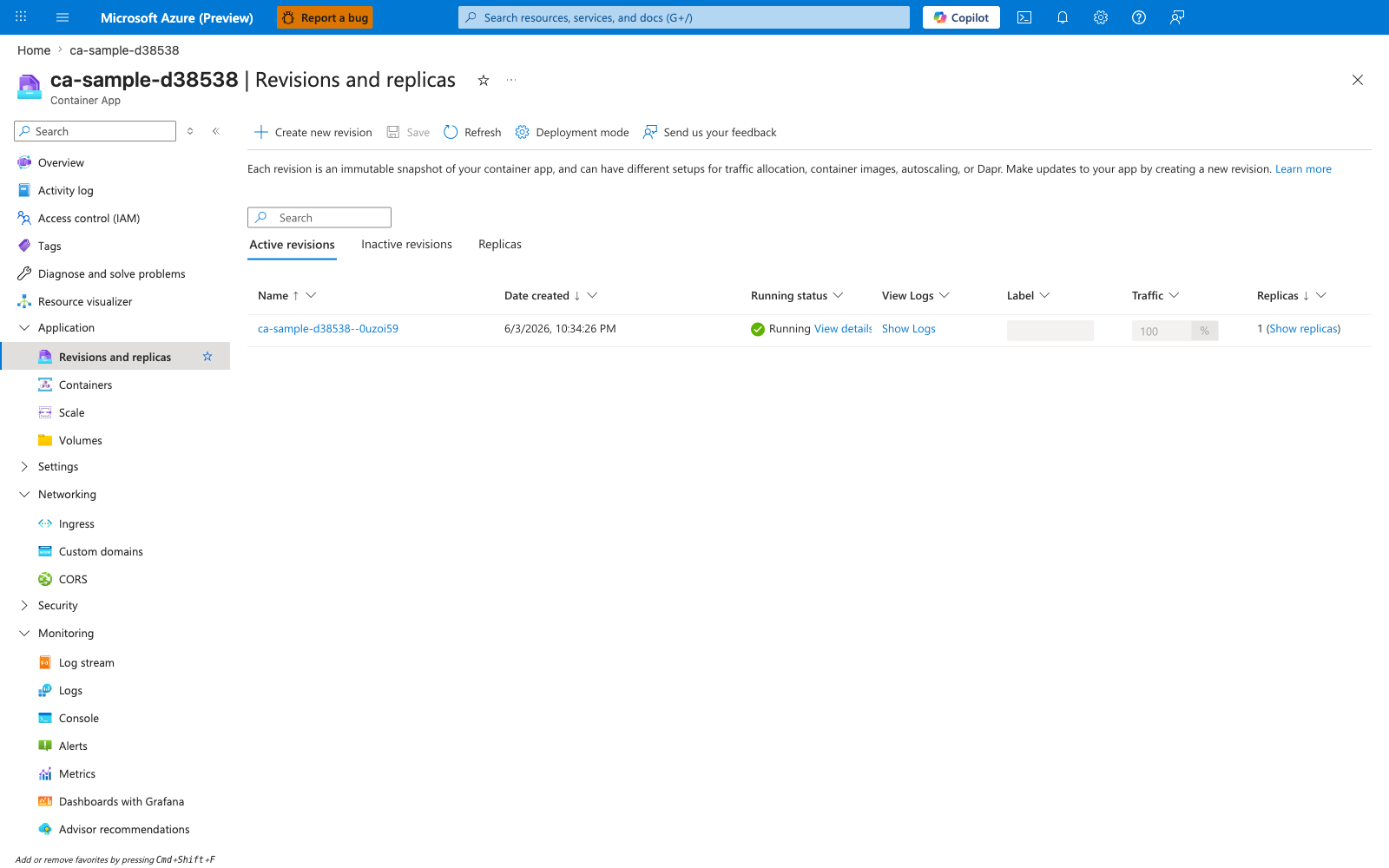
[Observed] ca-sample-d38538 | Revisions and replicas Container App Create new revision Save Refresh Deployment mode Active revisions Inactive revisions Replicas Name Date created Running status View Logs Label Traffic Replicas ca-sample-d38538--0uzoi59 6/3/2026, 10:34:26 PM Running View details Show Logs 100 % 1 (Show replicas).
[Inferred] The Running value under Running status for revision ca-sample-d38538--0uzoi59 is consistent with the probe-driven readiness model discussed in Design health probes as separate reliability signals, which gates traffic on readiness probe outcomes. The Active revisions / Inactive revisions toggle alongside Create new revision appears to map to the keep-last-known-good rollback workflow described in Revision-based rollback for speed and safety, which keeps a proven revision active while a new one is rolled out. The Traffic value 100 % on a single active revision is consistent with the containment step in Example incident workflow (15-minute containment target), which routes traffic to the known-good revision during incident response. The Replicas value 1 (Show replicas) appears to map to the minimum-replica decision in Scale reliability: avoid thrash and cold-start shock, which calls out keeping non-zero minimum replicas for latency-sensitive APIs.
[Not Proven] Additional revision reliability detail, termination detail, placement detail, and resiliency detail are not visible on this view.
Anti-patterns to avoid
- One
/healthendpoint reused for all probe types without intent. - Liveness probe checking downstream dependencies directly.
- Zero stable revision retained during canary rollout.
- No termination grace period for long-running requests.
- Declaring multi-region architecture without failover drills.
Advanced Topics
Use these advanced patterns for higher maturity:
- SLO-based progressive delivery gates tied to revision traffic automation.
- Synthetic transactions from multiple geographies for early detection.
- Adaptive concurrency limits and queue backpressure controls.
- Chaos experiments targeting dependency outages and network faults.
- Automated postmortem data capture from logs, traces, and deployment events.
Sample command set for recurring reliability audits:
az containerapp revision list \
  --name "$APP_NAME" \
  --resource-group "$RG" \
  --output json

az monitor metrics list \
  --resource "/subscriptions/<subscription-id>/resourceGroups/$RG/providers/Microsoft.App/containerApps/$APP_NAME" \
  --metric "CpuUsage" "MemoryUsage" \
  --interval "PT5M" \
  --aggregation "Average"
| Command | Why it is used |
|---|---|
az containerapp revision list ... | Lists revisions so rollout state, traffic, and health can be verified. |
Common Mistakes / Anti-Patterns
- Treating sample defaults as production-ready without checking ingress, scale, identity, and monitoring requirements.
- Applying a configuration change without verifying the resulting revision, logs, and metrics.
- Leaving ownership for certificates, private DNS, secrets, or rollout decisions undocumented.
Validation Checklist
- [ ] Required Container Apps settings are represented in infrastructure as code.
- [ ] The active revision, ingress, scale, identity, and monitoring state match the intended design.
- [ ] Rollback or cleanup commands have been tested in a non-production environment.
See Also
- Availability and Non-Guarantees — the five most-commonly-violated platform contracts (node spread, zone redundancy, planned maintenance, rolling rollout, single-region cap) and the compensating controls operators must add.
- Health and Recovery (Platform)
- Revisions (Platform)
- Scaling (Platform)
- Operations Monitoring
- Operations Recovery
- Zone Redundancy (Operations)
- Zone Redundancy Best-Effort playbook
- Networking Best Practices
- Identity and Secrets Best Practices