Azure Container Apps Networking Best Practices
This guide focuses on operating Azure Container Apps networking safely and predictably in production. Read this after the platform networking concepts so you can apply concrete patterns, guardrails, and rollout steps.
Why This Matters
Production Container Apps behavior depends on explicit platform choices for ingress, scale, identity, observability, and release safety. This page turns the cited Microsoft Learn guidance into reviewable practices that can be checked before promotion.
Prerequisites
- You understand environment, ingress, revision, and service-to-service basics.
- You reviewed the conceptual networking docs first:
- Platform Networking Overview
- VNet Integration
- Private Endpoints
- Azure CLI is installed and authenticated.
- You have Contributor (or equivalent) permissions on your resource group.
Set reusable variables:
export RG="rg-aca-prod"
export APP_NAME="ca-api-prod"
export ACA_ENV_NAME="cae-prod"
export ACR_NAME="acrprodshared"
export LOCATION="koreacentral"
Recommended Practices
Start with an ingress posture decision, not a command
Treat ingress as an application contract:
- External ingress: internet or external clients can reach the app endpoint.
- Internal ingress: only workloads with network reachability to the environment can call the app endpoint.
- No ingress: app is invoked through events, jobs, queues, or sidecar/service mesh paths.
Use this table before creating or updating an app:
| Workload Type | Recommended Ingress | Why |
|---|---|---|
| Public API | External | Client traffic must enter via managed Envoy |
| Internal API | Internal | Keep east-west private, no public endpoint |
| Queue processor | None | Reduces attack surface and accidental exposure |
| Admin tooling endpoint | Internal + access-controlled path | Avoid exposing privileged operations |
Do not use external ingress as a default
Every external endpoint becomes an internet boundary requiring TLS, WAF posture, abuse protection, and certificate lifecycle ownership.
External ingress pattern for controlled public entry
Use one entry app for public traffic, and keep downstream services internal.
graph TD
    U[Internet Client] --> D[Custom Domain]
    D --> E[Envoy Ingress]
    E --> P[Public API Container App]
    P --> I1[Internal Orders App]
    P --> I2[Internal Catalog App]
    I1 --> DB[(Private Data Service)]
    I2 --> DB
Create or update with explicit ingress controls:
az containerapp create \
  --name "$APP_NAME" \
  --resource-group "$RG" \
  --environment "$ACA_ENV_NAME" \
  --image "$ACR_NAME.azurecr.io/api:2026-04-04" \
  --target-port 8000 \
  --ingress external \
  --min-replicas 2 \
  --max-replicas 10
| Command | Why it is used |
|---|---|
az containerapp create ... | Creates the Container App with the documented image, ingress, scale, and environment settings. |
Operational notes:
- Keep public app stateless and narrow in scope.
- Put authN/authZ checks at the edge app before internal fan-out.
- Avoid making every microservice external; route internally instead.
Internal ingress pattern for service APIs
Use internal ingress for service-to-service APIs that should not be internet-addressable.
az containerapp create \
  --name "ca-orders-internal" \
  --resource-group "$RG" \
  --environment "$ACA_ENV_NAME" \
  --image "$ACR_NAME.azurecr.io/orders:2026-04-04" \
  --target-port 8080 \
  --ingress internal \
  --min-replicas 2 \
  --max-replicas 20
| Command | Why it is used |
|---|---|
az containerapp create ... | Creates the Container App with the documented image, ingress, scale, and environment settings. |
Validate ingress exposure:
az containerapp show \
  --name "ca-orders-internal" \
  --resource-group "$RG" \
  --query "properties.configuration.ingress.external" \
  --output tsv
| Command | Why it is used |
|---|---|
az containerapp show ... | Reads the Container App configuration so the documented setting can be verified. |
Expected output:
How traffic split really behaves with Envoy
Traffic weights are applied at ingress and route requests to active revisions.
graph TD
    C[Client Request] --> V[Envoy]
    V -->|90%| R1[Revision A]
    V -->|10%| R2[Revision B]
Operational implications:
- Weight is probabilistic over many requests, not strict per minute.
- During low traffic, observed percentages can be noisy.
- Session affinity is replica-level stickiness for HTTP ingress. It can skew per-replica load observations for sticky clients, but it is not a control for revision-level weighted traffic split or canary routing.
Set weighted traffic intentionally:
az containerapp ingress traffic set \
  --name "$APP_NAME" \
  --resource-group "$RG" \
  --revision-weight "${APP_NAME}--rev-a=90" "${APP_NAME}--rev-b=10"
| Command | Why it is used |
|---|---|
az containerapp ingress traffic ... | Runs the Azure CLI operation required by the documented step. |
Best practice rollout sequence:
- Deploy new revision with zero traffic.
- Run smoke tests against revision URL.
- Shift to 5-10% and monitor latency/error trends.
- Increase gradually if health remains stable.
- Keep immediate rollback command prepared.
VNet integration decision tree for real environments
Choose VNet integration when private networking requirements are explicit.
flowchart TD
    A[Need private connectivity?] -->|No| B[Managed environment without VNet integration]
    A -->|Yes| C[Need private dependencies or restricted egress?]
    C -->|Yes| D[VNet-integrated environment]
    C -->|No| E[Re-evaluate requirement and simplify]
    D --> F[Plan subnet sizes and UDR strategy]
    F --> G[Implement private DNS and endpoint routes]
Use VNet integration when any of the following is true:
- You must access Azure SQL/Storage/Key Vault through private endpoints.
- Corporate policy requires outbound filtering and audit trails.
- Your downstream systems are reachable only via private IP paths.
Avoid premature VNet integration when:
- You do not have private dependency requirements.
- Networking operations ownership is unclear.
- You cannot maintain DNS and route governance.
Internal-only environment pattern for microservices
For highly private architectures, create an environment where all apps are internal.
Pattern:
- Place only internal ingress apps in the environment.
- Expose the system through API Management, Application Gateway, or a separate edge app.
- Keep direct internet traffic away from service workloads.
Reference check command:
az containerapp env show \
  --name "$ACA_ENV_NAME" \
  --resource-group "$RG" \
  --query "properties.vnetConfiguration.internal" \
  --output tsv
| Command | Why it is used |
|---|---|
az containerapp env show ... | Reads managed environment settings for networking, logging, or workload profile verification. |
AppGW to Internal CAE NSG design pattern
When an internal Container Apps environment is fronted by Application Gateway, the NSG on the workload profile subnet is a frequent cause of "backend Unhealthy" symptoms that surface at the gateway with no matching Container Apps ingress or system log entry.
The mistake to avoid: pinning the NSG rule Destination to the environment's staticIp. That value is the internal load balancer frontend VIP — it is the address written into the private DNS A records for the environment default domain, and the address to which the container app FQDN resolves through the linked Private DNS Zone. It is not a valid Destination match for an NSG rule on the workload profile subnet (replicas run on subnet NICs, not on the VIP, so an NSG rule pinned to staticIp never matches replica-bound traffic), and it is not what Application Gateway targets in its backend pool directly — Application Gateway targets the container app FQDN and lets DNS resolve to staticIp at request time, which preserves SNI handling and Host-header rewriting.
Correct destination pattern:
- Destination = workload profile subnet CIDR (for example
10.0.2.0/23), not the environmentstaticIp. - Source = AppGW subnet CIDR (for example
10.0.1.0/24). - Destination ports = 443 and 31443 for HTTPS ingress, or 80 and 31080 for HTTP. The
31443and31080ports are the edge proxy ports behind the internal load balancer and must be reachable from the AppGW subnet. - Separate rule for Azure LB health probes: Source = service tag
AzureLoadBalancer, Destination ports =30000-32767.
Reference check for the environment's static IP (which is the value in the private DNS A record and the address the container app FQDN resolves to — the AppGW backend pool should target the FQDN, not staticIp directly):
az containerapp env show \
  --name "$ACA_ENV_NAME" \
  --resource-group "$RG" \
  --query "properties.staticIp" \
  --output tsv
| Command | Why it is used |
|---|---|
az containerapp env show ... --query "properties.staticIp" | Returns the environment's internal load balancer frontend VIP. Use this value in the private DNS A records that back the environment default domain — never as an NSG Destination on the workload profile subnet, and never as an Application Gateway backend pool target directly (target the container app FQDN, which resolves to this value through the linked Private DNS Zone). |
See Application Gateway Integration for the full VNet layout and NSG rule set, and the AppGW to Internal Azure Container Apps NSG Destination playbook for the diagnosis and fix flow.
Egress control with UDR and firewall patterns
A common enterprise pattern is controlled outbound internet access through Azure Firewall or NVA.
graph TD
    A[Container App Replica] --> R[Subnet Route Table]
    R --> F[Azure Firewall]
    F --> I[Internet]
    F --> P[Private Endpoint Services]
Operational checklist:
- Attach route table to the Container Apps delegated subnet.
- Define default route to firewall where required.
- Allow required service tags/FQDNs for platform dependencies.
- Validate image pull, startup, and runtime connectivity after changes.
Platform dependency allow-list
Restrictive egress often breaks image pulls, telemetry, or control-plane communication first. Validate with a canary app before broad rollout.
Private endpoint exposure patterns
There are two separate goals teams often confuse:
- App consumes private endpoints (outbound to private services).
- App is exposed privately (inbound reachability over private network).
For outbound private access:
- Configure private endpoints on target services.
- Link private DNS zones correctly.
- Ensure environment subnet can resolve and route to private IPs.
For private inbound exposure:
- Prefer internal ingress and private network reachability.
- Front with private-capable gateway if centralized ingress is required.
Quick DNS validation from operations workstation:
az network private-dns record-set a list \
  --resource-group "$RG" \
  --zone-name "privatelink.database.windows.net" \
  --output table
| Command | Purpose |
|---|---|
az network private-dns record-set a list | Lists the A records in the Private DNS zone so you can confirm that private-endpoint name resolution exists before blaming Container Apps networking. |
--zone-name "privatelink.database.windows.net" | Focuses the check on the SQL private-link zone used by the example, which is the DNS surface most likely to break outbound private connectivity. |
--output table | Produces an operator-friendly view for quick workstation validation of record names and private IP targets. |
Service-to-service communication: Dapr vs direct HTTP
Use this rule:
- Choose direct HTTP/gRPC when communication is simple and tightly bounded.
- Choose Dapr service invocation when you need cross-cutting resiliency, mTLS abstraction, or sidecar-driven patterns.
| Criteria | Direct Calls | Dapr Invocation |
|---|---|---|
| Setup complexity | Lower | Moderate |
| Retries/timeouts policy | App code | Dapr policy/component |
| Service discovery abstraction | Basic | Strong |
| Portability of resilience policy | Lower | Higher |
Direct call environment variable pattern:
az containerapp update \
  --name "$APP_NAME" \
  --resource-group "$RG" \
  --set-env-vars "ORDERS_BASE_URL=http://ca-orders-internal"
| Command | Purpose |
|---|---|
az containerapp update --set-env-vars "ORDERS_BASE_URL=http://ca-orders-internal" | Shows the direct-call pattern: inject the peer service endpoint into app config so the workload can call another internal Container App without adding Dapr sidecars. |
ORDERS_BASE_URL=http://ca-orders-internal | Makes the destination URL explicit in configuration, which keeps service-to-service routing simple but also leaves retries, discovery behavior, and resilience in application code. |
Dapr-enabled app update pattern:
az containerapp update \
  --name "$APP_NAME" \
  --resource-group "$RG" \
  --enable-dapr true \
  --dapr-app-id "api-gateway" \
  --dapr-app-port 8000
| Command | Why it is used |
|---|---|
az containerapp update ... | Updates the existing Container App configuration without recreating the app. |
CORS configuration without accidental overexposure
CORS should be restrictive and environment-specific.
Minimum safe pattern:
- Explicit origin allow-list.
- Explicit methods and headers.
- No wildcard origins with credentials.
Apply CORS at ingress configuration level:
az containerapp ingress cors enable \
  --name "$APP_NAME" \
  --resource-group "$RG" \
  --allowed-origins "https://portal.contoso.com" "https://admin.contoso.com" \
  --allowed-methods "GET" "POST" "PUT" "DELETE" \
  --allowed-headers "authorization" "content-type" \
  --allow-credentials true
| Command | Why it is used |
|---|---|
az containerapp ingress cors ... | Runs the Azure CLI operation required by the documented step. |
CORS is not authentication
CORS controls browser behavior, not API authorization. Keep identity checks in the app or gateway.
Custom domain and TLS certificate operations
Custom domains improve trust and routing hygiene, but must be operationalized.
Recommended sequence:
- Validate DNS ownership requirements.
- Bind custom domain to app ingress.
- Attach managed certificate.
- Enforce HTTPS-only behavior.
- Monitor certificate expiry and binding drift.
Bind custom hostname:
az containerapp hostname add \
  --name "$APP_NAME" \
  --resource-group "$RG" \
  --hostname "api.contoso.com"
| Command | Why it is used |
|---|---|
az containerapp hostname add ... | Manages custom hostname bindings for ingress. |
Create and bind managed certificate:
az containerapp env certificate create \
  --resource-group "$RG" \
  --name "$ACA_ENV_NAME" \
  --hostname "api.contoso.com" \
  --validation-method "CNAME"
| Command | Why it is used |
|---|---|
az containerapp env certificate ... | Manages certificates bound to Container Apps environment or hostnames. |
Verify hostname binding state:
| Command | Why it is used |
|---|---|
az containerapp hostname list ... | Manages custom hostname bindings for ingress. |
Session affinity considerations with revisions and scaling
Sticky sessions can simplify legacy behavior, but they reduce load distribution quality.
Use session affinity only when all are true:
- Client workflow cannot be made stateless quickly.
- You understand skew impact on autoscaling and canary analysis.
- You plan a migration away from stickiness.
Operational risks:
- Replica-level measurements for sticky clients become biased; revision-level canary traffic still follows configured weighted routing across request populations.
- Uneven replica utilization increases tail latency.
- Failover can disrupt sticky clients abruptly.
Ingress configuration guardrails
Use the conceptual guidance in Ingress in Azure Container Apps to make the initial platform choice, then enforce these production guardrails:
- Choose
http2explicitly for gRPC workloads instead of relying on later guesswork. - Prefer
affinity: noneunless you have a documented stateful dependency that requires sticky sessions. - Apply IP restrictions at ingress for coarse network filtering, but keep application authorization separate.
- Treat additional TCP ports as scarce shared environment resources because external ports must be unique across the environment.
Production networking guardrails checklist
Adopt this as a release gate before promoting revisions:
- Ingress mode explicitly declared and justified.
- Public endpoints mapped to approved threat model.
- CORS policy tested in browser and API clients.
- Private DNS resolution validated for all private dependencies.
- Outbound routes validated for image pull and telemetry.
- Domain and certificate status monitored.
- Rollback command prepared for current and previous revision.
Anti-patterns to avoid
- Making all apps external because it is convenient during early testing.
- Mixing public and private exposure rules without documented ownership.
- Relying on wildcard CORS origins in production.
- Turning on session affinity to hide shared-state bugs.
- Applying strict UDR egress policies without canary validation.
Verify ingress configuration in Azure Portal
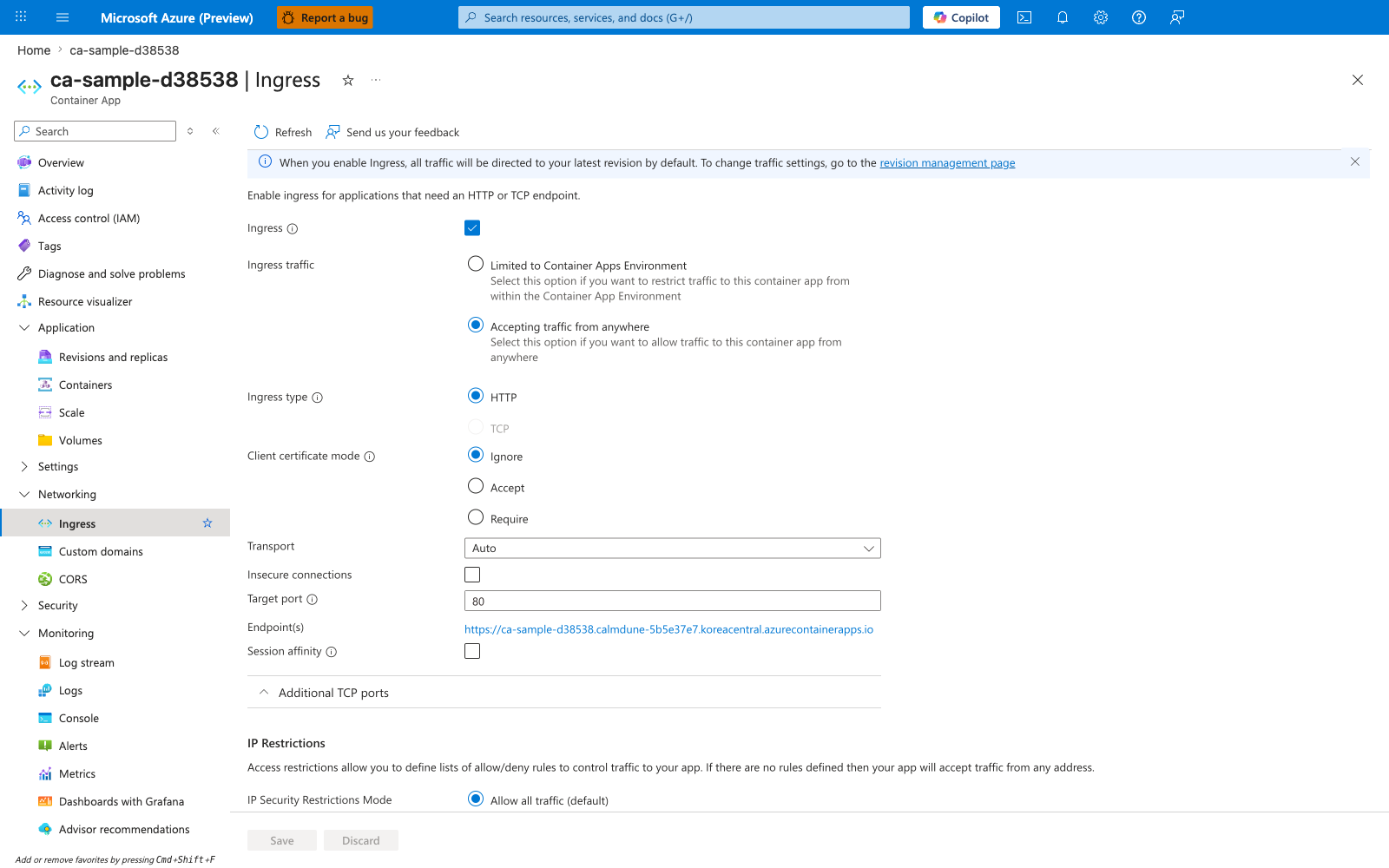
[Observed] ca-sample-d38538 | Ingress Container App Refresh Send us your feedback Ingress Ingress traffic Limited to Container Apps Environment Accepting traffic from anywhere Ingress type HTTP TCP Client certificate mode Ignore Accept Require Transport Auto Insecure connections Target port 80 Endpoint(s) https://<app-name>.<unique-id>.<region>.azurecontainerapps.io Session affinity Additional TCP ports IP Restrictions IP Security Restrictions Mode Allow all traffic (default) Save Discard Overview Activity log Access control (IAM) Tags Application Revisions and replicas Containers Scale Volumes Settings Networking Ingress Custom domains CORS Security Monitoring Log stream Logs Console Alerts Metrics.
[Inferred] The selected Accepting traffic from anywhere radio option paired with Target port 80 appears to map to the --ingress external and --target-port flags shown in the az containerapp create example in External ingress pattern for controlled public entry. The alternative Limited to Container Apps Environment radio option is consistent with the --ingress internal flag documented in Internal ingress pattern for service APIs. The IP Security Restrictions Mode value Allow all traffic (default) is consistent with the explicit allow/deny baseline discussed in Ingress configuration guardrails. The unchecked Session affinity field is consistent with the guidance in Session affinity considerations with revisions and scaling that recommends using session affinity only when necessary because it reduces load-distribution quality.
[Not Proven] Additional ingress configuration detail, binding detail, restriction detail, and provisioning detail are not visible on this view.
Advanced Topics
Explore these when baseline operations are stable:
- Blue/green environment networking across separate Container Apps Environments.
- Private ingress hub-and-spoke topologies with centralized edge services.
- mTLS and policy enforcement strategies with Dapr sidecars.
- Cross-region DNS failover for external ingress endpoints.
- Automated network conformance tests in CI/CD using CLI validation scripts.
Example network validation script fragment:
az containerapp show \
  --name "$APP_NAME" \
  --resource-group "$RG" \
  --query "properties.configuration.ingress" \
  --output json

az containerapp revision list \
  --name "$APP_NAME" \
  --resource-group "$RG" \
  --output table
| Command | Why it is used |
|---|---|
az containerapp show ... | Reads the Container App configuration so the documented setting can be verified. |
Pattern: Use Custom Internal Domains for On-Premises DNS Integration
When on-premises DNS policy prohibits Conditional Forwarders for external domains (e.g., *.azurecontainerapps.io), bind a custom internal domain (e.g., app.nhinvest.local) to your Container Apps app and create the corresponding Private DNS Zone A record pointing to the Container Apps environment's static IP. This lets on-prem DNS forward only internal domains to Azure Private DNS Resolver.
Requirements:
- Container Apps ingress must be
external: true(in Internal Environment, this means VNet-accessible, not internet-exposed) - Private DNS Resolver Inbound Endpoint reachable from on-prem via VPN/ExpressRoute
- BYO certificate for HTTPS (managed certificates require public DNS validation)
Common Mistakes / Anti-Patterns
- Treating sample defaults as production-ready without checking ingress, scale, identity, and monitoring requirements.
- Applying a configuration change without verifying the resulting revision, logs, and metrics.
- Leaving ownership for certificates, private DNS, secrets, or rollout decisions undocumented.
Validation Checklist
- [ ] Required Container Apps settings are represented in infrastructure as code.
- [ ] The active revision, ingress, scale, identity, and monitoring state match the intended design.
- [ ] Rollback or cleanup commands have been tested in a non-production environment.
See Also
- Environment Design
- Landing Zone Accelerator
- Platform Networking Overview
- VNet Integration
- Private Endpoints
- Application Gateway Integration
- Managed Identity
- Health and Recovery
- Operations Monitoring
- AppGW to Internal Container Apps NSG Destination playbook