Jobs Best Practices
Azure Container Apps Jobs are built for bounded background execution, not permanently running processes. This guide covers design patterns that keep job workloads reliable, observable, and cost-efficient in production.
Why This Matters
Production Container Apps behavior depends on explicit platform choices for ingress, scale, identity, observability, and release safety. This page turns the cited Microsoft Learn guidance into reviewable practices that can be checked before promotion.
Prerequisites
- Azure Container Apps environment available
- Azure CLI with Container Apps extension
- A container image for job execution
- Access to data dependencies used by the job
export RG="rg-aca-prod"
export ACA_ENV_NAME="cae-prod-shared"
export APP_NAME="ca-orders-api"
export ACR_NAME="acrsharedprod"
export LOCATION="koreacentral"
export JOB_NAME="job-orders-reconcile"

az extension add --name "containerapp" --upgrade
az account show --output table
| Command | Purpose |
|---|---|
export RG=..., ACA_ENV_NAME=..., APP_NAME=..., ACR_NAME=..., LOCATION=..., JOB_NAME=... | Defines the shared environment, registry, and job variables used by the examples so every job command points at the same operational context. |
az extension add --name "containerapp" --upgrade | Makes sure the jobs subcommands and latest flags are available before you create, update, or start Container Apps jobs. |
az account show --output table | Confirms the active Azure account context so you do not create or inspect jobs in the wrong subscription. |
Recommended Practices
Decide correctly: Job vs App
Use Container Apps Jobs when work has a clear start and finish boundary.
Use Container Apps (apps) when work is continuously available and request-driven.
| Decision area | Use Job | Use App |
|---|---|---|
| Workload lifetime | Finite execution | Long-running process |
| Trigger mode | Manual, scheduled, event-driven | HTTP and scaler-driven service runtime |
| Ingress requirement | Usually none | Common for APIs |
| Retry ownership | Platform execution retry + app idempotency | App and queue semantics |
| Cost shape | Execution window based | Baseline plus scale |
Signals you should switch from app to job:
- The process wakes up only on timer/queue and idles otherwise.
- Success is defined by "completed with exit code 0".
- You need execution history as an operational artifact.
Signals you should switch from job to app:
- You require low-latency request serving.
- Work cannot tolerate cold startup at each run.
- Stateful session behavior is expected across requests.
Trigger type design: Manual, Scheduled, Event-driven
Container Apps Jobs support three trigger models. Match trigger to operational intent.
Manual trigger (operator-controlled runs)
Manual jobs are useful for one-off tasks:
- Backfill operations
- Data repair and replay
- Controlled maintenance windows
Create a manual job:
az containerapp job create \
  --name "$JOB_NAME" \
  --resource-group "$RG" \
  --environment "$ACA_ENV_NAME" \
  --trigger-type "Manual" \
  --replica-timeout 1800 \
  --replica-retry-limit 1 \
  --image "$ACR_NAME.azurecr.io/jobs/orders-reconcile:v1.0.0"
| Command | Why it is used |
|---|---|
az containerapp job create ... | Creates, updates, starts, or inspects a Container Apps job. |
Start execution on demand:
| Command | Why it is used |
|---|---|
az containerapp job start ... | Creates, updates, starts, or inspects a Container Apps job. |
Scheduled trigger (predictable recurring runs)
Scheduled jobs are best when time is the primary trigger.
Common examples:
- Daily settlement calculations
- Nightly cleanup
- Hourly materialized view refresh
Create a scheduled job:
az containerapp job create \
  --name "$JOB_NAME" \
  --resource-group "$RG" \
  --environment "$ACA_ENV_NAME" \
  --trigger-type "Schedule" \
  --cron-expression "0 */2 * * *" \
  --replica-timeout 1200 \
  --replica-retry-limit 2 \
  --image "$ACR_NAME.azurecr.io/jobs/orders-reconcile:v1.0.0"
| Command | Why it is used |
|---|---|
az containerapp job create ... | Creates, updates, starts, or inspects a Container Apps job. |
Cron timezone
Store and document cron expectations in UTC to avoid daylight saving ambiguity. Add business-local translation in your runbook.
Event-driven trigger (throughput-linked runs)
Event-driven jobs are best when signal volume changes over time (for example queue depth).
Create an event-driven job with Service Bus scaler metadata:
az containerapp job create \
  --name "$JOB_NAME" \
  --resource-group "$RG" \
  --environment "$ACA_ENV_NAME" \
  --trigger-type "Event" \
  --scale-rule-name "orders-queue" \
  --scale-rule-type "azure-servicebus" \
  --scale-rule-metadata "queueName=orders" "messageCount=50" "namespace=<servicebus-namespace>.servicebus.windows.net" \
  --replica-timeout 900 \
  --replica-retry-limit 3 \
  --image "$ACR_NAME.azurecr.io/jobs/orders-reconcile:v1.0.0"
| Command | Why it is used |
|---|---|
az containerapp job create ... | Creates, updates, starts, or inspects a Container Apps job. |
Tune timeout and retry limits as SLO controls
--replica-timeout and --replica-retry-limit define both recovery behavior and spend profile.
Design method:
- Measure p95 execution duration under normal load.
- Set timeout at p95 + safety margin.
- Classify failures as transient vs deterministic.
- Allow retries only for transient categories.
Update timeout/retry:
az containerapp job update \
  --name "$JOB_NAME" \
  --resource-group "$RG" \
  --replica-timeout 1500 \
  --replica-retry-limit 2
| Command | Why it is used |
|---|---|
az containerapp job update ... | Creates, updates, starts, or inspects a Container Apps job. |
Failure-classification pattern:
- Authentication denied: no retry until configuration is fixed.
- Dependency timeout: limited retries with backoff.
- Data validation error: fail fast and send to dead-letter flow.
Retry amplification
High retry limits on non-idempotent operations can duplicate side effects. Always design write paths with idempotency keys or conflict-safe upserts before increasing retries.
Parallelism and completion count patterns
Jobs support execution-level concurrency controls:
--parallelism: how many replicas run in parallel--replica-completion-count: how many successful replicas mark the execution complete
Pattern guidance:
- Set
parallelism=1for order-sensitive workloads. - Increase parallelism for partitioned workloads with independent shards.
- Use completion count equal to partition count when all shards are mandatory.
Create a parallelized job execution model:
az containerapp job create \
  --name "$JOB_NAME" \
  --resource-group "$RG" \
  --environment "$ACA_ENV_NAME" \
  --trigger-type "Manual" \
  --parallelism 4 \
  --replica-completion-count 4 \
  --replica-timeout 1800 \
  --image "$ACR_NAME.azurecr.io/jobs/orders-reconcile:v1.0.0"
| Command | Purpose |
|---|---|
az containerapp job create | Defines a manual job template that fans work out across multiple replicas instead of serializing the entire batch on one execution path. |
--parallelism 4 | Allows four replicas to run at once, which is appropriate only when the workload can be partitioned safely. |
--replica-completion-count 4 | Requires all four shard replicas to succeed before the execution is marked complete, matching the "all partitions are mandatory" guidance in this section. |
--replica-timeout 1800 | Caps how long each shard can run before the platform treats it as stuck, which prevents runaway executions from consuming unbounded spend. |
flowchart TD
    A[Execution Triggered] --> B[Replica 1]
    A --> C[Replica 2]
    A --> D[Replica 3]
    A --> E[Replica 4]
    B --> F{All required completions reached?}
    C --> F
    D --> F
    E --> F
    F -->|Yes| G[Execution Succeeded]
    F -->|No and retries remain| H[Retry Failed Partitions]
    H --> F
Exit code conventions and error handling contracts
Define a clear contract between your job container and operations team.
Recommended exit code model:
| Exit code | Meaning | Operational action |
|---|---|---|
| 0 | Success | No action |
| 10 | Retryable external dependency issue | Allow configured retries |
| 20 | Validation/business-rule failure | No retry, inspect payload |
| 30 | Configuration or identity failure | Stop and fix deployment config |
| 40 | Unknown unhandled failure | Investigate logs and crash context |
Implementation principles:
- Emit structured log event before exit.
- Include correlation identifiers for replay.
- Keep final failure summary in one machine-readable line.
Job image design for fast startup and lower spend
Job runtime cost is sensitive to startup overhead. Keep images minimal and deterministic.
Best practices:
- Use slim base images and minimal runtime dependencies.
- Separate build dependencies from runtime layer.
- Avoid shell-heavy entrypoints for simple workloads.
- Pin image tags by immutable version (for example
v1.4.2), notlatest.
List job image currently configured:
az containerapp job show \
  --name "$JOB_NAME" \
  --resource-group "$RG" \
  --query "properties.template.containers[0].image" \
  --output tsv
| Command | Why it is used |
|---|---|
az containerapp job show ... | Creates, updates, starts, or inspects a Container Apps job. |
Startup budget
If job average runtime is short, image pull and startup can dominate total execution time. A 30-second startup penalty on a 60-second job can increase cost and delay by 50 percent or more.
Use managed identity for job workloads
Jobs frequently access Storage, Service Bus, Key Vault, or databases. Avoid embedded credentials.
Enable system-assigned identity:
az containerapp job identity assign \
  --name "$JOB_NAME" \
  --resource-group "$RG" \
  --system-assigned
| Command | Purpose |
|---|---|
az containerapp job identity assign | Enables a managed identity on the job so each execution can authenticate to Azure dependencies without embedded credentials. |
--system-assigned | Uses a lifecycle-bound identity that is created and deleted with the job, which is a simple default for single-job ownership. |
Inspect principal ID for role assignment workflows:
az containerapp job show \
  --name "$JOB_NAME" \
  --resource-group "$RG" \
  --query "identity.principalId" \
  --output tsv
| Command | Purpose |
|---|---|
az containerapp job show --query "identity.principalId" --output tsv | Extracts the job identity's principal ID so you can apply least-privilege RBAC on Storage, Service Bus, or Key Vault for this job workflow. |
--name "$JOB_NAME" / --resource-group "$RG" | Ensures the role-assignment lookup uses the exact job definition you just enabled for identity-based access. |
Identity patterns:
- Give jobs dedicated identities when blast radius must be isolated.
- Apply least-privilege role assignments per dependency.
- Rotate away from shared credentials and admin keys.
Storage and I/O design patterns for jobs
Choose storage by execution pattern:
| Pattern | Preferred storage | Why |
|---|---|---|
| Large immutable input/output files | Blob Storage | Durable and cost-efficient object store |
| Shared mutable work queue | Queue or Service Bus | Explicit delivery semantics |
| Low-latency metadata and checkpoints | Table/Cosmos DB/SQL | Queryable state with partitioning |
| Temporary per-execution files | Ephemeral local filesystem | Fast local scratch space |
Design guidance:
- Keep local filesystem usage ephemeral and bounded.
- Persist checkpoint state externally for retry continuation.
- Never assume execution affinity to previous replicas.
Monitor job execution health with CLI and KQL
List recent executions:
| Command | Why it is used |
|---|---|
az containerapp job execution ... | Creates, updates, starts, or inspects a Container Apps job. |
Show execution logs:
| Command | Why it is used |
|---|---|
az containerapp job logs ... | Creates, updates, starts, or inspects a Container Apps job. |
KQL: success/failure trend by job over 24 hours:
ContainerAppSystemLogs_CL
| where TimeGenerated > ago(24h)
| where Reason_s has "Job" or Log_s has "execution"
| summarize Events=count() by JobName=tostring(ContainerAppName_s), Result=tostring(Reason_s), bin(TimeGenerated, 1h)
| order by TimeGenerated asc
KQL: identify long-running executions:
ContainerAppConsoleLogs_CL
| where TimeGenerated > ago(24h)
| where ContainerAppName_s == "$JOB_NAME"
| extend Parsed=parse_json(Log_s)
| where tostring(Parsed.event) in ("job-start", "job-end")
| project TimeGenerated, ExecutionId=tostring(Parsed.executionId), Event=tostring(Parsed.event), DurationMs=todouble(Parsed.durationMs)
| summarize MaxDurationMs=max(DurationMs), AvgDurationMs=avg(DurationMs) by ExecutionId
| order by MaxDurationMs desc
Operational SLO indicators:
- Success rate by trigger type
- p95 execution duration
- Retry amplification ratio
- Queue lag to execution start delay
Cost implications of schedule frequency
Scheduling frequency directly controls run count and therefore total cost.
Guideline:
- If data freshness objective is 15 minutes, do not schedule every minute.
- Batch lightweight tasks into fewer runs when latency allows.
- Avoid overlap where one execution starts before previous completion.
Example adjustment from aggressive schedule to aligned schedule:
az containerapp job update \
  --name "$JOB_NAME" \
  --resource-group "$RG" \
  --cron-expression "*/15 * * * *"
Schedule design checklist:
| Question | Action |
|---|---|
| What freshness SLA is required? | Set cron at SLA boundary, not below |
| Can executions overlap? | Add guard logic or widen interval |
| Is runtime variable? | Use timeout headroom and concurrency limits |
| Is workload bursty? | Prefer event-driven trigger over fixed cron |
Execution lifecycle runbook pattern
Use a consistent lifecycle runbook for every production job:
- Trigger observed (manual/schedule/event)
- Execution started and correlated
- Dependency reachability verified
- Completion event emitted with exit code
- Retry decision logged
- Final status published to dashboard/alert channel
stateDiagram-v2
    [*] --> Triggered
    Triggered --> Running
    Running --> Succeeded: exit 0
    Running --> Failed: non-zero exit
    Failed --> Retrying: retryable + limit not reached
    Retrying --> Running
    Failed --> TerminalFailed: no retries
    Succeeded --> [*]
    TerminalFailed --> [*]
Production hardening checklist for jobs
| Domain | Required control |
|---|---|
| Trigger design | Manual/schedule/event selected by workload semantics |
| Timeouts | --replica-timeout set from measured p95 |
| Retries | --replica-retry-limit matches idempotency capability |
| Parallelism | Throughput tuned without overloading dependencies |
| Identity | Managed identity enabled with least privilege |
| Observability | Structured logs + execution dashboards + alerts |
| Cost | Schedule frequency and run duration reviewed monthly |
Verify job configuration in Azure Portal
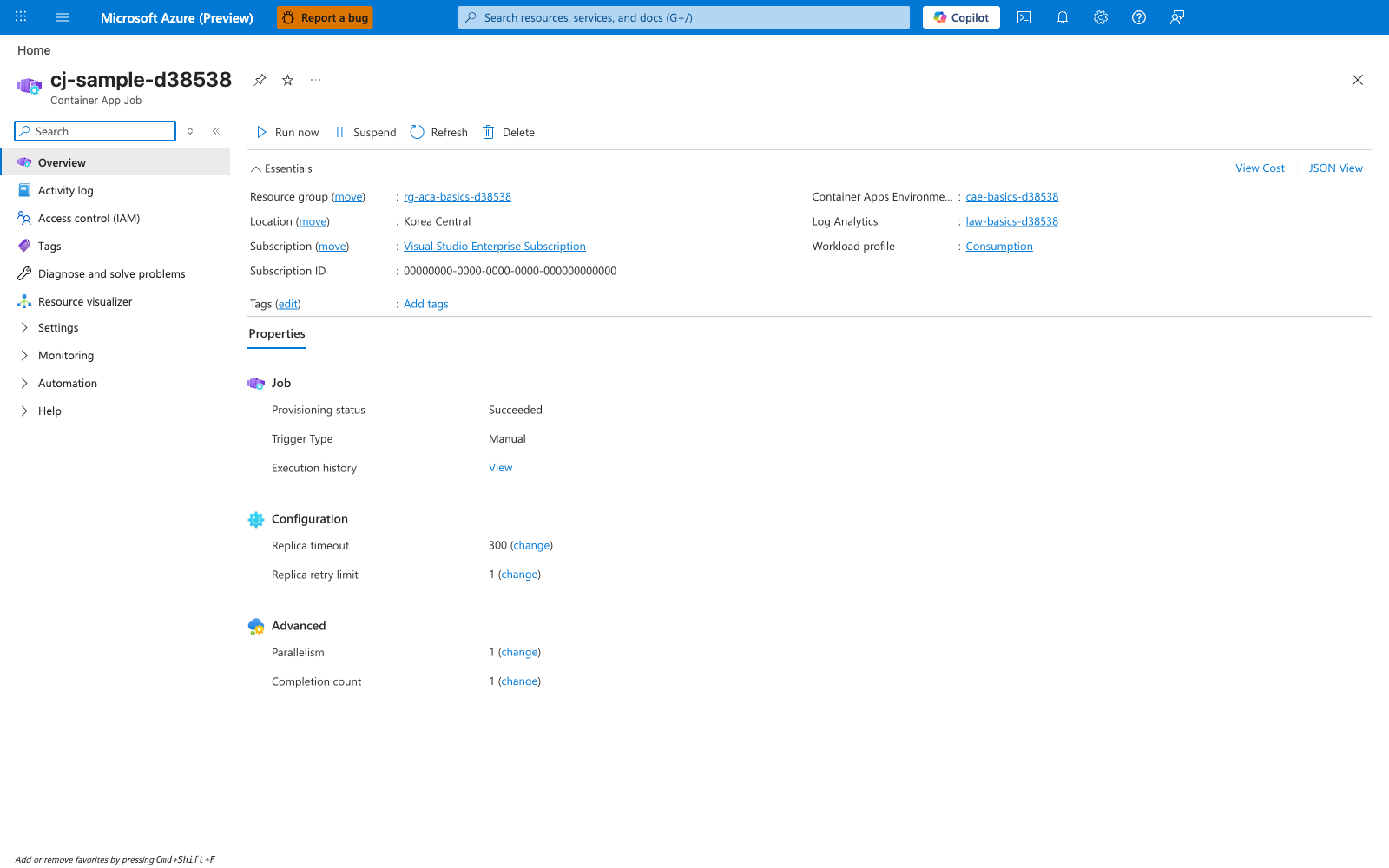
[Observed] cj-sample-d38538 Container App Job Run now Suspend Refresh Delete Essentials Resource group (move) rg-aca-basics-d38538 Location (move) Korea Central Subscription (move) Visual Studio Enterprise Subscription Subscription ID 00000000-0000-0000-0000-000000000000 Tags (edit) Add tags Container Apps Environme... cae-basics-d38538 Log Analytics law-basics-d38538 Workload profile Consumption Properties Job Provisioning status Succeeded Trigger Type Manual Execution history View Configuration Replica timeout 300 (change) Replica retry limit 1 (change) Advanced Parallelism 1 (change) Completion count 1 (change).
[Inferred] The resource-type label Container App Job paired with the Run now/Suspend command bar entries is consistent with the long-running compute boundary discussed in Decide correctly: Job vs App, which separates short-lived task workloads from always-on Container Apps. The Trigger Type value Manual appears to map to the --trigger-type "Manual" flag shown in the az containerapp job create example in Manual trigger (operator-controlled runs). The Replica timeout value 300 and Replica retry limit value 1 are consistent with the --replica-timeout and --replica-retry-limit SLO levers documented in Tune timeout and retry limits as SLO controls. The Parallelism value 1 and Completion count value 1 are consistent with the --parallelism and --replica-completion-count flags documented in Parallelism and completion count patterns.
[Not Proven] Additional job configuration detail, access detail, execution detail, and provisioning detail are not visible on this view.
Advanced Topics
- Build partition-aware jobs that dynamically assign shards using queue metadata and bounded parallelism.
- Add execution idempotency tokens persisted in durable storage to guarantee exactly-once side effects at business level.
- Use separate job definitions for fast and slow paths to avoid one timeout/retry policy for incompatible workloads.
- Integrate job execution status with deployment gates so critical release steps are blocked on failed prerequisite jobs.
Common Mistakes / Anti-Patterns
- Treating sample defaults as production-ready without checking ingress, scale, identity, and monitoring requirements.
- Applying a configuration change without verifying the resulting revision, logs, and metrics.
- Leaving ownership for certificates, private DNS, secrets, or rollout decisions undocumented.
Validation Checklist
- [ ] Required Container Apps settings are represented in infrastructure as code.
- [ ] The active revision, ingress, scale, identity, and monitoring state match the intended design.
- [ ] Rollback or cleanup commands have been tested in a non-production environment.
See Also
- Platform - Jobs
- Best Practices - Job Design
- Platform - Jobs vs Apps
- Best Practices - Scaling
- Best Practices - Reliability
- Best Practices - Identity and Secrets
- Operations - Monitoring