Job Design
Good Job design is mostly about safe replay, clear telemetry, and predictable failure boundaries. A fast job that cannot be retried safely is still a production risk.
Why This Matters
Jobs concentrate work into short windows. That makes mistakes expensive:
- retries can duplicate side effects
- timeouts can leave partial work behind
- fan-out can overwhelm dependencies
- missing telemetry makes replay blind
flowchart TD
    A[Define bounded unit of work] --> B[Make writes idempotent]
    B --> C[Add timeout and retry guardrails]
    C --> D[Emit structured logs and traces]
    D --> E[Measure success rate and duration]
    E --> F[Adjust resources and parallelism]
    F --> A
Recommended Practices
Make every job idempotent
Assume a job can be retried, replayed manually, or overlap with another run during incident handling.
Patterns that help:
- business idempotency keys
- upsert instead of blind insert
- checkpoint tables for processed partitions
- immutable output paths plus final publish step
Design observability from the first revision
Emit:
- structured JSON logs
- correlation IDs or execution IDs in every major step
- explicit start, completion, failure, and retry events
- dependency-specific error codes
If the job is business-critical, send application traces to Application Insights or another OpenTelemetry-compatible backend so you can connect execution failures to downstream calls.
Choose Jobs vs apps based on runtime shape
Prefer Jobs when the workload is bounded and can exit cleanly. Prefer Container Apps workers when the process should stay warm, hold open connections, or consume work continuously.
Right-size CPU and memory
Start from measured runtime, not guesswork.
- CPU-bound parsing or transforms usually need more CPU before more memory.
- ETL and SDK-heavy processing often need more memory headroom.
- Large batch jobs may benefit from separate job definitions for small and large payload classes.
- GPU jobs should only be considered when the environment and workload profile are designed for them; treat GPU capacity as a specialized deployment choice, not a default batch setting.
Handle failure with explicit dead-letter strategy
For event-driven Jobs:
- classify retryable vs non-retryable failure
- retry only transient conditions
- send poison messages or irrecoverable payloads to a dead-letter path
- keep replay runbooks separate from automatic retry rules
Common Mistakes / Anti-Patterns
- assuming retries make a non-idempotent job safe
- omitting
replicaTimeoutand letting stuck work hide indefinitely - setting retry limits high enough to amplify an outage
- mixing app concerns and job concerns in one container image without clear entrypoints
- using the ephemeral filesystem as a durable dedup store
- treating Job execution history as the only long-term audit trail
Validation Checklist
- [ ] The unit of work has a clear start and finish boundary.
- [ ] Every external write is idempotent or guarded by a dedup/checkpoint record.
- [ ] Timeout is based on measured runtime, not guesswork.
- [ ] Retry policy only covers transient failure classes.
- [ ] Logs include execution correlation fields.
- [ ] Monitoring tracks success rate, duration, and retry count.
- [ ] Event-driven workloads have a dead-letter or quarantine path.
- [ ] Long-running continuous consumers have been challenged against Jobs vs Apps.
Verify job design surfaces in Azure Portal
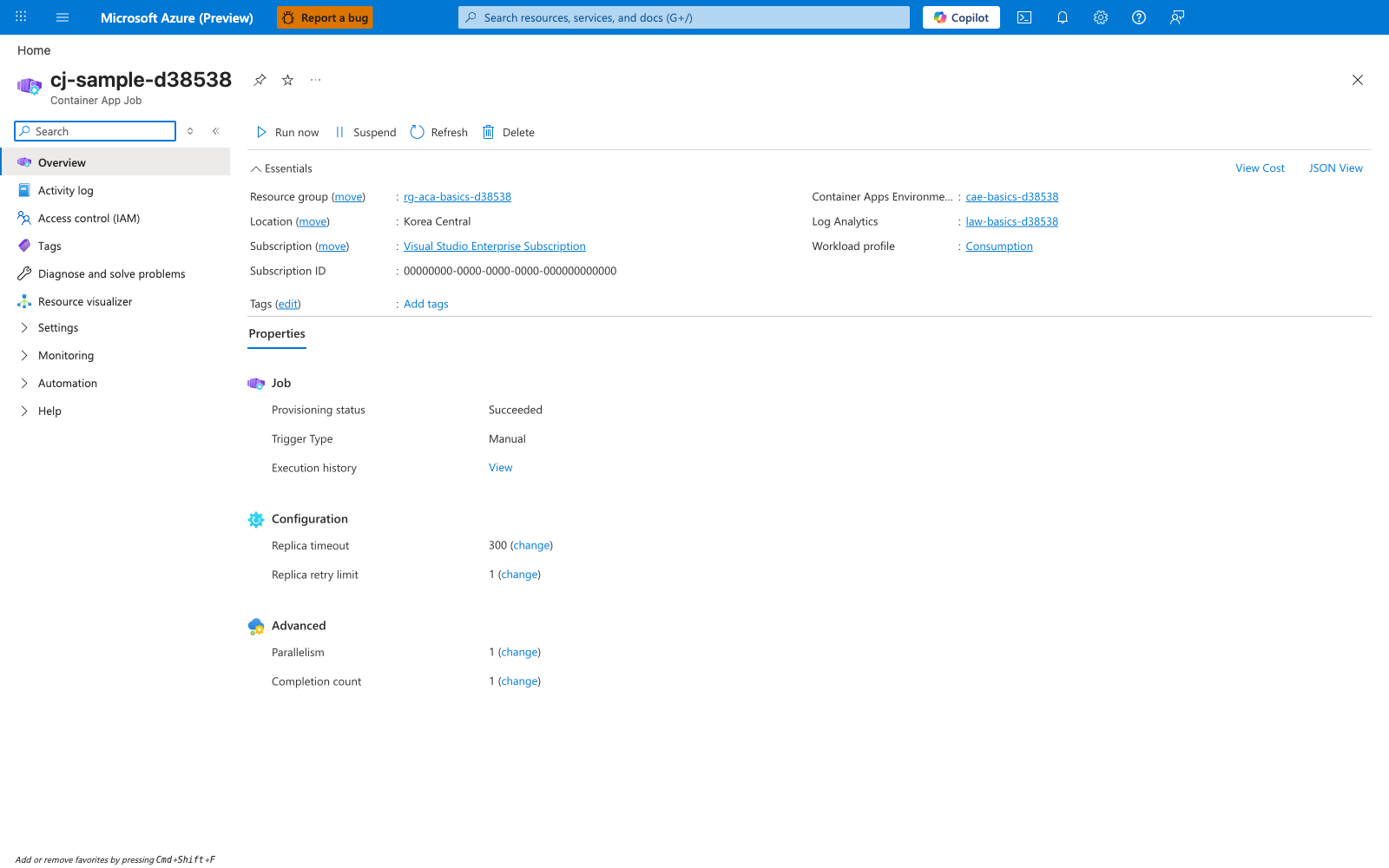
[Observed] cj-sample-d38538 Container App Job Run now Suspend Refresh Delete Essentials Resource group (move) rg-aca-basics-d38538 Location (move) Korea Central Subscription (move) Visual Studio Enterprise Subscription Subscription ID 00000000-0000-0000-0000-000000000000 Tags (edit) Add tags Container Apps Environme... cae-basics-d38538 Log Analytics law-basics-d38538 Workload profile Consumption Properties Job Provisioning status Succeeded Trigger Type Manual Execution history View Configuration Replica timeout 300 (change) Replica retry limit 1 (change) Advanced Parallelism 1 (change) Completion count 1 (change).
[Inferred] The resource-type label Container App Job is consistent with the runtime-shape distinction discussed in Choose Jobs vs apps based on runtime shape, which separates bounded-exit workloads from long-running Container Apps workers. The Trigger Type value Manual appears to map to the operator-initiated replay scenario described in Make every job idempotent, where a job can be retried or replayed manually during incident handling. The Replica timeout value 300 and Replica retry limit value 1 are consistent with the replicaTimeout and retry-limit guardrails called out in Common Mistakes / Anti-Patterns, which warns against omitting timeout and amplifying outages with high retry counts. The Workload profile value Consumption is consistent with the workload-specific sizing guidance in Right-size CPU and memory, which treats resource choices as measured decisions and calls out GPU-oriented profiles as specialized rather than default.
[Not Proven] Additional job implementation detail, observability detail, failure-handling detail, and historical detail are not visible on this view.
Review Matrix
| Review area | Page-specific check |
|---|---|
| Scope | Confirm the guidance applies to Job Design. |
| Source basis | Validate the recommendation against the Microsoft Learn sources in this page. |
| Evidence | Capture command output, portal state, metrics, logs, or screenshots before treating the result as proven. |