Azure Container Apps Image Security Best Practices
Image security is one of the easiest places to weaken a Container Apps deployment with convenience defaults. This page focuses on practical production patterns that reduce supply-chain risk, credential sprawl, and surprise rollouts.
Why This Matters
An image reference is both a deployment input and a security boundary. Weak image controls can lead to:
- Unapproved registries in production.
- Mutable tags pulling unexpected content.
- Registry passwords lingering in secrets.
- Unscanned vulnerable images reaching active revisions.
Recommended Practices
Use Azure Container Registry with managed identity
Make ACR the default production registry and let the container app authenticate with managed identity plus AcrPull.
Why this is the preferred default:
- No registry password in app configuration.
- Access is controlled by RBAC.
- Identity use is auditable.
Pin deploys to immutable versions
Use versioned tags and prefer digests where your deployment process can support them.
Good examples:
api:2026-04-25.1api:gitsha-1a2b3c4dapi@sha256:<digest>
This is especially important because image changes create new revisions. Immutable references make revision history easier to reason about.
Scan images before promotion
Enable Defender for Containers for vulnerability assessment on Azure Container Registry and review findings before promotion.
flowchart TD
    A[Build image] --> B[Push to ACR]
    B --> C[Defender for Containers scan]
    C --> D{Approved for deploy?}
    D -->|Yes| E[Update Container Apps image reference]
    D -->|No| F[Block or remediate]
    E --> G[New ACA revision]
Restrict image sources with governance
Use Azure Policy and internal platform rules to keep production deployments on approved registries.
Conservative guidance:
- Treat registry restriction as a governance control, not as a native Azure Container Apps allow-list feature.
- Standardize on approved registries such as ACR.
- Review pipeline inputs so application teams cannot silently switch to unapproved public registries.
Verify image security surfaces in Azure Portal
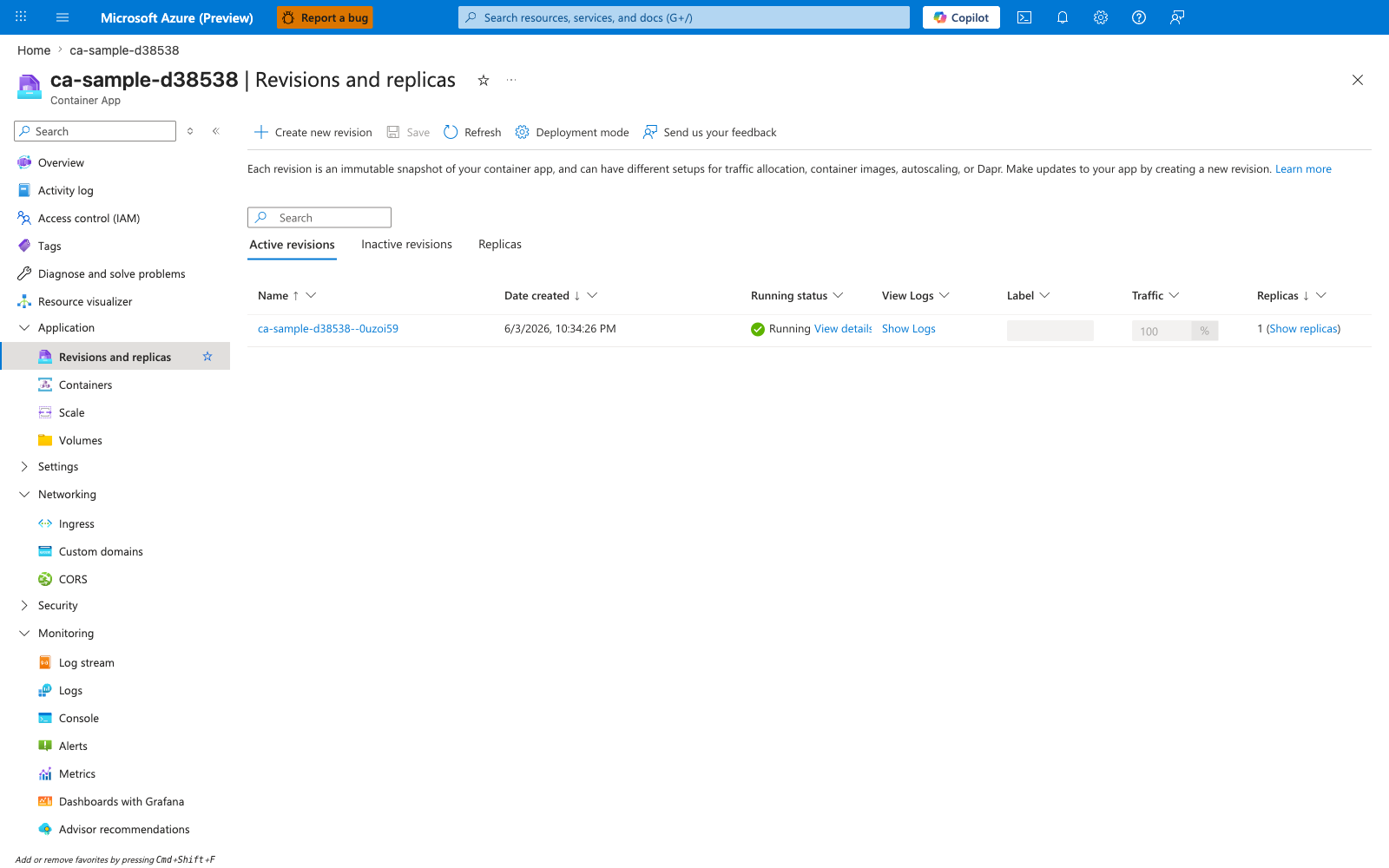
[Observed] ca-sample-d38538 | Revisions and replicas Container App Create new revision Save Refresh Deployment mode Active revisions Inactive revisions Replicas Name Date created Running status View Logs Label Traffic Replicas ca-sample-d38538--0uzoi59 6/3/2026, 10:34:26 PM Running View details Show Logs 100 % 1 (Show replicas).
[Inferred] The immutable revision suffix on ca-sample-d38538--0uzoi59 is consistent with the version-pinning guidance in Pin deploys to immutable versions, which treats immutable references as the basis for predictable rollback. The Create new revision control appears to map to the gated-promotion guidance in Scan images before promotion, which is consistent with separating scan approval from rollout. The Active revisions and Inactive revisions grouping is consistent with the rollback-traceability concern called out in the anti-pattern table below, which warns that :latest weakens rollback traceability. The Container App resource-type label for ca-sample-d38538 appears to map to the registry-authentication scope in Use Azure Container Registry with managed identity, which describes the container app authenticating to ACR via managed identity.
[Not Proven] Additional image provenance detail, access-control detail, scan detail, and policy detail are not visible on this view.
Common Mistakes / Anti-Patterns
| Anti-pattern | Why it is risky | Better choice |
|---|---|---|
:latest in production | Mutable deploy target and weak rollback traceability | Versioned tag or digest |
| Public images in production without governance review | Weak supply-chain control | Approved private registry workflow |
| ACR admin user enabled for routine production pulls | Shared credential and broad access | Managed identity + AcrPull |
| Service principal or PAT used when MI is available | Credential rotation burden | Managed identity |
| Shipping unscanned images | Vulnerabilities reach active revisions | Scan in ACR before promotion |
Validation Checklist
- [ ] Production images are stored in Azure Container Registry.
- [ ] Container Apps uses managed identity for ACR pulls.
- [ ]
AcrPullis scoped to the right registry. - [ ] Deployed image references are immutable tags or digests.
- [ ] Defender for Containers is enabled for ACR image scanning.
- [ ] CI/CD blocks or flags high-severity image findings.
- [ ] Approved registry policy is documented and enforced.
- [ ] No production app relies on the ACR admin user.
See Also
- Image Security (Platform)
- Security Best Practices
- Operations: Image Pull and Registry
- Container Design Best Practices