Cost-Aware Best Practices
Cost optimization in Azure Container Apps is an operational design activity, not a one-time tuning task. This guide explains how to reduce spend without sacrificing reliability by using the platform's scaling, profile, registry, and observability features intentionally.
Why This Matters
Production Container Apps behavior depends on explicit platform choices for ingress, scale, identity, observability, and release safety. This page turns the cited Microsoft Learn guidance into reviewable practices that can be checked before promotion.
Prerequisites
- Existing Azure Container Apps environment
- At least one running Container App
- Access to Cost Management and Log Analytics
- Azure CLI with Container Apps extension
export RG="rg-aca-prod"
export APP_NAME="app-orders-api"
export ACA_ENV_NAME="cae-prod-shared"
export ACR_NAME="acrsharedprod"
export LOCATION="koreacentral"

az extension add --name "containerapp" --upgrade
az account show --output table
| Command | Why it is used |
|---|---|
az extension add ... | Installs or updates the Container Apps Azure CLI extension. |
Recommended Practices
Understand the billing model before tuning
Azure Container Apps costs come from multiple meters that interact:
- Compute/runtime usage (CPU and memory)
- Workload profile capacity (when using dedicated profiles)
- Registry costs (Azure Container Registry SKU and data transfer)
- Log ingestion and retention (Log Analytics)
- Environment-level resources and optional networking features
If you optimize only one meter (for example, CPU), your total cost can still increase due to logs, always-on replicas, or over-frequent job schedules.
flowchart TD
    A[Workload Characteristics] --> B[Container Apps Runtime Cost]
    A --> C[Registry Pull/Storage Cost]
    A --> D[Observability Cost]
    A --> E[Environment Overhead]

    B --> B1[Consumption profile]
    B --> B2[Workload profile]
    B --> B3[minReplicas and maxReplicas]

    C --> C1[ACR SKU]
    C --> C2[Image size and pull frequency]

    D --> D1[Log Analytics ingestion]
    D --> D2[Retention policy]

    E --> E1[Environment sharing]
    E --> E2[Networking topology]
Optimization sequence
Start with architecture-level choices (profile, environment boundary, image strategy), then tune per-app resources and scale rules. Reversing this order usually creates local optimizations but higher total spend.
Consumption profile vs workload profiles
Choose profile type by workload shape, not team preference:
| Factor | Consumption | Workload Profiles |
|---|---|---|
| Billing model | Pay per vCPU-second and GiB-second | Reserved node capacity |
| Scale-to-zero | ✅ Supported | ✅ Supported (on Consumption nodes) |
| Burst handling | Automatic, platform-managed | Bounded by node pool size |
| Cost predictability | Variable with traffic | More predictable baseline |
| Best for | Bursty, intermittent, unknown traffic | Stable baseline, GPU, large memory |
| Cold start | Platform-managed, possible delay | Faster if nodes pre-provisioned |
flowchart TD
    Q{Traffic pattern known?}
    Q -->|No| C[Start with Consumption]
    Q -->|Yes| Q2{Stable baseline > 60% of time?}
    Q2 -->|Yes| WP[Workload Profiles]
    Q2 -->|No| Q3{Need GPU or large memory?}
    Q3 -->|Yes| WP
    Q3 -->|No| C
    C --> OBS[Observe 2-4 weeks]
    OBS --> Q
Inspect current environment profile configuration:
az containerapp env show \
  --name "$ACA_ENV_NAME" \
  --resource-group "$RG" \
  --query "properties.workloadProfiles" \
  --output json
| Command | Why it is used |
|---|---|
az containerapp env show ... | Reads managed environment settings for networking, logging, or workload profile verification. |
Inspect an app's active profile and requested resources:
az containerapp show \
  --name "$APP_NAME" \
  --resource-group "$RG" \
  --query "{workloadProfile:properties.workloadProfileName,cpu:properties.template.containers[0].resources.cpu,memory:properties.template.containers[0].resources.memory,minReplicas:properties.template.scale.minReplicas,maxReplicas:properties.template.scale.maxReplicas}" \
  --output json
| Command | Why it is used |
|---|---|
az containerapp show ... | Reads the Container App configuration so the documented setting can be verified. |
Practical decision pattern:
- Start in consumption for unknown traffic.
- Observe p50/p95 baseline replica hours over 2-4 weeks.
- Move stable high-baseline services to workload profiles.
- Keep burst-only APIs and async edges on consumption.
Scale-to-zero and billing impact
Scale-to-zero is the strongest cost control for non-critical or sporadic workloads.
az containerapp update \
  --name "$APP_NAME" \
  --resource-group "$RG" \
  --min-replicas 0 \
  --max-replicas 5
| Command | Why it is used |
|---|---|
az containerapp update ... | Updates the existing Container App configuration without recreating the app. |
When min replicas are zero:
- You avoid always-on runtime cost during idle periods.
- You may increase cold-start latency.
- You must validate startup probes and initialization time.
For user-facing APIs where latency SLO is strict, use a non-zero baseline:
az containerapp update \
  --name "$APP_NAME" \
  --resource-group "$RG" \
  --min-replicas 1 \
  --max-replicas 10
| Command | Why it is used |
|---|---|
az containerapp update ... | Updates the existing Container App configuration without recreating the app. |
Do not optimize cost by breaking SLO
If your API has hard latency objectives, forcing --min-replicas 0 can make tail latency unacceptable. Optimize elsewhere first (resource sizing, image startup, scaling thresholds).
Min replica costs and always-on design
minReplicas is effectively an explicit "always-on" commitment.
Use min replicas when you need:
- Consistent p95 latency without cold starts
- Warm caches or preloaded models
- Immediate queue processing for low-lag pipelines
Use zero min replicas when you have:
- Batch-style traffic
- Background APIs for admin tooling
- Internal endpoints with no strict latency target
Quick baseline cost check for min replica usage:
az containerapp show \
  --name "$APP_NAME" \
  --resource-group "$RG" \
  --query "properties.template.scale.minReplicas" \
  --output tsv
| Command | Why it is used |
|---|---|
az containerapp show ... | Reads the Container App configuration so the documented setting can be verified. |
Right-size CPU and memory intentionally
Over-provisioned resources are one of the most common sources of Container Apps waste.
Start with measured targets:
- CPU: sustained usage under expected p95 load
- Memory: steady-state plus burst headroom, not arbitrary large buffers
- OOM event count: should be zero in normal operation
Review configured resources:
az containerapp show \
  --name "$APP_NAME" \
  --resource-group "$RG" \
  --query "properties.template.containers[0].resources" \
  --output json
| Command | Purpose |
|---|---|
az containerapp show --query "properties.template.containers[0].resources" | Reads the current CPU and memory limits on the deployed container so you can compare configured size against observed utilization before making cost cuts. |
--name "$APP_NAME" / --resource-group "$RG" | Targets the exact workload whose right-sizing decision you are about to make, rather than a different app in the same subscription. |
--output json | Keeps both CPU and memory fields intact for review and scripting, which is more useful than a formatted table when tuning replica resources. |
Apply a smaller footprint safely:
| Command | Purpose |
|---|---|
az containerapp update | Applies a deliberate resource reduction to the running app so you can lower steady-state cost without rebuilding the image. |
--cpu 0.5 | Cuts the per-replica CPU reservation to a smaller baseline, which directly reduces spend if telemetry shows the app is over-provisioned. |
--memory "1Gi" | Reduces reserved memory to a measured target instead of carrying a larger idle buffer that continuously costs money. |
Then validate health and throughput before further reduction.
Registry SKU and image pull economics (ACR Basic vs Standard vs Premium)
ACR selection affects both direct registry pricing and indirect runtime behavior:
| ACR SKU | Storage | Throughput | Geo-Replication | Best For |
|---|---|---|---|---|
| Basic | 10 GiB | Low | ❌ | Small teams, dev/test |
| Standard | 100 GiB | Medium | ❌ | Growing production workloads |
| Premium | 500 GiB | High | ✅ | Multi-region, enterprise scale |
Check registry SKU:
az acr show \
  --name "$ACR_NAME" \
  --resource-group "$RG" \
  --query "{name:name,sku:sku.name,loginServer:loginServer}" \
  --output json
| Command | Purpose |
|---|---|
az acr show --query "{name:name,sku:sku.name,loginServer:loginServer}" | Summarizes the registry identity, SKU tier, and login server so you can verify whether current ACR throughput and feature cost match this workload's pull pattern. |
--name "$ACR_NAME" | Uses the registry variable shared across the cost examples so the SKU review stays tied to the images this guide deploys. |
--output json | Returns structured fields that are easy to compare across environments when deciding whether Basic, Standard, or Premium is justified. |
Operational implications:
- Large images + frequent revision deployments increase pull and startup overhead.
- Geo-distributed workloads can benefit from lower image pull latency with higher SKU features.
- Excessively retaining old tags increases storage cost and operational confusion.
List recent repository tags to review cleanup candidates:
az acr repository show-tags \
  --name "$ACR_NAME" \
  --repository "orders-api" \
  --orderby "time_desc" \
  --top 20 \
  --output table
| Command | Why it is used |
|---|---|
az acr repository show-tags ... | Inspects or manages repositories and tags inside Azure Container Registry. |
Reduce log ingestion cost without losing diagnostic value
Log Analytics can become a dominant cost driver if you emit verbose logs at high request volume.
Tactics specific to Container Apps:
- Keep structured logs, but avoid duplicate payload dumps.
- Log business events once, not at each internal layer.
- Use
Infofor lifecycle milestones,Warning/Errorfor action-worthy signals. - Restrict high-cardinality fields that explode ingestion size.
Inspect workspace linkage:
az containerapp env show \
  --name "$ACA_ENV_NAME" \
  --resource-group "$RG" \
  --query "properties.appLogsConfiguration" \
  --output json
| Command | Why it is used |
|---|---|
az containerapp env show ... | Reads managed environment settings for networking, logging, or workload profile verification. |
Example KQL to estimate noisy categories:
ContainerAppConsoleLogs_CL
| where TimeGenerated > ago(24h)
| summarize LogLines=count(), ApproxBytes=sum(_BilledSize) by ContainerAppName_s, LogLevel=tostring(parse_json(Log_s).level)
| order by ApproxBytes desc
Use results to cap noisy logs in application and sidecar settings.
Share environments strategically to reduce overhead
Environment sharing can reduce duplicated operational overhead, but only when boundaries are compatible.
Share an environment when workloads have similar:
- Compliance and data boundary requirements
- Network topology (public/private ingress patterns)
- Operational ownership and release cadence
Separate environments when you need:
- Strict isolation across teams or trust zones
- Distinct networking policies (for example private-only ingress)
- Independent lifecycle and change windows
List apps in an environment to evaluate consolidation:
az containerapp list \
  --resource-group "$RG" \
  --query "[?contains(properties.managedEnvironmentId, '$ACA_ENV_NAME')].{name:name,ingress:properties.configuration.ingress.external,minReplicas:properties.template.scale.minReplicas}" \
  --output table
| Command | Why it is used |
|---|---|
az containerapp list ... | Lists Container Apps in the selected resource group for inventory or verification. |
Understand idle environment cost
A common misconception is that "no running app" equals "zero platform cost".
Even with minimal workload activity, environment-related services and connected resources may continue to incur charges, including:
- Log Analytics workspace retention/ingestion
- Registry storage
- Networking resources used by the environment topology
Review environment state regularly:
az containerapp env show \
  --name "$ACA_ENV_NAME" \
  --resource-group "$RG" \
  --query "{name:name,location:location,provisioningState:properties.provisioningState,zoneRedundant:properties.zoneRedundant}" \
  --output json
| Command | Why it is used |
|---|---|
az containerapp env show ... | Reads managed environment settings for networking, logging, or workload profile verification. |
Budget guardrails with Azure Cost Management
Create budget and anomaly review routines for Container Apps estates:
- Budget per environment (dev, staging, prod)
- Budget per shared platform resource group
- Alert thresholds (for example 50%, 80%, 100%)
Quick cost snapshot by service name:
| Command | Purpose |
|---|---|
az consumption usage list --top 50 --output table | Gives a quick recent usage sample so you can spot which billed services are currently driving spend before you build more formal budgets and dashboards. |
--top 50 | Limits the first look to a manageable set of records, which is useful for a fast operator review instead of dumping the full usage history. |
Export cost data regularly and tag resources for cost allocation:
| Command | Purpose |
|---|---|
az group update | Applies cost-allocation metadata at the resource-group boundary so downstream cost reports can attribute shared Container Apps resources correctly. |
--name "$RG" | Tags the same resource group used throughout the page, which is usually the cheapest place to stamp consistent ownership metadata across related ACA resources. |
--set "tags.CostCenter=platform" "tags.Environment=prod" | Adds governance tags that let finance and engineering split spend by owner and lifecycle stage when reviewing Container Apps bills. |
Governance pattern
Pair technical guardrails (--max-replicas, right-sized resources, log controls) with financial guardrails (budgets, alerts, owner review cadence). Either one without the other is incomplete.
Cost-aware deployment checklist
Use this checklist before production rollout:
| Area | Check | Target |
|---|---|---|
| Scaling | minReplicas aligned to latency need | 0 for async, 1+ for latency-critical |
| Resources | CPU/memory based on measured load | No speculative over-allocation |
| Registry | ACR SKU and retention reviewed | Throughput and storage aligned |
| Logs | High-volume noise reduced | Actionable logs with bounded volume |
| Environment | Sharing/isolation decision documented | No accidental sprawl |
| Budget | Alerts configured | 50/80/100 percent notifications |
Example: end-to-end cost tuning workflow
- Baseline current app scale and resources.
- Set
minReplicasbased on SLO, not habit. - Reduce CPU/memory one step and observe error budget.
- Cut log verbosity where
_BilledSizedominates. - Review image size and tag retention.
- Validate monthly trend with Cost Management export.
Baseline command group:
az containerapp show \
  --name "$APP_NAME" \
  --resource-group "$RG" \
  --query "{profile:properties.workloadProfileName,minReplicas:properties.template.scale.minReplicas,maxReplicas:properties.template.scale.maxReplicas,cpu:properties.template.containers[0].resources.cpu,memory:properties.template.containers[0].resources.memory}" \
  --output json
| Command | Why it is used |
|---|---|
az containerapp show ... | Reads the Container App configuration so the documented setting can be verified. |
Cost anti-patterns to avoid during optimization
- Forcing scale-to-zero on user-facing critical APIs
- Increasing
maxReplicaswithout downstream capacity planning - Enabling highly verbose logs in production by default
- Retaining oversized base images and rebuilding frequently
- Creating many small environments without ownership boundaries
Verify cost-relevant surfaces in Azure Portal
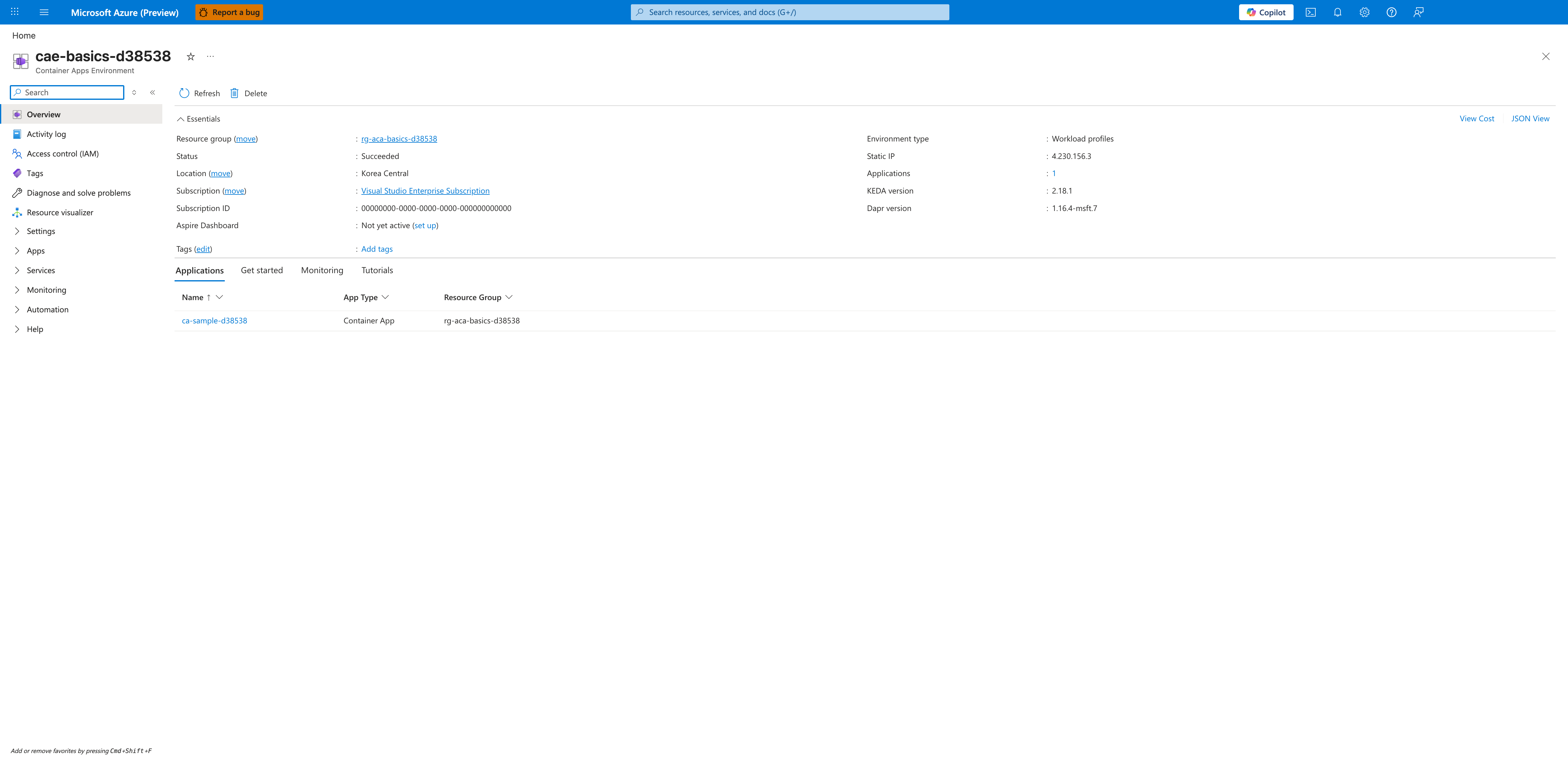
[Observed] cae-basics-d38538 Container Apps Environment Refresh Delete Essentials View Cost JSON View Resource group (move) rg-aca-basics-d38538 Status Succeeded Location (move) Korea Central Subscription (move) Visual Studio Enterprise Subscription Subscription ID 00000000-0000-0000-0000-000000000000 Aspire Dashboard Not yet active (set up) Tags (edit) Add tags Environment type Workload profiles Static IP 4.230.156.3 Applications 1 KEDA version 2.18.1 Dapr version 1.16.4-msft.7 Applications Get started Monitoring Tutorials Name App Type Resource Group ca-sample-d38538 Container App rg-aca-basics-d38538.
[Inferred] The Environment type value Workload profiles appears to map to the profile-selection decision discussed in Consumption profile vs workload profiles, which trades pay-per-second consumption billing against reserved node capacity. The Applications count 1 on this environment is consistent with the consolidation-vs-isolation question in Share environments strategically to reduce overhead, which evaluates how many workloads should sit behind one environment boundary. The KEDA version 2.18.1, Dapr version 1.16.4-msft.7, and Static IP 4.230.156.3 are consistent with the environment-managed components discussed in Understand idle environment cost, which warns that environment-related services continue to incur charges even with minimal workload activity. The Resource group (move) value rg-aca-basics-d38538 and Subscription (move) value Visual Studio Enterprise Subscription are consistent with the cost-allocation scope discussed in Budget guardrails with Azure Cost Management, which sets budgets per environment and tags resources for cost allocation.
[Not Proven] Additional workload sizing detail, workspace cost detail, registry cost detail, and budget detail are not visible on this view.
Advanced Topics
- Model monthly cost per workload class (interactive API, internal service, scheduled jobs) and assign explicit SLO-to-cost envelopes.
- Combine workload profiles for baseline traffic and consumption profiles for burst edges in the same architecture.
- Build automated policy checks for
minReplicas, image tag format, and maximum resource requests before deployment. - Use KQL-based spend proxies (for example billed log volume and replica-hours approximations) as early warning signals between official billing cycles.
Common Mistakes / Anti-Patterns
- Treating sample defaults as production-ready without checking ingress, scale, identity, and monitoring requirements.
- Applying a configuration change without verifying the resulting revision, logs, and metrics.
- Leaving ownership for certificates, private DNS, secrets, or rollout decisions undocumented.
Validation Checklist
- [ ] Required Container Apps settings are represented in infrastructure as code.
- [ ] The active revision, ingress, scale, identity, and monitoring state match the intended design.
- [ ] Rollback or cleanup commands have been tested in a non-production environment.
See Also
- Best Practices - Scaling
- Best Practices - Reliability
- Best Practices - Identity and Secrets
- Platform - Reliability Cost Optimization
- Operations - Monitoring