Container Design Best Practices for Azure Container Apps
This guide focuses on container-level operational decisions that improve startup reliability, revision stability, observability quality, and cost control in Azure Container Apps. It complements the platform architecture pages by translating core runtime behaviors into repeatable container design standards.
Why This Matters
Production Container Apps behavior depends on explicit platform choices for ingress, scale, identity, observability, and release safety. This page turns the cited Microsoft Learn guidance into reviewable practices that can be checked before promotion.
Prerequisites
- Azure CLI 2.57+ with Container Apps extension
- Docker 24+ or compatible OCI image builder
- Existing resource group (
$RG), Container Apps environment ($ACA_ENV_NAME), and Container Registry ($ACR_NAME) - A containerized app with a health endpoint and graceful shutdown support
az extension add --name containerapp --upgrade
az account show --output table
az acr show --name "$ACR_NAME" --resource-group "$RG" --output table
az containerapp env show --name "$ACA_ENV_NAME" --resource-group "$RG" --output table
| Command | Why it is used |
|---|---|
az extension add ... | Installs or updates the Container Apps Azure CLI extension. |
Recommended Practices
Design for the Azure Container Apps execution model
In Azure Container Apps, revision readiness gates traffic and scaler behavior. Container design directly affects whether revisions become healthy, scale correctly, and recover quickly.
Use these design assumptions:
- Every deployment creates a revision candidate.
- A revision must pass startup and readiness checks before it can safely carry production traffic.
- Bad container defaults (slow startup, missing probe path, unhandled SIGTERM, noisy logs) become deployment incidents.
flowchart TD
    B[Build Image] --> R[Create Revision]
    R --> S[Container Starts]
    S --> P[Startup and Readiness Probes]
    P -->|Pass| T[Traffic Eligible]
    P -->|Fail| F[Revision Failed]
    T --> O[Observe Logs and Metrics]
Multi-stage builds to reduce pull and cold-start time
Large images increase pull latency and amplify scale-out delay. Multi-stage builds keep runtime artifacts only.
Key practices:
- Separate build toolchain from runtime image.
- Pin base image tags to predictable patch versions.
- Remove package manager cache from final layer.
- Build wheel/artifact once, reuse in runtime stage.
# syntax=docker/dockerfile:1.7
FROM python:3.11-slim AS builder

ENV PIP_DISABLE_PIP_VERSION_CHECK=1 \
    PIP_NO_CACHE_DIR=1 \
    PYTHONDONTWRITEBYTECODE=1

WORKDIR /build
RUN apt-get update && apt-get install --yes --no-install-recommends \
    build-essential \
    gcc \
    && rm -rf /var/lib/apt/lists/*

COPY requirements.txt .
RUN pip install --upgrade pip \
    && pip wheel --wheel-dir /wheels --requirement requirements.txt

FROM python:3.11-slim AS runtime

ENV PYTHONDONTWRITEBYTECODE=1 \
    PYTHONUNBUFFERED=1 \
    CONTAINER_APP_PORT=8000

WORKDIR /app
RUN groupadd --gid 10001 appgroup \
    && useradd --uid 10001 --gid appgroup --create-home appuser

COPY --from=builder /wheels /wheels
COPY requirements.txt .
RUN pip install --no-cache-dir --no-index --find-links=/wheels --requirement requirements.txt \
    && rm -rf /wheels

COPY src ./src
USER appuser
EXPOSE 8000

CMD ["gunicorn", "--bind", "0.0.0.0:8000", "--workers", "4", "--chdir", "src", "app:app"]
Do not optimize only for image size
A smaller image is useful only when runtime dependencies are complete. Validate SSL libraries, DNS behavior, and timezone data in runtime images before promoting revisions.
Choose base image type by operational constraints
Base image selection is an operational tradeoff between security posture, debuggability, and compatibility.
| Base image | Strength | Risk | Good fit in Container Apps |
|---|---|---|---|
| distroless | Minimal attack surface | Harder interactive debugging | Mature services with strong CI validation |
| slim | Balanced size and compatibility | Slightly larger footprint | Most production services |
| alpine | Very small | musl-related compatibility issues | Carefully tested static-friendly workloads |
Decision checklist:
- Need shell-based runtime investigation during incident response? Prefer
slim. - Need maximum hardening and deterministic runtime? Consider
distrolesswith strict CI. - Using native extensions compiled against glibc? Validate before choosing
alpine.
Ensure deterministic startup behavior
Startup failures in revisions commonly come from non-deterministic boot logic.
Use these controls:
- Avoid migration execution inside container startup command for request-serving apps.
- Fail fast on invalid configuration.
- Keep bootstrap network calls bounded by short timeouts.
- Log one clear startup summary line with critical runtime configuration.
Example startup summary payload:
{
  "event": "startup_summary",
  "app_name": "orders-api",
  "bind_port": 8000,
  "revision_mode": "single",
  "config_version": "2026-04-04",
  "status": "starting"
}
Configure startup, readiness, and liveness probes intentionally
Probe design in Container Apps should represent actual lifecycle intent.
| Probe Type | Purpose | Endpoint Design | Failure Effect |
|---|---|---|---|
| Startup | Protect slow initialization from premature restart | Return 200 after all boot tasks complete | Container restarted before ready |
| Readiness | Control when traffic can reach the revision | Return 200 only when serving is safe | Traffic sent to unready replica |
| Liveness | Restart hung processes after running state | Return 200 if process loop is healthy | Stuck replica stays in rotation |
flowchart TD
    S[Container Starts] --> SP[Startup Probe]
    SP -->|Pass| RP[Readiness Probe]
    SP -->|Fail x threshold| RS[Container Restarted]
    RP -->|Pass| TR[Traffic Routed]
    RP -->|Fail| NR[No Traffic]
    TR --> LP[Liveness Probe]
    LP -->|Pass| TR
    LP -->|Fail x threshold| RS
Use a YAML template for probes (the probe-specific CLI flags are not supported in current az containerapp create).
# probes.yaml
properties:
  template:
    containers:
      - name: myapp
        image: myacr.azurecr.io/myapp:v1
        resources:
          cpu: 0.5
          memory: 1Gi
        probes:
          - type: startup
            httpGet:
              path: /health/startup
              port: 8000
            initialDelaySeconds: 5
            periodSeconds: 5
            failureThreshold: 24
            timeoutSeconds: 3
          - type: readiness
            httpGet:
              path: /health/ready
              port: 8000
            periodSeconds: 5
            failureThreshold: 6
            timeoutSeconds: 3
          - type: liveness
            httpGet:
              path: /health/live
              port: 8000
            periodSeconds: 10
            failureThreshold: 3
            timeoutSeconds: 3
az containerapp create \
  --name "$APP_NAME" \
  --resource-group "$RG" \
  --environment "$ACA_ENV_NAME" \
  --image "$ACR_NAME.azurecr.io/$APP_NAME:20260404-1" \
  --target-port 8000 \
  --ingress external \
  --registry-server "$ACR_NAME.azurecr.io" \
  --registry-identity system \
  --min-replicas 1 \
  --max-replicas 5

az containerapp update \
  --name "$APP_NAME" \
  --resource-group "$RG" \
  --yaml "probes.yaml"
| Command | Why it is used |
|---|---|
az containerapp create ... | Creates the Container App with the documented image, ingress, scale, and environment settings. |
Probe tuning guidance:
- Set startup probe window to worst-case cold start plus dependency initialization.
- Keep readiness endpoint shallow and deterministic.
- Keep liveness endpoint focused on process health, not deep dependency checks.
- Avoid using one endpoint for all probe types unless the app is simple and initialization is minimal.
Readiness must reflect true traffic safety
Returning HTTP 200 before connection pools, config fetch, or cache warm-up is complete causes immediate production errors after deployment. Gate readiness on real serving capability.
Align application port binding with CONTAINER_APP_PORT
Container Apps ingress forwards to the target port you configure. The app must listen on the same value.
Recommended pattern:
import os
from flask import Flask

app = Flask(__name__)

if __name__ == "__main__":
    port = int(os.environ.get("CONTAINER_APP_PORT", "8000"))
    app.run(host="0.0.0.0", port=port)
PORT vs CONTAINER_APP_PORT
The reference application in this repository uses PORT as its environment variable for Gunicorn binding. CONTAINER_APP_PORT is the platform-injected variable. Both approaches work; what matters is that your application listens on the same port configured as the ingress target port. This guide recommends CONTAINER_APP_PORT for new applications to align with platform conventions.
Validation commands:
az containerapp show \
  --name "$APP_NAME" \
  --resource-group "$RG" \
  --query "properties.configuration.ingress.targetPort"

az containerapp revision list \
  --name "$APP_NAME" \
  --resource-group "$RG" \
  --output table
| Command | Why it is used |
|---|---|
az containerapp show ... | Reads the Container App configuration so the documented setting can be verified. |
Implement SIGTERM-aware graceful shutdown
Scale-in and revision deactivation terminate containers. If SIGTERM is ignored, in-flight requests are dropped and logs are truncated.
import signal
import threading
from flask import Flask, jsonify

app = Flask(__name__)
is_draining = threading.Event()

def handle_sigterm(signum, frame):
    is_draining.set()

signal.signal(signal.SIGTERM, handle_sigterm)

@app.get("/health/ready")
def ready():
    if is_draining.is_set():
        return jsonify(status="draining"), 503
    return jsonify(status="ready"), 200
Operational behavior:
- Stop accepting new requests quickly.
- Let current requests finish within grace period.
- Flush structured logs before process exit.
Emit structured JSON logs for Log Analytics
Container Apps streams stdout/stderr to Log Analytics. Structured JSON allows precise KQL filtering and correlation.
Required fields per line:
timestamplevelmessageapprevisiontrace_id(if available)operationor endpoint
Example log line:
{
  "timestamp": "2026-04-04T09:15:26Z",
  "level": "INFO",
  "message": "request_complete",
  "app": "orders-api",
  "revision": "orders-api--20260404-1",
  "method": "GET",
  "path": "/orders/123",
  "status": 200,
  "duration_ms": 42,
  "trace_id": "5f9d95d9f1ef4a1abf17"
}
KQL check for malformed logs:
ContainerAppConsoleLogs_CL
| where TimeGenerated > ago(30m)
| where ContainerAppName_s == "$APP_NAME"
| extend Parsed = parse_json(Log_s)
| where isnull(Parsed.level) or isnull(Parsed.message)
| project TimeGenerated, Log_s
Separate environment variables from secrets
Use plain environment variables for non-sensitive runtime toggles and endpoint names. Use Container Apps secrets for credentials and tokens.
az containerapp secret set \
  --name "$APP_NAME" \
  --resource-group "$RG" \
  --secrets "db-password=<db-password>" "api-key=<api-key>"

az containerapp update \
  --name "$APP_NAME" \
  --resource-group "$RG" \
  --set-env-vars "APP_LOG_LEVEL=INFO" "UPSTREAM_BASE_URL=https://internal.example" \
  --replace-env-vars "DB_PASSWORD=secretref:db-password" "API_KEY=secretref:api-key"
| Command | Purpose |
|---|---|
az containerapp secret set ... | Creates two platform-managed secrets so credentials are stored outside the revision template and can be rotated without rebuilding the image. |
az containerapp update ... --set-env-vars ... --replace-env-vars ... | Applies non-sensitive settings as plain environment variables while remapping the sensitive ones to secretref: values, which is the separation pattern this section recommends. |
--replace-env-vars "DB_PASSWORD=secretref:db-password" "API_KEY=secretref:api-key" | Replaces any existing plain-text definitions for those variables so the container reads secrets from the Container Apps secret store instead of stale revision config. |
Separation policy:
- Non-secret configuration can be revision-scoped and visible in deployment manifests.
- Secrets should be rotated independently and referenced via
secretref:. - Never hardcode secrets in Dockerfile layers.
Secret values are operational assets
Treat every secret update as a production change. Validate applications handle secret refresh and restart behavior safely.
Use immutable image tags and reject :latest in production
Container Apps revision immutability is strongest when image tags are immutable.
Immutable image tag formats
| Tag Format | Example | Traceability | Recommended |
|---|---|---|---|
| Date + sequence | 20260404-1 | Deploy date visible | ✅ Simple teams |
| Git short SHA | git-a1b2c3d | Exact commit link | ✅ CI/CD pipelines |
| Semantic release | release-2026-04-04.1 | Calendar + ordinal | ✅ Release-gated |
latest | latest | None — mutable | ❌ Never in production |
| Branch name | main | None — mutable | ❌ Never in production |
export IMAGE_TAG="git-$(git rev-parse --short HEAD)"
export IMAGE_NAME="$ACR_NAME.azurecr.io/$APP_NAME:$IMAGE_TAG"

docker build --tag "$IMAGE_NAME" .
docker push "$IMAGE_NAME"

az containerapp update \
  --name "$APP_NAME" \
  --resource-group "$RG" \
  --image "$IMAGE_NAME"
| Command | Purpose |
|---|---|
export IMAGE_TAG=... / export IMAGE_NAME=... | Derives an immutable image reference from the current Git commit so the deployed revision can be traced back to a specific source version. |
docker build --tag "$IMAGE_NAME" . | Produces the exact runtime image that the later Container Apps revision will reference, keeping local build output aligned with the immutable tag policy. |
docker push "$IMAGE_NAME" | Publishes that tagged image to ACR before the app update, which avoids pointing a revision at an image that does not exist in the registry yet. |
az containerapp update --image "$IMAGE_NAME" | Tells Container Apps to create a new revision from the immutable image you just built and pushed, instead of relying on a mutable tag such as latest. |
Validate container behavior before revision promotion
Pre-promotion checks reduce failed revisions and emergency rollbacks.
docker run --rm --publish 8000:8000 --env CONTAINER_APP_PORT=8000 "$IMAGE_NAME"
curl --fail "http://localhost:8000/health/startup"
curl --fail "http://localhost:8000/health/ready"
curl --fail "http://localhost:8000/health/live"
Container readiness checklist:
- Image size within team budget threshold.
- Port binding is dynamic through
CONTAINER_APP_PORT. - Probe endpoints are present and stable.
- SIGTERM handling confirmed.
- JSON log schema validated.
- No secret material in build layers.
Standardize container design with a policy baseline
Define a shared baseline so every app team ships revisions with consistent runtime quality.
Example policy baseline:
| Control | Minimum Standard |
|---|---|
| Base image | Supported LTS image with patch cadence policy |
| User context | Non-root runtime user |
| Port binding | Uses CONTAINER_APP_PORT fallback to 8000 |
| Health probes | Startup, readiness, liveness endpoints implemented |
| Logging | JSON logs with severity and revision fields |
| Secrets | All sensitive values injected via secretref: |
| Tagging | Immutable tag only, no latest |
Verify container design surfaces in Azure Portal
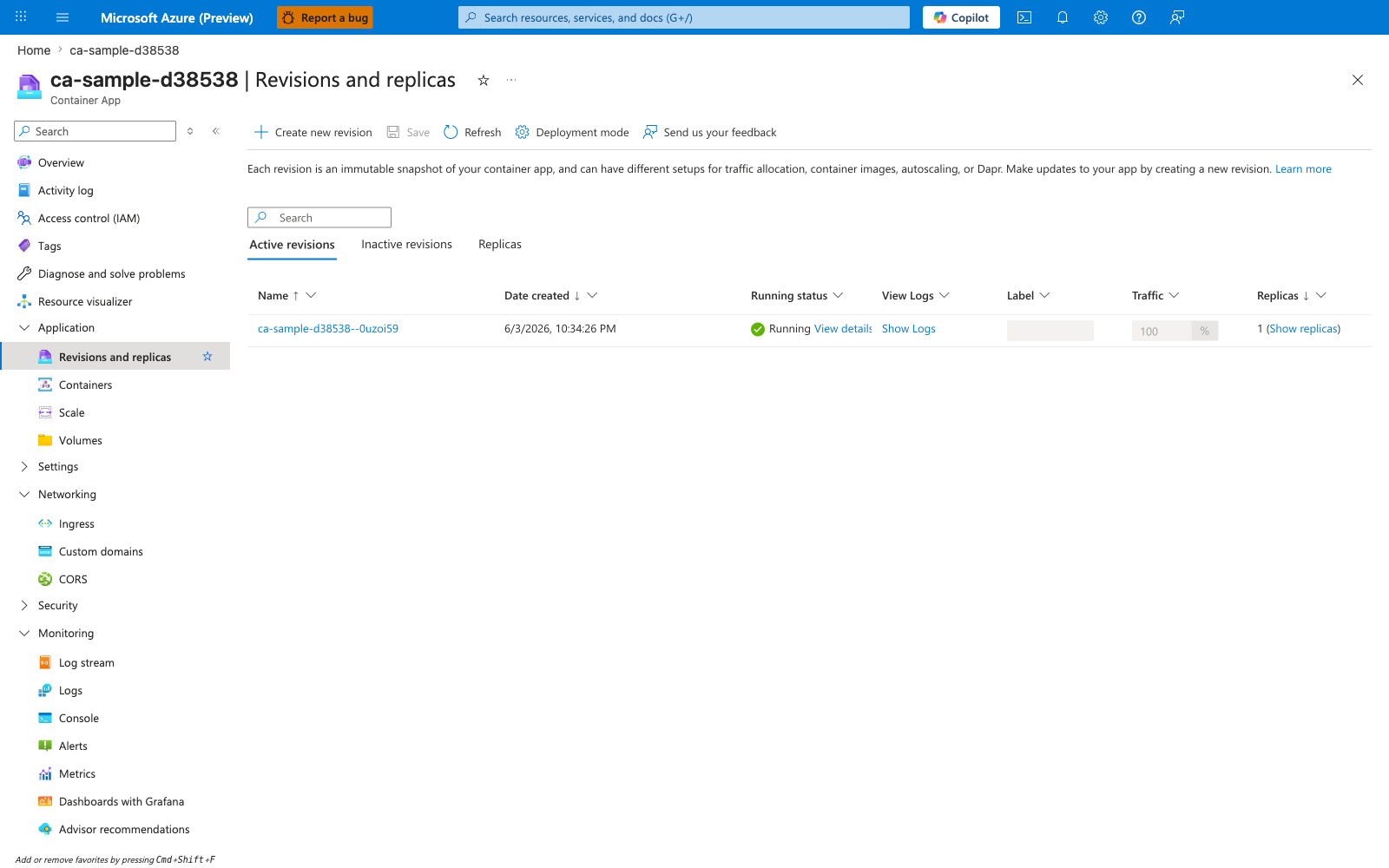
[Observed] ca-sample-d38538 | Revisions and replicas Container App Create new revision Save Refresh Deployment mode Active revisions Inactive revisions Replicas Name Date created Running status View Logs Label Traffic Replicas ca-sample-d38538--0uzoi59 6/3/2026, 10:34:26 PM Running View details Show Logs 100 % 1 (Show replicas).
[Inferred] The Running value under Running status for revision ca-sample-d38538--0uzoi59 is consistent with the probe-gated readiness model described in Configure startup, readiness, and liveness probes intentionally, which gates a revision becoming serving-ready on startup and readiness probe outcomes. The immutable revision name suffix --0uzoi59 alongside Create new revision appears to map to the per-revision identity discussed in Use immutable image tags and reject :latest in production, which strengthens revision immutability with immutable image tags. The Traffic value 100 % on a single revision is consistent with the deployment-creates-a-revision-candidate model described in Design for the Azure Container Apps execution model, which makes a revision traffic-eligible only after readiness gates pass. The Replicas value 1 (Show replicas) is consistent with the scale-in container-termination context discussed in Implement SIGTERM-aware graceful shutdown, which calls out that scale-in and revision deactivation terminate containers.
[Not Proven] Additional revision configuration detail and runtime parameters are not visible on this view.
Advanced Topics
Hardened supply chain integration
For higher assurance deployments:
- Generate SBOM per image build.
- Enforce vulnerability threshold gates in CI.
- Sign images and verify signatures in release pipelines.
- Retain digest-to-release metadata for incident reconstruction.
Progressive probe tightening
Start with conservative probe thresholds for new services, then tighten based on observed startup distributions and error patterns.
Distroless migration strategy
Migrate from slim to distroless only after:
- Runtime dependency map is complete.
- Startup and TLS behavior are validated in staging.
- Incident playbooks include non-shell troubleshooting methods.
Structured logging schema governance
Treat log schema as a versioned contract. Breaking schema changes should go through review, with KQL dashboard compatibility checks.
Common Mistakes / Anti-Patterns
- Treating sample defaults as production-ready without checking ingress, scale, identity, and monitoring requirements.
- Applying a configuration change without verifying the resulting revision, logs, and metrics.
- Leaving ownership for certificates, private DNS, secrets, or rollout decisions undocumented.
Validation Checklist
- [ ] Required Container Apps settings are represented in infrastructure as code.
- [ ] The active revision, ingress, scale, identity, and monitoring state match the intended design.
- [ ] Rollback or cleanup commands have been tested in a non-production environment.
See Also
- Platform: Sidecars and Init Containers
- Platform: Revisions
- Platform: Scaling
- Operations: Deployment
- Operations: Monitoring
- Python Recipe: Custom Container